Archive for the ‘Chrome’ Category
Posted by jpluimers on 2014/10/31
Last week, I viewed to webinars. A smaller one Geek Fest – Automating the ForgeRock Platform Installation about Ansible installation of Unix machines, and the first 70% of the last day ofCodeRage 9 | Free Development Event by Embarcadero.
Both had a bad experience because of GoToWebinar has a really bad user experience.
- When a GoToWebinar connection terminates, the GoToWebinar client closes. You loose everything in the Q&A log. You need to hope someone else saved the Q&A log so you can see the public questions, but the private comments you made are gone.
- It is impossible to install the Windows client when you are behind a McAfee Web Gateway that filters downloads and HTTPS traffic. After trying for about 15 minutes, we gave up and reverted back to a Mac over another connection. It meant we could not use the conference room and had to cram many people behind a small MacBook screen.
- The Mac OS X client does not allow you to resise the Q&A log, so even on a 4k display, you can see like 10 lines of Q&A.
- When there are many attendees, the refresh rate slows down from sub second to once per 5-10 seconds, this is really bad when watching demos of software: a big aim of webinars.
When terminating, the only thing GoToWebinar allows you to do is give feed back (too bad they don’t allow for detailed feed back). So I gave it 0 out of 5 stars.
–jeroen
PS: I could save the below Q&A logs. If you have other logs, please let me know so I can publish them. I’m especially interested in Have You Embraced Your Inner Software Plumber Yet? by David Schwartz – The Tool Wiz
These are the CodeRage 9 – Object Pascal Sessions I could save the Q&A log of:
Posted in Appmethod, Chrome, Delphi, Delphi XE7, Development, Firefox, Internet Explorer, Power User, Software Development, Web Browsers | Tagged: GoToWebinar | 3 Comments »
Posted by jpluimers on 2014/09/10
Yesterday I posted this question on StackOverflow and G+: Is there a url or site like example.org which always produces a 404 error?
Soon after that, I found out three links that produce predictable HTTP status codes:
They also work for https:
Edit 20241223: these also return a 404: http://www.google.com/undefined and https://www.google.com/undefined
On StackOverflow very few people even noticed the question, probably wondering “why?”.
I’m using these links for positive and negative testing of some http / https handling code that needs to be good at coping with positive and negative responses.
In my testing life, I’ve learned the hard way that both negative and positive tests are core part of your suite, hence the question.
–jeroen
via: Is there a url or site like example.org which always produces a 404 error?. Read the rest of this entry »
Posted in .NET, .NET 2.0, .NET 3.0, .NET 3.5, .NET 4.0, .NET 4.5, Chrome, Communications Development, Development, HTTP, Internet protocol suite, Power User, REST, Software Development, TCP, Web Browsers, Web Development | Leave a Comment »
Posted by jpluimers on 2014/03/16
Recently when starting Feedly through http://feedly.com, I got this message in Chrome on my Retina MacBook Pro:
Is feedly blocked?
Feedly is not able to load. It is probably because one of your extensions is blocking it. If you run Adblock, HTTPSEverywhere, Awesome screenshot etc.. please make sure that feedly.com is white listed.
Ask a question
I paused AdBlock: same thing. I don’t use HTTPSEverywhere or the other tools mentioned.
Solution: start using https://feedly.com. Since I prefer https anyway, I can live with that (: Read the rest of this entry »
Posted in Blogging, Chrome, Feedly, Power User, SocialMedia | Tagged: Feedly | Leave a Comment »
Posted by jpluimers on 2013/09/13
I wish I had kept an eye on it after it was announced (which was 3.5 years ago, but not very stable): The Youtube HTML5 viewer trial.
It has come a long way since then. Full screen it is still not as good as the official one, but the main attraction introduced since is: configurable playback speed!
Yes, you can choose playback at 25%, 50%, 100%, 150% or 200% of the original speed. Ideal for lectures or watching replays of conference sessions.
Quote from the life hacker post LifeHacker on this:
Read the rest of this entry »
Posted in Apple, Chrome, Firefox, Internet Explorer, Mac, Mac OS X / OS X / MacOS, Mac OS X 10.7 Lion, Opera, OS X 10.8 Mountain Lion, Power User, Web Browsers, Windows, Windows 7, Windows 8 | Leave a Comment »
Posted by jpluimers on 2013/02/21
Got a nice error message from Google Chrome today and wonder what the “true” means (:
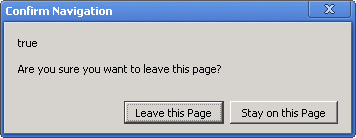
The text is this:
[Confirm Navigation]
true
Are you sure you want to leave this page?
[Leave this Page] [Stay on this page]
You can use Ctrl-C to copy, then you get the text below:
trueAre you sure you want to leave this page
That means it is not a standard Windows MessageBox, as pressing Ctrl-C there would copy the title and buttons as well.
–jeroen
via: 20130221-funny-google-chrome-error-message-true–Are-you-sure-you-want-to-leave-this-page | Flickr – Photo Sharing!.
Posted in Chrome, Power User, Web Browsers, Windows | Leave a Comment »
Posted by jpluimers on 2011/09/09
Quote:
Gif Stopper will stop animated gif images with using the escape key.
We all love animated gifs but some times they are too distracting, that’s with Gif Stopper comes in. Hit the escape key and the image stops. Most browsers have this build-in and now Google Chrome has it also.
Most importantly: it WORKS with Google+ Plus!!
–jeroen
via: Gif Stopper – Chrome Web Store.
Posted in Chrome, Power User, Web Browsers | Leave a Comment »
Posted by jpluimers on 2011/07/22
About 9 months ago I posted about HTTPS Everywhere | Electronic Frontier Foundation hoping someone would port the HTTPS Everywhere extension for Firefox to force HTTPS in other browsers like Google Chrome, Microsoft Internet Explorer et cetera.
In the mean time, I found out about HSTS (HTTP Strict Transport Security), which is supported by FireFox 4, and Chrome 12.
Also in the mean time I found about a few HTTPS enforcer extensions for other browsers.
For instance, there are two similar Google Chrome Extensions to HTTPS Everywhere:
Internet Explorer does not have such an extension.
Opera has the Security Enhancer extension.
Next to HTTPS Everywhere, there are the ForceHTTPS and NoScript extension for FireFox (NoScript also supports HSTS).
FireFox 4 supports HSTS out of the box.
So now you have a choice!
–jeroen
Posted in Chrome, Firefox, Internet Explorer, Power User, Web Browsers | Leave a Comment »
Posted by jpluimers on 2011/06/27
 Regression tests are useful, especially before release.
Clearly someone forgot to regression test the Issue 47714 – chromium – maximize bug while loading webpage on windows 7, as after a while of absence, Chrome 12 reintroduced this issue (it is present in all versions of Chrome 12 I tested, until at least 12.0.742.100).
Workarounds:
- Maximize the window, then enter a URL
- Wait for Chrome to fully load the URL, then maximize.
–jeroen
Posted in Chrome, Power User, Web Browsers, Windows, Windows 7 | Leave a Comment »
Posted by jpluimers on 2011/05/30
When using wget for downloading from the command-line, sometimes you need cookies in netscape file format.
There is a Chrome cookie.txt export extension that makes exporting your cookies in that format easy.
It opens a window that contains the cookies relevant to the domain of the currently opened web-page. You copy/paste your cookies in format like this:
# Cookies for domains related to wordpress.com.

# This content may be pasted into a cookies.txt file and used by wget

# Example: wget -x --load-cookies cookies.txt https://wiert.wordpress.com/wp-admin/post.php?post=5767&action=edit

#

en.forums.wordpress.com FALSE / FALSE 1304919940 TESTCOOKIE home

en.support.wordpress.com FALSE / FALSE 1304920249 TESTCOOKIE home

wiert.wordpress.com FALSE / FALSE 1304920561 TESTCOOKIE home

en.wordpress.com FALSE / FALSE 1304920572 TESTCOOKIE home
It even includes the wget command-line example for loading the cookies using the –load-cookies option :)
–jeroen
via: cookie.txt export – Google Chrome extension gallery.
Posted in *nix, Chrome, Power User, Web Browsers, wget | 3 Comments »



 The Wiert Corner - irregular stream of stuff