The Wiert Corner – irregular stream of stuff

Jeroen W. Pluimers on .NET, C#, Delphi, databases, and personal interests

  • My badges

  • Twitter Updates

  • My Flickr Stream

  • Pages

  • All categories

  • Enter your email address to subscribe to this blog and receive notifications of new posts by email.

    Join 1,861 other subscribers

Archive for the ‘Windows’ Category

How can I get Win10_1511_1_English_x64.iso or Win10_1511_1_EnglishInternational_x64.iso ?

Posted by jpluimers on 2016/05/24

I now officially hate Microsoft download sites.

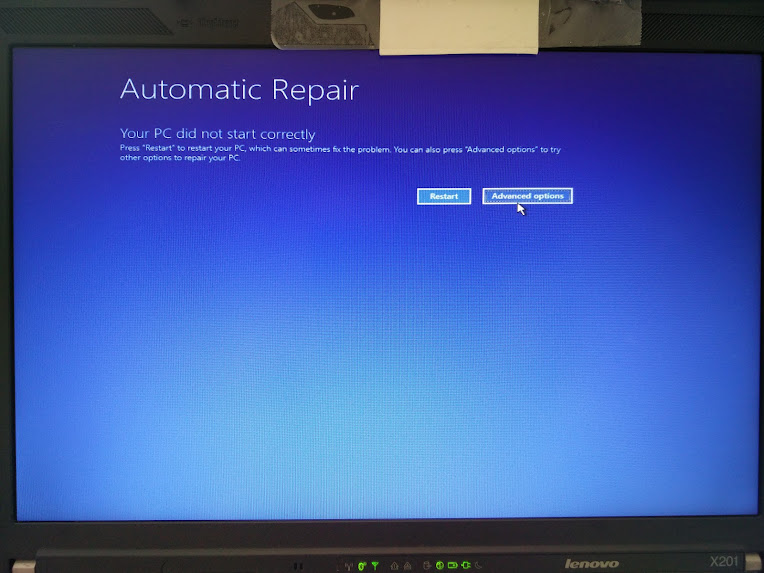
I’m trying to fix a friends PC where Windows 10 has screwed up (after he installed, it loads, but the screen turns black without a mouse cursor which indicates the video drivers are likely hosed). There is no F8 boot option in Windows 10 any more so I need media.

https://www.microsoft.com/en-us/software-download/windows10ISO redirects to https://www.microsoft.com/en-us/software-download/windows10 which forces you to download a “Media Creation Tool” that complains I don’t have 8 gigabyte free disk space.

I have. Just not on the C: drive freaking morons!

But https://www.microsoft.com/en-us/software-download/windows10 won’t let me download the ISOs.

Searching around, it looks like I need Win10_1511_1_English_x64.iso or Win10_1511_1_EnglishInternational_x64.iso

Does anyone know how to get them?

–jeroen


Posted in Power User, Windows 10 | 5 Comments »

Setting your DTAP environments apart: Push a solid colored background to a Windows Server 2012 or later | Tidbits of Information from Virot

Posted by jpluimers on 2016/05/17

This post summarises it nicely: [Wayback/Archive.is] Push a solid colored background to a Windows Server 2012 or later | Tidbits of Information from Virot.

I already knew about the one below, but the post above gives a more complete picture with:

  • Background color
  • Wallpaper
  • tells how to set the menu and

These I already knew:

–jeroen


Posted in Agile, Color (software development), Development, Power User, Software Development, Windows, Windows 7, Windows 8, Windows 8.1, Windows 9, Windows Server 2003, Windows Server 2003 R2, Windows Server 2008, Windows Server 2008 R2, Windows Server 2012, Windows Server 2012 R2, Windows Vista, Windows XP | Leave a Comment »

Windows RDP error 3489661694 when connecting from a Mac, connecting from Windows fails without any message

Posted by jpluimers on 2016/05/16

Connecting from Mac OS X edition of Microsoft Remote Desktop
Sometimes I connecting to various Windows systems over RDP fails. On Windows the mstsc (Remote Desktop Connection) application recognises the server has a certificate, presents you with a login dialog, then just stops without any message.

Connecting from Mac OS X edition of Microsoft Remote Desktop does give you error message “The server denied the logon with reason: 3489661694”.

Read the rest of this entry »

Posted in Power User, Remote Desktop Protocol/MSTSC/Terminal Services, Windows, Windows 8.1 | 4 Comments »

Cool Windows tool of the day: RegJump by SysInternals

Posted by jpluimers on 2016/05/13

RegJump.exe is really cool, and has already there for more than a year (:

This little command-line applet takes a registry path and makes Regedit open to that path. It accepts root keys in standard (e.g. HKEY_LOCAL_MACHINE) and abbreviated form (e.g. HKLM).

usage: regjump <<path>|-c>
-c Copy path from clipboard.
e.g.: regjump HKLM\Software\Microsoft\Windows

–jeroen

via: RegJump.

Posted in Power User, Windows, Windows 7, Windows 8, Windows 8.1, Windows 9, Windows Server 2000, Windows Server 2003, Windows Server 2003 R2, Windows Server 2008, Windows Server 2008 R2, Windows Server 2012, Windows Server 2012 R2, Windows Vista, Windows XP | Leave a Comment »

ntrights – grant/revoke Logon As Batch Job rights

Posted by jpluimers on 2016/05/11

Sometimes you want to run a batch file from a Task Scheduler task. For that, the user under which the task runs needs to Logon as a batch job right. If it hasn’t, you get this nice error message:

“This task requires that the user account specified has log on as batch job rights”.

Despite being part of the Windows Server 2003 Resource Kit Tools, you can still use ntrights in more modern Windows versions to grant or revoke this right.

As ntrights uses a hard to remember SeBatchLogonRight name for it and I tend to forget the ntrights syntax, I wrote two batch files to grant or revoke the Logon as Batch Job rights for the specified user:

Read the rest of this entry »

Posted in Batch-Files, Development, Power User, Scripting, Software Development, Windows, Windows 7, Windows 8, Windows 8.1, Windows 9, Windows Server 2008, Windows Server 2008 R2, Windows Server 2012, Windows Server 2012 R2, Windows Vista | Leave a Comment »

Windows Update error 80072EE2 – Windows Help

Posted by jpluimers on 2016/05/09

When you roll-out new machines and you get Windows Update 80072EE2 to install updates required by some installations…

If you receive Windows Update error 80072ee2 while checking for updates, the Windows Update servers might be experiencing an unusually high number of requests for updates.

–jeroen

Source: Windows Update error 80072ee2 – Windows Help

Posted in Power User, Windows, Windows 10, Windows 7, Windows 8, Windows 8.1 | Leave a Comment »

windows update cannot currently check for updates because the service is not running window 7 – when the official fixes don’t work

Posted by jpluimers on 2016/04/29

Sometimes the solution is soooo simple:

The fix for me was to:

  1. go into Windows Update and
  2. change the settings to “Never check for updates (not recommended)”,
  3. click OK, and
  4. then change it back to “Install updates automatically”.

I’m sure that switching it off this way and then choosing any option that enables windows updates would have had the same effect. As soon as I did this, windows update went from having a red X to a green check mark that said “Windows is up to date” (even though it was not – but this signified that the service was now working properly). I clicked check for updates and was successful – several updates were ready to be downloaded and installed.

Source: windows update cannot currently check for updates because the service is not running window 7 HELP

–jeroen

Posted in Power User, Windows, Windows 7 | Leave a Comment »

findstr as alternative for recursive grep search

Posted by jpluimers on 2016/04/27

Usually I use the old Borland grep.exe that still ships with Delphi. Too bad it is 16-bit app which does not recognise Unicode.

FindStr does. Though much slower and with limited regular expression capabilities, can do recursive searches too:

findstr /spin /c:"string to find" *.*

The /spin is a shortcut for these case insensitive command-line options (the full list of possible options is below):

  /S         Searches for matching files in the current directory and all
             subdirectories.
  /I         Specifies that the search is not to be case-sensitive.
  /N         Prints the line number before each line that matches.
  /P         Skip files with non-printable characters.

Sometimes I leave out the /P to include binary files.

–jeroen

via:

Read the rest of this entry »

Posted in Batch-Files, Development, Power User, RegEx, Scripting, Software Development, Windows, Windows 7, Windows 8, Windows 8.1, Windows NT, Windows Server 2000, Windows Server 2003, Windows Server 2003 R2, Windows Server 2008, Windows Server 2008 R2, Windows Server 2012, Windows Server 2012 R2, Windows Vista, Windows XP | Leave a Comment »

Windows 10 1511 update broke the Hyper-V networking – Fix network connection issues

Posted by jpluimers on 2016/04/11

After updating a Windows 8.1 machine that had Hyper-V running, none of the VMs could access any networking: Windows 10 build 1511 completely broke the vSwitch infrastructure.

This is what I had to do:

  1. Reinstall network devices using netcfg –d command (Source: Fix network connection issues – Windows Help)
  2. Reboot host
  3. Create a new vSwitch in Hyper-V (as the old one was gone)
  4. Remove the network adapters of the VMs (they were in a limbo state)
  5. Add new network adapters to the VMs connecting them to the correct vSwitch.

This was the umpteenth time Hyper-V let me down, so in the future I’m back to VMware or Virtual Box.

Windows 10 also broke Everything Search Engine and UBCD4Win. I could not get UBCD4Win to work again, but a reinstall of Everything made it to work again.

And Windows 10 moved a lot of things away from the Control Panel, which means that things that basically worked for more than a decade are now gone. For instance, Windows updates now must be run with a shortcut like this:

%LocalAppData%\Packages\windows.immersivecontrolpanel_cw5n1h2txyewy\LocalState\Indexed\Settings\nl-NL\AAA_SystemSettings_MusUpdate_UpdateActionButton.settingcontent-ms

Note that’s for a DUTCH system. For a US-English system of course the shortcut is different:

%LocalAppData%\Packages\windows.immersivecontrolpanel_cw5n1h2txyewy\LocalState\Indexed\Settings\en-US\AAA_SystemSettings_MusUpdate_UpdateActionButton.settingcontent-ms

This feels like “1998 wants its VBA translated languages back”.

Of course I could get around this by building a table translatingto a text language code from the numeric language code* from the below command, but that’s not the point: Windows 10 makes life harder.

reg query “hklm\system\controlset001\control\nls\language” /v Installlanguage
returns codes like 0407, 0409, 040D, 0413, etc.

–jeroen

*: Heck if Microsoft cannot even update their 2002 Table of Language Culture Names, Codes, and ISO Values Method [C++] and has trouble keeping the various .NET version pages updated**, how could I?

**: these are the only .NET versions the table is documented

Posted in Everything by VoidTools, Hyper-V, Power User, Virtualization, Windows | 1 Comment »

VirtualBox: Clone VM without Re-activation of Windows 7 (via: Danny Thorpe – Google+)

Posted by jpluimers on 2016/04/04

This week I needed the trick below, so I was glad that a long time ago, Danny Thorpe Shared publicly on G+:

[Wayback/Archive] VirtualBox: Clone VM without Re-activation of Windows

Follow these steps to clone a VirtualBox VM in a manner so that the Windows 7 Activation in the guest doesn’t have to be re-activated in the clone.

–jeroen

via: Danny Thorpe – Google+: VirtualBox: Clone VM without Re-activation of Windows 7.

Posted in Power User, VirtualBox, Virtualization, Windows, Windows 7 | Leave a Comment »