Posted by jpluimers on 2011/10/07
You cannot move the C:\Program Files directory to another volume without installing Windows on that volume.
A small abstract from the explanation by Raymond Chen: The symbiotic relation between C:\Windows\WinSxS and C:\Program Files through NTFS hard links prevents you to move C:\Program Files (nor WinSxS) to a different disk volume. Both directories need to be on the same volume because of the NTFS hard link limitation.
NTFS hardlinks do save a ton of diskspace, even though WinSxS will keep growing over time, which means you need to do some careful disk volume planning, especially on SSD drives.
–jeroen
via: Why can’t I move the Program Files directory via the unattend file? – The Old New Thing – Site Home – MSDN Blogs.
Posted in Microsoft Surface on Windows 7, Power User, Windows, Windows 7, Windows 8, Windows Server 2000, Windows Server 2003, Windows Server 2003 R2, Windows Server 2008, Windows Server 2008 R2, Windows Vista, Windows XP | Leave a Comment »
Posted by jpluimers on 2011/09/23
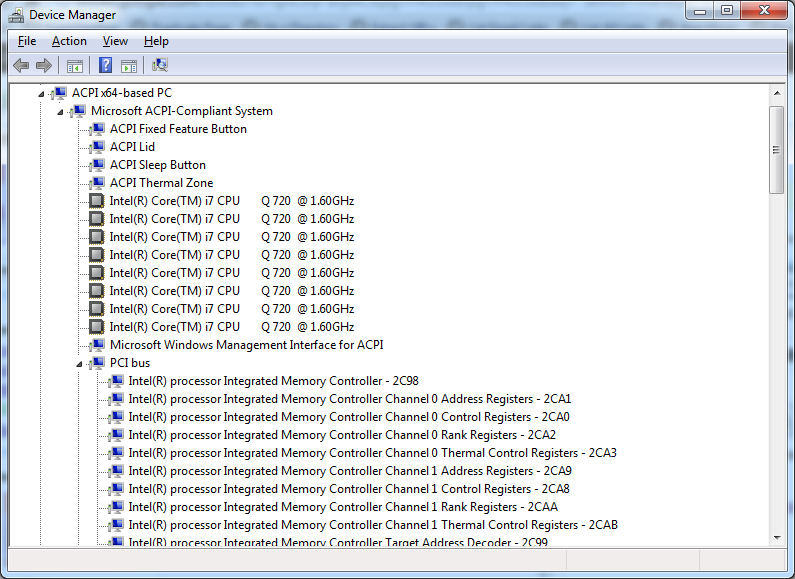
With the increasing number of devices, it really helps to expand all nodes in the Device Manager’s tree view.
You cannot do this with the mouse, as none of the menu options contain an “Expand All” option.
But since the treeview, is the built-in Windows treeview (used in many places, like Windows explorer), you can use these shortcuts to expand/collapse nodes:
- Numeric Keypad *: Expands everything under the current selection
- Numeric Keypad +: Expands the current selection
- Numeric Keypad -: Collapses the current selection.
- RIGHT ARROW: Expands the current selection if it is not expanded, otherwise goes to the first child
- LEFT ARROW: Collapses the current selection if it is expanded, otherwise goes to the parent
This not only works in Microsoft Windows 7: Visual … – Google Books, I think it has been introduced as far back as Windows 95.
–jeroen
Posted in Keyboards and Keyboard Shortcuts, Power User, Windows, Windows 10, Windows 7, Windows 8, Windows 8.1, Windows 9, Windows Server 2003, Windows Server 2003 R2, Windows Server 2008, Windows Server 2008 R2, Windows Server 2012, Windows Server 2012 R2, Windows Vista, Windows XP | 1 Comment »
Posted by jpluimers on 2010/09/01
From a batch-file I recently had to start Windows Explorer, at the same time select a specific file or directory.
This turned out pretty easy: use the /select command-line switch from Windows Explorer.
In fact, Windows Explorer has a few command-line switches, and the “explorer” commandline parameters “/n” “/e” “/select” “/root” “/start” site:microsoft.com query will find quite a few topics about it: Read the rest of this entry »
Posted in Power User, Windows, Windows 10, Windows 7, Windows 8, Windows 8.1, Windows 9, Windows 95, Windows 98, Windows ME, Windows NT, Windows Server 2000, Windows Server 2003, Windows Server 2003 R2, Windows Server 2008, Windows Server 2008 R2, Windows Server 2012, Windows Server 2012 R2, Windows Server 2016, Windows Vista, Windows XP | 1 Comment »
Posted by jpluimers on 2009/09/18
Some things to check when clipboard sharing for Remote Desktop (RDP/MSTSC) or VMware is broken. Read the rest of this entry »
Posted in Fusion, Power User, Remote Desktop Protocol/MSTSC/Terminal Services, View, VMware, VMware Workstation, Windows, Windows 7, Windows Server 2000, Windows Server 2003, Windows Server 2003 R2, Windows Server 2008, Windows Server 2008 R2, Windows Vista, Windows XP | Leave a Comment »


 The Wiert Corner - irregular stream of stuff