The Wiert Corner – irregular stream of stuff

Jeroen W. Pluimers on .NET, C#, Delphi, databases, and personal interests

  • My badges

  • Twitter Updates

  • My Flickr Stream

  • Pages

  • All categories

  • Enter your email address to subscribe to this blog and receive notifications of new posts by email.

    Join 1,862 other subscribers

Archive for the ‘Windows XP’ Category

VDI driving me nuts

Posted by jpluimers on 2012/04/20

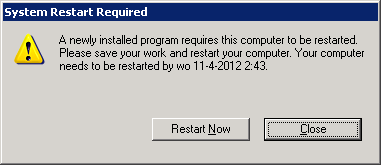
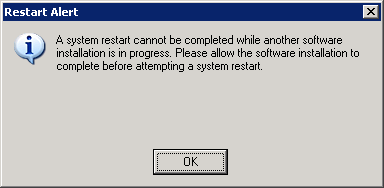
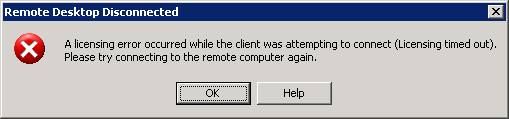
The VDI recently it is driving me nuts with sudden disconnects and messages like these after you have been connected for a couple of hours.

It all looks like there is some sort of Connectra thing in the middle that does deep packet inspection and randomly kicks out RDP or PCoIP sessions it doesn’t like, then doesn’t allow any new sessions to come in.

If I get a connection at all, now I always get a fresh VM, which – because they all are single core – take between 2 and 3 hours of getting below 100% CPU usage.

CcmExec.exeSMSCliUI.exe, and the svchost.exe instances for RpcSs and BITS hog the CPU scanning for updates and software installs for about about 25% of a working day.

Boy I wish there was something I could do about it.

---------------------------
Remote Desktop Disconnected
---------------------------
A licensing error occurred while the client was attempting to connect (Licensing timed out).
Please try connecting to the remote computer again.
---------------------------
OK Help
---------------------------

Read the rest of this entry »

Posted in Power User, Windows, Windows XP | Leave a Comment »

Who has a Workaround for Windows XP “KB2509553 Setup Error: Setup cannot update your Windows XP files because the language installed on your system is different from the update language.”?

Posted by jpluimers on 2012/04/13

Recently I was at a site where the KB2509553 security update on Windows XP would not install because of this error, even after retrying a couple of times:

---------------------------
KB2509553 Setup Error
---------------------------
Setup cannot update your Windows XP files because the language

installed on your system is different from the update language.
---------------------------
OK
---------------------------

The error came from the Dutch version of Microsoft Update and the (also Dutch) Autoupdate inside Windows XP.

The solution that seemed easy didn’t work:

Manually download the Dutch version at the KB2509553 download page, and install that one.

Thanks Halima S for mentioning this on the Microsoft Answers site.

So: where should I start looking to get this security update installed?

–jeroen

Posted in Power User, Windows, Windows XP | Leave a Comment »

Debt in IT and Software Development (via: Coding Horror: Paying Down Your Technical Debt)

Posted by jpluimers on 2012/04/04

Debt and flood insurance

Thanks to Randy Glasbergen for the debt image

I love this quote from Jeff Attwood on technical debt in 2009:

periodically pay down your technical debt

and the Computer Weekely article about half a year ago:

Short-term speed may come at the price of long-term delays and cost.

Lately, I find that I need to explain Debt in relation to IT and Software Development more and more often.

We now all know what happens with the financial system when we let debt get out of control.

The same holds for your IT and Software Development.

Debts get introduced by not “playing by the rules”. The quotes are there because you can not always play nicely, and the rules are not always clear or known.

Lets give a few examples of rules that – from experience at clients – are more often than not neglected. The examples are based on Windows, but could just as easily be Mac OS X, Unix, OS/400 or anything else.

  • Make sure you use a recent Windows version
    I often see companies lagging more than one version behind (i.e. still use Windows XP or SQL Server 2000). That’s too far.
  • Don’t run your users with too many privileges (and certainly not as Administrators)
    Especially running as Administrator will get you in trouble with User Account Control (UAC) in Windows Vista and up.
  • Using directories like C:\TEMP is a no-no.
    This should be a no-brainer, but truckloads of in-company software still thinks it can write everywhere.
    I know C:\TEMP used to be the Temporary Folder some 20 years ago.
    But that was then, and this is now: Use the %TEMP% environment variable or GetTempPath function (even better: the GetTempFileName function or the .NET Path.GetTempFileName function).
    More in general for known folders, use CSIDL or KNOWNFOLDERID whenever possible. Your favourite development tool usually has a library functions for that, for instance the .NET System.Environment.GetFolderPath function.

These few were examples ranged from technically very broad to specific. There are more, but these will give you a rough idea how wide the field of debt can be. Even debt outside the realm of Technical Debt can turn out to be really expensive.

Every time you  postpone or skip a Windows version, you collect some debt in the hope (often wrongfully called expectation) that you earn more on the money/resource you just didn’t invest and putting that money/resource to use otherwise. The same holds for any other kind of debt.

The main problem with debt is not the total of the debt, it is the interest rate that makes the accrued debt grows faster than most people and organizations realize.

This is actually one of the main causes of the current world wide financial crisis, the same holds for many IT debts.

And for all kinds of debts, you often don’t know how high the interest rate will be, so the accrued value can be way beyond what you expect.

I’ve regularly seen projects collecting so much debt, that migration costs raised to thousands of hours because of it, resulting into management taking another very bad decision: rewriting the stuff from scratch. Don’t do that: Joel on Software excellently describes what happens when you do that.

What to do about it?

You might say “don’t collect debt”, but you can’t always avoid debt.

So you need to build periods where you pay off accrued debt. And you need to do that regularly, in order to avoid the interest pitfall.

This does not limit itself to software development (though that’s what I normally focus at). It covers a wide range of IT topics.

Sometimes, you can even pay your debt in advance. For instance, I was among the first to switch from Windows XP to the x64 of Windows Vista. I knew it would cause pain, but it immediately payed back by being able to use much more memory, and run more Virtual Machines at the same time. That made me more flexible and productive.

–jeroen

via: Coding Horror: Paying Down Your Technical Debt.

Posted in *nix, .NET, Delphi, Development, Opinions, Power User, Software Development, Technical Debt, Windows, Windows 7, Windows 8, Windows Vista, Windows XP | 9 Comments »

Patch time: RDP vulnerability in all Windows versions; CVE-2012-0002: A closer look at MS12-020’s critical issue – Security Research & Defense – Site Home – TechNet Blogs

Posted by jpluimers on 2012/03/15

If you have RDP open on one or more of your computers, you should have patched your machines by now:

vulnerabilities in Microsoft’s implementation of the Remote Desktop Protocol (RDP) […] a Critical, remote code execution vulnerability affecting all versions of Windows. This blog post shares additional information with the following goals:

  • To strongly encourage you to make a special priority of applying this particular update;
  • To give you an option to harden your environment until the update can be applied.

–jeroen

via: CVE-2012-0002: A closer look at MS12-020’s critical issue – Security Research & Defense – Site Home – TechNet Blogs.

Posted in Power User, Windows, Windows 7, Windows Server 2003, Windows Server 2008, Windows Vista, Windows XP | Leave a Comment »

version v3.3.4.14431 of Beyond Compare released by Scooter Software

Posted by jpluimers on 2012/03/02

About a week ago, version v3.3.4.14431 of Beyond Compare was release by Scooter Software.

For me, this is the ultimate comparison tool as it runs on Windows and Linux natively or under WINE on Mac OS.

It has a massive change list:

-----------------------------------
v3.3.4.14431      February 24, 2012
-----------------------------------

- Notable Changes
  - Fixed context menus on newer versions of Konqueror, Thunar, and Nautilus.
  - FILE-REPORT (and TEXT-REPORT, etc.) commands will now accept a saved file
    compare session name instead of a pair of files.  E.g., "file-report
    layout:side-by-side output-to:printer MySession".

- Archives
  - Fixed extracting files where a single deflate block contains more than 1MB
    of data.
  - Fixed zips showing non-existent files if a zip contained another zip and
    the outer one had additional data after the archive comment.
  - Attempting to extract a file from a zip using an unsupported compression
    algorithm now shows that as an error.
  - Split up zip error messages for "Error during extraction" and "Unsupported
    compression algorithm".

- Data Compare
  - Fixed "Extract HTML table(s)" handling of UTF-16 files.

- File Formats
  - OpenOffice default character encoding is now UTF-8.
  - Fixed "COBOL Source" format to include "Identifier" definition.
  - "Picture Files" format added CUT, GED, MSK, PFR, and TUB to mask, removed
    PAL.

- File Views
  - Fixed saving files with paths between 247-259 characters long.
  - Fixed foreground selection coloring when using white on blue system colors.
  - Added key accelerators to "Save changes" dialog.

- Folder Compare
  - Long file operations will now keep Windows from going to sleep due to
    inactivity.
  - Using "Compare to" to open a file view and then using "Next/Previous
    Difference Files" now closes the file view.

- FTP
  - Fixed support for FTP listings with filenames containing Chinese
    month/year characters.
  - Fixed parsing Comau C5G FTP listings.

- Home View
  - When editing a session, dropped files/folders are ignored unless they're
    on a path edit.
  - Expand All and Collapse All commands now affect the shared and auto-saved
    sessions nodes.
  - Fixed behavior when using "Collapse All" hides the currently selected
    session.

- Linux
  - Fixed context menus on newer versions of Konqueror, Thunar, and Nautilus.
  - Fixed Folder Compare crash when performing rules-based comparisons.
  - Fixed clicking the "Next Difference Files" link on the message panel when
    using "Next Difference" at the end of a comparison.
  - Fixed various comboboxes incorrectly allowing editing.

- Misc
  - Fixed menu checkboxes not showing on Vista and Windows 7 when using the
    Classic Theme.
  - Dropping files/folders onto a path edit no longer changes the edit if the
    drop results in a new view.
  - Added "RE Examples" buttons to Grammar Item dialog.
  - Improved Open/Save dialog handling of file type options.

- Options
  - "Customize Commands" dialog's "Default" command now checks to see if
    shortcut is already in use.

- Picture Compare
  - "Difference Offset", "Flip", and "Rotate" are now persistent session
    settings.
  - Fixed handling of DIB, MSK, and RLE bitmap files.

- Registry Compare
  - Fixed loading .reg files with a '\' before hex data.
  - Fixed loading .reg files with a ']' in a key name.

- Scripting
  - FILE-REPORT (and TEXT-REPORT, etc.) commands will now accept a saved file
    compare session name instead of a pair of files.  E.g., "file-report
    layout:side-by-side output-to:printer MySession".
  - LOG command will now create the target folder if it doesn't exist.
  - Fixed support for STRIKEOUT-RIGHT-ORPHANS in TEXT-REPORT command.

–jeroen

via: Beyond Compare ChangeLog

Posted in *nix, Power User, Windows, Windows 7, Windows 8, Windows Server 2003, Windows Server 2008, Windows Vista, Windows XP | Leave a Comment »

Batch file to detect Windows version number

Posted by jpluimers on 2012/02/08

Most Batch files for detecting Windows versions try to parse the either the [WayBack] output fromVER  or the [WayBackoutput from SYSTEMINFO [WayBack], but forget that there many Windows installations are not English. Some even use WMIC, but [WayBackWMIC is only available for administrators and not available some flavours like XP Home.

Languages issues are always important to watch for. The Dutch Windows XP returns Microsoft Windows XP [versie 5.1.2600] which is just one word different from the English Microsoft Windows XP [Version 5.1.2600]. Other languages may differ even more.

This batch file tries to circumvent the language differences, uses VER and works at least with Dutch and English Windows versions of XP and 7, most likely with many other languages and versions as well.

On a Windows XP SP3 machine, it lists WindowsVersion=5.1.2600 and on a Windows 7 SP1 machine it lists WindowsVersion=6.1.7601.

One possible addition would be to [WayBack] detect x64 or x86.

The detection assumes that VER will emit the version in [angle] brackets, and uses two batch file for loops to get the text in between them using the [WayBacktokens and delims for loop parameters in the first for loop right behind the begin label and the second for loop right after the parse1 label.

Then it splits the remaining text using spaces at the parse2 label, and takes the right most portion using the [WayBackshift command at the parse3 label.

Many thanks to [WayBackRob van der Woude for a lot of interesting batch file documentation. Read the rest of this entry »

Posted in Batch-Files, Power User, Scripting, Software Development, Windows, Windows 7, Windows XP | Leave a Comment »

Outlook signature locations

Posted by jpluimers on 2012/02/07

When Google searching, most results for the Outlook 2003 Signature Folder Location AppData give you the wrong folder.

They mix environment keys like UserName, UserProfile, but should use AppData as that has been the base since at least Windows XP.

This is the correct folder for any Outlook version (2003, 2010, etc): %appdata%\Microsoft\Signatures

Making sure you use the right environment variable is very important, especially in large Windows based environments that often use roaming profiles and a mix of Windows environments.

For instance, at a client they have a mixed environment of Windows XP and Windows 7, with separate AppData locations for the two on a LAN:

  • Windows XP:
    \\server\DFS\share\Application Data
  • Windows 7:
    \\server\DFS\share\Application Data.v2

There is a very nice Wikipedia article on the Windows Environment variable that explains this situation in the synopsis.

–jeroen

Posted in Batch-Files, Development, Power User, Scripting, Software Development, Windows, Windows 7, Windows Vista, Windows XP | Leave a Comment »

Alternate (offline) Google Chrome installer (Windows) – Google Help

Posted by jpluimers on 2012/01/06

Currently most software installers have a small bootstrap and during the actuall install will download only the files that are actually needed.

Often that is not convenient: slow or no network connection, repeated installs in a test environment, etc.

Luckily, a lot of software does have an offline installer (a.k.a. standalone installer).

Being no exception Google Chrome has two offline installers: one single user install, and one for all users on the same Windows machine.

It ends up at one of these download pages, each with a download link for the current version (which changes for every new version):

–jeroen

via: Alternate (offline) Google Chrome installer (Windows) – Google Help.

Posted in LifeHacker, Power User, Windows, Windows 7, Windows 8, Windows Vista, Windows XP | 1 Comment »

Easy ways to show which Windows version/service packs are installed; via Super User: windows command line: can I tell Service pack number?

Posted by jpluimers on 2011/12/23

Sometimes you want to know which SP is installed on Windows with built-in tools only.

For end-users the fastest way is to start Winver, it will give you dialogs like these (left: XP with SP3, right: Windows 7 without any SP):

For command-line lovers, the one I like this most is this:

systeminfo | findstr /B /C:"OS Name" /C:"OS Version"

[WayBack] systeminfo can show a truckload of information, and [WayBack] findstr condenses this to what I need.

On Windows XP SP3, it shows this:

OS Name: Microsoft Windows XP Professional
OS Version: 5.1.2600 Service Pack 3 Build 2600

On vanilla Windows 7, it shows this:

OS Name: Microsoft Windows 7 Ultimate
OS Version: 6.1.7600 N/A Build 7600

–jeroen

via: [WayBackwindows command line: can I tell Service pack number? – Super User.

Posted in Power User, Windows, Windows 7, Windows Vista, Windows XP | Leave a Comment »

VMware KB: Sharing a folder from your Mac to a virtual machine

Posted by jpluimers on 2011/12/23

Note that Sharing a Mac folder through VMware Fusion to a Windows VM works, but is:

  1. not fast
  2. eats a lot of Mac resources
    (it would get the fan of my MacBook Air running like mad when copying about 1Gigabyte of files – about 20-thousand files total; a robocopy /mir sync when nothing is changes takes a whopping 5 minutes)

This is how you do it:

To configure a shared folder in a Windows virtual machine:

  1. Launch VMware Fusion.
  2. Power on the virtual machine.
  3. Click Virtual Machine > Settings.
  4. Click Sharing.
  5. Select Share folders on your Mac.
  6. Click the + button.
  7. Browse to the folder on the Mac that will be shared with the virtual machine and click Add.

Shared folders can be accessed via the VMware Shared Folders shortcut on the Windows desktop or the mapped network drive Z:.

–jeroen

via VMware KB: Sharing a folder from your Mac to a virtual machine.

Posted in Fusion, Mac OS X 10.5 Leopard, Mac OS X 10.6 Snow Leopard, Mac OS X 10.7 Lion, MacBook, Power User, VMware, Windows, Windows 7, Windows 8, Windows Vista, Windows XP | Leave a Comment »