The Wiert Corner – irregular stream of stuff

Jeroen W. Pluimers on .NET, C#, Delphi, databases, and personal interests

  • My badges

  • Twitter Updates

  • My Flickr Stream

  • Pages

  • All categories

  • Enter your email address to subscribe to this blog and receive notifications of new posts by email.

    Join 1,854 other subscribers

Archive for the ‘Python’ Category

Delphi, decoding files to strings and finding line endings: some links, some history on Windows NT and UTF/UCS encodings

Posted by jpluimers on 2019/12/31

A while back there were a few G+ threads sprouted by David Heffernan on decoding big files into line-ending splitted strings:

Code comparison:

Python:

with open(filename, 'r', encoding='utf-16-le') as f:
  for line in f:
    pass

Delphi:

for Line in TLineReader.FromFile(filename, TEncoding.Unicode) do
  ;

This spurred some nice observations and unfounded statements on which encodings should be used, so I posted a bit of history that is included below.

Some tips and observations from the links:

  • Good old text files are not “good” with Unicode support, neither are TextFile Device Drivers; nobody has written a driver supporting a wide range of encodings as of yet.
  • Good old text files are slow as well, even with a changed SetTextBuffer
  • When using the TStreamReader, the decoding takes much more time than the actual reading, which means that [WayBack] Faster FileStream with TBufferedFileStream • DelphiABall does not help much
  • TStringList.LoadFromFile, though fast, is a memory allocation dork and has limits on string size
  • Delphi RTL code is not what it used to be: pre-Delphi Unicode RTL code is of far better quality than Delphi 2009 and up RTL code
  • Supporting various encodings is important
  • EBCDIC days: three kinds of spaces, two kinds of hyphens, multiple codepages
  • Strings are just that: strings. It’s about the encoding from/to the file that needs to be optimal.
  • When processing large files, caching only makes sense when the file fits in memory. Otherwise caching just adds overhead.
  • On Windows, if you read a big text file into memory, open the file in “sequential read” mode, to disable caching. Use the FILE_FLAG_SEQUENTIAL_SCAN flag under Windows, as stated at [WayBack] How do FILE_FLAG_SEQUENTIAL_SCAN and FILE_FLAG_RANDOM_ACCESS affect how the operating system treats my file? – The Old New Thing
  • Python string reading depends on the way you read files (ASCII or Unicode); see [WayBack] unicode – Python codecs line ending – Stack Overflow

Though TLineReader is not part of the RTL, I think it is from [WayBack] For-in Enumeration – ADUG.

Encodings in use

It doesn’t help that on the Windows Console, various encodings are used:

Good reading here is [WayBack] c++ – What unicode encoding (UTF-8, UTF-16, other) does Windows use for its Unicode data types? – Stack Overflow

Encoding history

+A. Bouchez I’m with +David Heffernan here:

At its release in 1993, Windows NT was very early in supporting Unicode. Development of Windows NT started in 1990 where they opted for UCS-2 having 2 bytes per character and had a non-required annex on UTF-1.

UTF-1 – that later evolved into UTF-8 – did not even exist at that time. Even UCS-2 was still young: it got designed in 1989. UTF-8 was outlined late 1992 and became a standard in 1993

Some references:

–jeroen

Read the rest of this entry »

Posted in Delphi, Development, Encoding, PowerShell, PowerShell, Python, Scripting, Software Development, The Old New Thing, Unicode, UTF-16, UTF-8, Windows Development | Leave a Comment »

Pythonic

Posted by jpluimers on 2019/12/24

When learning Python, one of the terms to get used to is Pythonic, basically shorthand for a loosely defined idiomatic Python way of writing code.

Some links to help you get a feel for this:

Sometime, I am going to dig into learning how to write Pythonic code for merging and joining dictionaries (preferably those of namedtuple entities). Hopefully these links will help me with that:

–jeroen

Posted in Development, Python, Software Development | Leave a Comment »

Visual Studio Code: enable Python debugging and selecting the Python version used

Posted by jpluimers on 2019/12/18

A few links and screenshots for my archive (assuming development on MacOS):

Enable Python Debugging

  1. Start the debugger: key combination Shift-Command-D, or click the debug icon 
  2. Click on the wheel with the red dot in the debugger pane: , which will generate and open a launch.json file in the current workspace, remote the red dot and fill the drop down with debug configurations
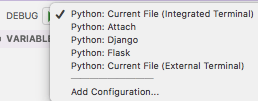

Via:

Selecting the Python version

  1. Key combination Ctrl-Shift-P
  2. Type Select Interpreter
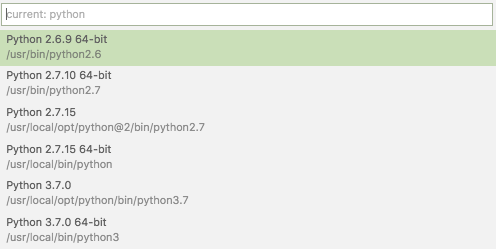
  3. Select the Python version you want; on my system they were at the time of writing:

Via:

Setting command-line arguments

Commandline arguments are set in the same .vscode/launch.json file:

"args": [
    "--quiet", "--norepeat"
],

Though [WayBack] Python debugging configurations in Visual Studio Code: args could have been more clear that you should put that under the Python configuration section you are debugging with, for instance:

{
    // Use IntelliSense to learn about possible attributes.
    // Hover to view descriptions of existing attributes.
    // For more information, visit: https://go.microsoft.com/fwlink/?linkid=830387
    "version": "0.2.0",
    "configurations": [
        {
            "name": "Python: Current File (Integrated Terminal)",
            "type": "python",
            "request": "launch",
            "program": "${file}",
            "console": "integratedTerminal",
            "args": [
                "--quiet", "--norepeat"
            ]
        },

Setting the startup python program

The page above also has a section on [WayBack] Python debugging configurations in Visual Studio Code: _troubleshooting that you can use to start the same script each time you debug, for instance your integration tests:

{
    // Use IntelliSense to learn about possible attributes.
    // Hover to view descriptions of existing attributes.
    // For more information, visit: https://go.microsoft.com/fwlink/?linkid=830387
    "version": "0.2.0",
    "configurations": [
        {
            "name": "Python: Current File (Integrated Terminal)",
            "type": "python",
            "request": "launch",
            // "program": "${file}",
            "program": "${workspaceFolder}/snapperListDeleteFailures.FileTests.py",

Fazit

I should have read [WayBack] Get Started Tutorial for Python in Visual Studio Code first.

–jeroen

Posted in Development, Python, Scripting, Software Development | Leave a Comment »

shell – Should I put #! (shebang) in Python scripts, and what form should it take? – Stack Overflow

Posted by jpluimers on 2019/12/17

It is very important to get the shebang correct. In case of Python, you both need env and the correct Python main version.

Answer

Correct usage for Python 3 scripts is:

#!/usr/bin/env python3

This defaults to version 3.latest. For Python 2.7.latest use python2 in place of python3.

Comment

env will always be found in /usr/bin/, and its job is to locate bins (like python) using PATH. No matter how python is installed, its path will be added to this variable, and env will find it (if not, python is not installed). That’s the job of env, that’s the whole reasonwhy it exists. It’s the thing that alerts the environment (set up env variables, including the install paths, and include paths).

Source: [WayBack] shell – Should I put #! (shebang) in Python scripts, and what form should it take? – Stack Overflow

Thanks GlassGhost and especially flornquake for the answer and Elias Van Ootegem for the comment!

The answer is based on [WayBack] PEP 394 — The “python” Command on Unix-Like Systems | Python.org.

The env is always in the same place, see env – Wikipedia and Shebang (Unix) – Wikipedia.

–jeroen

Posted in Development, Python, Scripting, Software Development | Leave a Comment »

How to Send Emails with Gmail using Python

Posted by jpluimers on 2019/11/27

The cool thing about [WayBack] How to Send Emails with Gmail using Python is that it covers a broad range of email sending topics:

  • regular connections
  • secure connections
  • authenticating
  • rate limits
  • Google disallowing SMTP by default

Well wordt reading it, and the references:

–jeroen

Posted in Development, Python, Scripting, Software Development | Leave a Comment »

PyGotham keynote: The Other Async (Threads + Async = ❤️)

Posted by jpluimers on 2019/09/18

Interesting talk:

Published on Oct 8, 2017

Screencast of my keynote presentation at PyGotham 2017, New York City. October 7, 2017. In this live-coded talk, I build a queue object that spans the world of threads and asyncio with a single unified API.

Via [WayBack] The Other Async (Threads + Async = ❤️) – screencast of David Beazley’s keynote at PyGotham 2017 – ThisIsWhyICode – Google+

–jeroen

Read the rest of this entry »

Posted in Development, Python, Scripting, Software Development | Leave a Comment »

What do the three arrow (“>>>”) signs mean in python?

Posted by jpluimers on 2019/09/10

When starting to work with Python, a lot of examples contain the >>> characters on the first line often followed by ... characters on continuing lines.

They are about two things:

  1. interactive Python sessions
  2. doctest

The answers in [WayBackWhat do the three arrow (“>>>”) signs mean in python? give insight in the various Python versions and how they prompt.

References from them:

–jeroen

Posted in Development, Python, Scripting, Software Development | Leave a Comment »

Python “NameError: name ‘socket’ is not defined”

Posted by jpluimers on 2019/09/05

I bumped into this a while ago, but could not find back the code example showing it, so below is the SO question to solve it:

NameError: name 'socket' is not defined

[WayBackHow to refer to a standard library in a logging configuration file?

Related: [WayBack[Tutor] Socket error in class

–jeroen

Posted in Development, Python, Scripting, Software Development | Leave a Comment »

python multithreading wait till all threads finished

Posted by jpluimers on 2019/09/04

A great tip from [WayBack] python multithreading wait till all threads finished:

ou need to use join method of Thread object in the end of the script.

t1 = Thread(target=call_script, args=(scriptA + argumentsA))
t2 = Thread(target=call_script, args=(scriptA + argumentsB))
t3 = Thread(target=call_script, args=(scriptA + argumentsC))

t1.start()
t2.start()
t3.start()

t1.join()
t2.join()
t3.join()

Thus the main thread will wait till t1t2 and t3 finish execution.

I’ve used a similar construct that’s used by the multi-threading code I posted a few ways ago (on Passing multiple parameters to a Python method: the * tag) in the ThreadManager class below.

But first some of the other links that helped me getting that code as it is now:

Example:

class ThreadManager:
    def __init__(self):
        self.threads = []

    def append(self, *threads):
        for thread in threads:
            self.threads.append(thread)

    def runAllToCompletion(self):
        ## The loops are the easiest way to run one methods on all entries in a list; see https://stackoverflow.com/questions/2682012/how-to-call-same-method-for-a-list-of-objects
        # First ensure everything runs in parallel:
        for thread in self.threads:
            thread.start()
        # Then wait until all monitoring work has finished:
        for thread in self.threads:
            thread.join()
        # here all threads have finished

def main():
    ## ...
    threadManager.append(
        UrlMonitorThread(monitor, "http://%s" % targetHost),
        SmtpMonitorThread(monitor, targetHost, 25),
        SmtpMonitorThread(monitor, targetHost, 587),
        SshMonitorThread(monitor, targetHost, 22),
        SshMonitorThread(monitor, targetHost, 10022),
        SshMonitorThread(monitor, targetHost, 20022))

    threadManager.runAllToCompletion()

–jeroen

Posted in Development, Python, Scripting, Software Development | Leave a Comment »

Python: variables in the class scope are class, not instance

Posted by jpluimers on 2019/09/03

A very subtle thing that keeps biting me as my background is from languages where by default, identifiers on the class scope are instance level, not class level:

In Python, variables on class level are class variables.

If you need instance variables, initialise them in your constructor with a self.variable = value.

The example in the Python 3 docs [WayBackClasses – A First Look at Classes – Class and Instance Variables is the same as in the Python 2 docs [WayBackClasses – A First Look at Classes – Class and Instance Variables:

Generally speaking, instance variables are for data unique to each instance and class variables are for attributes and methods shared by all instances of the class:

class Dog:

    kind = 'canine'         # class variable shared by all instances

    def __init__(self, name):
        self.name = name    # instance variable unique to each instance

>>> d = Dog('Fido')
>>> e = Dog('Buddy')
>>> d.kind                  # shared by all dogs
'canine'
>>> e.kind                  # shared by all dogs
'canine'
>>> d.name                  # unique to d
'Fido'
>>> e.name                  # unique to e
'Buddy'

For people new at Python: the __init__ is a constructor; see these links for more explanation:

Of course, the __init__() method may have arguments for greater flexibility. In that case, arguments given to the class instantiation operator are passed on to __init__(). For example,

>>> class Complex:
...     def __init__(self, realpart, imagpart):
...         self.r = realpart
...         self.i = imagpart
...
>>> x = Complex(3.0, -4.5)
>>> x.r, x.i
(3.0, -4.5)

–jeroen

Posted in Development, Python, Scripting, Software Development | Leave a Comment »