The Wiert Corner – irregular stream of stuff

Jeroen W. Pluimers on .NET, C#, Delphi, databases, and personal interests

  • My badges

  • Twitter Updates

  • My Flickr Stream

  • Pages

  • All categories

  • Enter your email address to subscribe to this blog and receive notifications of new posts by email.

    Join 1,861 other subscribers

Archive for the ‘WordPress’ Category

As of December 3rd, 2012, the WordPress.com statistics shows you unique visitor counts too

Posted by jpluimers on 2012/12/18

As of December 3rd, 2012, a WordPress.com blog stat page (https://wordpress.com/#!/my-stats/) now shows unique visitors in addition to total views.

The hint for each bar even does the views per visitor math (seems to average around 1.25 views per visitor on this blog, will update this when a longer period has passed).

The Your Unique Visitors from the Blog at WordPress.com explains some more details.

–jeroen

Posted in Power User, SocialMedia, WordPress | Tagged: , , , , , | Leave a Comment »

.NET/C#: Generating a WordPress posting categories page – part 2

Posted by jpluimers on 2012/08/22

In Generating a WordPress posting categories page – part 1, you learned how to

  1. get the HTML with all the category information from your WordPress.com blog,
  2. convert that to XHTML,
  3. generate an XSD for the XHTML,
  4. generate C# classes from that XSD

This episode, you will learn how the data read from the XHTML can be transformed to a simple tree in HTML suited for a posting categories page like mine.

In the final post, the same data will be transferred into a real category cloud with font sizes indicating the frequency of the category usage.

From there, you can go into other directions (for instance generating squarified treemaps from the data).

That’s the cool thing about data: there are many ways to visualize, and this series was meant – next to some groundwork on how to get the data – as inspiration into some forms of visualization.
Hope you had fun reading it!

Getting a HTML tree from the optionType items

                StringBuilder outputHtml = new StringBuilder();
                string rootUrl = args[1];
                foreach (optionType item in select.option)
                {
                    if (item.Level == optionType.RootLevel)
                        continue;

                    // <a style="font-size: 100.3986332574%; padding: 1px; margin: 1px;" title="XML/XSD (23)" href="https://wiert.me/category/development/xmlxsd/">XML/XSD</a>
                    string url = String.Format("{0}/category{1}", rootUrl, item.HtmlPath);
                    string prefix = new string('.', item.Level * 5);// optionType.NbspEscaped.Repeat(item.Level);
                    outputHtml.AppendFormat("{0}<a title="{2}" href="{1}">{2} ({3})</a>", prefix, url, item.Category, item.Count);
                    outputHtml.AppendLine();
                }

One way of generating an HTML tree, is to prefix every node with a series of dots corresponding with the level of that node. Not the most pretty sight, but it will suffice for this episode.

Inside each node, I want to show the Category and Count.

Since the optionType as generated from the XSD only contains the below properties, a major portion on this posting is how to decode the Value so we can generate HTML like this:

...............<a href='https://wiert.me/category/development/software-development/net/c-' title='C#'>C#&nbsp;(118)</a>
....................<a href='https://wiert.me/category/development/software-development/net/c-/c--2-0' title='C# 2.0'>C# 2.0&nbsp;(46)</a>
....................<a href='https://wiert.me/category/development/software-development/net/c-/c--3-0' title='C# 3.0'>C# 3.0&nbsp;(33)</a>
....................<a href='https://wiert.me/category/development/software-development/net/c-/c--4-0' title='C# 4.0'>C# 4.0&nbsp;(31)</a>
....................<a href='https://wiert.me/category/development/software-development/net/c-/c--5-0' title='C# 5.0'>C# 5.0&nbsp;(2)</a>

Decoding the optionType Value property

optionType only contains the these properties:

  1. class
    • the class used to reference the style in the stylesheet
    • example value: “level-4”
  2. value
    • internal unique WordPress ID for the category (this allows you to alter the Slug and Value without breaking the links between posts and categories
    • example value: “45149061”
  3. Value
    • string that WordPress uses to make the category combobox look like a tree structure
    • example value: “&nbsp;&nbsp;&nbsp;&nbsp;&nbsp;&nbsp;&nbsp;&nbsp;&nbsp;&nbsp;&nbsp;&nbsp;C# 5.0&nbsp;&nbsp;(2)”

The extra properties needed for the HTML generation logic above are these:

  1. Category
    • the Value undone from leading non breaking space character escapes, and the trailing count information
    • example value: C# 5.0
  2. Count
    • the Value undone from leading non breaking space character escapes, Caption information, separator non breaking space character escapes, and surrounding parenthesis
    • example value: 2
  3. Level
    • the class undone from the level- prefix
    • example value: 4
  4. Slug
    • the category slug is the unique value for a category that WordPress uses to form category urls. It is auto-generated from the Category, but you can also edit it. I don’t, as it is not in the combobox HTML, so I derive it from the Category. Note there are also posting slugs used in the permalink of each post.
    • example value: c--5-0 (it consists of lowercase letters and hyphens derived from the Category)
  5. HtmlPath
  6. parent (used internally for making the HtmlPath code much easier

The really cool thing about XSD2Code is that it generated the optionType C# code as a partial class.
Which means we can extend the generated partial classes in a seperate C# file like the code fragments below (you can download it from the WordPressCategoriesDropDown.cs file at BeSharp.CodePlex.com)

    partial class optionType
    {
        public const int RootLevel = -1;

        private const string slash = "/";
        private const char hyphen = '-';
        public const string NbspEscaped = "&nbsp;";
        private const string emptyCountInParenthesis = "(-1)";

        public optionType parent { get; set; }

        public string Category
        {
            get
            {
                string result;
                string countInParenthesis;
                splitValue(out result, out countInParenthesis);
                return result;
            }
        }

        public int Count
        {
            get
            {
                string category;
                string countInParenthesis;
                splitValue(out category, out countInParenthesis);
                string count = countInParenthesis.Substring(1, countInParenthesis.Length - 2);
                int result = int.Parse(count);
                return result;
            }
        }

        public int Level
        {
            get
            {
                if (string.IsNullOrWhiteSpace(@class))
                    return RootLevel;
                string[] split = @class.Split(hyphen);
                string number = split[1];
                int result = int.Parse(number);
                return result;
            }
        }

        /// <summary>
        /// This is the HTML part that WordPress uses to reference a Category
        /// </summary>
        public string Slug
        {
            get
            {
                StringBuilder result = new StringBuilder();
                foreach (char item in Category)
                {
                    if (char.IsLetterOrDigit(item))
                        result.Append(item.ToString().ToLower());
                    else
                        if (result.Length > 0)
                            result.Append(hyphen);
                }
                return result.ToString();
            }
        }

        public string HtmlPath
        {
            get
            {
                if (RootLevel == Level)
                    return string.Empty;

                string result = Slug;
                if (null != parent)
                    result = parent.HtmlPath + slash + result;
                return result;
            }
        }

        private void splitValue(out string category, out string countInParenthesis)
        {
            // might want to do this using RegEx, but that is a write-only language https://wiert.me/category/development/software-development/regex/
            string result = Value;
            int nbspCountToStripFromLeftOfValue = Level * 3; // strip 3 &nbsp; for each Level
            for (int i = 0; i < nbspCountToStripFromLeftOfValue; i++)
            {
                int nbspEscapedLength = NbspEscaped.Length;
                if (result.StartsWith(NbspEscaped))
                    result = result.Substring(nbspEscapedLength, result.Length - nbspEscapedLength);
            }
            string doubleNbspEscaped = NbspEscaped + NbspEscaped;
            if (result.Contains(doubleNbspEscaped))
            {
                string[] separators = new string[] { doubleNbspEscaped };
                string[] split = result.Split(separators, StringSplitOptions.None);
                category = split[0];
                countInParenthesis = split[1];
            }
            else
            {
                category = result;
                countInParenthesis = emptyCountInParenthesis;
            }
        }

        public override string ToString()
        {
            string result = string.Format("Level {0}, Count {1}, Slug {2}, HtmlPath {3}, Category '{4}'", Level, Count, Slug, HtmlPath, Category);
            return result;
        }
    }

The bulk of the above code is in the splitValue method (that could have used RegEx, but I try to avoid RegEx when I can do without it).
Note that the HtmlPath propererty uses the parent property. Without it, the HtmlPath code would have been very complex. The value of the parent properties for all optionType instances is generated in the selectType.FixParents method below since the selectType instance contains all the optionType instances in its’ option property.

    partial class selectType
    {
        public void FixParents()
        {
            Stack<optionType> itemStack = new Stack<optionType>();
            optionType parent = null;
            int previousLevel = optionType.RootLevel;

            foreach (optionType item in option)
            {
                int itemLevel = item.Level;
                if (itemLevel == previousLevel)
                {
                    if (optionType.RootLevel != itemLevel)
                    {
                        itemStack.Pop();
                        item.parent = parent;
                    }
                    itemStack.Push(item);
                }
                else
                {
                    if (itemLevel > previousLevel)
                    {
                        parent = itemStack.Peek();
                    }
                    else
                    {
                        do
                        {
                            itemStack.Pop();
                            parent = itemStack.Peek();
                            previousLevel = parent.Level;
                        }
                        while (previousLevel >= itemLevel);
                    }
                    itemStack.Push(item);
                    item.parent = parent;
                    previousLevel = itemLevel;
                }
            }
        }
    }

–jeroen

Posted in .NET, C#, C# 4.0, C# 5.0, Development, LINQ, Software Development, Usability, User Experience (ux), Web Development, WordPress, WordPress, XML, XML escapes, XML/XSD, XSD | 4 Comments »

Keep your WP title length shorter than 118 characters for these work: WP.me — shorten your links

Posted by jpluimers on 2012/08/13

When you have a WordPress.com account, articles can have multiple links, one of which is a shortlink in the WP.me domain.

For instance, this article has these links:

When it gets published, and you publicize through Twitter, the WP.me shortcut gets appended to your Tweet.

Since WP.me shortlinks are 22 characters long, you loose 23 characters (an extra space is needed for separation) of Tweet size.

Which means your blog title should be nog longer than 117 characters (i.e. shorter than 118 characters). Read the rest of this entry »

Posted in LifeHacker, Power User, SocialMedia, WordPress | Leave a Comment »

Dear fellow social media users, please post screen shots as PNG, not as JPEG image files

Posted by jpluimers on 2012/08/01

I still see many people post screen shots as JPEG images.

JPEG images introduce distortion, and usually are bigger than PNG images.

The PNG images are more crisp, and have more vibrant colors.

So dear fellow social media users: please post screen shots as PNG images.

Comparison: the JPEG on the left is 120 kilobyte, the PNG on the right only 60 kilobyte and looks much better.

JPEG PNG 

Posted in G+: GooglePlus, LinkedIn, Power User, SocialMedia, Twitter, WordPress | 4 Comments »

.NET/C#: Generating a WordPress posting categories page – part 1

Posted by jpluimers on 2012/07/31

From the category cloud it is hard to see that the categories are organized as a hierarchy. The combobox on the right shows that, but does not have room to properly show the hierarchy. Since WordPress.com does not allow you to deploy your own code, I worked around it in this way using a small .NET C# console program:

  1. Extract the HTML for the All Categories combobox on the right of the page.
  2. Convert that HTML to XHTML (and therefore XML)
  3. Generate XSD from that XML
  4. Generate C# class wrappers from the XSD

Future posts will show more logic on how to handle the imported information, and generate nice category overviews. Preliminary source code is at the BeSharp.net source repository.

Extract the HTML

The HTML is not fully accurate (see my post on HTML and XML escapes from last week), but it is fairly easy to extract. Most web browsers allow you to view the source of your web page. Do that, then search for “All Categories”. Now you see HTML like this:

</pre>
<h2 class="widgettitle">All categories</h2>
<pre><select class="postform" name="cat"><option value="-1">Select Category</option></select><select class="postform" name="cat"><option class="level-0" value="256">About  (66)</option></select><select class="postform" name="cat"><option class="level-1" value="64">   Personal  (60)</option></select><select class="postform" name="cat"><option class="level-2" value="20254983">      Adest Musica  (7)</option></select><select class="postform" name="cat"><option class="level-2" value="32122">      Certifications  (2)</option></select><select class="postform" name="cat">...</select><select class="postform" name="cat"><option class="level-0" value="756">Comics  (3)</option></select><select class="postform" name="cat"><option class="level-0" value="780">Development  (473)</option></select><select class="postform" name="cat"><option class="level-1" value="872460">   Database Development  (55)</option></select><select class="postform" name="cat">...</select><select class="postform" name="cat"><option class="level-0" value="9280">User Experience  (3)</option></select>

I don’t need the H2 heading line, but the rest I do need to generate XML from. I saved the HTML into a text file for processing by the console app.

Convert the HTML to XML

The HTML contains loads of &nbsp;, but XML does not allow for that entity. So the & ampersand needs to be escaped into &amp;This also solves other uses of & in the HTML. The rest of the HTML is XHTML compliant, so does not require change, which results into this C# conversion method:

        private static string toXml(string inputHtml)
        {
            string result = inputHtml.Replace("&", "&");
            return result;
        }

Generate an XSD for the XML, then amend the XSD

Given my comparison of tools for generating XSD from XML, so I used the XmlForAsp XML Schema generator, with the “Separate Complex Types” option. (Note: I will link to the XSD before/after, as WordPress – yet again – screws the XSD sourcecode in the post; this should do for now). That gives me XSD like this (XML is also at pastebin):

<?xml version="1.0" encoding="utf-8"?>
<xsd:schema attributeFormDefault="unqualified" elementFormDefault="qualified" version="1.0" xmlns:xsd="http://www.w3.org/2001/XMLSchema">
 <xsd:element name="select" type="selectType" />
 <xsd:complexType name="selectType">
  <xsd:sequence>
   <xsd:element maxOccurs="unbounded" name="option" type="optionType" />
  </xsd:sequence>
  <xsd:attribute name="name" type="xsd:string" />
  <xsd:attribute name="id" type="xsd:string" />
  <xsd:attribute name="class" type="xsd:string" />
 </xsd:complexType>
 <xsd:complexType name="optionType">
  <xsd:attribute name="value" type="xsd:int" />
 </xsd:complexType>
</xsd:schema>

Which is not complete, but gives a good start. The actual XSD it needs to be like this with a more elaborate optionType complex type that also defines it’s own content as deriving from xsd:string, and adds the class attribute (XML is also at pastebin):

<?xml version="1.0" encoding="utf-8"?>
<xsd:schema attributeFormDefault="unqualified" elementFormDefault="qualified" version="1.0" xmlns:xsd="http://www.w3.org/2001/XMLSchema">
 <xsd:element name="select" type="selectType" />
 <xsd:complexType name="selectType">
  <xsd:sequence>
   <xsd:element maxOccurs="unbounded" name="option" type="optionType" />
  </xsd:sequence>
  <xsd:attribute name="name" type="xsd:string" />
  <xsd:attribute name="id" type="xsd:string" />
  <xsd:attribute name="class" type="xsd:string" />
 </xsd:complexType>
 <xsd:complexType name="optionType">
  <xsd:simpleContent>
  <xsd:extension base="xsd:string">
   <xsd:attribute name="class" type="xsd:string" />
   <xsd:attribute name="value" type="xsd:int" />
  </xsd:extension>
 </xsd:simpleContent>
 </xsd:complexType>
</xsd:schema>

Generate C# classes from the XSD

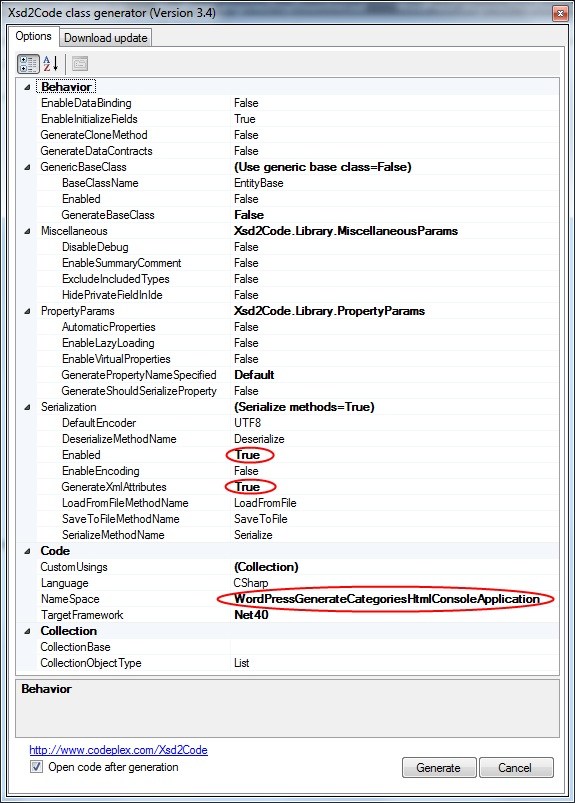
You can generate C# wrapper classes using the XSD.exe tool that ships with Visual Studio, but XSD.exe is hard to use, is hard to integrate into Visual Studio (despite Microsoft Connect request for it), the XSD.exe generated code still needs work for deserializing, and XSD.exe has very limited generation options (heck, after it changed from .NET 1.x to 2.0, it hasn’t been updated for about a decade). XSD2Code has some great reviews, to I used that in stead. And indeed, very well integrates into Visual Studio 2010, and generates very nice C#, especially when you use the options (see also the screenshot on the right):

  • Under Serialization, set Enabled to True
  • Under Serialization, set GenerateXmlAttributes to True

That way, loading the HTML, converting it to XML, then deserializing it into object instances is as simple as this:

                string inputFileName = args[0];
                string inputHtml = getHtml(inputFileName);
                string xml = toXml(inputHtml);
                selectType select = selectType.Deserialize(xml);

More on actually working with the loaded instances in the next episode, including the great benefit of XSD2Code: it generates C# code as partial classes.

–jeroen

Posted in .NET, C#, C# 4.0, C# 5.0, Development, SocialMedia, Software Development, Usability, User Experience (ux), Web Development, WordPress, WordPress, XML, XML escapes, XML/XSD, XSD | 2 Comments »

XML and HTML escapes

Posted by jpluimers on 2012/07/26

While reviewing some client’s code, I noticed they were generating and parsing XML and HTML by hand (do not ever do that yourself!).

Before refactoring this into something that uses libraries that properly understand XML and HTML, I needed to assess some of the risks.

A major risk is to get the escaping (and unescaping) of XML and HTML right.

Time to finally organize some of my links on escaping HTML and XML that I had in my favourites list.

The starting point is the List of XML and HTML character entity references on Wikipedia. It is readable, complete and lists both kinds of escapes.

XML escapes

The official W3C text that describes XML escaping is hard to read.

There are only 5 predefined XML entities for characters that can (some must) be escaped. This table is derived from the Wikipedia article.

Name Character Unicode code point
(decimal)
Standard When to escape (from the XML 1.0 standard) Description
quot U+0022 (34) XML 1.0 To allow attribute values to contain both single and double quotes double quotation mark
amp & U+0026 (38) XML 1.0 Outside  comment, a processing instruction, or a CDATA section ampersand
apos U+0027 (39) XML 1.0 To allow attribute values to contain both single and double quotes apostrophe (= apostrophe-quote)
lt < U+003C (60) XML 1.0 Outside  comment, a processing instruction, or a CDATA section less-than sign
gt > U+003E (62) XML 1.0 in content, when that string is not marking the end of a CDATA section greater-than sign

HTML escapes

Read the rest of this entry »

Posted in " quot, & amp, > gt, < lt, ' apos, ASCII, Development, Encoding, HTML, Power User, SocialMedia, Software Development, Unicode, Web Development, WordPress, XML, XML escapes, XML/XSD | 1 Comment »

#WordPress changed from Alt-Shift to Alt #keyboard #shortcuts and now breaks your regular browser Alt shortcuts. @wordpressdotcom

Posted by jpluimers on 2012/07/23

A couple of months ago, I created a nice post listing all #WordPress Editor #keyboard #shortcuts for both Windows and Mac OS X.

As of a few days ago, WordPress.com changed their Alt-Shift shortcuts into Alt shortcuts.

For instance, Alt-Shift-d (strike through) is now Alt-d, thereby blocking the original Alt-d (which for most browsers on Windows brings you to the address bar).

They violate one of the basic GUI principles: keep existing keyboard shortcuts as they are.

On Windows based browsers that means: keep Alt and Ctrl based shortcuts. Alt-Shift, Ctrl-Shift and Ctrl-Alt-Shift shortcuts are OK.

I haven’t tested WordPress on my MacBook air yet (as I don’t think the end-users should be the WordPress.com beta testers, though they probably think the world at large is a big beta-test garden).

I have asked WordPress.com to change the shortcuts back to what they were.

–jeroen

via: #WordPress Editor #keyboard #shortcuts « The Wiert Corner – irregular stream of Wiert stuff.

Posted in Keyboards and Keyboard Shortcuts, Power User, SocialMedia, WordPress | Leave a Comment »

The end of the classic ThinkPad Keyboard layout (#Lenovo #Fail)

Posted by jpluimers on 2012/05/18

(Thanks to a “Missed Post” problem on WordPress.com, this one didn’t get posted on the scheduled date. Sorry for any inconvenience)

First Lenovo did away with 1920×1200 screens. Now they done away with the ThinkPad keyboard layout.

Both were my compelling reasons for buying Lenovo.

In fact, they are now marked as forum.thinkpads.com • non-ThinkPad Lenovo Hardware.

New Lenovo X1 keyboard. No more ScrLk, Pause and local-menu keys, PrtScr key moved to impossible place. 6-key navigation split.

New Lenovo X1 keyboard. No more ScrLk, Pause and local-menu keys, PrtScr key moved to impossible place. 6-key navigation split.

–jeroen

PS: Anyone in The Netherlands who has a new ThinkPad W701 with 1920×1200 screen for sale?

Posted in Keyboards and Keyboard Shortcuts, Missed Schedule, Power User, SocialMedia, WordPress | 2 Comments »

Some research links on “change assemblyversion during checkin ccnet” – via Google Search

Posted by jpluimers on 2012/05/15

(Thanks to a “Missed Post” problem on WordPress.com, this one didn’t get posted on the scheduled date. Sorry for any inconvenience)

One of the next steps in the automated build process I’m setting up is increasing AssemblyVersion values after succesful builds.

It is is in a CCnet / TFS2010 / VS2010 environment.

Some links:

–jeroen

via: change assemblyversion during checkin ccnet – Google Search.

Posted in .NET, C#, Continuous Integration, CruiseControl.net, Development, Missed Schedule, SocialMedia, Software Development, Source Code Management, TFS (Team Foundation System), WordPress | Leave a Comment »

“Missed schedule” on post « WordPress.com Forums

Posted by jpluimers on 2012/05/15

Just checked my post history (as most posts are scheduled months in advance) just to see a bunch marked “Missed Schedule“:

20 user Inbound TCP connection limit in Windows 7 – Super User

Power UserWindows,Windows 7 21 hours ago
Missed schedule
On the research list: Kidi.Net: Kinderen VEILIG op het Net via Giovanni Praet (giovannipraet) on Twitter.

AboutPersonalPower User 2012/05/14
Missed schedule
How to Fix Temporary Profile in Windows 7

Power UserWindows,Windows 7 2012/05/11
Missed schedule

I tried this trick, but it didn’t help:

wget http://www.domain.com/wp-cron.php

Anyone who knows how to work around this?

Edit: posted on the forum, and contacted staff. But any ideas are still welcome.

–jeroen

via:

Posted in Missed Schedule, Power User, SocialMedia, WordPress | 2 Comments »