Posted by jpluimers on 2022/01/27
There seem to be at least three Huawei E3372 models:
- Huawei E3372s
- Huawei E3372h-153
- Huawei E3372-h-320
4G Systems W1208 seems to have only one model (it is an OEM Huawei E3372, not sure which submodel), but it looks like it is only available in Germany, and might even be region locked.
There are various reports on which ones work/fail with Fritz!Box devices as backup-internet link.
Here are some links:
- [Archive.is] HUAWEI E3372h-320 LTE-Stick: Amazon.de: Elektronik
- [Wayback] Huawei E3372 (Wit) – Kenmerken – Tweakers: E3372h-153
- [Wayback] Huawei Mobile USB-stick E3372 voor Windows
Zoekt u een snelle 4G LTE dongle met een geïntegreerd micro SD kaart slot en 2 externe antenne aansluitingen? Dan is de Huawei E3372h-153 iets voor u.
- [Wayback/Archive.is] E3372h-320 (Hi-Link) Dongle now works with fritz OS 7.25 : fritzbox
After updating to Fritz OS 7.25(2021-03-11) , The Huawei E3372h-320 Mobile Dongle now works with the Fritzbox 7530 without any need to disable the HiLink software (aka flash into stick mode) on the Dongle
- [Archive.is] Firmware-update: AVM Fritz!Box 5490 151.07.27 – Computer – Downloads – Tweakers
…
- Improved New “Compatibility mode for mobile broadband dongles” option for generic integration of variants of known mobile broadband dongles
- Improved Country-specific list of mobile network providers when FRITZ!Box used with a USB mobile network dongle
- Improved Optimized details for “Advanced failover protection” setting
- Improved Mobile network provider “Magenta Mobil” added for Austria
- Improved Support for Huawei E3372h-320 USB mobile network dongle
…
- [Wayback] Firmware-update: FRITZ!Box 7490 7.26 – Computer – Downloads – Tweakers
…
- Improved New “Compatibility mode for mobile broadband dongles” option for generic integration of variants of known mobile broadband dongles
- Improved Country-specific list of mobile network providers when FRITZ!Box used with a USB mobile network dongle
- Improved Optimized details for “Advanced failover protection” setting
- Improved Mobile network provider “Magenta Mobil” added for Austria
- Improved Support for Huawei E3372h-320 USB mobile network dongle
…
- [Wayback] Firmware-update: FRITZ!Box 7590 7.25 – Computer – Downloads – Tweakers
…
- Improved Support for Huawei E3372h-320 USB mobile network dongle
…
- [Wayback] Firmware-update: AVM FritzBox 7590 – FritzOS 7.10 – Computer – Downloads – Tweakers
- NEW Higher data rates possible through support for the Mobile Broadband Interface Model (MBIM) (for instance, W1208 from 4G Systems)
- NEW Push Service for sending received text messages
- [Wayback] Setting up 4G backup on FritzBox 7530 :: Mobile Broadband (3G, 4G, 5G etc) :: think broadband
…
AVM Fritz OS 7.25 (March 2021) now works with the Hi-Link software in the Huawei Dongle.
…
- [Wayback] fritz 7530 USB LTE compatable dongle – AVM
…
I just tested using VoIP when using the USB Mobile data on the E3372 dongle on the 7590 (Optus pre-paid mobile data plan). I was able to call out on VoIP to my mobile. I suppose incoming VoIP call would also work…
…
The secret to getting VOIP to work over a mobile connection is to set the Transport Protocol in the FritzBox to TCP. You thus need a telephony provider that supports TCP.
I’ve tested my 7590 (running FritzOS 7.20 or later) and an E3372 (using Optus) with SipTalk, and it worked correctly.
You’ll find the setting under Telephone number, Edit, Additional Settings for the Connection, Transport protocol. Other needed settings are: Username, Password and Registrar. You can leave Proxy and Stun servers blank.
…
- [Wayback] Fritz!Box 7490 und Huawei E3372 für Internet | IP Phone Forum
…
Hallo, ich habe F!B 7490 international, habe Huawei E3372.USB LTE Stick mit o2.de SIM angeschlossen. LTE Internetverbindung funktioniert perfekt mit APN “internet”.
Zuerst habe ich E3372 im Tethering mode an der F!B 7490i betrieben und konnte ich auf Hilink zugreifen.
Da ich aber die native IP adresse benutzen wollte, habe
habe ich die E3372 als Modem angeschlossen. Internet mit APN “internet” funktioniert weiterhin perfekt. Bekomme eine private native IP adresse an der F!B 7490i.
Bei O2.de habe ich mir für SIM-Karte eine öffentliche IP adresse geben lassen. Dazu muste ich den APN auf “netpublic” umstellen.
Jetzt kommt die Internetverbindung nicht zu stande. F!B zeigt unter ‘Mobilfunk’ dass das Netz gefunden wurde ‘bereit’ aber SIM ist nicht registriert wurde.
Im Modem Mode kann ich über Hilink auf die Konfiguratioin der E3372 nicht zugreifen.
Die SIM Karte in einem anderen Router (TP-Link M7350) funktioniert die SIM Karte mit APN “netpublic” mit öffentliche IP adresse eiwandfrei.
Zurück zu F!B 7490i mit E3372 als Modem und APN “netpublic”.
Bis jetzt keine Hilfestellung von AVM.
Bin dabei das Problem mit F!B 7490i zu lösen.
…
Mit aktueller 7.12-DE-FW scheinen die Sticks den Tethering-Mode nicht mehr (ohne weiteres?) zu beherrschen und werden trotz-HiLink-FW (22….) trotzdem ausschließlich als Modem angesprochen bzw. umgeschaltet.
Vormals -bei älterer FW <7.xx … iirc- hing die Einbindung/Erkennung entweder als Modem oder Tethering-Device allein von der FW des 3372-Sticks ab (22er versus 21er-Version). Umso erstaunter bin ich über die eingangs zitierte Aussage, dass Du dies anscheinend wohl nach Belieben steuern könntest? Über das “how” wäre sicherlich mancher Leser hoch erfreut.
Zu Deinem Problem: Es könnte sein, dass im Modem-Mode auf vorgefertigte APN-Listen zurückgegriffen wird, die eben “netpublic” (noch) nicht kennen und eine diesbzgl. Änderung im FB-GUI gleichfalls nicht greift? Die FW des 3372 ist eh schon recht betagt, sodass dieser intern die Verschmelzung von E-Plus und O² wohl auch noch nicht vollständig mitbekommen hat.
…
Habe ich vom AVM den gleichen Typ erhalten wie Du beschreibst, es lag genau an dem dass ich ein neues Profil mit APN “netpublic” einrichten mußte. Jetzt funktioniert die F!B 7490i mit E3372 und APN “netpublic” tadenlos.
Hier noch die Angaben zu E3372h und F!B 7490i.
E3372h gekauft bei Conrad im Mai 2017
Bestell-Nr.: 1234133 – 62
EAN Code 6901443021437
HW: Hardware-Version: CL2E3372HM
FW: Software-Version: 22.328.62.00.1217
HiLink: Weboberflächen-Version: 17.100.18.05.1217
7490i Model: 20002647
ASIN:B00H3IC3FC
HWRevision 185
HWSubRevision 6
ProductID Fritz_Box_HW185
annex A
firmware_info 113.07.12
firmware_version avme
…
Habe mit dem AVM Support geschrieben. Anscheinend arbeitet AVM tatsächlich daran das Feature rauszuwerfen. Haben ja auch meine Screenshots zur 7490 113.07.19-75207 Labor gezeigt in gezeigt und zeigt auch die neue Labor FW (FRITZ.Box 7490 (UI) 113.07.19-75736 siehe Screenshot in diesem Post), die alles nochmal “klarer formuliert” aber halt nichts daran ändert, dass ein Feature entfernt wird, ohne es in die Release Notes zu schreiben. Außerdem könnte es Nutzer dazu bringen, kein Update mehr zu machen, wenn ein Feature weg gekürzt wird, dass sie früher einwandfrei genutzt haben… :/
…
- [Wayback] [Frage] – LTE Stick für 7590 | IP Phone Forum
…
An meiner 7490 hängt ein Huawei E3372 und macht was er soll. Einen Anschluss für eine externe Antenne hat er auch.
…
In einer FB7490 FW 7.19-81587 (inhaus) erkenne ich im Bereich “Netzverfügbarkeit” 2von5 Balken … im Telekom-Mobilfunknetz hier indoor.
Auch wenn ich nicht stündlich/täglich Ooaklo-Speedtests versuche, komme ich eher regelmäßig/ohne Probleme “eingebremst auf tarifliche 50/10MBit/s” auf die Werte.
…
Generell habe ich unmaßgeblich erkannt, dass die E3372s oder h erheblich “wärmer” werden im Betrieb als der W1208. Ein Blick auf das Konstruktionsdatum E3372 ca. 2005/2006 lt. FW der W1208 laut “Bepper” 18/8/2019 könnte doch einen markanten Hinweis liefern, womit man besser fährt?
…
Habe mir nun einen gebrauchten W1208 von 4GSystems (1und1) geholt und der läuft.
…
Ok jetzt hab ich es nochmal versucht und plötzlich wie von selbst wird der Stick korrekt erkannt auch an der 7590.
XSStick W1208 (1&1)
…
- [Wayback] FritBox 7490 und Huawei E3372h-153 – kein No-HiLink? | IP Phone Forum
In Bezug auf den E3372s/h ist es als Backup-Lösung unerheblich, ob dieser als als usb-net Device (HiLink-FW) oder usb-modem (NoHilink-FW) arbeitet. Dies ist ausschließlich von der verwandten SIM (Tarif/Netz/Lokaler Empfang) abhängig. Gerade bei O² (Netzkonsolodierung mit Base/E-Plus) kann es lokal sinnvoller sein, sich im 3G-Modus zu bewegen statt 4G.
Damit ein usb-modem -hier ein E3372 mit NonHilink- vollständig und korrekt eingebunden wird, muss als Inet-verbindung eben der Client-Modus (hier hinter Kabelmodem) erst verlassen werden und “voll” über Mobilfunkverbindung kurz eingerichtet werden.
-Dies gilt auch für andere voicefähige UMTS-Sticks z.B. für die GSM-Gateway-Geschichte-
Danach kann man wieder auf Client-Modus umschalten. -hier I-Net via LAN1 und Kabelmodem-
…
In Verbindung bzw. dem Einsatz an einer FB7490 ist dies -aus meiner persönlichen Sichtweise heraus- nicht einfach zu beantworten, da es oftmals auch an der verwandten SIM-Karte liegt und eben der gebuchten Geschwindigkeit nebst den Empfangsverhältnissen. Oftmals kommt die Kombination eher stationär auf Campingplatz/Gartenlaube/Ferienwohnung o.ä. zum Einsatz, wo jeder dies halt persönlich Testen muss, was im Dauereinsatz stabiler läuft.
Erschwerend kommt hinzu, dass laut aktueller 7490 Intern-/Labor-FWs sich einiges tut in der Anbindung, da wohl Anpassungen im Rahmen der FB6890, die eben ein UMTS/LTE-Device schon onboard hat, ins Haus stehen. Da es keine Voicefähige FW für den E3372 gibt, kann man durchaus bei einer HiLink-FW bleiben. In Verbindung mit anderen Routern auf Linux-Basis, ist die Anbindung -lt. Tenor im lteforum.at- mit der NonHiLink-FW stabiler.
Und wo wir schon dabei sind: was ist der Unterschied zwischen dem E3372s und E3372h?
Es handelt sich nach meinen Wissen um unterschiedliche Hardware-Revisionen. Bekannt ist allerdings, dass die h-Version inpunkto Umflashen recht zickig sein kann, und es wohl öfters schon zu gebrickten Sticks dabei kam/kommt und man mit der “Nadel-Methode” und Spezialtools diese eher mühsam wiederbeleben muss/kann.
…
- [Wayback] Internettoegang via mobiel netwerk via Fritz!box 7369
…
Access-point (APN) is voor een XS4ALL SIM iets van umts.xs4all.nl of
umts2.xs4all.nl, die informatie kreeg je bij de SIM.
Access number is *99#, en username/password zijn onbelangrijk, maar
moeten wel ingevuld zijn.
…
APN: umts.xs4all.nl
Gebruikersnaam: xs4all
Wachtwoord: 1234
Pincode: 0000
…
- Huawei E180
- Huawei E3372 , de E3135 dongles en met de Samsung
J5 in tethering mode
…
- [Wayback/Archive.is] AVM veröffentlicht FRITZ!OS 7 für weitere Geräte – teltarif.de News
hat AVM auch ein neues FRITZ!Labor zum Download bereitgestellt. Dieses trägt die Versionsnummer 6.98-63245 und richtet sich an Besitzer der FRITZ!Box 4020
…
Zudem sollen sich Internet-Verbindungen mit dem Huawei-LTE-Stick mit der Seriennummer E3372h-153 wieder herstellen lassen.
- [Wayback] [Problem] – FritzBox 7580 mit Huawei E3372 geht so halb (aber unbrauchbar) | IP Phone Forum This is with older Fritz!Box and Huawei firmwares.
- [Wayback] Firmware Versionen Hi/Non Hilink E3372h inkl Mod | LTE-Forum Österreich
- [Wayback] Probleem met 4G USB modem HuaweiE3272 icm Fritzbox 4790 – Netwerken – GoT
als ik mijn Huawei E3272s-153 4G/LTE USB modem aansluit op 1 van de USB poorten van mijn Fritzbox 4790, loop ik tegen het rare fenomeen aan dat afhankelijk van de SIM welke in de dongel aanwezig is, ik wél of géen IP adres krijg toegewezen via het betreffende 3G/4G netwerk.
Mijn firmware van de Huawei E3272s-153 en Fritzbox 4790 zijn up to date.
Wat ik al gevonden of geprobeerd heb, met 4 verschillende SIM kaarten:
KPN SIM met data abonnement only:
Werkt met USB dongle in PC met KPN mobile connect software (LTE en HSPA+ netwerken getest).
Werkt niet icm Fritzbox 4790 (wordt wel herkend, pin is valide, KPN UMTS netwerk wordt herkend in GUI Fritzbox, maar er wordt geen IPv4 IP adres toegewezen).
KPN SIM met voice en data abonnement:
Werkt met USB dongle in PC met KPN mobile connect software (HSPA+ netwerk getest)
Werkt niet icm Fritzbox 4790 (wordt wel herkend, pin is valide, KPN UMTS netwerk wordt herkend in GUI Fritzbox, maar er wordt geen IPv4 IP adres toegewezen).
XS4ALL SIM met alleen data abonnement:
Werkt met USB dongle in PC met KPN mobile connect software (HSPA+ netwerk getest)
Werkt wel! in icm Fritzbox 4790, KPN UMTS/WCMDA wordt herkend en connecteert op UMTS, krijgt een IP adres toegewezen en LAN devices hebben daarna internet toegang.
BEN SIM met data/voice abonnement:
Werkt met USB dongle in PC met KPN mobile connect software (HSPA+ netwerk getest)
Werkt wel! in icm Fritzbox 4790, BEN UMTS wordt herkend en connecteert op UMTS, krijgt een IP adres toegewezen en LAN devices hebben daarna internet toegang.
- [Wayback/Archive.is] LTE-Surfstick bei 1&1 – Ihr mobiler Internet-Stick mit LTE
Allgemein
Hersteller: HUAWEI
Modell: E3372
–jeroen
Posted in Fritz!, Fritz!Box, Hardware, Internet, Network-and-equipment, Power User, SpeedTest | Leave a Comment »
Posted by jpluimers on 2022/01/27
First the script that display messages for all virtual machines, vim-cmd-display-messages-for-all-VMs.sh:
#!/bin/sh
vmids=`vim-cmd vmsvc/getallvms | sed -n -E -e "s/^([[:digit:]]+)\s+((\S.+\S)?)\s+(\[\S+\])\s+(.+\.vmx)\s+(\S+)\s+(vmx-[[:digit:]]+)\s*?((\S.+)?)$/\1/p"`
for vmid in ${vmids} ; do
    powerState=`vim-cmd vmsvc/power.getstate ${vmid} | sed '1d'`
    name=`vim-cmd vmsvc/get.config ${vmid} | sed -n -E -e '/\(vim.vm.ConfigInfo\) \{/,/files = \(vim.vm.FileInfo\) \{/ s/^ +name = "(.*)",.*?/\1/p'`
    vmPathName=`vim-cmd vmsvc/get.config ${vmid} | sed -n -E -e '/files = \(vim.vm.FileInfo\) \{/,/tools = \(vim.vm.ToolsConfigInfo\) \{/ s/^ +vmPathName = "(.*)",.*?/\1/p'`
    echo "Messages for VM with id ${vmid} which has power state ${powerState} (name = ${name}; vmPathName = ${vmPathName})."
    vim-cmd vmsvc/message ${vmid}
done
exit 0
It is very similar to vim-cmd-reload-all-VM-vmx-configurations.sh from Source: ESXi: reloading all virtual machines from their (potentially) vmx files.
Messages I know either equal “No message” or are about “This virtual machine may have been moved or copied.“
If there is no available message, then you always get the stock message No message., so this is something you can use as a check in scripts.
Read the rest of this entry »
Posted in *nix, *nix-tools, ArchiveTeamWarrior, ash/dash, ash/dash development, Development, ESXi6, ESXi6.5, ESXi6.7, ESXi7, Power User, Scripting, Software Development, Virtualization, VMware, VMware ESXi | Leave a Comment »
Posted by jpluimers on 2022/01/27
Based on [Wayback] domain name system – Overriding some DNS entries in BIND for internal networks – Server Fault and some further reading, there seem to be two ways used in these scenarios:
I wonder how that would interact best with Pi-Hole based solutions. Would it be best to have your local network use the Pi-Hole server, then have the Pi-Hole server obtain the DNS information it cannot resolve through one of the above solutions? Or would other solutions work better?
So here are a few links:
- [Wayback] domain name system – Overriding some DNS entries in BIND for internal networks – Server Fault; A lot of information in the answers to this question; important takeaway is that BIND named does support RPZ, but the support is not as fine grained as what Unbound DNS Server supports.
- [Wayback] bind – Is it possible to split a domain using dns Bind9 – Server Fault
- [Wayback] domain name system – Redirecting time.windows.com to internal server – Server Fault: poor man’s approach for a single host.
- [Wayback] Chapter 4 DNS Configuration Types (Bind)
- [Wayback] Split horizon DNS master/slave with Bind | Jensd’s I/O buffer having a full set of steps for master and slave, explaining the how and why of each step
- [Wayback] DNS Response Policy Zones (RPZ) / [Wayback] draft-vixie-dnsop-dns-rpz-00: DNS Response Policy Zones (RPZ) (Internet-Draft, 2018):
This document describes a method for expressing DNS response policy inside a specially constructed DNS zone, and for recursive name servers to use such policy to return modified results to DNS clients. The modified DNS results can stop access to selected HTTP servers, redirect users to “walled gardens”, block objectionable email, and otherwise defend against attack. These “DNS Firewalls” are widely used in fighting Internet crime and abuse.
- [Wayback] Overriding DNS for fun and profit (with bind)
- [Wayback] Chapter 7 – Response Policy Zone (Bind)
- [Wayback] configuration – Large zone file for bind9 : ad-blocking – Unix & Linux Stack Exchange
- [Wayback] HOWTO – Configure a DNS firewall with RPZ (with examples)
- [Wayback] Jan-Piet Mens :: RPZ revisited (Bind, with very clear examples no order of processing)
- [Wayback] domain name system – Alternative ways to get past 32 rpz zone limit in BIND? …without running BIND a thousand times – Server Fault (yes, as zones can be in views)
- [Wayback] Build a Privacy-respecting and Threat-blocking DNS Server
Learn how you can install your own DNS server to protect your devices from phishing, malware and ransomware
- [Wayback] Glen Pitt-Pladdy :: Blog – DNS Firewall (blackhole malicious, like Pi-hole) with bind9
- [Wayback] DNSRPZ performance and scaleability when using multiple RPZ zones (Bind)
- [Wayback] debian – DNS server for blacklisting tons of domains and also some TLDs – Unix & Linux Stack Exchange (Bind)
- [Wayback] NLnet Labs – Unbound – About
Unbound is a validating, recursive, caching DNS resolver. It is designed to be fast and lean and incorporates modern features based on open standards. Late 2019, Unbound has been rigorously audited, which means that the code base is more resilient than ever. To help increase online privacy, Unbound supports DNS-over-TLS …
- [Wayback] NLnet Labs – News – Unbound 1.10.0 released: rpz support and serve-stale conformance
The 1.10.0 release has RPZ support and serve stale functionality according to draft draft-ietf-dnsop-serve-stale-10. And a number of other, smaller, features, and bug fixes.
- [Wayback] jimh.dev: Unbound Pi-hole without scripts
- The Internet is full of Ads and Trackers. Some of them are useful to monetize free content. Some are used in a non-ethical manner. Savvy users will configure Ad-Blocker on their Web browser. Others won’t. Most Appliance and IoT modules won’t allow third-party blocking addons. Here’s how to add an extra layer of privacy using … Continue reading “Blocking Ads using unbound(8) on OpenBSD”[Wayback] Blocking Ads using unbound(8) on OpenBSD – TuM’Fatig
The public blocklists used by Pi-Hole are the following:
I wrote a [Wayback] script that will fetch the blocklists content, parse it and create a local zone file for unbound(8). That file will contain all the blocked domains and use the redirect answer to resolve those as invalid.
- [Wayback] geoghegan.ca: unbound-adblock, The Ultimate DNS Firewall! with [Wayback] script version 0.5p4
Pi-Hole seems not interested in RPZ: [Wayback] Implement Response Zone Policies (NXDOMAIN) for end-user performance increase – Feature Requests / Implemented – Pi-hole Userspace
Pi-Hole default blacklist is mentioned in [Wayback/Archive.is] pi-hole/basic-install.sh at master · pi-hole/pi-hole (look for adlistFile which defaults to [Wayback/Archive.is] StevenBlack/hosts: 🔒 Consolidating and extending hosts files from several well-curated sources. Optionally pick extensions for porn, social media, and other categories.).
Since I need this for ESXi: [Wayback/Archive.is] Let’s Encrypt SSL for ESXi
–jeroen
Posted in *nix, *nix-tools, bind-named, DNS, Internet, Linux, Power User | Leave a Comment »
Posted by jpluimers on 2022/01/26
I’ve been agile all my (not just programming) life, and only figured out this century that there is a vocabulary for that, containing the words agile, extreme programming, feature-driven and many more.
Now with the passing of the years, I also realise I have been trying to do “slow and smooth” all my life, and that with age (and less adrenaline) this becomes easier and easier.
I think “slow and smooth” goes well with “agile”, specially when you keep the focus on “doing things right” (and trying to do them right the first time, and keeping it right in incremental steps).
It often reminds me of the Dutch phrase “heeft u haast, gaat dan zitten” which often is attributed to be part of the many Chinese proverbs. It roughly translates to “when in a hurry, take a seat”, and suggests to take a step back and think when under pressure. Maybe this English version of a Chinese proverb comes close: “When you are in a hurry, the horse holds back”.
For is it is intriguing that mainly Chinese, but in a broader sense Asian, proverbs play such an important role, whereas Western proverbs get less and less important. Informal knowledge seems to diminish in Western culture, which I think is a pity.
Maybe all these vocabulary things that started to make sense way after my puberty also have to do with being diagnosed autistic at 50. That too started a lot of puzzle-pieces to suddenly make sense.
Below the links that inspired me to make this blog post in the first place:
–jeroen
Read the rest of this entry »
Posted in Agile, Conference Topics, Conferences, Development, Event, LifeHacker, Power User, Software Development | Leave a Comment »
Posted by jpluimers on 2022/01/26
I had to reload all registered virtual machine configurations after replacing an NVMe adapter in one of my ESXi hosts (see the posts next week).
The below script is based on this series of April last year on listing, stopping, starting, hibernating and waking up VMs, especially vim-cmd-list-all-VMs.sh:
- VMware ESXi console: viewing all VMs, suspending and waking them up: part 1 on Busybox, sed and regular expressions (especially capture groups)
- VMware ESXi console: viewing all VMs, suspending and waking them up: part 2 on
vim-cmd vmsvc commands, especially the on the ones accepting a vmid parameter
- VMware ESXi console: viewing all VMs, suspending and waking them up: part 3 digging deeper into the various
vim-cmd vmsvc/power.* commands
- VMware ESXi console: viewing all VMs, suspending and waking them up: part 4 on amending
vim-cmd vmsvc/getallvms with information from vim-cmd vmsvc/power.getstate and vim-cmd vmsvc/get.config
- VMware ESXi console: viewing all VMs, suspending and waking them up: part 5 on applying the various
vim-cmd vmsvc/power.* commands on a list of relevant virtual machines
Here is the script vim-cmd-reload-all-VM-vmx-configurations.sh:
#!/bin/sh
vmids=`vim-cmd vmsvc/getallvms | sed -n -E -e "s/^([[:digit:]]+)\s+((\S.+\S)?)\s+(\[\S+\])\s+(.+\.vmx)\s+(\S+)\s+(vmx-[[:digit:]]+)\s*?((\S.+)?)$/\1/p"`
for vmid in ${vmids} ; do
    powerState=`vim-cmd vmsvc/power.getstate ${vmid} | sed '1d'`
    name=`vim-cmd vmsvc/get.config ${vmid} | sed -n -E -e '/\(vim.vm.ConfigInfo\) \{/,/files = \(vim.vm.FileInfo\) \{/ s/^ +name = "(.*)",.*?/\1/p'`
    vmPathName=`vim-cmd vmsvc/get.config ${vmid} | sed -n -E -e '/files = \(vim.vm.FileInfo\) \{/,/tools = \(vim.vm.ToolsConfigInfo\) \{/ s/^ +vmPathName = "(.*)",.*?/\1/p'`
    echo "Reloading vmx of VM with id ${vmid} which has power state ${powerState} (name = ${name}; vmPathName = ${vmPathName})."
    vim-cmd vmsvc/reload ${vmid}
done
exit 0
Note that the script can throw errors, for instance the below one:
# vim-cmd vmsvc/reload 27
(vmodl.fault.SystemError) {
   faultCause = (vmodl.MethodFault) null,
   faultMessage = ,
   reason = "Invalid fault"
   msg = "Received SOAP response fault from []: reload
vim.fault.InvalidState"
}
This particular error means that the ESXi system itself is in an invalid state (as opposed to the virtual machine being an invalid state). In this case, it can be thrown if the ESXi system is in Maintenance Mode: in that case, it is not allowed to reload any .vmx virtual machine configurations (it only shows the configuration at the time that hostd got started).
There are two ways to solve this:
- The blunt way: restart the
hostd as this will re-read the .vmx files
- The not so blunt way: bring the server out of maintenance mode, then rerun the
vim-cmd vmsvc/reload command.
On the many places that can throw vim.fault.InvalidState
In this case, the reason for vim.fault.InvalidState was that the server was in maintenance mode. However, be aware that there are way more places that can throw vim.fault.InvalidState.
Via [Wayback/Archive.is] 1-day-SAP-custom/InvalidState.rst at master · bcstryker/1-day-SAP-custom and [Wayback/Archive.is] bcstryker/1-day-SAP-custom, I found [Wayback/Archive.is] InvalidState – vSphere Web Services API – VMware {code} that lists about 200 API calls for this seemingly simple fault:
Fault Description
An InvalidState fault is thrown if the operation failed due to the current state of the system.
For example, at [Wayback] Failed to deploy VM: vim.fault.InvalidState – VMware Technology Network VMTN the cause of vim.fault.InvalidState was deploying an .ova file over a slow WiFi connection.
On VMware services and their names
The VMware service names are very well explained in the [Wayback] what is difference between hostd, Vpxa and vpxd. – VMware Technology Network VMTN answer by [Wayback] About AndreTheGiant – VMware Technology Network VMTN
hostd is the daemon for direct VIC connection (when you use VIC to connect to your ESX).vpx is the original name of vCenter Center, so:
vpxa is the VC agent (ESX side)vpxd is the VC daemon (VC side)
Since ESXi 5.0, the VIC (VMware Infrastructure Client) got gradually replaced by the vSphere Web Client which is serviced by the hostd as well, see:
–jeroen
Posted in ESXi6, ESXi6.5, ESXi6.7, ESXi7, Power User, Virtualization, VMware, VMware ESXi | 1 Comment »
Posted by jpluimers on 2022/01/26
When working with converging algorithms, sometimes floating code can become very slow. That is: orders of magnitude slower than you would expect.
A very interesting answer to [Wayback] c++ – Why does changing 0.1f to 0 slow down performance by 10x? – Stack Overflow.
I’ve only quoted a few bits, read the full question and answer for more background information.
Welcome to the world of denormalized floating-point! They can wreak havoc on performance!!!
Denormal (or subnormal) numbers are kind of a hack to get some extra values very close to zero out of the floating point representation. Operations on denormalized floating-point can be tens to hundreds of times slower than on normalized floating-point. This is because many processors can’t handle them directly and must trap and resolve them using microcode.
If you print out the numbers after 10,000 iterations, you will see that they have converged to different values depending on whether 0 or 0.1 is used.
Basically, the convergence uses some values closer to zero than a normal floating point representation dan store, so a trick is used called “denormal numbers or denormalized numbers (now often called subnormal numbers)” as described in Denormal number – Wikipedia:
…
In a normal floating-point value, there are no leading zeros in the significand; rather, leading zeros are removed by adjusting the exponent (for example, the number 0.0123 would be written as 1.23 × 10⁻²). Denormal numbers are numbers where this representation would result in an exponent that is below the smallest representable exponent (the exponent usually having a limited range). Such numbers are represented using leading zeros in the significand.
…
Since a denormal number is a boundary case, many processors do not optimise for this.
–jeroen
Posted in .NET, Algorithms, ARM, Assembly Language, C, C#, C++, Delphi, Development, Software Development, x64, x86 | Leave a Comment »
Posted by jpluimers on 2022/01/25
Good Abstracts: A Template
Fabrizio Gilardi*
February 24, 2021
Abstract
Everyone agrees that this issue is really important. But we do not know much about
this specific question, although it matters a great deal, for these reasons. We approach the
problem from this perspective. Our research design focuses on these cases and relies on
these data, which we analyze using this method. Results show what we have learned about
the question. They have these broader implications.
*Department of Political Science, University of Zurich (https://fabriziogilardi.org/).
1
Source: [Wayback] fabriziogilardi.org/resources/papers/good-abstracts.pdf
Via:
–jeroen
Posted in LifeHacker, Power User | Leave a Comment »
Posted by jpluimers on 2022/01/25
In Determining the ESXi installation type (2014558) | VMware KB, I also showed how to backup the configuration and download it.
Sometimes you want an ISO 8601 time-stamped local tarball just in case you want to revert to it at a later stage.
First a small recap on how to get the tarball, download location and temporary location in the first place (it will be automatically deleted from the temporary location):
# vim-cmd hostsvc/firmware/sync_config
# vim-cmd hostsvc/firmware/backup_config
Bundle can be downloaded at : http://*/downloads/52aa233b-5db4-2298-5e1b-f510b2cd149f/configBundle-ESXi-X10SRH-CF.tgz
# find /scratch/downloads/ -name *.tgz
/scratch/downloads/52aa233b-5db4-2298-5e1b-f510b2cd149f/configBundle-ESXi-X10SRH-CF.tgz
Goal is to get the download filename and save it to a different folder and embed the ISO 8601 timestamp in the filename.
Like many scripts, sed and regular expressions come to the rescue once more, just like in ESXi ash/dash/busybox shell getting current timestamp in UTC ISO8601 format without colons or dashes (which we will need anyway because of the ISO 8601 time stamp, and a bit of fiddling at regex101.com/r/NyrzKF
# SCRATCH_CONFIG_BUNDLE_NAME=$(vim-cmd hostsvc/firmware/backup_config | sed -n -E -e "s/^(Bundle can be downloaded at : http://*)(/downloads/[[:xdigit:]]{8}-[[:xdigit:]]{4}-[[:xdigit:]]{4}-[[:xdigit:]]{4}-[[:xdigit:]]{12}/configBundle-.+?)(.tgz)$//scratch23/p")
# echo "SCRATCH_CONFIG_BUNDLE_NAME: '${SCRATCH_CONFIG_BUNDLE_NAME}'"
SCRATCH_CONFIG_BUNDLE_NAME: '/scratch/downloads/5271677d-97db-30dc-673d-b99e61bed251/configBundle-ESXi-X10SRH-CF.tgz'
# date --utc -I'seconds' --reference "${SCRATCH_CONFIG_BUNDLE_NAME}"
2021-05-09T17:44:42UTC
Note:
Not few people have bumped into this, the only other I could find through [Wayback] “vim.fault.TooManyWrites” “syncConfiguration” – Google Search is [Archive.is] mal wieder purple Screen – VMware-Forum.
Figuring out the various parts of the SCRATCH_CONFIG_BUNDLE_NAME: '/scratch/downloads/5271677d-97db-30dc-673d-b99e61bed251/configBundle-ESXi-X10SRH-CF.tgz' is like at regex101.com/r/J4yU72, regex101.com/r/uID9xs and regex101.com/r/o8a4Am:
CONFIG_BUNDLE_DIRECTORY_NAME=$(echo "${SCRATCH_CONFIG_BUNDLE_NAME}" | sed -n -E -e "s/(\/scratch\/downloads\/[[:xdigit:]]{8}-[[:xdigit:]]{4}-[[:xdigit:]]{4}-[[:xdigit:]]{4}-[[:xdigit:]]{12}\/)(configBundle-.+?)(.tgz)$/\1/p")
CONFIG_BUNDLE_FILE_NAME=$(     echo "${SCRATCH_CONFIG_BUNDLE_NAME}" | sed -n -E -e "s/(\/scratch\/downloads\/[[:xdigit:]]{8}-[[:xdigit:]]{4}-[[:xdigit:]]{4}-[[:xdigit:]]{4}-[[:xdigit:]]{12}\/)(configBundle-.+?)(.tgz)$/\2/p")
CONFIG_BUNDLE_DOT_EXTENSION=$( echo "${SCRATCH_CONFIG_BUNDLE_NAME}" | sed -n -E -e "s/(\/scratch\/downloads\/[[:xdigit:]]{8}-[[:xdigit:]]{4}-[[:xdigit:]]{4}-[[:xdigit:]]{4}-[[:xdigit:]]{12}\/)(configBundle-.+?)(.tgz)$/\3/p")
echo "CONFIG_BUNDLE_DIRECTORY_NAME: '${CONFIG_BUNDLE_DIRECTORY_NAME}'"
echo "CONFIG_BUNDLE_FILE_NAME:      '${CONFIG_BUNDLE_FILE_NAME}'"
echo "CONFIG_BUNDLE_DOT_EXTENSION:  '${CONFIG_BUNDLE_DOT_EXTENSION}'"
Output is like this:
SCRATCH_CONFIG_BUNDLE_NAME:   '/scratch/downloads/528f9f5a-0123-f022-2b4d-a5c2e595c51a/configBundle-ESXi-X10SRH-CF.tgz'
CONFIG_BUNDLE_DIRECTORY_NAME: '/scratch/downloads/528f9f5a-0123-f022-2b4d-a5c2e595c51a/'
CONFIG_BUNDLE_FILE_NAME:      'configBundle-ESXi-X10SRH-CF'
CONFIG_BUNDLE_DOT_EXTENSION:  '.tgz'
Full backup-config-to-ESXi_configuration_backup-directory.sh script:
Read the rest of this entry »
Posted in *nix, *nix-tools, ash/dash, ash/dash development, cron/crontab, Development, ESXi6, ESXi6.5, ESXi6.7, ESXi7, Power User, Scripting, Software Development, Virtualization, VMware, VMware ESXi | Leave a Comment »
Posted by jpluimers on 2022/01/25
In Get Formatted Value of Cell in Excel – Stack Overflow, I focused on the =TEXT function, then indicated I would look into Excel format strings later.
Below are just a few links and a very short description as hopefully later I will have more time to dig into this.
The basic format is this (where all bits other than Format1 are optional):
[Locale]Format1;Format2;Format3;Format4
For now this is for my link archive:
- [Wayback] Excel number format strings (e.g. “@”, “$-409]d-mmm-yy;@”) – Complete reference availability? – Stack Overflow has two answers of which the second one is deleted, but very useful:
- Here’s a list of the Number Format Codes for Excel.
- Second option for link: Ecma-376 4th Edition Part 1, Section 18.8.31
- If you are looking for the international number codes try at http://office.microsoft.com/en-gb/excel-help/creating-international-number-formats-HA001034635.aspx
- The
HA001034635 link has disappeared, which is a pity as it explains the localisation; luckily two forms of the URL have been saved where [Locale] is constructed like this example (all Locale digits are hexadecimal):
[$-24050412]m/d/yy
In the preceding example:
24 is the numeral shape component (Korean 1).
05 is the calendar type component (Korean (Tangun era)).
0412 is the locale and language designation component (Korean).
- [Wayback] Archive.is: Creating international number formats – Excel … HA001034635.aspx
- [Wayback] Archive.is: Creating international number formats – Excel – Office.com … HA001034635.aspx?redir=0
- More
[Locale] information is explained in [Wayback] What does the 130000 in Excel locale code [$-130000] mean? – Stack Overflow by [Wayback] User IrwinAllen13 – Stack Overflow and has more calendar formats than the above Microsoft links.
- [Wayback] Number format codes – Excel for Mac has the base and sort of explains what the
@ is for: the content of the cell.
First the base:
When you create custom number formats, you can specify up to four sections of format code. These sections of code define the formats for
- positive numbers,
- negative numbers,
- zero values, and
- text,
in that order. The sections of code must be separated by semicolons (;).
The following example shows the four types of format code sections.

 Format for positive numbers
 Format for negative numbers
 Format for zeros
 Format for text
Then on on specifying less than 4 sections:
- If you specify only one section of format code, the code in that section is used for all numbers.
- If you specify two sections of format code, the first section of code is used for positive numbers and zeros, and the second section of code is used for negative numbers.
- When you skip code sections in your number format, you must include a semicolon for each of the missing sections of code.
- You can use the ampersand (&) text operator to join, or concatenate, two values.
Then on the @ sign (which is under “Text and spacing”):
To create a number format that includes text that is typed in a cell, insert an “at” sign (@) in the text section of the number format code section at the point where you want the typed text to be displayed in the cell.
…
For example, to include text before the text that’s typed in the cell, enter “gross receipts for “@ in the text section of the number format code.
Finally it explains how to colorise the formatting or hide particular values under “Decimal places, spaces, colors, and conditions”:
The color code must be the first item in the code section.
[Black] [Blue] [Cyan] [Green] [Magenta] [Red] [White] [Yellow]
…
Hiding various values:
| To hide |
Use this code |
| Zero values |
0;–0;;@ |
| All values |
;;; (three semicolons) |
- [Wayback] ECMA-376 – Ecma International where Ecma-376 4th Edition Part 1, Section 18.8.31 is supposed to have format strings (will dig into this later)
Office Open XML file formats – This Standard defines Office Open XML’s vocabularies and document representation and packaging
- [Wayback] ECMA-376, Part 1
- Not sure where Part 2 is
- [Wayback] ECMA-376, Part 3
- [Wayback] ECMA-376, Part 4
- Not sure where Part 5 is
Below a few screenshots while experimenting.
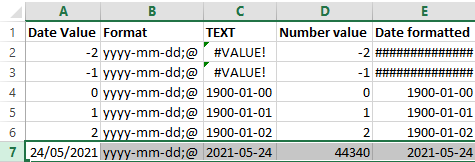
The first one shows the formulas, the second one the content. The Date value cells shows the values when entered as shown; the Date formatted cells are all formatted with yyyy-mm-dd;@ formatting.
I still need to figure out why using a =TEXT function shows #VALUE! whereas using cell formatting just a bunch of ############### (15 times a #, not sure if that is always the same number).

–jeroen
Posted in Development, Excel, Office, Office Development, Power User, Software Development | Leave a Comment »
Posted by jpluimers on 2022/01/24
For my link archive:
Problem was that the privacy statement was not on a separate page during DigiD logon: you had to copy/paste to word in order to save it.
–jeroen
Posted in About, GDPR/DS-GVO/AVG, LifeHacker, Personal, Power User, Privacy | Leave a Comment »





 The Wiert Corner - irregular stream of stuff