


For my link archive, a bunch of task state diagrams that include transitions between the states.
The diagrams are in no particular order.
–jeroen
Posted by jpluimers on 2021/07/06
For my link archive, a bunch of task state diagrams that include transitions between the states.
The diagrams are in no particular order.
–jeroen

Posted in Development, Software Development | Leave a Comment »
Posted by jpluimers on 2021/07/06
Even though RIVM twitter-care did not respond at all on my raised issue that the production environment leaded an acceptation environment URL, it did gain me some knowledge on their systems and the (then upcoming) European QR code systems.
[Archive.is] Jeroen Wiert Pluimers on Twitter: “Onhandig op de #CoronaCheck site van het @rivm de link hier (1) wijst nog naar de acceptatie omgeving en daar heb je authorisatie voor nodig. Zonder “.acc” werkt het ook niet: (2) Dit werkt wel: (3) CC @locuta… “
The problem digging into it was that it only reproduces when inside the [Archive.is] Coronacheck Print Portaal after you have logged on via DigiD, so you cannot save it in the WayBack machine nor Archive.is.
This print portal isn’t a straightforward hierarchy of web-pages, but an actual Vue.js app that injects itself into [Wayback/Archive.is] nl-covid19-coronacheck-website/index.html at main · minvws/nl-covid19-coronacheck-website and dynamically changes the URL depending on the application state.
It also means that you cannot archive pages like coronacheck.nl/nl/print/vaccinatie-ophalen or coronacheck.nl/nl/print/keuze-papieren-bewijs as the Vue.js app will not understand state from those sub-URLs and go back to coronacheck.nl/nl/print/
The only other results of [Wayback] “acc.coronacheck.nl” – Google Search were:
I had a hunch the CoronaCheck code would be open source, though finding it through the most obvious [Wayback] open source coronacheck app – Google Search failed. Since the web-site and app look very similar to the CoronaMelder web-site and app, I tried [Wayback] open source coronamelder app – Google Search and found the page with links: [Wayback] Colophon – Stop the spread of the coronavirus, download CoronaMelder.
Note that [Wayback] Open-Source Project Corona-Warn-App is a different beast. Though internationally available and released way earlier than the Dutch apps, the Dutch government has a huge ego (maybe even abbreviatable to Hugo) resulting in severe “not invented here” syndrome despite having had to be bailed out when “code black” happened in hospitals.
One thing that I learned is that there is one version of the code behind coronacheck.nl/nl/print/print-vaccinatie in the main branch of github.com/minvws/nl-covid19-coronacheck-website that has only acceptance URLs. They are in these locations:
Apparently, replacing these with production URLs is done during deployment, but I could not find the code that does it in the main repositories at [Wayback] github.com/minvws
One answer to my tweet was [Archive.is] Joel Haasnoot on Twitter: “gir.st/blog/greenpass.html… “ which provides more information on the European
These are the links I thought were interesting:
–jeroen

Posted in Development, JavaScript/ECMAScript, Scripting, Software Development, Vue.js, Web Development | Leave a Comment »
Posted by jpluimers on 2021/07/06
A few links for my archive:
The brackets are required if you use keywords or special chars in the column names or identifiers. You could name a column
[First Name](with a space)–but then you’d need to use brackets every time you referred to that column.The newer tools add them everywhere just in case or for consistency.
Delimited names – surrounded by square brackets or double quotes (if QUOTED_IDENTIFIER is set to ON) – can contain basically anything other than the delimiters themselves. It is even possible to use the delimiters within the name with some escape logic. Note though that it is only the closing escape character that must be escaped. In the first example below, the single instance of the opening escape character in the name does not need to be escaped whereas the closing escape character does have to be escaped (by replacing the single instance with two). I guess the logic here is that whatever code that is parsing these statements is looking for a closing escape character and has is not interested in nested opening escape characters.
- [Test[Test] -> Test[Test
- [Test]]Test] -> Test]Test
The following is a description of the rules surrounding non delimited (nonquoted) identifier names in SQL Server 2012. It is an extract from the document Guide to Migrating from MySQL to SQL Server 2012.
Schema Object Names
In SQL Server 2012, an object name can be up to 128 characters long.
Nonquoted identifier names must follow these rules:
- The first character must be alphanumeric, an underscore (_), an at sign (@), or a number sign (#).
- Subsequent characters can include alphanumeric characters, an underscore, an at (@) sign, a number sign, or a dollar sign.
- The identifier must not be a Transact-SQL reserved word. Guide to Migrating from MySQL to SQL Server 2012 8
- Embedded spaces or special characters are not allowed.
Identifiers that start with @ or a number sign have special meanings. Identifiers starting with @ are local variable names. Those that start with a number sign are temporary table names.
To quote an identifier name in Transact-SQL, you must use square brackets ([]).
–jeroen

Posted in Database Development, Development, SQL, SQL Server | Leave a Comment »
Posted by jpluimers on 2021/07/06
Doing a “DefaultUsrPwDm” – Google Search, I bumped into the System.Classes.TLoginCredentialService class.
There is hardly any documentation.
It was introduced as [WayBack] System.Classes.TLoginCredentialService – XE2 API Documentation with the standard TObject template:
TObject is the ultimate ancestor of all objects and components.
System.Classes.TLoginCredentialService inherits from System.TObject. All content below this line refers to System.TObject.
TObject is the ultimate ancestor of all objects and components.
…
Although TObject is the based object of a component framework, not all objects are components. All component classes descend from TComponent.
Note: TObject is never directly instantiated. Although it does not use programming language features that prevent instantiation, TObject is an abstract class.
The documentation was updated in Delphi XE4 to [WayBack] System.Classes.TLoginCredentialService – RAD Studio API Documentation
TLoginCredentialServiceprovides functionality for login action, regardless of framework.
TLoginCredentialServicerepresents an extensible, framework agnostic, login credential service with support for callbacks (success, failure). It includes methods for:
- Getting user credentials: Domain, Username and Password.
- Registering and unregistering credentials from handlers.
See Also
That version also added [WayBack] System.Classes.ELoginCredendialError – RAD Studio API Documentation
ELoginCredendialErroris the exception class for handling invalid login credentials.
ELoginCredendialErroris raised when an application attempts to get specified, but unexisting, login credentials.
Nothing ever got added, no examples, no documentation, just look at for instance the Delphi Rio documentation:
Luckily, I found this for my research list (code at [WayBack] tlogincredentialservice.zip) : [WayBack] delphi – TLoginCredentialService usage example – Stack Overflow which uses globals, but that’s not the point of the demo (you can use different storage in your actual code)
I’ve just created a small demo of how to use it
Click here to download the code
In the following I’ll show some of the code:
First I need a record to hold Credentials, and a list of them :
Type
  TCredential = record
    Username, Password, Domain: string;
    constructor Create(const aUsername, aPassword, aDomain: string);
    function AreEqual(const aUsername, aPassword, aDomain: string): Boolean;
  end;

  TCredentialList = class(TList<TCredential>)
  public
    function IsValidCredential(const aUsername, aPassword, aDomain: string): Boolean;
  end;
then we need to define a context in wich we are calling this. Thats just a application unique string wich identifyes each Loginfunction
const
  Context = 'TForm1';
In Form create I create my list and add dummy data to it
procedure TForm1.FormCreate(Sender: TObject);
begin
  CredentialList := TCredentialList.Create;
  //Add Dummy data
  CredentialList.Add(TCredential.Create('AA', 'AA', 'DomainAA'));
  CredentialList.Add(TCredential.Create('BB', 'BB', 'DomainAA'));
  CredentialList.Add(TCredential.Create('CC', 'CC', 'DomainAA'));

  // Register your Login handler in a context.
  // This method is called when you try to login
  // by caling TLoginCredentialService.GetLoginCredentials();
  TLoginCredentialService.RegisterLoginHandler(Context, LoginCredentialEvent);
end;
I have placed a button on my form from wich I make my call to login :
procedure TForm1.Button1Click(Sender: TObject);
begin
  // The actual call to login
  // First param is the context
  // Second Parameres is a callback function given to the event handler.
  TLoginCredentialService.GetLoginCredentials(Context,
    function { LoginFunc } (const Username, Password, Domain: string): Boolean
    begin
      //The actual user validation
      Result := CredentialList.IsValidCredential(Username, Password, Domain);
    end);
end;
Finally I just need to implement my loginhandler:
//This is the "onLogin" event handler.
//This is called durring a login attempt
//The purpose of this event handler are to call tha callBack function with correct information
//and handle the result
procedure TForm1.LoginCredentialEvent(Sender: TObject; Callback: TLoginCredentialService.TLoginEvent; var Success: Boolean);
begin
  //Call the callback
  Callback(Sender, LabeledEdit1.Text, LabeledEdit2.Text, LabeledEdit3.Text, Success);

  //Handle the success.
  if Success then
    Label1.Caption := 'Yes'
  else
    Label1.Caption := 'No';
end;
Hope this answers the question.Dont forget to download the complete code here
–jeroen
Posted in Delphi, Development, Software Development | Leave a Comment »
Posted by jpluimers on 2021/07/05
By now it should be able to order them normally, as this link is from early 2019: [WayBack] New version Smart Citizen Kit available | Waag
An improved 2.1 version of the Smart Citizen Kit is now ready for pre-ordering.
…
What does the 2.1 version measure?
The Smart Citizen Kit focuses on the weather, sound, light and air quality. The following overview shows the different sensors in version 2.1:
- Temperature (°C) – Sensirion SHT31
- Relative humidity (% rh) – Sensirion SHT31
- Noise level (dBA) – Invensense ICS4342
- Ambient light (lx) – Rohm BH1721FVC
- Air pressure (barometer, kPa) – NXP MPL3115A2
- Equivalent carbon dioxide (CO2 in ppm) – AMS CCS811
- Volatile organic compounds (ppb) – AMS CCS811
- Particulate matter (PM1/2,5/10 in μg/m3) – Plantower PMS 5003
…
Our findings in 2014 showed that the housing can be an important factor by influencing the sensors; there must be sufficient air flow, but also a watertight environment. And the placement is important (not in full sun for example).
Some relevant links and information:
Fablab Amsterdam is open to the public on Thursday afternoon (12:00-17:00 hrs).
Via:
–jeroen

Posted in Development, Hardware Interfacing, Power User, Software Development | Leave a Comment »
Posted by jpluimers on 2021/07/05
[WayBack] PLA use outdoors? – 3D Printing Stack Exchange:
TL;DR: though bio-degradable, PLA needs high temperatures (> 50 Celsius) to degrade.
So in European summers, for light weight enclosures (like weather stations or signage), it should be fine.
To biodegrade within 90 days, as described, the products have to reach 140 F for 10 consecutive days. This requires a special facility, which few consumers have access to. If your PLA products end up at the landfill, they will not degrade any faster than a petroleum-based product.
Abiotic PLA degradation is due to 3 mechanisms:[35]
- Hydrolysis: The ester groups of the main chain are cleaved, dividing the molecule in two parts, thus reducing molecular weight.
- Thermal degradation: A complex phenomenon leading to the appearance of different compounds such as lighter molecules and linear and cyclic oligomers with different Mw, and lactide.
- Photodegradation: Sunlight induces degradation due to low-wavelength and high-energy UV radiation. This is a factor mainly where PLA is exposed to sunlight in its applications in plasticulture, packaging containers and films.
The hydrolytic reaction is:
{\displaystyle {\ce {-COO + H2O -> – COOH + -OH-}}}
The degradation rate is very slow in ambient temperatures. A 2017 study found that at 25 °C in seawater, PLA showed no degradation over a year.[36]
Pure PLA foams undergo selective hydrolysis when placed in an environment of Dulbecco’s modified Eagle’s medium (DMEM) supplemented with fetal bovine serum (FBS) (a solution mimicking body fluid). After 30 days of submersion in DMEM+FBS, a PLLA scaffold lost about 20% of its weight.[37]
PLA samples of varying molecular weight were degraded into methyl lactate (a green solvent) by using a metal complex catalyst.[38]
Some bacteria can also degrade PLA, such as Amycolatopsis and Saccharothrix. A purified protease from Amycolatopsis sp., PLA depolymerase, can also degrade PLA. Enzymes such as pronase and most effectively proteinase K from Tritirachium album degrade PLA.[39]
Degradation is the reverse of the synthesis process in this Wikipedia picture:
For other materials and in-car usage, read:
generally, materials should not be exposed prolonged periods of time above (give or take):
- 70 °C (158 °F) for basic Co-Polymers
- 85 °C (185 °F) for ABS
- 100 °C (212 °F) for enhanced Co-Polymers
- 105 °C (221 °F) for Polypropylene (PP)
- 110 °C (230 °F) for Polycarbonate (PC)
…
If you put PLA parts in a sealed plastic bag (or two to keep it dry) and simmer in water (212 °F or 100 °C), the part “anneals”. The time taken varies with the part shape, but for small parts should be about 15-30 minutes. You can simmer longer if unsure, but it provides no additional benefit once the part is annealed. When you remove and cool the annealed part, it will feel harder and more compact. You may also notice a slight hazing or color change.
Annealed parts become a bit more resistant to heat warp. The annealing process shrinks and hardens your part (I’ve annealed gears) so you need to account for the shrinkage by making the unannealed part slightly larger.
–jeroen
Posted in 3D printing, Power User | Leave a Comment »
Posted by jpluimers on 2021/07/05
I wish I had blogged about this a lot sooner, as then far less people would use var aFoo: array of TFoo as method parameters for results that are just out parameters and could be a function result.
You cannot have array of TFoo as function result, but you can have TArray<TFoo>. The former would be an open array, the latter is a proper array type.
I see many people use var aFoo: array of TFoo with all sorts of SetLength calls before calling and inside a method where a function returning a TArray<TFoo> would be far more appropriate, both in the sense of readability and maintainability.
–jeroen
Posted in Delphi, Development, Software Development | 2 Comments »
Posted by jpluimers on 2021/07/02
Having it accidentally made it to the CBL (Composite Blocking List – Wikipedia) a long time ago, I discovered the page started with (WayBack link mine):
IMPORTANT: Many CBL/XBL listings are caused by a vulnerability in Mikrotik routers. If you have a Mikrotik router, please check out the [WayBack] Mikrotik blog on this subject and follow the instructions before attempting to remove your CBL listing.
It wasn’t one of my Mikrotik devices, as first of all they had all being patched out of the box from a really empty internal network before being externally exposed to the internet or more busy internal networks, and second because the CBL entry was a one off on one specific day where someone used our guest network.
Some CBL entries in the range where it was displayed, quite a while after CVE-2018-14847 became public:
Description MikroTik RouterOS through 6.42 allows unauthenticated remote attackers to read arbitrary files and remote authenticated attackers to write arbitrary files due to a directory traversal vulnerability in the WinBox interface. References Note: References are provided for the convenience of the reader to help distinguish between vulnerabilities. The list is not intended to be complete.
- EXPLOIT-DB:45578
- [WayBack] URL:https://www.exploit-db.com/exploits/45578/
- [WayBack] MISC:https://github.com/BasuCert/WinboxPoC
- [WayBack] MISC:https://github.com/BigNerd95/WinboxExploit
- [WayBack] MISC:https://github.com/tenable/routeros/blob/master/bug_hunting_in_routeros_derbycon_2018.pdf
- [WayBack] MISC:https://github.com/tenable/routeros/tree/master/poc/bytheway
- [WayBack] MISC:https://github.com/tenable/routeros/tree/master/poc/cve_2018_14847
- [WayBack] MISC:https://n0p.me/winbox-bug-dissection/
Hyperlink Resource https://github.com/BasuCert/WinboxPoC Exploit MitigationThird Party Advisory https://github.com/BigNerd95/WinboxExploit Exploit MitigationThird Party Advisory https://github.com/tenable/routeros/blob/master/bug_hunting_in_routeros_derbycon_2018.pdf ExploitThird Party Advisory https://github.com/tenable/routeros/tree/master/poc/bytheway ExploitThird Party Advisory https://github.com/tenable/routeros/tree/master/poc/cve_2018_14847 ExploitThird Party Advisory https://n0p.me/winbox-bug-dissection/ ExploitThird Party Advisory https://www.exploit-db.com/exploits/45578/ ExploitThird Party AdvisoryVDB Entry
If you want to try for yourself or harden it: [WayBack] Exploiting Mikrotik for Good ? | Syed Jahanzaib Personal Blog to Share Knowledge !
First of all, it seems that if you ever had an infected Mikrotik system, then you have to factory reset it, then upgrade and configure from scratch. Otherwise at least the SOCKS and Web proxy services can still send out spam: [Archive.is] spammer behind mikrotik or mikrotik is the spammer : sysadmin. There, the best advice was
aliterCogitare, Jr. Sysadmin:Your mikrotik has been compromised then, I would suggest either going on site and rebuilding the router from scratch, or looking at a few things:
Check System -> Scheduler for any schedules running( that you haven’t configured yourself)
Check Systems -> scripts for any installed scripts that are running and delete, also look for running jobs and terminate them.
Finally check the file explorer for any suspicious files or scripts, and delete any you find. A default library should look like this: flash (the partition) -pub -skins anything else that you havent put there yourself, Delete.
Anything else that I have mentioned above should be empty. Also you need to re-evaluate the security of your network. If you happen to be on site, reset the router and remove the default configuration on the boot prompt. Create two rules:
Allow input chain source IP from your default local network, if i remember correctly its 192.168.88.0/24
create an explicit drop rule on input chain for all interfaces and addresses + ports
disable IP – services except winbox Finally work your way up on what your network needs step by step by creating rules to accept traffic. And be sure to put your explicit rule on the bottom of the list by drag-and-dropping. That is all I can say, I hope I could be of help.
This means the advice in these two links might not be enough:
Another helpful resource [WayBack] Router Sending Spam – MikroTik which discusses the firewall rules, socks and web proxy services.
Second, there are a truckload of these devices around: [WayBack] Thousands of Compromised MikroTik Routers Send Traffic to Attackers and [WayBack] Thousands of MikroTik routers are snooping on user traffic | ZDNet write that in September 2018, at least 7500 devices were known infected and about 370-thousand endpoints vulnerable.
Third, you should be able to use [WayBack] Manual:Tools/Netwatch – MikroTik Wiki to check if you are on the CBL: [WayBack] Probing CBL blacklist – MikroTik.

Posted in Firewall, Internet, MikroTik, Power User, routers, SPAM | Leave a Comment »
Posted by jpluimers on 2021/07/02
Based on:
Via macos “keep both” versus “skip” – Google Search
When copying or moving files on MacOS using the Finder, sometimes you get a popup with chooses “Skip”, “Stop”, “Replace”, but at other times “Keep Both”, “Stop”, “Replace”.
Empirically:
–jeroen

Posted in Apple, Mac OS X / OS X / MacOS, Mac OS X 10.7 Lion, macOS 10.12 Sierra, macOS 10.13 High Sierra, OS X 10.10 Yosemite, OS X 10.11 El Capitan, OS X 10.8 Mountain Lion, OS X 10.9 Mavericks, Power User | Leave a Comment »
Posted by jpluimers on 2021/07/02
Whenever I get time to dig into the actual cause (a reboot fixed it; I do not like problems disappearing by themselves).
I got these errors:
A reboot resolved the first, which might be caused by the /bootbank pointing to /tmp:
[root@ESXi-X9SRI-F:~] ls -la /bootbank
lrwxrwxrwx    1 root     root             4 May 20 08:44 /bootbank -> /tmp
[root@ESXi-X9SRI-F:~] ls -la /tmp
total 36
drwxrwxrwt    1 root     root           512 Jun 23 06:13 .
drwxr-xr-x    1 root     root           512 Jun 17 13:13 ..
-rw-------    1 root     root            40 Jun 23 06:15 probe.session
-rw-r--r--    1 root     root         14188 Jun 23 06:01 state.tgz
drwx------    1 root     root           512 Jun 23 04:44 vmware-root
[root@ESXi-X9SRI-F:~] ls -la /tmp/vmware-root/
total 8
drwx------    1 root     root           512 Jun 23 04:44 .
drwxrwxrwt    1 root     root           512 Jun 23 06:13 ..
[root@ESXi-X9SRI-F:~] cd ..
Normally, this points to a valid filesystem:
[root@ESXi-X9SRI-F:~] ls -la /bootbank
lrwxrwxrwx    1 root     root            49 Jun 23 06:29 /bootbank -> /vmfs/volumes/69ab34ee-f2e2bd4a-e013-a62e6975b9e7
[root@ESXi-X9SRI-F:~] du -h `readlink /bootbank`
146.7M  /vmfs/volumes/69ab34ee-f2e2bd4a-e013-a62e6975b9e7
Cannot be live installed: finding boot device (in practice a df -h is easier if you just have one USB stick to boot from)
No space left on device (combined in the above search with “ESXi” and “profile update”)
This was while applying patches using the [WayBack] VMware ESXi 6.7.0 Patch History pop-ups:
# Cut and paste these commands into an ESXi shell to update your host with this Imageprofile
# See the Help page for more instructions
#
esxcli network firewall ruleset set -e true -r httpClient
esxcli software profile update -p ESXi-6.7.0-20190604001-standard \
-d https://hostupdate.vmware.com/software/VUM/PRODUCTION/main/vmw-depot-index.xml
esxcli network firewall ruleset set -e false -r httpClient
#
# Reboot to complete the upgrade
# Cut and paste these commands into an ESXi shell to update your host with this Imageprofile
# See the Help page for more instructions
#
esxcli network firewall ruleset set -e true -r httpClient
esxcli software profile update -p ESXi-6.7.0-20190504001-standard \
-d https://hostupdate.vmware.com/software/VUM/PRODUCTION/main/vmw-depot-index.xml
esxcli network firewall ruleset set -e false -r httpClient
#
# Reboot to complete the upgrade
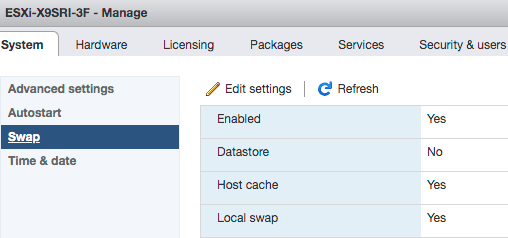
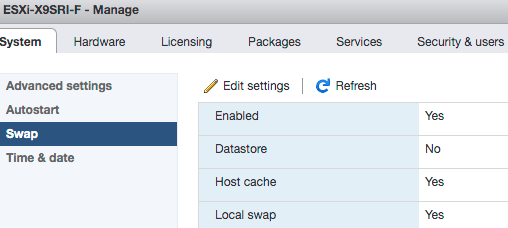
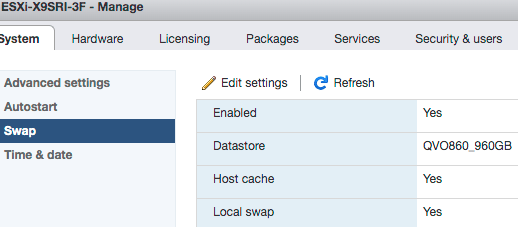
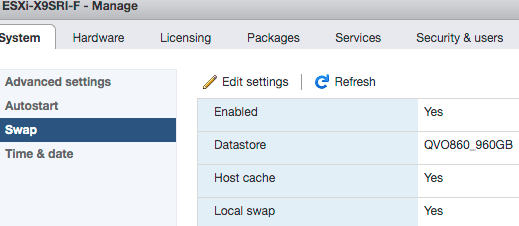
The swap settings were exactly the same:
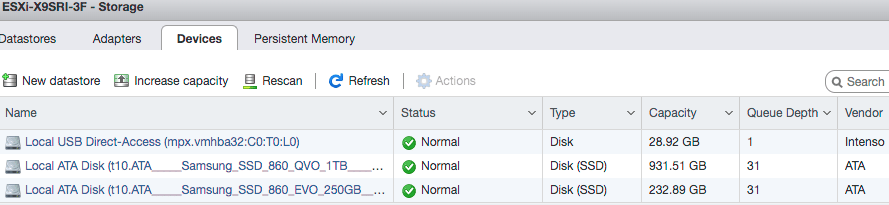
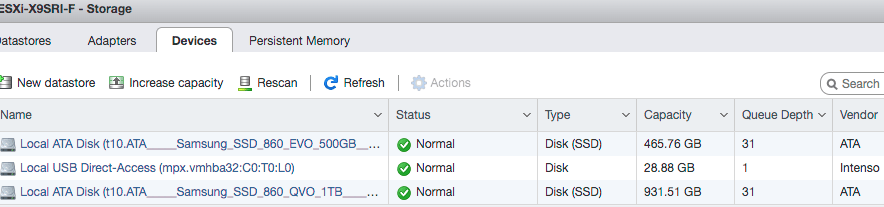
The USB devices were the same too:
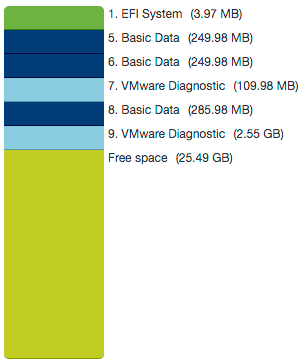
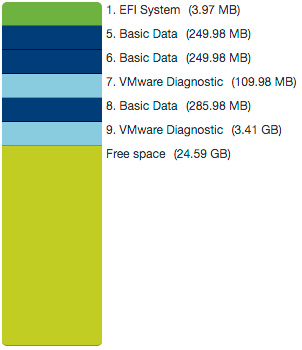
The failing system had even more partition space than the working system:
Working Failing
So was quite baffled that pointing the swap space pointing to a datastore solved the problem:
You can also request this from the shell (via [WayBack] VMware vSphere 5.1):
[root@ESXi-X9SRI-F:~] esxcli sched swap system get

Datastore Active: true

Datastore Enabled: true

Datastore Name: QVO860_960GB

Datastore Order: 1

Hostcache Active: false

Hostcache Enabled: true

Hostcache Order: 0

Hostlocalswap Active: false

Hostlocalswap Enabled: true

Hostlocalswap Order: 2
Quoted in full as it cannot be archived in the WayBack machine nor Archive.is: Bootbanks mounts to /tmp folder and configuration changes are lost after rebooting of ESXi 6.0 Server (2148321)
Last Updated: 1/31/2019Categories: TroubleshootingSymptoms
- Configuration changes on the ESXi is lost after rebooting the server.
- Bootbank and altbootbank points to /tmp folder instead of pointing to the ESXi installed partition (this can be confirmed by running ls -l on root (“/”) folder)
Cause
This issue happens if there is a delay in Fabric Login during the ESXi Boot process. By default, there is 3 Second timeout for Fabric login.If Fabric Login takes more than 3 seconds, claiming the devices and discovering the LUNs happens parallelly and some LUNs will not be claimed on time during the boot process. If the boot LUN is not claimed before mounting the bootbank, ESXi boot process will mount bootbank and altbootbank to /tmp.Resolution
VMware introduced a new boot configuration parameter on ESXi 6.0 Patch 4 to handle the delay in Fabric logins.
To resolve this issue, follow the steps:
- To mount the bootbank to proper LUN, run this command on ESXi:
localcli –plugin-dir=/usr/lib/vmware/esxcli/int/ boot system restore –bootbanks- Upgrade ESXi to Patch 4 (Build number 4600944) available VMware Downloads.
- Connect to the Server KVM Console.
- During the ESXi boot process, press Shift+O and append the boot parameter devListStabilityCount=10 (its 10 Seconds, can be different value depending on flogi delay in the environment).
- After the boot process, append the devListStabilityCount=10 entry in the /bootbank/boot.cfg file.Note: This step is to ensure that change is persistent.
Related Information
Following log from ESXi boot, HBA Link is UP and it took more than 3 seconds for the Fabric login completion (flogi succeeded) and Claim rules are enabled after 3rd Second :2016-05-13T11:07:45.610Z cpu24:33363)<7>fnic : 1 :: link up2016-05-13T11:07:45.610Z cpu24:33363)<6>host1: libfc: Link up on port ( 0)2016-05-13T11:07:45.752Z cpu15:33365)<7>fnic : 2 :: link up2016-05-13T11:07:45.752Z cpu15:33365)<6>host2: libfc: Link up on port ( 0)2016-05-13T11:07:46.754Z cpu0:33369)<6>usb 1-1: suspended2016-05-13T11:07:46.754Z cpu0:33369)<6>usb 1-1: suspended2016-05-13T11:07:48.019Z cpu0:33315)ScsiClaimrule: 2463: Enabling claimrules for MPplugins.2016-05-13T11:07:49.465Z cpu0:33351)<6>usb usb1: suspended2016-05-13T11:07:49.465Z cpu0:33351)<6>usb usb1: suspended2016-05-13T11:07:49.620Z cpu26:33353)<6>host1: Assigned Port ID 163692016-05-13T11:07:49.620Z cpu26:33353)<7>fnic : 1 :: set port_id 16369 fp 0x439e41ccebc82016-05-13T11:07:49.620Z cpu26:33353)<6>host1: fip: received FLOGI LS_ACC using non-FIP mode2016-05-13T11:07:49.620Z cpu26:33353)<7>fnic : 1 :: update_mac 0x439e41ccec41M2016-05-13T11:07:49.620Z cpu26:33353)<7>fnic : 1 :: FLOGI reg issued fcid 16369 map 0 dest 0x43915249bcfaM2016-05-13T11:07:49.622Z cpu11:33158)<7>fnic : 1 :: flog reg succeededNote: The preceding log excerpts are only examples. Date, time, and environmental variables may vary depending on your environment.
—jeroen

Posted in ESXi6.7, Power User, Virtualization, VMware, VMware ESXi | Leave a Comment »


 The Wiert Corner - irregular stream of stuff