Delphi compiler generates debug information in TD32 format and stores it to special sections within the resulting PE file. Delphi places debug information into the sections that are located at the end of the file. StripTDS reads debug information from these sections and saves it into a separate .tds file. Then it removes the debug information sections from the PE module and corrects the module’s headers so that they contain the appropriate info. That is, StripTDS only works with sections that store debug info. It does not touch the code and data sections, so your application will work the way it was programmed.
The idea is to have a stack of things that can be later put into multiple micro-service pillars.
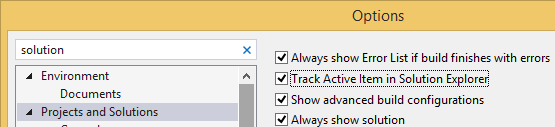
Helpful: enable “Track Active Item in Solution Explorer”:
Start with an empty repository; add an origin
Add .gitignore / .gitattributes appropriate for C#, for instance from github.com/Microsoft/vswhere, git commit it, and push it withgit push -u origin master.
Choose “API” in the list of ASP.NET templates, without Authentication or Docker support (let’s keep the balance bit simple enough for now)
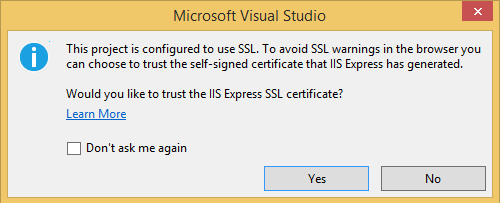
Run with Ctrl-F5, then confirm the SSL development certificate, and install it:
---------------------------
Security Warning
---------------------------
You are about to install a certificate from a certification authority (CA) claiming to represent:

localhost

Windows cannot validate that the certificate is actually from "localhost". You should confirm its origin by contacting "localhost". The following number will assist you in this process:

Thumbprint (sha1): 09EA054F 14D5D4CE 6B22C5F1 3E7EBDB5 F7583116

Warning:

If you install this root certificate, Windows will automatically trust any certificate issued by this CA. Installing a certificate with an unconfirmed thumbprint is a security risk. If you click "Yes" you acknowledge this risk.

Do you want to install this certificate?


---------------------------
Yes   No
---------------------------
Your browser now opens at a port for debugging: https://localhost:<port>/api/values, then tries to download the result as values.json.
This is configured in Properties\launchSettings.json under "launchUrl": "api/values" (for the browser URL) and Controllers\ValuesController.cs under // GET api/values for the actual implementation.
a
a
a
IHostedService
Have any service related stuff implement IHostedService, so it is easy to deploy it in all kinds of processes:
This extension measures the dimensions from your mouse pointer up/down and left/right until it hits a border. So if you want to measure distances between elements on a website this is perfect. It doesn’t really work with images because there the colors change a lot pixel to pixel.
# Images & HTML Elements
Measure between the following elements: images, input-fields, buttons, videos, gifs, text, icons. You can measure everything you see in the browser.
# Mockups
Your designer handed you mockups as PNGs or JPEGs? Just drop them into Chrome, activate Dimensions and start measuring.
# Keyboard Shortcut
You can start and stop dimensions with the ALT + D shortcut.
# Area Boundaries
Wanna get the radius of a circle? Is text standing in your way? Press Alt to measure the dimensions of a connected area.







 The Wiert Corner - irregular stream of stuff