Posted by jpluimers on 2020/06/29
 For quite a while, I had the error “The application “Audacity.app” can’t be opened.” and Audacity still opening. Clicking the OK button often enough made me hunt for the solution:
This is what I did:
$ cd ~/Library/Application\ Support/audacity

$ grep Temp audacity.cfg

TempDir=/Users/jeroenp/Library/Application Support/audacity/SessionData
Then I checked if the directory existed:
Read the rest of this entry »
Posted in *nix, *nix-tools, Apple, Audacity, Audio, Mac, Mac OS X / OS X / MacOS, MacBook, MacBook Retina, MacBook-Air, MacBook-Pro, Media, Power User, sed | Leave a Comment »
Posted by jpluimers on 2020/06/26
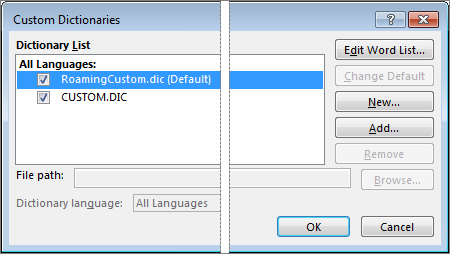
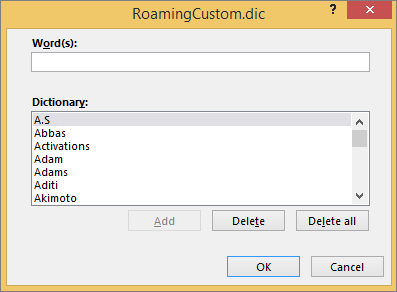
[WayBack] Add or edit words in a spell check dictionary – Office Support:
By default, the words are stored in a text file called “RoamingCustom.Dic” – Google Search.
You can get there from the menu:
- Menu “File”, “Options”, then “Proofing”
- In the dialog, click on “Edit Word List…”
–jeroen
Posted in Office, Power User | Leave a Comment »
Posted by jpluimers on 2020/06/26
Put the song in a playlist and click the check box off. All the songs in the playlist will have to be clicked off as well.Or easier still have the track as the only song in the play list.
For me, the easiest way to do this is to put all songs in a playlist, then in the playlist (can be “Playlist” view mode, but “Songs” view mode is easier). The video below shows exactly how to do this, but here are te steps:
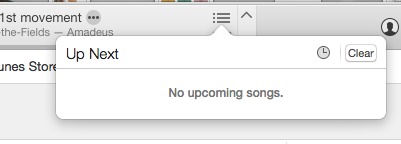 select all songs with Command-A
- right-click
- choose “Uncheck Selection” to remove all checkboxes
- double click on each song you want to play individually
Via:
Finally, [WayBack] iTunes 11 for Mac: Ways to play songs shows the meaning of the shuffle and repeat buttons in the player:

Source: S0024_ProgressBar.png (350×115)
–jeroen
Read the rest of this entry »
Posted in Apple, iTunes, Mac OS X / OS X / MacOS, Power User | Leave a Comment »
Posted by jpluimers on 2020/06/26
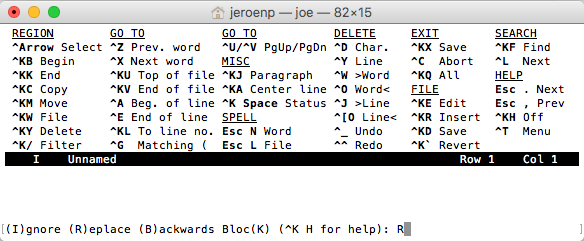
The built-in help of the Joe’s Own Editor – Wikipedia shows only a limited set of keyboard shortcuts:
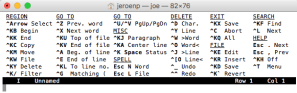
What it misses is how to navigate through Windows. You use the ^KN (for Next) and ^KP (for Previous) navigation shortcuts for that.
You can even use that to navigate out of the Find or Replace line: The Find and Replace lines are single line prompts without a status line (but with a caption).
Read the rest of this entry »
Posted in *nix, *nix-tools, joe, Power User | Leave a Comment »
Posted by jpluimers on 2020/06/25
From a while back, but still relevant as the speed of the GMail web-UI still has not improved.
[WayBack/Archive.is] Peeking under the hood of redesigned Gmail – Boris – Medium
Via:
–jeroen
Read the rest of this entry »
Posted in CSS, Development, GMail, Google, HTML, JavaScript/ECMAScript, Power User, Scripting, Software Development, Web Development | Leave a Comment »
Posted by jpluimers on 2020/06/25
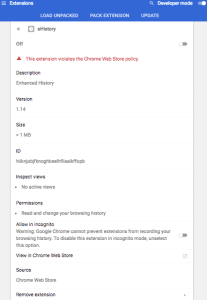 [WayBack] browser – Clearing old browsing data in Chrome instead of newer data – Super User had a few possibilities, but eHistory disappeared from the Chrome store (apparently due to some unknown violation), so the way that works best now is to hack the History database which is a SQLite file as mentioned in
[WayBack] How can I delete all web history that matches a specific query in Google Chrome – Super User: For literal values of “query”…You can even query your Chrome history using SQL. (Firefox too: see below. Of course, the appropriate file path will have to be changed).
If you really want you can hack the history frame chrome://history-frame/: [WayBack] How can I delete all web history that matches a specific query in Google Chrome – Super User
–jeroen
Posted in Chrome, Database Development, Development, Google, Power User, Software Development, SQL | Leave a Comment »
Posted by jpluimers on 2020/06/24
Still a very good (Dutch) read by mentor (not only Agile, also DCI and Marching) Robby Overvliet [WayBack/Archive.is] Go pick a leaf of that tree!:
Ben jij Agile? Weet je het zeker? Tuurlijk het whiteboard hangt en de stickies schuiven vrolijk van links naar rechts. Dagelijks is daar netjes de standup en andere feedback loops doen hun ding.
Via:
One of the cool things is that he learned a lot from Charlie Anderson, that I recollect from the Borland and Quattro Pro days. What a smal world (:
On Charlie:
- [WayBack] CharlieAnderson.com
- [WayBack] Borland Software Craftsmanship: A New Look at Process, Quality and Productivity | James Coplien – Academia.edu (Proceedings of the 5th Annual Borland International Conference, Orlando, Florida, 5 June 1994) this the first ever Borland conference I attended.
- [Cache] Borland-Software-Craftsmanship-A-New-Look-at-Process-Quality-and-Productivity.pdf borland-process.ps
- [WayBack] Robby Overvliet (@overvliet) | Twitter
- [WayBack] The Personal Computer Museum, Brantford, Ontario, CANADA – Recycle, donate, and browse your old computers, electronics, video games, and software
- [WayBack] Organizational Patterns of Agile Software Development – PDF Free Download
–jeroen
Posted in Agile, Conference Topics, Conferences, Development, Event, Software Development | Leave a Comment »
Posted by jpluimers on 2020/06/24
From about 4 years ago, so time to see how many development stacks support Unum by now: [WayBack] The End of (Numeric) Error
Crunching numbers was the prime task of early computers. The common element of these early computers is they all used integer arithmetic. John Gustafson, one of the foremost experts in scientific computing, has proposed a new number format that provides more accurate answers than standard floats, yet saves space and energy. The new format might well revolutionize the way we do numerical calculations.
Back then, I found these links through my G+ circles:
Read the rest of this entry »
Posted in Algorithms, Development, Floating point handling, Software Development, Unum | Leave a Comment »
Posted by jpluimers on 2020/06/24
From [WayBack] Git – Credential Storage:
Git has a few options provided in the box:
- The default is not to cache at all. Every connection will prompt you for your username and password.
- The “cache” mode keeps credentials in memory for a certain period of time. None of the passwords are ever stored on disk, and they are purged from the cache after 15 minutes.
- …
$ git config --global credential.helper cache
The cache helper accepts the --timeout <seconds> option, which changes the amount of time its daemon is kept running (the default is 900, or 15 minutes).
This is a one time config setting.
To remove it, use this command:
$ git config --global unset credential.helper cache
–jeroen
Posted in Development, DVCS - Distributed Version Control, git, Software Development, Source Code Management | Leave a Comment »


 For quite a while, I had the error “The application “Audacity.app” can’t be opened.” and Audacity still opening. Clicking the OK button often enough made me hunt for the solution:


 The Wiert Corner - irregular stream of stuff