The Wiert Corner – irregular stream of stuff

Jeroen W. Pluimers on .NET, C#, Delphi, databases, and personal interests

  • My badges

  • Twitter Updates

  • My Flickr Stream

  • Pages

  • All categories

  • Enter your email address to subscribe to this blog and receive notifications of new posts by email.

    Join 1,839 other subscribers

GitHub – pyscripter/pyscripter: Pyscripter is a feature-rich but lightweight Python IDE

Posted by jpluimers on 2020/04/28

Just in case I ever need to develop Python scripts on Windows (nowadays it’s mostly on Linux/BSD based systems):[WayBack] GitHub – pyscripter/pyscripter: Pyscripter is a feature-rich but lightweight Python IDE.

If you like that, you can (also) help with this project: [WayBack] PyScripter localization Translate PyScripter into your own language.

Via: [WayBack] The PyScripter IDE, which is written in Delphi is looking for translators. We have set up a translation project on transifex.com and would be happy if s… – Lübbe Onken – Google+

–jeroen

Posted in Delphi, Development, Python, Scripting, Software Development | Leave a Comment »

KiTTY auto-reconnect ssh tunnel so you can RDP from remote machine into local one

Posted by jpluimers on 2020/04/27

I needed this equivalent in KiTTY while also keeping the connection alive:

ssh -o "ExitOnForwardFailure yes" -R :3389:127.0.0.1:3389 

Here, (via [WayBack] SSH options, Port Forwarding over SSH, Keepalives – zwilnik), -R Specifies that the given port on the remote (server) host is to be forwarded to the given host and port on the local side. This works by allocating a socket to listen to port on the remote side, and whenever a connection is made to this port, the connection is forwarded over the secure channel, and a connection is made to host port hostport from the local machine.

This is unlike most port forwarding examples which shows you how to forward a local port to a remote one (for instance [WayBack] Portforwarding with SSH (Putty)).


I wanted this on Windows, but auto connect, and not depend on OpenSSH. So I used the portable edition of [WayBack] Download KiTTY., which is a PuTTY derivative with more features.

With OpenSSH it is easier, but requires either Windows 10 (having it pre-installed) or an OpenSSH installation. How simple? This simple: [WayBack] openssh – How do I keep SSH connection alive on Windows 10? – Stack Overflow

The portable version of KiTTYensures all configuration is in configuration files (not the registry like the regular edition: [WayBack] KiTTY Session Configuration Location – Chase’s Notes)

I bumped into KiTTY because in another situation, I needed to execute a remote command and found [WayBack] ssh – How to run a remote command in PuTTY after login & keep the shell running? – Super User

Later I found other references as it can also auto-logon:

Kitty has a URL based update checker; for instance [WayBackwww.9bis.net/kitty/check_update.php?version=0.70.0.6 checks if a newer version than 0.70.0.6 is available. If you do not trust it, you can run that URL over TLS as well.

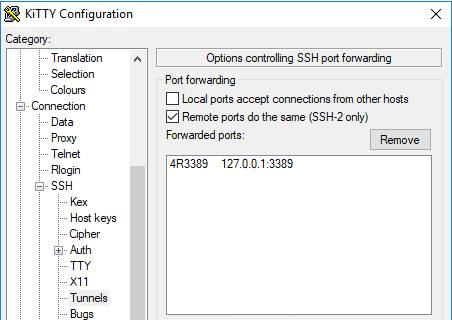
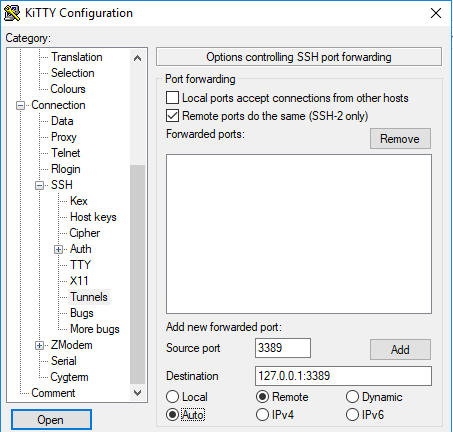
These screenshots seem to do just get the above configuration:

  1. Under “SSH”, in “Tunnels”
    • tick “Remote ports do the same (SSH-2 only)”
    • fill in a source port (that’s the remote port and will become the :3389: bit above)
    • fill in destination 127.0.0.1:3389 (that’s the local RDP port on your Windows machine)
    • tick “Remote”
    • tick “Auto”
    • click “Add” to get to the second screenshot
  2. Under connection:
    • Ensure “Seconds between keepalives” is larger than zero (I took 1)
    • Tick “Disable Nagle’s algorithm”
    • Tick “Enable TCP keepalives”
    • Tick “Attempt to reconnect on system wakup”
    • Tick “Attempt to reconnect on connection failure”
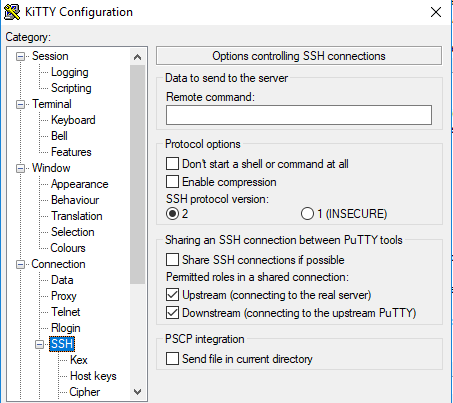
  3. On the “SSH” tab:
    • Do not enter a “Remote command” (seems unneeded on my system)
So for now, I can do without things like:

–jeroen

Posted in *nix, *nix-tools, Power User, ssh/sshd, Windows | Leave a Comment »

OSK: How to turn off auto start On-Screen Keyboard on Windows 7 64 bit? – Super User

Posted by jpluimers on 2020/04/27

Steps based on [WayBackHow to turn off auto start on-screen-keyboard on Windows 7 64 bit? – Super User.

  1. Turn down the volume of your PC
  2. Run “Control Panel”
  3. Choose “Ease of Access”, then “Ease of Access Center”
  4. Click “Use the computer without a mouse or keyboard”
    • If you forgot the sound settings, and they are at max: the narrative voice will probably deafen you
  5. Uncheck the “use on-screen keyboard” box
  6. Press “Apply” or “OK
  7. Close the “Control Panel”

I got in this situation when I selected the “On-Screen Keyboard” (often abbreviated to OSK; it is serviced by OSK.exe) on the logon screen in the “Ease of Access Center”. After that it would launch after each logon, even after I disabled it on the logon screen.

Back then I needed it because the VM ran on a Mac under Virtual Box which by default not only takes the left Command key, but also messes with some of the other left modifier keys.

The password for a new user I had to logon with needed the modifier keys, so it appears that the logon screen settings during the very first logon get copied to the user profile.

Turning them off on the logon screen does not copy them to the profile again:

Read the rest of this entry »

Posted in Power User, Windows, Windows 7 | Leave a Comment »

curl/wget: use content-disposition for the file names

Posted by jpluimers on 2020/04/27

For me, on Windows, curl works better than wget, but on Linux/Mac OS X, curl tends to work better. Some people find wget easier for downloading multiple URLs at the same time. So here the parameter switches for both so they download to the file specified by the Content-Disposition http header:

  • curl --remote-name --remote-header-name
  • wget --content-disposition

My experience is that wget is better at this, especially when redirects are involved (by adding a [WayBack] --location parameter to  thecurl command line).

So for instance the first fails, but the second succeeds determining the download to be VSCodeUserSetup-x64-1.27.2.exe (so curl keeps the name stable):

curl.exe --location --remote-name --remote-time --remote-header-name https://vscode-update.azurewebsites.net/latest/win32-x64-user/stable

wget.exe --content-disposition https://vscode-update.azurewebsites.net/latest/win32-x64-user/stable

This takes into account the name after all followed redirects.

Via:

–jeroen

Posted in *nix, cURL, Power User, wget | Leave a Comment »

Twitter thread unroll so you can read tweet storm on one page without distraction: ThreadReaderApp.com a.k.a. tttthreads.comtttthreads.com

Posted by jpluimers on 2020/04/24

I am have been using ThreadReaderApp.com – and more so since G+ went belly up – but forgot to schedule a post on it, so here it is:

[WayBack] Show HN: Unroll Twitter threads for easy reading | Hacker News:

I made this new service called Thread Reader that given a first tweet from a twitter thread will return a carefully designed web page with the full [WayBack] Tweetstorm unrolled.

It comes with two “bots” – one that answer people who mention “@tttthreads unroll” replying to the first tweet of a threads and give them a link to the unrolled story – the second that search twitter for “#threads” and check if it is a valid thread (> 5 tweets) and if so post a unrolled version back to the author (limited to a few post per hour to avoid to be too spammy)

The stack is good old LAMP using the PHP silex micro framework and of course Twitter API

[WayBack] Thread Reader Thread Reader helps you discover and read the best of Twitter Threads

–jeroen

Posted in LifeHacker, Power User, SocialMedia, Twitter | Leave a Comment »

This means your SD card is dead for writing: “fsck.ext4: unable to set superblock flags on ROOT”

Posted by jpluimers on 2020/04/24

A while ago I had a "fsck.ext4: unable to set superblock flags on ROOT" on an SD card in a Raspberry Pi: it basically means the SD card is dead.

Back then Google found only one entry: [WayBack] Bad Superblock – Raspberry Pi Forums

–jeroen

Posted in *nix, *nix-tools, Development, Hardware Development, Power User, Raspberry Pi | Leave a Comment »

Netgear Prosafe GS110TP – Tweakers

Posted by jpluimers on 2020/04/24

Interesting Power over Ethernet (PoE) capable router: [WayBack] Netgear Prosafe GS110TP – Tweakers

About the same price as [WayBackAmazon.com: Netgear Prosafe GS110TP

–jeroen

Posted in Ethernet, Network-and-equipment, Power User | Leave a Comment »

Unit testing frameworks in C#: Comparing XUnit, NUnit and Visual Studio · Raygun Blog

Posted by jpluimers on 2020/04/23

Still an interesting read: [WayBack] Unit testing frameworks in C#: Comparing XUnit, NUnit and Visual Studio · Raygun Blog

Posted in .NET, Development, Software Development | Leave a Comment »

Reminder: try to get vscode-restructuredtext to fully work – reStructuredText Language Support in Visual Studio Code

Posted by jpluimers on 2020/04/23

I love Visual Studio Code, but my initial tries to get [WayBackGitHub – vscode-restructuredtext/vscode-restructuredtext: reStructuredText Language Support in Visual Studio Code to work partially failed: editing works, but I got a non-descriptive error during preview.

All prerequisites are installed, so I needed to pause that for a while.

I still want it, as out of the box, [WayBack] Markdown editing with Visual Studio Code: Markdown Preview  works fine, but for complicated documents I tend to use reStructuredText.

Initial steps were simple, as per [WayBack] reStructuredText – Visual Studio Marketplace and editing is awesome (thanks to [WayBack] GitHub – lextm/restructuredtext-antlr: ANTLR Grammar for reStructuredText).

–jeroen

Read the rest of this entry »

Posted in .NET, Development, Lightweight markup language, reStructuredText, Software Development, Visual Studio and tools, vscode Visual Studio Code | Leave a Comment »

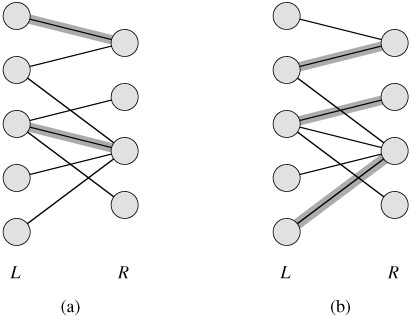
Bipartite matching algorithm in Delphi… John Kouraklis – Google+

Posted by jpluimers on 2020/04/23

In the thread is an actual implementation: [WayBack] I am looking for an implementation of Bipartite matching algorithm in Delphi or Pascal. Does anyone have a suggestion? Thanks – John Kouraklis – Google+

As I probably need it one day (:

–jeroen

Posted in Algorithms, Delphi, Development, Software Development | Leave a Comment »