


Interesting: [WayBack] A cheat-sheet for password crackers
Via: [WayBack] Joe C. Hecht – Google+
–jeroen
Posted by jpluimers on 2018/07/30
Interesting: [WayBack] A cheat-sheet for password crackers
Via: [WayBack] Joe C. Hecht – Google+
–jeroen

Posted in *nix, *nix-tools, Hashing, md5, Power User, Security, SHA, SHA-256, SHA-512 | Leave a Comment »
Posted by jpluimers on 2018/07/29
https://plus.google.com/+JeroenPluimers/posts/81xPrhbMu65
https://plus.google.com/+JeroenPluimers/posts/Rs8YwyXQXke
Posted in Uncategorized | Leave a Comment »
Posted by jpluimers on 2018/07/27
Later on, I might add a USB31000S in the mix, but I will do some initial testing with USB 3 gigabit ethernet adapters based on Realtek RTL8153 and Asix AX88179 chips.
Things I will focus on with my Retina MacBook Pro 2015 model are:
Some links for my references:
A first impression from the above links is that for Realtek chipset based devices, drivers are more readily included in operating systems, and these chipsets are better at VLAN handling.
–jeroen
Posted in Ethernet, LifeHacker, Network-and-equipment, Power User, USB, USB, USB-C | Leave a Comment »
Posted by jpluimers on 2018/07/27
 This worked for Windows 8.1 as well: Trying fix for Windows 8 high CPU usage of TiWorker.exe (via: bit-tech.net) « The Wiert Corner – irregular stream of stuff
DISM /online /cleanup-image /restorehealth
After more than one hour of running, it:
–jeroen

Posted in Power User, Windows, Windows 8, Windows 8.1 | Leave a Comment »
Posted by jpluimers on 2018/07/27
For all you SysAdmin’s: happy SysAdmin Day | System Administrator Appreciation Day.
For all others: please show some appreciation for your SysAdmins today. They are the ones keeping your business running. The less visible they are, the better they do their work.
Gifts are always welcome with them, but you can also appreciate SysAdmins by trying this:

And for the SysAdmins: have a laugh:

Posted in Power User | Leave a Comment »
Posted by jpluimers on 2018/07/26
A while ago, I landed a place using Plastic SCM, so I had to adopt some idiom from the git world.
The [WayBack] .gitignore equivalent in Pastic SCM is ignore.conf. Here are some links to documentation on it:
There is another file with a similar, but deceptively different name and behaviour: hidden_changes.conf. There ignore.conf ignores changes, hidden_changes.conf completely hides them. I am still not sure what subtleties are involved in the difference between “ignore” and “hide”, as the documentation is confusing and hidden_changes.conf can also appear in the root of a repository:
ignore.confContains the paths of the private files to be ignored in the Pending changes view. The ignored files are files that you have no intention of placing under source control. This config file is placed at the root directory of the workspace, or in the plastic-global-config repository so that all clients have the same settings by default.
Learn about how to configure the ignored list.
These configuration files are supported:
Important: These are the files that can be globally configured:
branchexplorer.confcloaked.confexternaltools.conffiletypes.confhidden_changes.confignore.confreadonly.confserveralias.conf– This file can only be placed in the/allreposdirectory (no other location is supported for this configuration file). The Plastic SCM GUI will load the aliases during the startup.writable.conf
So I based mine on Tortoise SVN Global Ignore Pattern for Delphi and Visual Studio containing at least these:
*.identcache

*.local

*.dcu

*.rsm

*.bak

*.~*

*.tvsconfig

__history

__recovery

ModelSupport_*
–jeroen
Posted in Development, DVCS - Distributed Version Control, git, PlasticSCM, Software Development, Source Code Management | Leave a Comment »
Posted by jpluimers on 2018/07/26
Change at will:
  select 'select * from ' || r.rdb$relation_name as query
    from rdb$relations r
   where 1=1
     and r.rdb$system_flag <> 1 -- no system relations
     and r.rdb$view_source is null -- only tables
order by r.rdb$relation_name
For the EMPLOYEE demo database, this results in:
select * from COUNTRY

select * from CUSTOMER

select * from DEPARTMENT

select * from EMPLOYEE

select * from EMPLOYEE_PROJECT

select * from JOB

select * from PROJECT

select * from PROJ_DEPT_BUDGET

select * from SALARY_HISTORY

select * from SALES
–jeroen
Posted in Database Development, Development, Firebird, InterBase, Software Development | Leave a Comment »
Posted by jpluimers on 2018/07/26
The below code expands %…% for environment variables and $(…) for CSIDL values.
Someday I will find time to convert it to something that does expansion like the $(…) one from the Delphi IDE.
References:
–jeroen
Posted in Uncategorized | Leave a Comment »
Posted by jpluimers on 2018/07/25
If you are using bitbucket from behind a firewall, these might be important to you:
What are we doing? We’ll start a gradual rollout of changing our A records in DNS starting at 22:00 UTC on Sunday, July 29 2018 to point to new IP addresses. The rollout is expected to be completed for all our customers two weeks later, i.e by the 15th of August.
…
How will this affect you?
Most users will not have to do anything special for this migration. Your DNS servers should pick up the new IPs within a few minutes of the migration, and your systems should start using the new IPs right away. We’ll keep the old IPs running for a few weeks afterwards just in case, though.
Firewall considerations
If you control inbound or outbound access with a firewall, then you may need to update your configuration. Please whitelist these new IPs now; you should be able to remove the old IPs after the migration is complete. New destination IP addresses for
bitbucket.org,bitbucket.com,api.bitbucket.org,bitbucket.io,bytebucket.org,altssh.bitbucket.orgwill be: IPv4:18.205.93.0/25and13.52.5.0/25IPv6:2406:da00:ff00::0/96
- Note: this IPv6 range includes subnets that are not necessary owned by Atlassian, but is the longest subnet that matches *all* Bitbucket IPv6 Atlassian IPs. We will post a list of the exact IPv6 addresses at https://confluence.atlassian.com/bitbucket/what-are-the-bitbucket-cloud-ip-addresses-i-should-use-to-configure-my-corporate-firewall-343343385.html soon. Webhooks IPs will remain unchanged as per https://confluence.atlassian.com/bitbucket/manage-webhooks-735643732.html
SSH considerations
Our server’s SSH key is not changing, so most SSH clients will continue to work without interruption. However, a small number of users may see a warning similar to this when they push or pull over SSH: Warning: the RSA host key for ‘bitbucket.org’ differs from the key for the IP address ‘18.205.93.1’ The warning message will also tell you which lines in your ~/.ssh/known_hosts need to change. Open that file in your favorite editor, remove or comment out those lines, then retry your push or pull.
Additional resources Atlassian Public IP ranges JSON: https://ip-ranges.atlassian.com/ (will be updated with the new addresses as part of the new IPs rollout) https://confluence.atlassian.com/bitbucket/what-are-the-bitbucket-cloud-ip-addresses-i-should-use-to-configure-my-corporate-firewall-343343385.html (will be updated with the new addresses as part of the new IPs rollout)
From:
–jeroen
Posted in BitBucket, Development, Source Code Management | Leave a Comment »
Posted by jpluimers on 2018/07/25
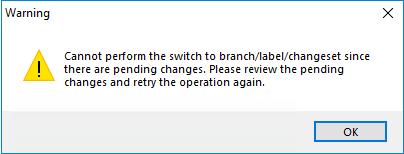
User experiences like this drives me crazy, this time in Plastic SCM, when you try to get the most recent files on a branch/label/changeset after you made some changes:
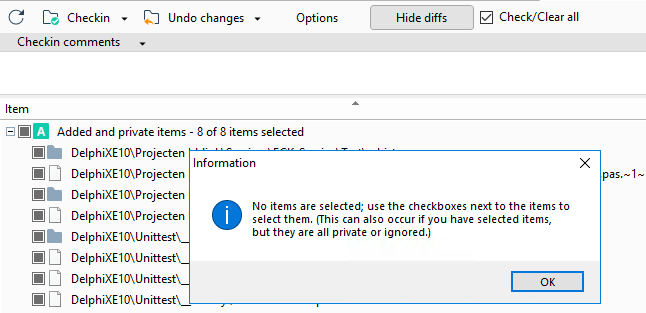
So you go to the pending changes, see it involves additions and you see a big “Undo changes” button that fails to work:
- 8 of 8 items selected
- plastic insisting there are none
The undocumented “secret” is at the end of the messages “added and private items” cannot be undone. You have to manually “delete” them, which the message does not tell you.
Of course there is no “Delete” entry in the toolbar. There is no “Delete” entry in the local menu either.
You have to know that you
How is that for a lack of user-experience?
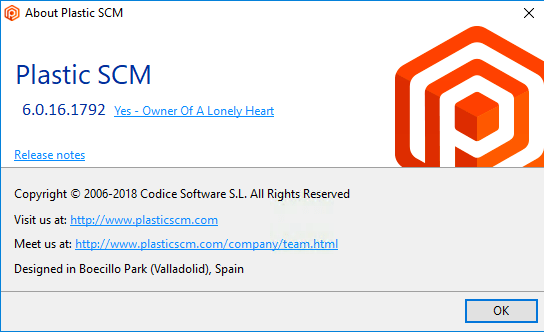
This is on a version 6 client with a version 6 server.
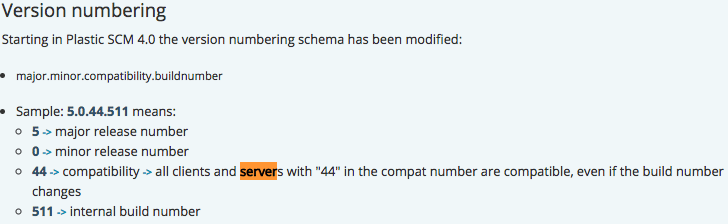
Later I found out this bit on versioning, which I totally did not expect, as it does not match semantic versioning:
Version numbering
Starting in Plastic SCM 4.0 the version numbering schema has been modified:
- major.minor.compatibility.buildnumber
- Sample: 5.0.44.511 means:
- 5 -> major release number
- 0 -> minor release number
- 44 -> compatibility -> all clients and servers with “44” in the compat number are compatible, even if the build number changes
- 511 -> internal build number
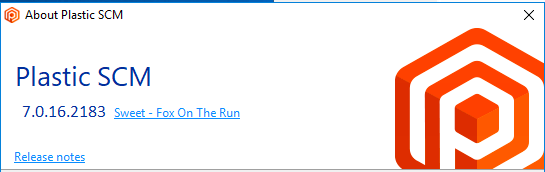
So I have tried to to switch from
using the download at https://www.plasticscm.com/download/ to
with no difference.
–jeroen

Posted in Development, PlasticSCM, Source Code Management | Leave a Comment »
 The Wiert Corner - irregular stream of stuff