The Wiert Corner – irregular stream of stuff

Jeroen W. Pluimers on .NET, C#, Delphi, databases, and personal interests

  • My badges

  • Twitter Updates

  • My Flickr Stream

  • Pages

  • All categories

  • Enter your email address to subscribe to this blog and receive notifications of new posts by email.

    Join 1,854 other subscribers

Mac: when “Save time with right-click sharing from your Google Drive folder” fails…

Posted by jpluimers on 2018/07/09

A few years ago, Google Drive introduced this:

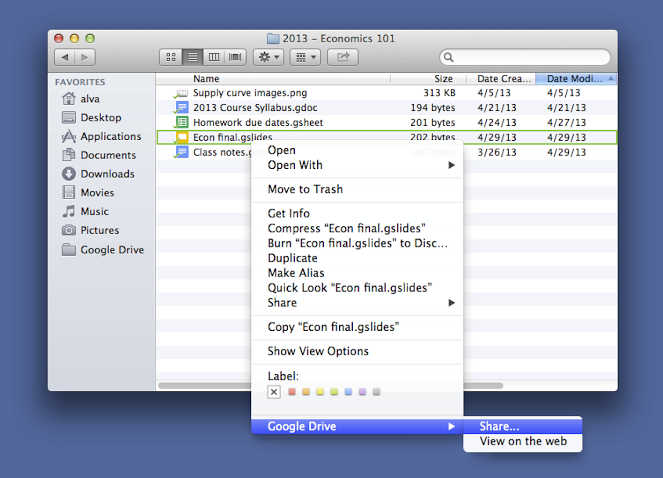
For those looking to share files more quickly, listen up. You can now share with others directly from the Google Drive folder on your Mac or PC. To share a file while inside your Google Drive folder, simply right click the file, select “Google Drive” and then click “Share.” This new feature is rolling out over the next few days.

Source: [WayBackSave time with right-click sharing from your Google Drive folder…

However, sometimes it fails. And the menu has changed as well.

By now the menu looks like this:

  • “View with Google Drive”
  • “Share using Google Drive”

If those do not appear, then:

Try to stop, then start Google Drive.

If that fails:

Read the rest of this entry »

Posted in Google, GoogleDrive, LifeHacker, Power User | Leave a Comment »

Automated “take-down” algorithm simulation: thread by @AlecMuffett: “Regards Article13, I wrote up a little command-line false-positive emulator; it tests 10 million events with a test (for copyrighted material […]” #Article13

Posted by jpluimers on 2018/07/08

Via [WayBack] Artikel 13 (Uploadfilter) vs. Math – Math wins – Kristian Köhntopp – Google+:

Simulation of the proposed law effects are easy: [WayBackThread by @AlecMuffett: “Regards Article13, I wrote up a little command-line false-positive emulator; it tests 10 million events with a test (for copyrighted material) […]” #Article13

What it shows that an automated test for content-originality only succeeds when there are a truckload of copyrighted-material uploads than original-content uploads:

about 1 in 67 postings have to be “bad” in order to break even

So if you have less than 1% false uploads, even with a 98.5% accuracy (which is very very good for a take-down algorithm!), you will piss off far more good items wrongly marked as false positive, than bad items correctly marked bad.

When the accuracy gets less, you piss-off far more original-content uploads, but also catch less copyrighted-material uploads..

This is called the a far less “sexy” term False positive paradox – Wikipedia, which is a specialisation of the far mor dull sounding Base rate fallacy – Wikipedia

Source code: [WayBack] random-code-samples/falsepos.py at master · alecmuffett/random-code-samples · GitHub

Original thread:

[WayBack] Alec Muffett on Twitterさん: “Regards #Article13, I wrote up a little command-line false-positive emulator; it tests 10 million events with a test (for copyrighted material, abusive material, whatever) that is 99.5% accurate, with a rate of 1-in-10,000 items actually being bad.… https://t.co/CJvxdvkiom”

https://twitter.com/alecmuffett/status/1015594170424193024

and

[WayBack] next_ghost on Twitter: “And for the nerds who want to learn more, this is called a “False positive paradox”. https://t.co/CIvw2ni21q… “


–jeroen

Posted in Algorithms, Development, Software Development | 1 Comment »

Tail it: 4 new affordable GPS trackers with global range by Morten Sæthre — Kickstarter

Posted by jpluimers on 2018/07/08

A few more days: [Archive.is] Tail it GPS

Via:

–jeroen

Posted in LifeHacker, Power User | Leave a Comment »

Online markup conversion from markdown to mediawiki: pandoc

Posted by jpluimers on 2018/07/06

Since Mediawiki needs an extension to display Markdown, and many MediaWiki installations do not have that extension, I was looking for an online conversion from markdown to MediaWiki markup.

Luckily the Pandoc try has this conversion: [WayBack] Try pandoc! Markdown(pandoc) -> MediaWiki

These links helped me get there:

–jeroen

Posted in *nix, *nix-tools, Development, Lightweight markup language, MarkDown, MediaWiki, pandoc document converter, Power User, Software Development | Leave a Comment »

LEGO Macintosh classic with Wi-Fi and e‑paper display running docker

Posted by jpluimers on 2018/07/06

A Wi-Fi enabled 1990 Macintosh Classic built with LEGO, powered by a Raspberry Pi Zero running docker and a 2.7″ e-paper display by EmbeddedArtists.

Cool stuff!

Source: [Archive.isLEGO Macintosh classic with Wi-Fi and e‑paper display running docker

Via: [WayBack] This guy built a (kind of) working Lego Macintosh, and now you can too … | 9to5Mac

This should run well with a Classic Color Macintosh System 7 emulated on Raspberry Pi: [WayBack] On this tutorial I show you how to run Mac II OS color on your Raspberry PI, I have also included a compiled version for Windows. Running Mac OS 7 on Raspberry Pi with Color – Novaspirit

via:

ROM images: [WayBackIndex of /pub/software/ROM/Macintosh 68K

–jeroen

Read the rest of this entry »

Posted in Apple, Classic Macintosh, Development, Hardware Development, History, Macintosh SE/30, Power User, Raspberry Pi | Leave a Comment »

Raspberry Pi zero W notes

Posted by jpluimers on 2018/07/06

Launch dates:

Now you only need a memory card and a camera module to make a nice “CCTV” system with plenty of choice. More details here:

Depending on what and when you record video, you might want to consider an IR capable camera. In Raspberry Pi land, they call them NOIR (which stands for No IR, meaning they leave out the IR filter which means they can record IR).

–jeroen

Read the rest of this entry »

Posted in Development, Hardware Development, Power User, Raspberry Pi | Leave a Comment »

listview – TListView detecting ESC or unchanged editing – Stack Overflow

Posted by jpluimers on 2018/07/05

Delphi translation by Thomas Mueller of a C++ Builder fix [WayBack] listview – TListView detecting ESC or unchanged editing – Stack Overflow

Via [WayBack] TListView detecting ESC or unchanged editing – Thomas Mueller (dummzeuch) – Google+

–jeroen

Posted in Delphi, Development, Software Development | Leave a Comment »

You can use Linux API calls directly from Delphi 10.2 and up

Posted by jpluimers on 2018/07/05

Paul TOTH figured this out:

you can use any Linux API but it’s not trivial.

  1. you have to install the “dev” library under Llinux, like “apt-get install xxx-dev” for the xxx API
  2. you have to update the Linux DSK in Delphi
  3. you can declare the API as externals function as usual
  4. now you can compile and deploy the application.

If you miss the steps 1 or 2 you’ll have a linker error.

Source: [WayBackDear… Delphi 10.2 Tokyo, can i use linux api directly? like ‘fcntl(….)’.

And there is this great blog post that I found later by [WayBack] Allen Drennan: [WayBackImporting third-party Linux libraries on Delphi 10.2 Tokyo – grijjy blog

–jeroen

Posted in Delphi, Delphi 10.2 Tokyo (Godzilla), Development, Software Development | Leave a Comment »

I totally forgot that Delphi has had a function to get the current executing thread – Stack Overflow

Posted by jpluimers on 2018/07/05

While updating some old code fiddling with the[WayBackGetThreadId function, I wanted to have some TThread wrapper around it. I had totally forgotten there has been already a means for this since Delphi 2009 (which initially had a bug, but that was worked around at first and fixed later): [WayBackCurrentThread.

The latest version of Delphi, Delphi 2009, has a CurrentThread class property on the TThread class.

This will return the proper Delphi thread object if it’s a native thread. If the thread is an “alien” thread, i.e. created using some other mechanism or on a callback from a third party thread, then it will create a wrapper thread around the thread handle.

20081001 at 5:00 – [WayBackBarry Kelly

Sources

–jeroen

Posted in Delphi, Delphi 10 Seattle, Delphi 10.1 Berlin (BigBen), Delphi 10.2 Tokyo (Godzilla), Delphi 2010, Delphi XE, Delphi XE2, Delphi XE3, Delphi XE4, Delphi XE5, Delphi XE6, Delphi XE7, Delphi XE8, Development, QC, Software Development | Leave a Comment »

Visual Studio – Add File As Link

Posted by jpluimers on 2018/07/04

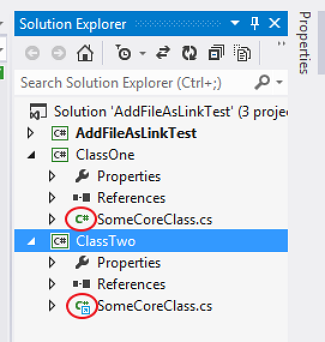
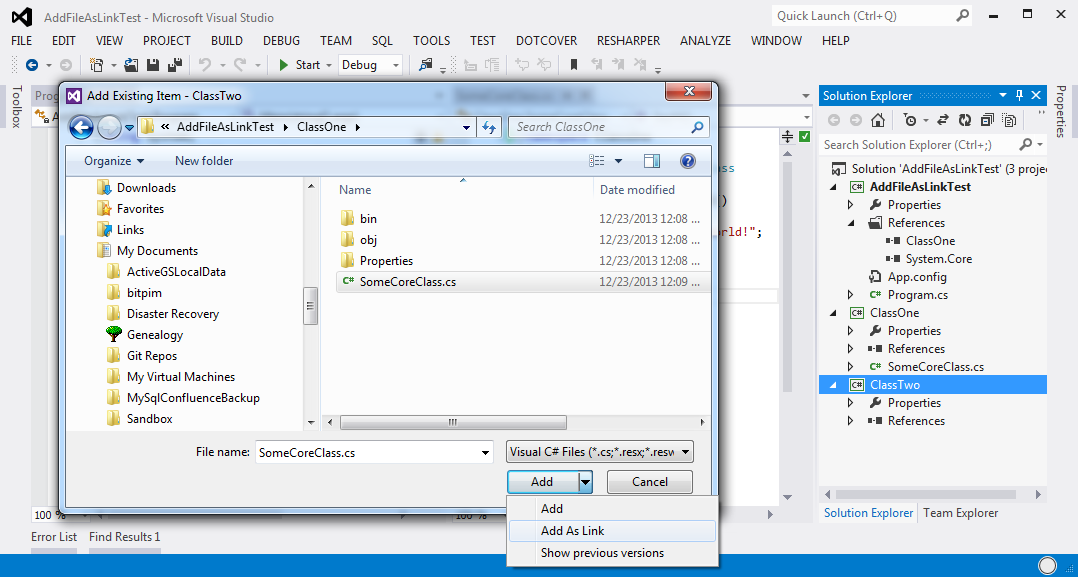
Since I forget where they hid the [WayBack] Visual Studio – Add File As Link feature, two images from the linked post:

  1. The icon in the link is different from the normal file:
  2. Adding as a link is  not a separate menu item, but a modification of the file open dialog overlaying the default Add button with two more options: Add; Add as Link (note Show Previous Versions is a feature of non-Home version of Windows Vista and up).
    Do not double click the file name, as that will add (AND COPY TO THE CURRENT PROJECT DIRECTORY !!!1!!!) that file to your current project.

A step by step instruction is at [WayBack] c# – Add File as a Link on Visual Studio – Debug vs Publish – Stack Overflow.

–jeroen

Posted in .NET, Development, Software Development, Visual Studio and tools | Leave a Comment »