The Wiert Corner – irregular stream of stuff

Jeroen W. Pluimers on .NET, C#, Delphi, databases, and personal interests

  • My badges

  • Twitter Updates

  • My Flickr Stream

  • Pages

  • All categories

  • Enter your email address to subscribe to this blog and receive notifications of new posts by email.

    Join 1,828 other subscribers

Windows Firewall: Block rules take precedence over Allow rules

Posted by jpluimers on 2018/05/07

Reminder to self for Windows Firewall: Block rules take precedence over Allow rules (see * below as actually it is even more complex); [WayBackFirewall Rule Properties Page: General Tab has

Firewall rules are evaluated in the following order:

  1. Allow if secure with Override block rules selected in the Customize Allow if Secure Settings dialog box.
  2. Block the connection.
  3. Allow the connection.
  4. Default profile behavior (allow or block as specified on the applicable Profile tab of the Windows Firewall with Advanced Security Properties dialog box).

Within each category, rules are evaluated from the most specific to the least specific. A rule that specifies four criteria is selected over a rule that specifies only three criteria.

Which means that this will block TCP port 1024 traffic to bar.exe:

The Block rules are inserted by Windows if you click “Cancel” on a dialog like this (note the lowercase path, despite the application being at C:\Program Files (x86)\Foo\Bar.exe):

Read the rest of this entry »

Posted in Firewall, Infrastructure, Power User, Windows | 1 Comment »

CoreFreq – A Powerful CPU Monitoring Tool for Linux Systems

Posted by jpluimers on 2018/05/07

I need to check out if it finally got available for OpenSuSE: [WayBackCoreFreq – A Powerful CPU Monitoring Tool for Linux Systems

via:

Read the rest of this entry »

Posted in *nix, *nix-tools, Linux, openSuSE, Power User, ps, SuSE Linux | 2 Comments »

How to move Gmail sub-label out of hiearchy – Web Applications Stack Exchange

Posted by jpluimers on 2018/05/04

Source: [WayBack] How to move Gmail sub-label out of hiearchy – Web Applications Stack Exchange

  1. Hover over the label
  2. Click the down error
  3. Choose Edit
  4. Change the nesting

–jeroen

Posted in GMail, Google, Power User | Leave a Comment »

Old Google+ versions and photo backup may stop working on May 20, 2018 – Google+ Help

Posted by jpluimers on 2018/05/04

This message was sent because you may have an older version of the Google+ app installed on one of your mobile devices.

Now if the message would tell on which device, I could find it….

Source: [WayBackOld Google+ versions and photo backup may stop working on May 20, 2018 – Google+ Help

–jeroen

Posted in G+: GooglePlus, Google, Power User | Leave a Comment »

Penetration Testing Tools and nmap Cheat Sheets

Posted by jpluimers on 2018/05/04

Via [WayBack] Penetration Testing Tools Cheat Sheet https://highon.coffee/blog/penetration-testing-tools-cheat-sheet/ #Security – This is why I Code – Google+

Penetration testing tools cheat sheet, a high level overview / quick reference cheat sheet for penetration testing.

Source: [Archive.isPenetration Testing Tools Cheat Sheet

Nmap Cheat Sheet, examples and practical examples

Source: [Archive.isNmap Cheat Sheet

Posted in *nix, *nix-tools, nmap, Power User | Leave a Comment »

Dear Twitter: masked passwords are not the same as hashed passwords. Please refrain from storing them in any recoverable form.

Posted by jpluimers on 2018/05/04

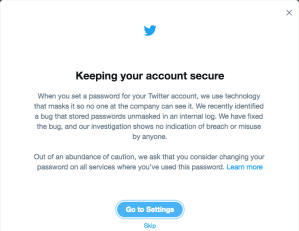
Apparently Twitter not only logged plain text passwords, but they handle them in a masked form:

Keeping your account secure

When you set a password for your Twitter account, we use technology that masks it so no one at the company can see it. We recently identified a bug that stored passwords unmasked in an internal log. We have fixed the bug, and our investigation shows no indication of breach or misuse by anyone. Out of an abundance of caution, we ask that you consider changing your password on all services where you’ve used this password. Learn more

This seems to imply passwords are not hashed, but can be recovered into plain text.

Please Twitter, ensure that passwords are never recoverable.

Note: after changing your password at https://twitter.com/settings/password visit https://twitter.com/settings/applications

–jeroen

Posted in LifeHacker, Power User | Leave a Comment »

Happy Password day – BTW: Use a password manager. Don’t reuse passwords. – The Isoblog.

Posted by jpluimers on 2018/05/04

Since it is password day, please read [WayBackUse a password manager. Don’t reuse passwords. – The Isoblog.

Background:

Lock it down. Add another layer to your password. PasswordDay.org #PasswordDay

–jeroen

Posted in LifeHacker, Power User | Leave a Comment »

GitLeaks – Search Engine for exposed secrets on the web

Posted by jpluimers on 2018/05/03

via: [WayBack] Yet another reason to be very careful with what you put in version control: GitLeaks – Search Engine for exposed secrets on the web https://gitleaks.com/This is why I Code – Google+

[Archive.isGitLeaks – Search Engine for exposed secrets on the web

–jeroen


Posted in Development, Security, Software Development | Leave a Comment »

Client-Side Password Hashing – DelphiTools

Posted by jpluimers on 2018/05/03

Interesting thought on client-side password hashing: [Archive.isClient-Side Password Hashing – DelphiTools.

I’ve ambivalent feelings on it, especially since it will expose salt and other settings to the client.

On the other hand it tremendously helps when there are transparent proxies in between. Read the article for full details; here is just one quote below.

Maybe dual hashing would be in place: once at the client to prevent plain-text to go over MITM channels, and a second hash server side with different settings like salt to prevent brute force attacks.

I need to give this more thought.

The quote:

If you are using a regular Windows and a regular browser, access to HTTPS will go through the regular certificate chain, using regular certificate authority. You also benefit from extra security layers like Public Key Pinning.

But when a custom Root CA is installed, all that goes through the window: the custom Root CA allows the corporate proxies to issue “valid” certificates for any website (even google.com and the rest), and the public key pinning features are disabled:

How does key pinning interact with local proxies and filters?

Chrome does not perform pin validation when the certificate chain chains up to a private trust anchor. 

A key result of this policy is that private trust anchors can be used to proxy (or MITM) connections, even to pinned sites. “Data loss prevention” appliances, firewalls, content filters, and malware can use this feature to defeat the protections of key pinning.

All the major browsers have a similar behavior… because it is required to allow transparent proxies. And transparent proxies are the means through which the legal logging requirements are fulfilled.

So besides introducing a major MITM opportunity, this also means that there are legally-required corporate logs somewhere of all that went through HTTPS… including plain text passwords, if you did not hash them on the client-side.

These logs will have varying degrees of security when in the corporate domain… and next to none if they are ever requested by the legal system for an investigation.

–jeroen


Posted in Algorithms, Design Patterns, Development, Hashing, Power User, Security, Software Development | Leave a Comment »

Delphi .dproj file changed or not changed? Normalize it! | The Art of Delphi Programming

Posted by jpluimers on 2018/05/02

Cool tool that integrates into the Delphi IDE: [WayBackDproj changed or not changed? Normalize it! | The Art of Delphi Programming

Via: [WayBack] Introducing DprojNormalizer: http://www.uweraabe.de/Blog/2017/01/18/dproj-changed-or-not-changed/ – Uwe Raabe – Google+

Note there is also RadCLI that requires Python and does it via the command-line:[WayBackjoshkel/RadCli: Command-line utilities for RAD Studio / Delphi / C++Builder

DprojNormalizer supports Delphi XE7 and up.

Updates at [WayBack] Downloads | The Art of Delphi Programming: DprojNormalizer

Note that it requires an elevation to Administrator for installing. If you run Delphi as a normal user, then afterwards you need to register the package yourself, for instance with a batch file like this:

reg add "HKEY_CURRENT_USER\Software\Embarcadero\BDS\18.0\Known Packages" /v "C:\Program Files (x86)\DprojNormalizer\DprojNormalizer240.bpl" /t REG_SZ /d "Dproj Normalizer" /f
reg add "HKEY_CURRENT_USER\Software\Embarcadero\BDS\19.0\Known Packages" /v "C:\Program Files (x86)\DprojNormalizer\DprojNormalizer250.bpl" /t REG_SZ /d "Dproj Normalizer" /f

Adjust your BDS and DllSuffix in the BPL file names using the table at Delphi version info table: C# Builder, Delphi 8 through 10.2 Tokyo and Appbuilder.

If you want to temporarily disable it:

reg add "HKEY_CURRENT_USER\Software\Embarcadero\BDS\18.0\Disabled Packages" /v "C:\Program Files (x86)\DprojNormalizer\DprojNormalizer240.bpl" /t REG_SZ /d "Dproj Normalizer" /f
reg add "HKEY_CURRENT_USER\Software\Embarcadero\BDS\19.0\Disabled Packages" /v "C:\Program Files (x86)\DprojNormalizer\DprojNormalizer250.bpl" /t REG_SZ /d "Dproj Normalizer" /f

If you want to re-enable it: remove the values under Disabled Packages.

–jeroen


Posted in Conference Topics, Conferences, Delphi, Development, Event, Software Development | 1 Comment »