The Wiert Corner – irregular stream of stuff

Jeroen W. Pluimers on .NET, C#, Delphi, databases, and personal interests

  • My badges

  • Twitter Updates

  • My Flickr Stream

  • Pages

  • All categories

  • Enter your email address to subscribe to this blog and receive notifications of new posts by email.

    Join 1,861 other subscribers

Archive for 2009

CodeRage 4: session materials are available for download« The Wiert Corner – Jeroen Pluimers’ irregular stream of Wiert stuff

Posted by jpluimers on 2009/09/09

My CodeRage 4 session materials are available for download:

CodeRage 4 is a free, virtual conference on Embarcadero technologies with a lot of Delphi sessions.
It is held from September 8 till 11, 2009, i.e. while I write this :-)
If you want to watch sessions live, be sure to register through LiveMeeting (the technology they use for making this all happen).

Let me know if you download, and what you are using the sample code for.

–jeroen

Posted in .NET, CodeRage, CommandLine, Conferences, Database Development, Debugging, Delphi, Development, Encoding, Event, Firebird, InterBase, ISO-8859, ISO8859, Prism, Software Development, Source Code Management, SQL Server, TFS (Team Foundation System), Unicode, UTF-8, UTF8, Visual Studio and tools, XML, XML/XSD, XSD | 4 Comments »

Manually call the “Safely Remove Hardware” dialog — HotSwap! – hot eject and hot insert SATA hard-drives – practical use with ICY BOX 266StUSD « The Wiert Corner – Jeroen Pluimers’ irregular stream of Wiert stuff

Posted by jpluimers on 2009/09/09

I forgot to explicitly mention that the normal “Safely Remove Hardware” icon in the system tray notification area sometimes disappears.

Today, I bumped in such a system, so I was glad I had a reference explaining how manually call the “Safely Remove Hardware” dialog to solve it.

But now I had this dumb icon:

So here are the full steps, including icon.

1. Add a shortcut with this command line:

[script sourcecode=’cscript’]
RunDll32.exe shell32.dll,Control_RunDLL hotplug.dll
[/sourcecode]

2. Change the icon to take icons from this DLL:

[script sourcecode=’cscript’]
%SystemRoot%\system32\hotplug.dll
[/sourcecode]

3. Name the shortcut “Safely Remove Hardware”

So, now you have a nice shortcut with the correct.
This shortcut works, even when it is gone from the system tray:

BTW: Rob van der Woude has a nice page with rundll32 scripts.

–jeroen

Posted in CommandLine, Development, Hardware Interfacing, Software Development, USB | Leave a Comment »

Formatting drives with FAT32 – works well with: HotSwap! – hot eject and hot insert SATA hard-drives – practical use with ICY BOX 266StUSD « The Wiert Corner – Jeroen Pluimers’ irregular stream of Wiert stuff

Posted by jpluimers on 2009/09/07

Every once in a while, you want to exchange lots of information with systems that only have FAT32 in common.

Exchanging such large amounts is easiest with an external drive, especially because you should not underrate the bandwidth of your harddrive. Especially if you can connect them with (e)SATA, and HotSwap them. But even USB usually is fast enough to compete with a gigabit network connection.

For that, it would be easy if you could format an external drive with FAT32.

However, the built-in FORMAT (using format /FS:FAT32 X:) barfs if your disk is larger than 32 gigabytes.
Since it is hard to get such small drives anymore, you seem to be stuck.

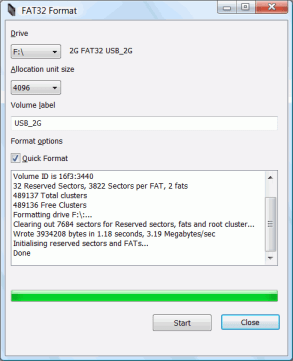
[Wayback/Archive] fat32format ([Wayback] www.ridgecrop.demon.co.uk/download/fat32format.zip) comes to the rescue!

It formats any drive, as long as it has a driveletter:

fat32format X:

You can assign driveletters to drives using diskmgmt.msc

There is even a [Wayback/Archive] GUI version!

–jeroen

Posted in CommandLine, Development, Software Development | 2 Comments »

CodeRage 4: sessions recorded; Delphi 2010 migration was a beeze; samples/slides will be uploaded soon

Posted by jpluimers on 2009/09/05

I just finished recording my CodeRage 4 sessions:

  • Practical XML in Delphi
  • Reliable Communication between Applications with Delphi and ActiveMQ
  • Using Unicode and Other Encodings in your Programs

CodeRage 4 is a free, virtual conference on Embarcadero technologies with a lot of Delphi sessions.
It is held from September 8 till 11, 2009, i.e. next week :-)
If you want to watch sessions live, be sure to register through LiveMeeting (the technology they use for making this all happen).

This week, I found some time do migrate all the sample projects to the release versions of Delphi Win32 2010 and Delphi Prism 2010.

Delphi Win32 2010 works like a charm: it is much faster and has a much smaller footprint than any other Galileo based IDE.
In fact, it feels almost as fast as the pre-Galileo based IDE’s.
With the added benefit that all the new features make me much more productive, not the least because it has not yet crashed on me this week once.
Crashing has been a frequent thing on me since Delphi 4 (maybe I should not even mention that number ), for most IDE’s at least a couple of times a week, so this is good.

Delphi Prism 2010 works really nice too, it is rock solid, and the language as some great features not found in other .NET languages.
But it still needs a tiny bit more polishing on the Visual Studio IDE Integration part.
There are a few things not as smoothly integrated as I’m used to in C# and VB .NET (for instance when adding assembly references; C# and VB.NET allow you to do that from multiple places in the IDE; Delphi Prism from only one).
I know it is nitpicking (the same holds for the Team Foundation System integration in the Visual Studio IDE: ever tried to add files or folders? There is only one icon that allows you to do it. Ever tried to move files or folders around? No way you can drag & drop, in fact you can move only 1 file or folder at a time, and then the folder tree leaves you at the target).

The Embarcadero folks have worked hard on developer productivity in the Delphi Win32 2010 IDE.
(Did I mention the F6 key? It is an awesome way of directly jumping into configuration dialogs a zillion levels deep.
Did I mention the Ctrl-D key? It instantly reformats your source code to your formatting settings).
So maybe it is now time to put some of that effort into the Prism side as well.

Back to my CodeRage sessions: the recordings are done, they will soon become available as downloads together with the samples/slides.

Keep watching :-)

–jeroen

Posted in .NET, CommandLine, Database Development, Debugging, Delphi, Development, Encoding, Event, Firebird, InterBase, Java, Package Development, Prism, Software Development, Source Code Management, TFS (Team Foundation System), Unicode, Visual Studio and tools, XML, XML/XSD, XSD | Leave a Comment »

.NET – Delphi Prism – How to generate wrapper classes code from XSD file

Posted by jpluimers on 2009/09/04

I do a lot of .NET work; most in C#, but also some in Delphi Prism (which like C#, VB.NET and other languages integrate in the Visual Studio Shell).

Both Visual Studio and the .NET Framework SDK include a nifty tool called XSD.EXE.

XSD.EXE allows you you to generate the code for wrapper classes from your XSD or other schema definition file, both for regular classes (that you can use for XML Serialization) as well as for typed dataset classes.

You need to specify the Oxygene language to generate Delphi Prism code.

A sample batch-file is here:

xsd /classes /language:Oxygene /namespace:xokumClasses xokum.xsd
rename xokum.pas xokumClasses.pas

xsd /dataset /language:Oxygene /namespace:XokumDataset xokum.xsd
rename xokum.pas xokumDataset.pas

Thanks to Peter Nowotnick who posted this answer at Stackoverflow!

–jeroen

Posted in .NET, CommandLine, Delphi, Development, Pingback, Prism, Software Development, Stackoverflow, Visual Studio and tools, XML/XSD, XSD | 4 Comments »

Firebird/InterBase – “unsupported on-disk structure for file …; found 32779.13, support .”

Posted by jpluimers on 2009/09/03

If you get this error message:

Sep 3, 2009 5:16:24 PM de.aderon.dl.adapter.DataAdapter getConnection
SEVERE: error DataAdapter getConnection : GDS Exception. 335544379. unsupported on-disk structure for file C:\\develop\\Db\\17_20090314.fdb; found 32779.13, support .
Reason: unsupported on-disk structure for file C:\\develop\\Db\\17_20090314.fdb; found 32779.13, support .

Most answers found by google mention that your ODS (on disk structure) is too new for your Firebird version.
But in this case, the portname was pointing to InterBase 2009 (relatively new) in stead of Firebird (2.1.1) also relatively new.

The solution was to fix the connection string:

  <key name="connection_uri"><value>jdbc:firebirdsql:127.0.0.1/3050:C:\\develop\\Db\\17_20090314.fdb</value></key>
  <key name="connection_uri"><value>jdbc:firebirdsql:127.0.0.1/30521:C:\\develop\\Db\\17_20090314.fdb</value></key>

Firebird 2.1.1 was running on port fbs_211 (decimal 30521), but the jdbc Firebird driver does not understand service names like fbs_211, only hard-coded TCP/IP ports like 30521.
InterBase 2009 was running onport 3050.

–jeroen

Posted in Database Development, Development, Firebird, InterBase | 2 Comments »

Camtasia Studio and Snagit available to MCTs FREE – Microsoft Certified Trainers Group: News Discussion | LinkedIn

Posted by jpluimers on 2009/09/03

If you are a Microsoft Certified Trainer like me, then you can get a free (as in gratis)  license key for Camtasia Studio and Snagit from TechSmith.

A quote from what Tjeerd Veninga wrote in this LinkedIn MCT group message:

From: Tjeerd Veninga TechSmith’s Camtasia Studio and Snagit are available to MCTs now FREE of charge. Simply go here http://www.techsmith.com/MCT and request an activation key.

A few MCT’s thought they didn’t receive their activation mail, but in fact it got in their SPAM box.

The activation mail will be sent from evangelists@techsmith.com, in my case from the host 72.52.191.4, hostmx01.techsmith.com, so make sure your anti-SPAM measures allow for that.

Note you need new activation keys for each new release full version of Snagit/Camtasis.

Download links:

–jeroen

Posted in About, Certifications, Personal | Leave a Comment »

Delphi – good article on pointers and memory structures by Rudy Velthuis

Posted by jpluimers on 2009/08/31

While explaining someone the concept of pointers, I came across this excellent article by Rudy Velthuis with the deceptivly simple title Addressing pointers.

It takes you step by step through almost anything you want to know about pointers in Delphi.

Highly recommended!

–jeroen

Posted in Delphi, Development, Software Development | Leave a Comment »

HotSwap! – hot eject and hot insert SATA hard-drives – practical use with ICY BOX 266StUSD

Posted by jpluimers on 2009/08/30

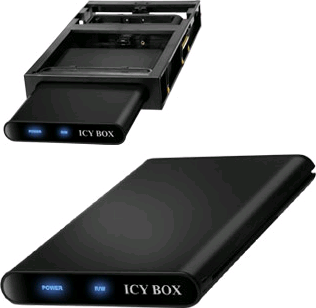
RaidSonic ICY BOX IB-266StUSD-B and IB-266StUS-BOver the last couple of years, I have upgraded a few SATA laptop hard-disk drives to larger ones.
The easiest way to reuse these drives, is to put them into an external USB enclosure.
But: USB does not deliver the speed of SATA.

So, a few years ago, I found the ICY BOX IB-266StUSD-B from RaidSonic – the picture at the top.
This box contains both the actual enclosure part IB-266StUS-B (note the missing D from the part number) – the picture on the bottom, and a docking station that fits in a regular 3.5″ external bay (now normally used for multi-card readers, in the past used for floppy drives or ZIP drives).

The cool thing is that the enclosure has both an USB and an eSATA connection:
IB-266StUS-B has both eSATA and USB connections 

Even cooler is that the docking station also has a SATA connection. Which means that as soon as you insert the HDD, you have full SATA speed.

Now the not so cool thing is that Windows does not allow you to hot eject or hot insert a SATA drive.
Or does it?
In fact it does allow inserts, and even ejects, but with a lot of fiddling with Device Manager, and only if your SATA driver allows it from within the Device Manager.

This is where HotSwap! kicks in… Read the rest of this entry »

Posted in Development, Hardware Interfacing | 1 Comment »

Foto’s van KatwijnBinse Truckrun 2009

Posted by jpluimers on 2009/08/24

Zaterdag was de jaarlijkse KatwijkBinse Truckrun: een evenement waar gehandicapte mensen als bijrijder in een Truck (97 stuks!) of Bus (3 stuks) een rit van ongeveer 4.5 uur mee mogen maken.

Het festijn begint met een kennismaking tussen de bijrijders en chauffeurs, foto sessie, groepsfoto, lunch en dan de hele rit.

Reuze gaaf, het gaat de halve bollenstreek, een stukje Leiden en een stuk kust door.
Vertrek en aankomst zijn op het voormalige Marine Vliegkamp Valkenburg.

Mijn broer Martijn (met een groene body warmer op een aantal foto’s) was een van de bijrijders, en ik heb een leuke camera, dus deze keer foto’s gemaakt.

De glimlach van bijrijders, chauffeurs, medewerkers en kijkers is onbetaalbaar!

Om een lang verhaal kort te maken, hier wat sets met foto’s:

Vliegkamp: http://www.flickr.com/photos/jwpluimers/sets/72157622117156084/

Boulevard Katwijk: http://www.flickr.com/photos/jwpluimers/sets/72157621992526809/

Groet,

–jeroen

Posted in About, Personal, Truckrun | Leave a Comment »