


OSnews has an interesting view on code quality: the number of WTFs/minute.
I know it is from 2008, but it is so true, so I’m glad I re-found it.
–jeroen
via: wtfm.jpg (500×471).
Posted by jpluimers on 2011/07/06
OSnews has an interesting view on code quality: the number of WTFs/minute.
I know it is from 2008, but it is so true, so I’m glad I re-found it.
–jeroen
via: wtfm.jpg (500×471).

Posted in .NET, Agile, Delphi, Development, Opinions, Software Development | Leave a Comment »
Posted by jpluimers on 2011/07/05
Recently, Jon Lennart Aasenden (of Surface Library fame) asked a nice winapi – Best way to do non-flickering, segmented graphics updates in Delphi question on StackOverflow.
Though the question is marked Delphi, the boundaries and solution very generic, and apply to any graphics library or GUI you develop: Windows, Mac, iOS, et cetera:

Posted in .NET, Delphi, Development, Software Development, xCode/Mac/iPad/iPhone/iOS/cocoa | 2 Comments »
Posted by jpluimers on 2011/07/04
While playing around to improve the WiFi network reception of my Samsung LED TV, I enabled SWL.
It didn’t do much on the WiFi reception, but I found out that after enabling SWL, other devices could hardly find my regular access point any more.
Somehow, a very strong access point appeared pushing away all access points. The new access point had an SSID like SEC_LinkShare_######.
Though this wasn’t mentioned in the PDF manual of my TV, PDF manual of my TV (a [Archive.is] UE40C6800 LED-TV 40″ with [WayBack] Firmware T-VALDEUC-3018.1.exe ), a quick search on SEC_LinkShare+SSID indicated in the direction of Samsung devices.
So, when you enable SWL on your TV:
Conclusion: Unless you have other Samsung devices that need the SWL, don’t activate it on your TV.
–jeroen
PS: Some links from Axel’s comment:
Posted in Power User | 39 Comments »
Posted by jpluimers on 2011/07/01
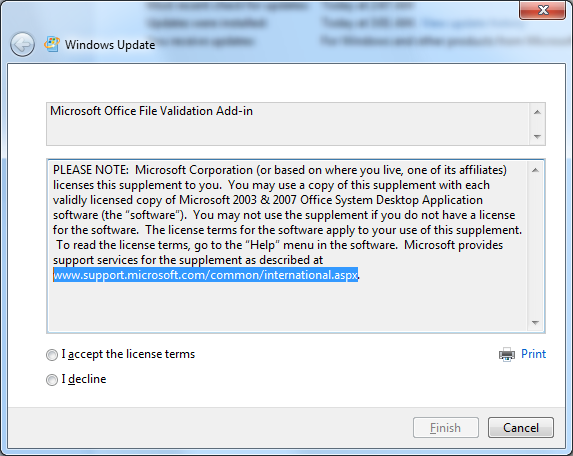 Unlike most updates marked as “Important Update”, this one requires a manual license agreement confirmation:
Microsoft Office File Validation Add-in
PLEASE NOTE: Microsoft Corporation (or based on where you live, one of its affiliates) licenses this supplement to you. You may use a copy of this supplement with each validly licensed copy of Microsoft 2003 & 2007 Office System Desktop Application software (the “software”). You may not use the supplement if you do not have a license for the software. The license terms for the software apply to your use of this supplement. To read the license terms, go to the “Help” menu in the software. Microsoft provides support services for the supplement as described at www.support.microsoft.com/common/international.aspx.
Though the security advisory was more than 2 months ago, it only got pushed to Microsoft update this week.
Good thing though that finally Microsoft is able to check the integrity of their document formats in Office 2007 and 2003: Microsoft Security Advisory: Microsoft Office File Validation for Office 2003, 2007 Office, and Office 2010: April 12, 2011.
–jeroen

Posted in Power User, Windows, Windows 7, Windows Vista, Windows XP | Leave a Comment »
 The Wiert Corner - irregular stream of stuff