The Wiert Corner – irregular stream of stuff

Jeroen W. Pluimers on .NET, C#, Delphi, databases, and personal interests

  • My badges

  • Twitter Updates

  • My Flickr Stream

  • Pages

  • All categories

  • Enter your email address to subscribe to this blog and receive notifications of new posts by email.

    Join 1,854 other subscribers

Archive for 2012

Dodgy Coder: Coding tricks of game developers

Posted by jpluimers on 2012/04/26

Some very interesting tips from game development that apply juts as well to general software development.

On code health:

Now I always try to dig right down to the root cause of a bug, even if a simple, and seemingly safe, patch is available. I want my code to be healthy. If you go to the doctor and tell him “it hurts when I do this,” then you expect him to find out why it hurts, and to fix that.

Though tools like SourceMonitor can help you track your code health, the best tool is between your ears.

–jeroen

via: Dodgy Coder: Coding tricks of game developers.

Posted in .NET, Batch-Files, C#, C# 2.0, C# 3.0, C# 4.0, C# 5.0, Delphi, Delphi x64, Delphi XE2, Development, JavaScript/ECMAScript, PHP, PowerShell, Scripting, Software Development | 1 Comment »

SQL Server 2012 is Generally Available! – SQL Server Team Blog – Site Home – TechNet Blogs

Posted by jpluimers on 2012/04/25

I’ve been really busy lately with a couple of migration projects, so I totally missed the various SQL Server 2012 is Generally Available! announcements.

Which is important because for one client, this opens the possibility of move from SQL Server 2000 right to SQL Server 2012  in stead of SQL Server 2008 R2 and make a more smooth path for Azure.

–jeroen

via:

Posted in Database Development, Development, SQL Server, SQL Server 2000, SQL Server 2008 R2, SQL Server 2012 | Leave a Comment »

SQL Server 2000 (and probably later) other reason for System.Data.SqlClient.SqlException: A severe error occurred on the current command. (via SQL Server Forums)

Posted by jpluimers on 2012/04/24

While transitioning from SQL Server 2000 to 2008, I recently had the “A severe error occurred on the current command. The results, if any, should be discarded.”  occurring on SQL Server 2000 in the form as shown at the bottom of this message.

Many of the search results point you into the area of atabase corruption, or in using NVARCAR parameters with SQL Server 2000 or SQL Server 2005 (the app didn’t use NVARCAR, nor did it use large VARCHAR parameters).

The cool thing on the SQL Server Forums – System.Data.SqlClient.SqlException: A severe error occurred on the current command post was that it summed up causes, and asked for more:

Posted – 06/17/2004 :  15:05:20

Rashid writes “Hi: Gurus I am getting these errors when I try to execute my application. According to MS knowledge base (http://support.microsoft.com/default.aspx?scid=kb;en-us;827366) these errors happen due to following resons

  1. You use a SqlClient class in a Finalize method or in a C# destructor.
  2. You do not specify an explicit SQLDbType enumeration when you create a SqlParameter object. When you do not specify an explicit SQLDbType, the Microsoft .NET Framework Data Provider for SQL Server (SqlClient) tries to select the correct SQLDbType based on the data that is passed. SqlClient is not successful.
  3. The size of the parameter that you explicitly specify in the .NET Framework code is more than the maximum size that you can use for the data type in Microsoft SQL Server.

None of these are true in my case. Are there any other reasons that can cause these problems..

There is one more: sending huge SQL Statements to your SQL Server is always a bad idea and gives this error too. Read the rest of this entry »

Posted in .NET, C#, C# 2.0, C# 3.0, C# 4.0, Database Development, Development, Encoding, Software Development, SQL Server, SQL Server 2000, SQL Server 2008 R2, Unicode | Leave a Comment »

Funny: VDI client system wants to restart, but can’t

Posted by jpluimers on 2012/04/23

Someone forgot to kick the VDI instances in the farm to perform an automatic reboot.

Patch Tuesdays only work when you make sure that mandatory reboots are actually being done.

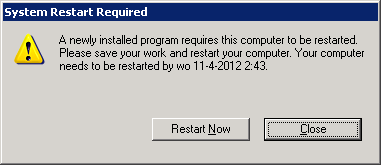
That also prevents users of getting confused by these System Modal dialogs:

[System Restart Required]
A newly installed program requires this computer to be restarted.
Please save your work and restart your computer. Your computer needs to be restarted by wo 11-4-2012 2:43.
[Restart Now] [Close]

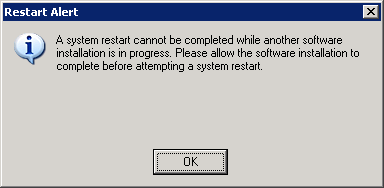
and

[Restart Alert]
A system restart cannot be completed while another software installation is in progress. Please allow the software installation to complete before attempting a system restart.
[OK]

–jeroen

Posted in Power User, Windows, Windows XP | Leave a Comment »

Gbridge: Free instant VPN for everyone! – wow, a portable version of this…

Posted by jpluimers on 2012/04/23

Hmm, interesting*:

Gbridge lets you sync folders, share files, chat and VNC securely and easily between friends or your own computers. Google Apps users can create their own free VPN within the organization instantly!

  • EasyBackup: Backup to remote computer!
  • DesktopShare: Technical support made easy.
  • SecureShare & AutoSync: Share files within group!

Either a portable version of Gbridge (currently non-existent) or Gbridge running under a portable VM solution (would vbox.me or VirtualBox on a USB stick work?) running as a non-admin would open up a can of worms for syadmins, and at the same time make a lot of life hackers extremely happy :)

–jeroen

via: Google Apps Marketplace – Gbridge: Free instant VPN for everyone!.

PS: *If you hear a programmer mumble “Hmm, interesting” be wary as either something very smart or very stupid came to mind.

Posted in LifeHacker, Power User | Leave a Comment »

VDI driving me nuts

Posted by jpluimers on 2012/04/20

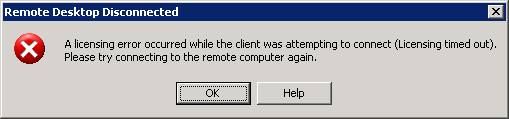
The VDI recently it is driving me nuts with sudden disconnects and messages like these after you have been connected for a couple of hours.

It all looks like there is some sort of Connectra thing in the middle that does deep packet inspection and randomly kicks out RDP or PCoIP sessions it doesn’t like, then doesn’t allow any new sessions to come in.

If I get a connection at all, now I always get a fresh VM, which – because they all are single core – take between 2 and 3 hours of getting below 100% CPU usage.

CcmExec.exeSMSCliUI.exe, and the svchost.exe instances for RpcSs and BITS hog the CPU scanning for updates and software installs for about about 25% of a working day.

Boy I wish there was something I could do about it.

---------------------------
Remote Desktop Disconnected
---------------------------
A licensing error occurred while the client was attempting to connect (Licensing timed out).
Please try connecting to the remote computer again.
---------------------------
OK Help
---------------------------

Read the rest of this entry »

Posted in Power User, Windows, Windows XP | Leave a Comment »

The Hitchhiker’s Guide to the Galaxy – Wikiquote

Posted by jpluimers on 2012/04/20

Found this out 9 days before my birthday: wikiquote.org: of course with the one of the most famous quotes from the Hitchhiker’s Guide to the Galazy:

almost, but not quite, entirely unlike tea

–jeroen (who won’t be 42 forever)

via: The Hitchhiker’s Guide to the Galaxy – Wikiquote.

Posted in About, LifeHacker, Personal, Power User | Leave a Comment »

.NET/C#: setting private fields and properties through reflection (via: .net – Is it possible to set private property via reflection – Stack Overflow)

Posted by jpluimers on 2012/04/19

The Stack Overflow question “Can I set a private property via reflection?” was answered “Yes, it is” with some good examples on how to set private fields and properties through reflection.

Recommended reading!

–jeroen

via .net – Is it possible to set private property via reflection – Stack Overflow.

Posted in .NET, C#, C# 2.0, C# 3.0, C# 4.0, Development, Software Development | Leave a Comment »

.NET/C#: Way overdue post – the syntax inside the Obsolete attribute; Looking for the new ConfigurationManager? (via: @ScottCate Blog Moved ….)

Posted by jpluimers on 2012/04/18

Everytime I get a warning like

Warning 1 'System.Configuration.ConfigurationSettings.AppSettings' is obsolete: 'This method is obsolete, it has been replaced by ConfigurationManager.AppSettings'

it reminds me I should have written a blog post about it, as the solution is a tiny bit more than just replacing System.Configuration.ConfigurationSettings.AppSettings by System.Configuration.ConfigurationManager.AppSettings.

Scott Gate wrote a nice post on his old blog about this (his new blog is awesome, he really should import his old posts into his new blog) that explains how to solve this well, so below is an elaboration on the how of the change, a tiny trick and a short series of steps to resolve this warning.

First of all, the above message means you are touching code that has been written in the .NET 1.x era, and the maintaining people (you! <g>) have been too lazy to solve the warning. That is bad, as your code should compile without warnings, and preferably without hints too. Read the rest of this entry »

Posted in .NET, C#, C# 2.0, C# 3.0, C# 4.0, Development, Software Development | Leave a Comment »

Migrating SQL Server 2000 ISQLW Utility to SQL Server 2008 R2 SSMS command-line parameters (SQL Query Analyzer; SQL Server Management Studio)

Posted by jpluimers on 2012/04/17

If you followed my blog, you probably already guessed that I’m assisting a client to prepare for a big SQL Server 2000 to SQL Server 2008 R2 migration. When not, you know now :)

I’m a fan of commandline, tools, and preconfigured settings. Which means that I’m in the midst of reconfiguring all my shortcuts to SQL Server 2000 tools to SQL Server 2008 equivalents.

When inspecting and changing LNK shortcut files, two tools are important:

  • dumplnk: dumps a shortcut lnk file from the commandline
  • shurtcut: creates a shortcut lnk file from the commandline

One of tools I many shortcuts for is the ISQLW aka SQL Query Analyzer, which I use far more than the SQL Server Enterprise Manager (more on SSEM in a future post).

Depending on the mode of authentication you use to connect to your SQL Server, there basically are two forms of shortcuts:

  • SQL Server Authentication (using SQL Server username and password):
    "C:\Program Files\Microsoft SQL Server\80\Tools\Binn\isqlw.exe" /S"servername[\instancename]" /U"username" /P"password"
  • Windows Authentication (using the credentials of the currently logged in windows user):
    "C:\Program Files\Microsoft SQL Server\80\Tools\Binn\isqlw.exe" /S"servername[\instancename]" /E

The former is less secure (so better to only store those shortcuts in a place that no other users can access).

From the ISQLW.exe syntax documentation:

Syntax

isqlw
[-?] |
[
[-S server_name[\instance_name]]
[-d database]
[-E] [-U user] [-P password]
[{-i input_file} {-o output_file} [-F {U|A|O}]]
[-f file_list]
[-C configuration_file]
[-D scripts_directory]
[-T template_directory]
]

The parameters /S, /U, /P and /E are very similar to the -S, -U, -P and -E ones from SSMS.exe (SQL Server Management Studio) with one distinction: there MUST be a space between each parameter and the value:

  • SQL Server Management Studio (using SQL Server username and password):
    "C:\Program Files\Microsoft SQL Server\100\Tools\Binn\VSShell\Common7\IDE\Ssms.exe" -S "servername[instancename]" -U "username" -P "password"
  • SQL ServerManagement Studio (using credentials for the currently logged in windows user):
    "C:\Program Files\Microsoft SQL Server\100\Tools\Binn\VSShell\Common7\IDE\Ssms.exe" -S "servername[instancename]" -E

Read the rest of this entry »

Posted in Batch-Files, Database Development, Development, Power User, Scripting, Software Development, SQL Server, SQL Server 2000, SQL Server 2005, SQL Server 2008, SQL Server 2008 R2, SQL Server 2012 | 5 Comments »