The Wiert Corner – irregular stream of stuff

Jeroen W. Pluimers on .NET, C#, Delphi, databases, and personal interests

  • My badges

  • Twitter Updates

  • My Flickr Stream

  • Pages

  • All categories

  • Enter your email address to subscribe to this blog and receive notifications of new posts by email.

    Join 1,862 other subscribers

Archive for 2015

Error 13EC when installing The .NET Framework 4.5.2 means you need to free more disk space. 3GB that is.

Posted by jpluimers on 2015/05/23

About a year and a half ago, I wrote:

My conclusion is that various Microsoft updates now require 3 gigabytes of disk space.

This seems to be the case with the .NET Framework 4.5.1 KB 2858725 update, and probably more future updates. I tried installing the KB 2858725 update with slightly less than 3 gigabytes of space (and after the 3 gigabyte reserve.tmp appeared), and I was still getting error 13EC. But with slightly more than 3 gigabyte the update would install.

That is quite difficult when you run loads of VMs on SSDs: they usually don’t have an awful lot of disk space left.

The same issue holds for Microsoft .NET Framework 4.5.2 for Windows 7 x64-based Systems (KB2901983) which got released earlier this week:

Read the rest of this entry »

Posted in Power User, Windows, Windows 7, Windows 8, Windows 8.1, Windows 9, Windows Server 2008, Windows Server 2008 R2, Windows Server 2012, Windows Server 2012 R2, Windows Vista | 1 Comment »

Error during: git svn clone “RA layer request failed: PROPFIND request failed on” means fix your proxy configuration

Posted by jpluimers on 2015/05/22

When during a git svn clone you get an error message starting with “RA layer request failed: PROPFIND request failed on” it means you have to set your git svn proxy.

This is in a different location than the git proxy setting (it would be too easy if these were the same, right?).

So you do not get/set it through commands like these:

git config --global --get http.proxy
git config --global http.proxy localhost:3128

Via Cannot do git-svn fetch behind proxy and  git svn clone died of signal 11 under cygwin (thanks janosFredrik Pihl and User Pavel, I found out that you need to change these files (create the .subversion directory and servers file when they do not exist):

  • Windows:
    • %HomeShare%\.subversion\servers
    • %UserProfile%\.subversion\serverssour
  • Linux:
    • ~/.subversion/servers

If you ever run in the same problem with the regular SVN client, then you need to change yet different files (why have 1 standard when you can have many?):

  • Windows:
    • %AppData%\Roaming\Subversion\servers
  • Linux:
    • ~/Subversion/servers

Ensure a section like this exists and fill in the blanks:

[global]
# http-proxy-exceptions = *.exception.com, www.internal-site.org
http-proxy-host = YOURPROXY.com
http-proxy-port = YOURPORT
# http-proxy-username = defaultusername
# http-proxy-password = defaultpassword
# http-compression = no
# http-auth-types = basic;digest;negotiate
# No http-timeout, so just use the builtin default.
# No neon-debug-mask, so neon debugging is disabled.
# ssl-authority-files = /path/to/CAcert.pem;/path/to/CAcert2.pem<

Notes:

In some poorly managed networked environments, the %AppData% environment variable can be wrong, so make sure your Windows profile is not somewhere on a network share.

TortoiseGit seems to use yet another directory for GIT SVN server configuration.

–jeroen

via:

Posted in Cntlm, DVCS - Distributed Version Control, git, Power User, Source Code Management, SourceTree, Windows, Windows-Http-Proxy | Leave a Comment »

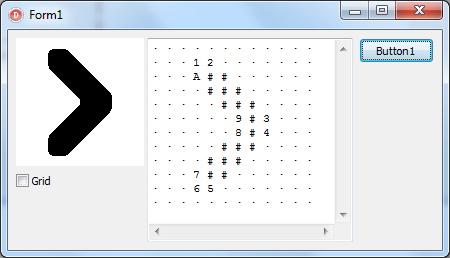
Woot: AsciiImage for Delphi http://memnarch.bplaced.net/blog/?p=129

Posted by jpluimers on 2015/05/21

Woot!

AsciiImage for Delphi by Alexander Benikowski on GitHub repository Memnarch/AsciiImage..

AsciiImage for Delphi

AsciiImage for Delphi

–jeroen

via: And here it is: AsciiImage for Delphi http://memnarch.bplaced.net/blog/?p=129.

Posted in Delphi, Development, Software Development | Leave a Comment »

Intermittent but frequent OS X pauses may be from iCloud syncing | MacIssues

Posted by jpluimers on 2015/05/21

fseventer is a great tool for investigating Mac OS X file system events. Like many low-level tools, it requires admin privileges.

This is apparent through the use of the tool “fseventer” which monitors what files on your hard drive are being accessed.

–jeroen

via: Intermittent but frequent OS X pauses may be from iCloud syncing | MacIssues.

Posted in Apple, Mac, Mac OS X / OS X / MacOS, Mac OS X 10.4 Tiger, Mac OS X 10.6 Snow Leopard, Mac OS X 10.7 Lion, MacBook, MacBook Retina, MacBook-Air, MacBook-Pro, MacMini, OS X 10.10 Yosemite, OS X 10.8 Mountain Lion, OS X 10.9 Mavericks, Power User | Leave a Comment »

How to add screenshot to markdown/READMEs in github repository ? (via: Stack Overflow)

Posted by jpluimers on 2015/05/20

Adding relative links to screenshots in markdown files (like README.md) works way better at GitHub than on BitBucket:

For GitHub, this works, has documentation and various places with tips:

In fact it is a reason for some people to move public projects from Bitbucket to GitHub.

For private repositories that is different as GitHub charges for private repositories, but BitBucket has free private repositories.

Note: if you go the npm way, then you might want to have absolute URLs: Add images to readme.md in GitHub – Stack Overflow.

–jeroen

via: git – How to add screenshot to READMEs in github repository ? – Stack Overflow.

Posted in BitBucket, Development, DVCS - Distributed Version Control, git, GitHub, MarkDown, Mercurial/Hg, Power User, Source Code Management, SourceTree | Leave a Comment »

Dynamic DNS through NO-IP: keeping your hosts current, and your NO-IP account happy.

Posted by jpluimers on 2015/05/19

Now that DynamicDNS moved itself to a fully payed service, named it DynDns Pro, then renamed it Remote Access and limiting it to 30 hosts for USD 25 a year, I looked for alternatives, and noticed NO-IP.

I like it for a few reasons:

OK, last year, there was this Microsoft Legal Action and Controversy, but I think that is a once time thing (some people even argue that Microsoft wasn’t thinking), so I created the last script below in PowerShell.

A few open-source scripts to keep your NO-IP account happy (that also work on most other DDNS providers like Duck DNS):

Read the rest of this entry »

Posted in *nix, *nix-tools, bash, CommandLine, Development, Perl, PHP, Power User, PowerShell, Scripting, Software Development | 1 Comment »

Wanneer is mijn huis nou eigenlijk gebouwd? – AT5

Posted by jpluimers on 2015/05/18

Wanneer is mijn huis nou eigenlijk gebouwd? – AT5.

Directe link: http://code.waag.org/buildings/#52.3674,4.9099,13

Our house is from the mid 1990s.

–jeroen

Posted in LifeHacker, Power User | Leave a Comment »

Sneak Preview – Build your own vSphere 6 home datacenter in about an hour – YouTube

Posted by jpluimers on 2015/05/16

Interesting: Sneak Preview – Build your own vSphere 6 home datacenter in about an hour – YouTube.

–jeroen

Posted in ESXi6, Power User, Virtualization, VMware, VMware ESXi | Leave a Comment »

Oh wow. Apparently all S3 buckets are also BitTorrent trackers.

Posted by jpluimers on 2015/05/16

Interesting:

There is no extra charge for use of BitTorrent with Amazon S3. Data transfer via the BitTorrent protocol is metered at the same rate as client/server delivery. To be precise, whenever a downloading BitTorrent client requests a “piece” of an object from the…

Note

You can get torrent only for objects that are less than 5 GB in size.

via Using BitTorrent with Amazon S3 – Amazon Simple Storage Service.

–jeroen

via Oh wow. Apparently all S3 buckets are also BitTorrent trackers..

Posted in Amazon S3, Cloud Apps, Cloud Development, Development, Internet, Power User | Leave a Comment »

From batch file or shortcut: start Windows Update (via: Windows 7 Help Forums)

Posted by jpluimers on 2015/05/15

Call either of these from a batch file or Windows shortcut to end up at the Windows Update screen in the Control Panel:

%windir%\System32\rundll32.exe url.dll,FileProtocolHandler wuapp.exe
%windir%\explorer.exe shell:::{36eef7db-88ad-4e81-ad49-0e313f0c35f8}

Notes:

  • I’ve tested this in Windows 7, 8.x and 9 and it works fine in all these.
  • Unlike Control Printers calling Control Updates does not work.
  • I suspect there are many more magic GUID values you could use for other functions because the built-in syntax has been there for a long time.

–jeroen

via: Windows Update Shortcut – Create in Windows 7 – Windows 7 Help Forums.

Posted in Power User, Windows, Windows 7, Windows 8, Windows 8.1, Windows Server 2008, Windows Server 2008 R2, Windows Server 2012, Windows Server 2012 R2 | Leave a Comment »