Archive for 2015
Posted by jpluimers on 2015/05/04
I wonder if Toshiba’s MQ03ABB300 really can be ordered in May:
- 3 TB
- 2.5 inch
- 15 mm Height
- 5,400 rpm
–jeroen
via:
Posted in Hardware, Power User | 1 Comment »
Posted by jpluimers on 2015/05/01
A few places, including the comment thread at MacWorld UK – New 2015 MacBook Pro with Retina display release date, specs and UK pricing – News – Page 2 – Macworld UK have a some rumours on the Macbook Pro Retina QHD+ 2015 Expected Specs: Skylake and more.
This would be having the Skylake Tock of the Intel Tick-Tock.
If Apple pulls that of this year, I’m sure lots of high end developers and graphics people are going to get it:
Macbook Pro Retina QHD+ 2015 Expected Specs.
- Processor : Intel Skylake i7-6770HQ (40% Faster & 50% Power Efficient Over Haswell)
- RAM: 32 GB DDR4 @ 2400 Mhz.
- Display : Retina QHD+ (iPS/OLED 30% Power Saving!)
- Hard Disk : 3rd-gen PCIe SSD 2.1Gbps Read Speed 1.6Gbps Write Speed.
- Graphics Card : Intel & GTX 970 M 4GB DDR5 256Bit. (300x Faster & 50% Less pwr vs 750m)
- Body/Looks : New Thinner Design & 3 Color Options.(Radical New Look)
- Security : Touch ID integration.
- Webcam : Improved Face time HD Camera 1080p @ 60fps
- Keyboard : New Multi Color LED Backlight Keyboard.
–jeroen
Posted in Apple, Mac, MacBook, MacBook Retina, Power User | Leave a Comment »
Posted by jpluimers on 2015/04/30
Often I want to execute a TF.exe from the console, but don’t have the Visual Studio environment variables setup. Most of the times I want to run TF.exe from the most current Visual Studio installation, hence this TF.bat file figures out the location of it, then runs with the parameters passed to TF.bat: Read the rest of this entry »
Posted in .NET, Development, Software Development, Visual Studio 11, Visual Studio 2005, Visual Studio 2008, Visual Studio 2010, Visual Studio 2013, Visual Studio 2014, Visual Studio and tools | 1 Comment »
Posted by jpluimers on 2015/04/29
Front-end web development isn’t my core area of expertise, but every now and then I am slightly more than the usual spectator and do get involved.
This case it was about helping to prevent The Clickjacking attack by using the The X-Frame-Options response header from RFC 7034.
Lots of people seem to have questions about it: Highest Voted ‘x-frame-options’ Questions – Stack Overflow.
So, from The X-Frame-Options response header:
There are three possible values for X-Frame-Options:
DENY- The page cannot be displayed in a frame, regardless of the site attempting to do so.
SAMEORIGIN- The page can only be displayed in a frame on the same origin as the page itself.
ALLOW-FROM uri- The page can only be displayed in a frame on the specified origin.
–jeroen
via:
Posted in Development, Software Development, Web Development | Leave a Comment »
Posted by jpluimers on 2015/04/28
Stefan Glienke started some interesting demographics polls on the G+ Delphi community.
Demographics are about group members that actually voted. Which might rule out Delphi programmers not writing English well.
Despite that, I think it actually tells a lot, especially when you read the comments as well.
And it made DavidI provide some background on the geographic distribution: Where in the world are programmers using Delphi? – Blogs.
–jeroen
Posted in Delphi, Development, Software Development | 3 Comments »
Posted by jpluimers on 2015/04/28
The CRC algorithm isn’t hard, but choosing the right polynomial and parameters can be tricky especially since there are so many permutations to choose from and lots of libraries have made their own (often incompatible) choices.
A few quotes
Basics: Read the rest of this entry »
Posted in Algorithms, Development, Software Development | Leave a Comment »
Posted by jpluimers on 2015/04/27
Edit 20210727:
- A lot of the links below have died due to link rot (sometimes even the domains have gone), but most of the WayBack machine links marked [Wayback] still work.
- The same stop [Wayback] stop
0x0000007B can happen when converting a physical machine to VMware (I will schedule a separate post about this):
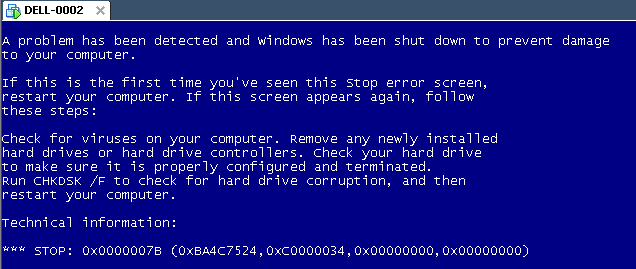
Windows XP Virtual Machine failing with stop 0x0000007B
Steps:
- Put the SATA disk of the XP machine in a different one.
- Disk2Vhd on the new machine to create a VHDX of the XP hard disk.
- Install Hyper-V on the target Windows 8.1 machine (you need at least Pro for that).
- Setup the base VM directory.
- Setup a virtual network switch (decide if you want it to be internal, external or private, then bind it to a network adapter if needed).
- Add a new VM.
- Assign a new directory to it.
- Assign memory to it.
- Assign the virtual network switch to it.
- Save it.
- Edit the settings, then bind the DVD drive on the IDE controller 1 to C:\Windows\System32\vmguest.iso.
- Connect to the VM.
- Start it.
- If you get a stop
0x0000007B (usually because of SATA/AHCI/IDE or other MassStorage controller driver issues), then read [Wayback] Jon’s Project Blog » disk2vhd using [Wayback] UBCD for Windows to solve the issue as there is no BIOS screen in Hyper-V that allows you to switch from AHCI to SATA and back.
- Note: you cannot perform UBCD4Win when you access the Hyper-V host through Microsoft Remote Desktop (the mouse will not work at all, and most keyboard shortcuts will not work either; [Wayback] Virtual Machine Connection Key Combinations with Hyper-V – Ben Armstrong – Site Home – MSDN Blogs does not apply).
- Boot.
- Register Windows (you might need to do extra work to go from OEM to Retail here).
- Remove hidden devices that are not used any more and their drivers.
- Setup a backup schedule.
Some links that helped me get at these steps:
–jeroen
Posted in BIOS, Boot, Hyper-V, Internet, link rot, Power User, Virtualization, Windows, Windows 8, Windows 8.1, Windows XP, WWW - the World Wide Web of information | Leave a Comment »
Posted by jpluimers on 2015/04/24
Interesting podcast:
Scott talks to Gina Häußge, creator of OctoPrint. In very short order OctoPrint has gone from a small side project to Gina’s full time open source job!
OctoPrint gives your 3D Printer:
- a camera,
- a print queue,
- visualizers,
- temperature control and
- much more!
Gina shares her journey in this Maker episode.
You can even request new features.
–jeroen
via: Building a better 3D printer (with software!) with OctoPrint’s Gina Häußge on the Hanselminutes Technology Podcast: Fresh Air for Developers.
Posted in 3D printing, Power User | Leave a Comment »
Posted by jpluimers on 2015/04/23
Boy, I wish I had read these PowerShell articles earlier:
- PowerShell One-Liners: Help, Syntax, Display and Files.
- PowerShell One-Liners: Variables, Parameters, Properties, and Objects.
- PowerShell One-Liners: Collections, Hashtables, Arrays and Strings.
- PowerShell One-Liners: Accessing, Handling and Writing Data.
Besides being in depth, the articles also contain a ton of examples all in this form:
| Action |
Command |
Example |
| Basic help for x |
Get-Help cmd (cmd is a full name) |
help Get-ChildItem |
| Help in separate window |
Show-Command cmd; then select the help icon |
Show-Command Get-ChildItem |
–jeroen
Posted in CommandLine, Development, PowerShell, Software Development | Leave a Comment »


 The Wiert Corner - irregular stream of stuff