The Wiert Corner – irregular stream of stuff

Jeroen W. Pluimers on .NET, C#, Delphi, databases, and personal interests

  • My badges

  • Twitter Updates

  • My Flickr Stream

  • Pages

  • All categories

  • Enter your email address to subscribe to this blog and receive notifications of new posts by email.

    Join 1,860 other subscribers

Archive for August, 2018

when bind named service hasn’t started after OpenSuSE Tumbleweed boots

Posted by jpluimers on 2018/08/20

A while ago, named would not start any more after I rebooted my Tumbleweed systems.

I had this behaviour on multiple systems, each installed quite a while ago and kept up-to-date with zypper dist-upgrade so it looked like a systematic issue.

Below are steps in researching the problem together with the helpful people on the IRC channel opensuse-factory.

Background reading for some of the commands: [WayBackHow To Use Systemctl to Manage Systemd Services and Units | DigitalOcean.

Both systemctl status named.service and systemctl status named would show the same output:

# systemctl status named
● named.service - LSB: Domain Name System (DNS) server, named
   Loaded: loaded (/etc/init.d/named; generated; vendor preset: disabled)
   Active: inactive (dead)
     Docs: man:systemd-sysv-generator(8)

Getting the log from events around a reboot would show a successful shutdown, but no start:

# journalctl --unit named --catalog --pager-end

Apr 28 13:19:27 laurel systemd[1]: Stopping LSB: Domain Name System (DNS) server, named...
-- Subject: Unit named.service has begun shutting down
-- Defined-By: systemd
-- Support: http://lists.freedesktop.org/mailman/listinfo/systemd-devel
-- 
-- Unit named.service has begun shutting down.
Apr 28 13:19:28 laurel named[20360]: no longer listening on 192.168.124.27#53
Apr 28 13:19:32 laurel named[20360]: received control channel command 'stop'
Apr 28 13:19:32 laurel named[20360]: shutting down: flushing changes
Apr 28 13:19:32 laurel named[20360]: stopping command channel on 127.0.0.1#953
Apr 28 13:19:32 laurel named[20360]: no longer listening on ::#53
Apr 28 13:19:32 laurel named[20360]: no longer listening on 127.0.0.1#53
Apr 28 13:19:32 laurel named[20360]: exiting
Apr 28 13:19:34 laurel named[30705]: Shutting down name server BIND  waiting for named to shut down ..done
Apr 28 13:19:34 laurel systemd[1]: Stopped LSB: Domain Name System (DNS) server, named.
-- Subject: Unit named.service has finished shutting down
-- Defined-By: systemd
-- Support: http://lists.freedesktop.org/mailman/listinfo/systemd-devel
-- 
-- Unit named.service has finished shutting down.

Similar results in these files:

  • /var/lib/named/log/general.log

28-Apr-2017 13:19:32.465 general: shutting down: flushing changes
28-Apr-2017 13:19:32.468 general: stopping command channel on 127.0.0.1#953
28-Apr-2017 13:19:32.622 general: exiting

  • /var/lib/named/log/named.log

28-Apr-2017 13:19:32.489 network: no longer listening on ::#53
28-Apr-2017 13:19:32.489 network: no longer listening on 127.0.0.1#53

With systemctl, I got this:

# systemctl is-enabled named
named.service is not a native service, redirecting to systemd-sysv-install.
Executing: /usr/lib/systemd/systemd-sysv-install is-enabled named
enabled
# systemctl is-active named
inactive
# systemctl is-failed named
inactive

After this, I was out of systemd and sysv knowledge, so I asked for help on the #openSUSE-factory IRC channel, where ismail was of great help.

Read the rest of this entry »

Posted in *nix, *nix-tools, bind-named, Linux, openSuSE, Power User, SuSE Linux, Tumbleweed | Leave a Comment »

On Windows Control Flow Guard effects: 24-core CPU and I can’t type an email (part one) | Random ASCII

Posted by jpluimers on 2018/08/19

So many interesting bits on Windows process behaviour investigations: https://randomascii.wordpress.com/2018/08/16/24-core-cpu-and-i-cant-type-an-email-part-one/

Via Check out @BruceDawson0xB’s Tweet:

Posted in Uncategorized | Leave a Comment »

How to check if a binary is 32 or 64 bit on Windows? – Super User

Posted by jpluimers on 2018/08/17

It seems there are a few, but only loading the binary is the sure method to know what the process will be using: [WayBackHow to check if a binary is 32 or 64 bit on Windows? – Super User and [WayBack] How do I determine if a .NET application is 32 or 64 bit? – Stack Overflow.

Details in the answers of these questions, here are a few highlights:

  • The first few characters in the binary header reveal what it was originally designed for.
  • A .NET executable might still have an x64 header for bootstrapping.
  • The Windows SDK has a tool dumpbin.exe with the /headers option.
  • You can use sigcheck.exe from SysInternals.
  • The file utility (e.g. from cygwin, which comes with msysgit) will distinguish between 32- and 64-bit executables.
  • Use the command line 7z.exe on the PE file (Exe or DLL) in question which gives you a CPU line.
  • Virustotal File detail is a way to find out if a binary is 32 bit or 64 bit.
  • Even an executable marked as 32-bit can run as 64-bit if, for example, it’s a .NET executable that can run as 32- or 64-bit. For more information see https://stackoverflow.com/questions/3782191/how-do-i-determine-if-a-net-application-is-32-or-64-bit, which has an answer that says that the CORFLAGS utility can be used to determine how a .NET application will run.

–jeroen

Search terms: win64, win32, x64, x86_64, x86

Posted in Assembly Language, Development, Power User, Windows, x64, x86 | Leave a Comment »

Ziggo – als je geen papieren factuur meer wilt

Posted by jpluimers on 2018/08/17

Als je bij Ziggo geen papieren factuur meer wilt, kun je dat op https://www.ziggo.nl/mijn-ziggo/gegevens/betalingsgegevens-wijzigen/ instellen.

–jeroen

via: [WayBack]

Posted in LifeHacker, Power User | Leave a Comment »

Steve Losh on Twitter: “HTTP status ranges in a nutshell: 1xx: hold on 2xx: here you go 3xx: go away 4xx: you fucked up 5xx: I fucked up”

Posted by jpluimers on 2018/08/17

[WayBackSteve Losh on Twitter:

“HTTP status ranges in a nutshell:

  • 1xx: hold on
  • 2xx: here you go
  • 3xx: go away
  • 4xx: you fucked up
  • 5xx: I fucked up”

–jeroen

via: [WayBack] HTTP status ranges in a nutshell… – This is why I Code – Google+

Read the rest of this entry »

Posted in Communications Development, Development, HTTP, Internet protocol suite, Power User, TCP | Leave a Comment »

Upgrade to ‎Microsoft Remote Desktop 10 on the Mac App Store

Posted by jpluimers on 2018/08/17

If you are still on version 8, then note this version will be deprecated at 20180901, so it is time to upgrade to [Archive.is‎Microsoft Remote Desktop 10 on the Mac App Store

[Archive.is] ‎Microsoft Remote Desktop 8 on the Mac App Store is now at version 8.0.44, which changed one thing:

This update adds a dismissible banner to the app UI to message the fact that the client will be deprecated soon. You can start using the new version of Remote Desktop today by downloading Microsoft Remote Desktop 10 from the App Store.

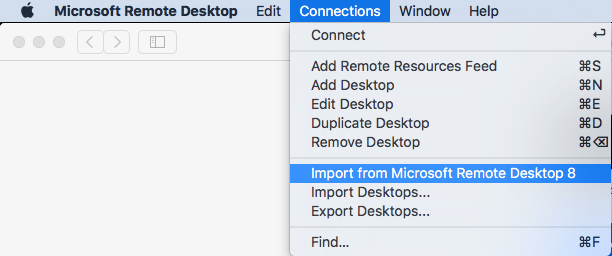
It is easy to import your RDP desktops from version 8 into version 18: in the menu, select Connections, then Import from Microsoft Remote Desktop 8, then enter your credentials so the saved logon passwords can be imported from the [WayBack] KeyChain.

A few things to note:

  • importing the Microsoft Remote Desktop 8 fails to import the Local Resource bindings
  • in Microsoft Remote Desktop 10, editing Local Resource binding right after adding them will crash

Background reading:

The full version histories of both:

Read the rest of this entry »

Posted in Apple, Power User, Remote Desktop Protocol/MSTSC/Terminal Services, Windows | Leave a Comment »

Reading files that are locked by other references: c# – Notepad beats them all? – Stack Overflow

Posted by jpluimers on 2018/08/16

Cool feature borrowed from Notepad, which can read files locked by other references (for instance a process having the handle open): [WayBackc# – Notepad beats them all? – Stack Overflow.

The example from the answer is in .NET, but can be used in a native environment as well (Notepad is a native application).

Notepad reads files by first mapping them into memory, rather than using the “usual” file reading mechanisms presumably used by the other editors you tried. This method allows reading of files even if they have an exclusive range-based locks.

You can achieve the same in C# with something along the lines of:

using (var f = new FileStream(processIdPath, FileMode.Open, FileAccess.Read, FileShare.ReadWrite))
using (var m = MemoryMappedFile.CreateFromFile(f, null, 0, MemoryMappedFileAccess.Read, null, HandleInheritability.None, true))
using (var s = m.CreateViewStream(0, 0, MemoryMappedFileAccess.Read))
using (var r = new StreamReader(s))
{
    var l = r.ReadToEnd();
    Console.WriteLine(l);
}

Via: [WayBack] Maintaining Notepad is not a full-time job, but it’s not an empty job either – The Old New Thing

–jeroen

Posted in .NET, Delphi, Development, Software Development, The Old New Thing, Windows Development | Leave a Comment »

Cape Cod Gunny Does Delphi: Gunny Meets Uncle Bob – Part 1

Posted by jpluimers on 2018/08/16

I like how Michael Riley compares his learning quest of software development to things he learned in real life:

  • Gang of Four Patterns = Chess
  • POSA Patterns = Golf
  • SOLID = JJDIDTIEBUCKLE

Note that JJDIDTIEBUCKE is actually 14 parts of Marine Corps leadership.

Software development is all about learning and making connections. Like life: learn new things and relate them to existing ones each and every day.

Given Michaels military background, I understand the comparison and the reference that Eric Grange makes. I think good software development is finding the balance between guerrilla and traditional thinking. Don’t loose yourself into patterns and processes, pick the ones that fit you best at the time you use them. This requires reflection which is often neglected.

I also like the comment thread in the post, so I’ve extracted some really useful information below.

Source: [WayBackCape Cod Gunny Does Delphi: Gunny Meets Uncle Bob – Part 1

From the comments

Note I don’t agree with everything, but I they make me think about my profession.

Joseph Mitzen:

Don’t give in to the conventional thinking about “design patterns”. Design patterns are language smell. They’re a sign of places where a language is broken. They’re not some sort of gospel truth. Most of the patterns don’t even exist in languages like Lisp.

Google’s Joe Gregorio emphasized this point in a talk in 2009:

You don’t need to understand 24 patterns for a language you don’t program in to be a good programmer.

Embrace Joe Gregorio, Dr. Peter Norvig, and Paul Graham… become the anti-Hodges!

Michael Riley:

+Joseph Mitzen I agree when Martin says, “Your system architecture should be as ignorant as possible about how it is to be delivered. You should be able to deliver it as a console app, or a web app, or a thick client app, or even a web service app, without undue complication or change to the fundamental architecture.”

I agree when Martin says at a minimum software professionals should be able to describe the GoF patterns and have a working knowledge of the patterns describe in the POSA books.

My pursuit to learn Dependency Injection is taking me in directions I didn’t know about and didn’t expect I be going.Hodges is my fallback position because the only mainstream language I know is Pascal. When I see the code examples he uses I understand them… it’s the concepts I’m having a hard time with.

I just now today am learning Java. This time around it is very exciting and fun. I’m totally amazed at the NetBeans IDE. I’m very impressed with JavaDocs. At this point I’m finding myself question why I should continue to pursue Delphi.

The bottom line is this: I want to make the next release of my software able to support mobile customers, web customers, windows customers and mac customers.

I feel like I’ve been given a chance to go back to high school and start over again.

Michael Thuma:

It’s not Java that confused you. It’s the combination of the Class Library and Framework. Object Orientation simply starts with using Objects. No one needs to go further beyond, which is the original idea.

There is no such a ‘dumb’ Delphi developer for example who just uses components or the classes provided. The programming world is not divided into programmers or not. Those who define classes and provide them share a common space with those who simply use (Framework). You need to play first and play it loud.

Different example from the relational world. A DB design has nothing to do with Entity Relationship which is maybe the dominating approach. The relational model is capable of a lot more than this tiny but widely used subset.

Thinking in terms of E/R limits the scope of taking opportunities. The same way you limit yourself to one specific paradigm when it comes to programming languages. All the others make up the difference.

The Java framework is heavy. It was redesigned about 15 years ago with design patterns in mind. Design patterns were introduce to extend or put the focus on reusability which does come for anything but free even in the object oriented world. That’s why these patterns became integral part of software architecture.

Eric Grange:

All good points, but one key difference with military is that in development, Rambos routinely trounces whole armies, and not just in movies. And guerilla tactics usually win over more formal armies and approaches.

IOW shops with established methodologies are regularly overtaken by startup proof of concepts, and experienced teams are all too often outsourced by management that think they’ve found a (cheaper) guerilla team.

Don’t let that stop you from learning, but it’s a wholly different battlefield…

The comment thread also reminded me that  the GoF patterns in Delphi has moved since I wrote GoF Patterns in Delphi | Implementations of the famous Gang of Four Design Patterns in Delphi language – via Nick Hodges, so I learned this:

–jeroen

via: [WayBackLars Fosdal – Google+

Read the rest of this entry »

Posted in Dependency Injection, Design Patterns, Development, Inversion of Control / IoC, LISP, Software Development | Leave a Comment »

Have NoMessageBoxes depend on a global boolean · Issue #58 · pleriche/FastMM4 · GitHub

Posted by jpluimers on 2018/08/16

Reminder to self: [WayBackHave NoMessageBoxes depend on a global boolean · Issue #58 · pleriche/FastMM4 · GitHub

–jeroen

Posted in Delphi, Development, FastMM, Software Development | Leave a Comment »

Work around for running out of memory when building multiple projects in Delphi < 10.2

Posted by jpluimers on 2018/08/16

I found out this is a problem until at least Delphi 10.1 Berlin, but my original question was for XE8:

Is there any tool that clears the Delphi memory overhead when a “build all” switches to the next project in a project group?

XE8 constantly runs out of memory with large project groups as the memory usage keeps increasing for each project it builds in the group.

There are actually two answers:

Uwe Raabe:  Have you tried with Use MSBuild checked for each project?

Jeroen Wiert Pluimers: +Uwe Raabe Much better. Much slower too (:

and:

Torbjörn Olsson: Have you tried DDevExtensions?
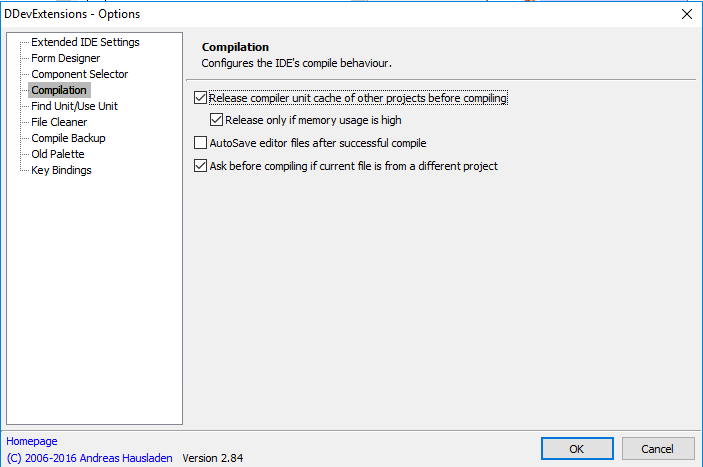
There is a setting named “Release compiler unit cache before compiling”

I’ve opted for the [Archive.is] DDevExtensions; I thought this VM had it installed, but apparently I forgot installing it as [Archive.is] IDE FixPack by the same author was installed.

This is how you configure DDevExtensions:

  1. Run Delphi
  2. Choose menu “Tools”, submenu “DDevExtensions Options…”
  3. In the dialog, select “Compilation” in the list on the left
  4. Ensure “Release compiler unit cache of other projects before compiling” is checked
  5. Confirm any changes

Source: [WayBackIs there any tool that clears the Delphi memory overhead when a “build all” s…

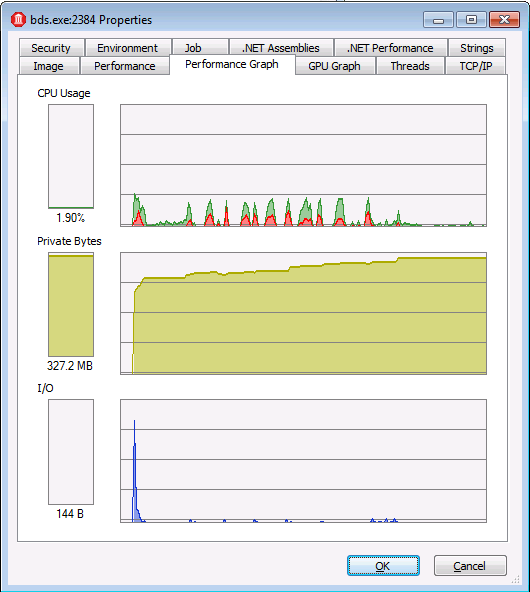
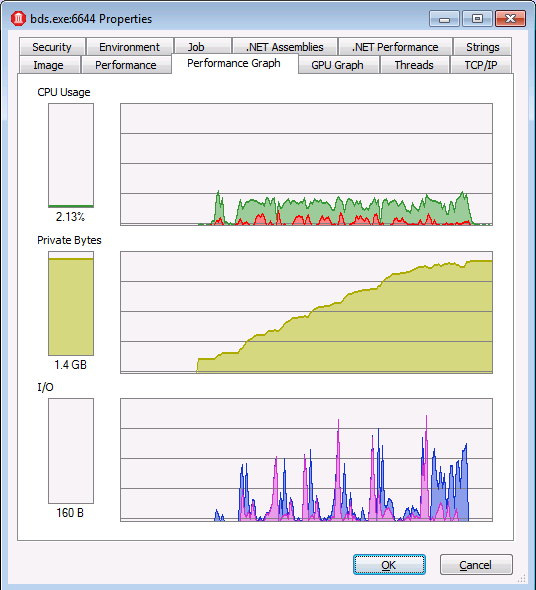
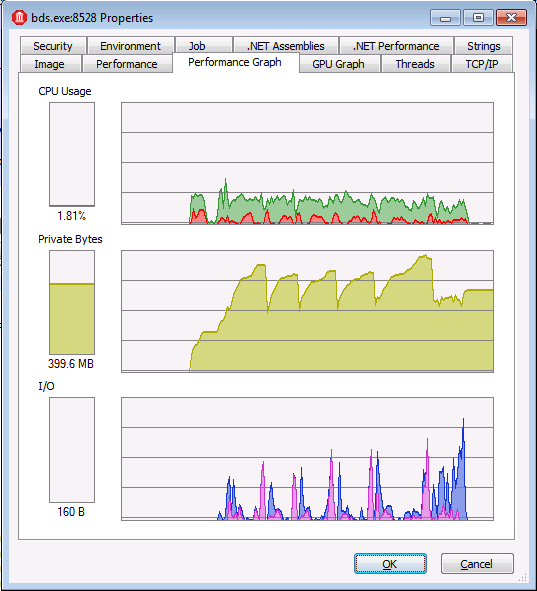
In the comparison below:

  • watch the scale of the graphs
  • observe that DDevExtensions uses about the same memory as msbuild, but builds much faster
With "Use MSBuild externally to compile"

With “Use MSBuild externally to compile”

Regular "Build all"

Regular “Build all”

With DDevExtensions

With DDevExtensions


Posted in Conference Topics, Conferences, Delphi, Development, Event, Software Development | Leave a Comment »