The Wiert Corner – irregular stream of stuff

Jeroen W. Pluimers on .NET, C#, Delphi, databases, and personal interests

  • My badges

  • Twitter Updates

  • My Flickr Stream

  • Pages

  • All categories

  • Enter your email address to subscribe to this blog and receive notifications of new posts by email.

    Join 1,861 other subscribers

Archive for October, 2018

Some Indy SSL Perfect Forward Secrecy links

Posted by jpluimers on 2018/10/18

Some links on Indy SSL Perfect Forward Secrecy especially for the [WayBackSSL_CTX_set_ecdh_auto method that was introduced in OpenSSL 1.0.2.

Indy now has it built in: [WayBack] Patches from Jeroen Wiert Pluimers: · graemeg/indy@659f629 · GitHub (this is on a regular git mirror of the official Indy svn repository).

–jeroen


Posted in Delphi, Development, Indy, Software Development | 1 Comment »

Archiving Delphi documentation

Posted by jpluimers on 2018/10/18

[WayBackHow can I search for Delphi documentation? – Stack Overflow explains how I’ve been searching Delphi documentation for almost a decade.

I love how Google Search filters can be used, and even mentioning “docwiki” or “docwiki delphi” usually narrows your search down to the official documentation.

However, since a while, [Archive.is] docwiki.embarcadero.com/robots.txt disallows older indexing by search indexes or archiving in the WayBack machine.

So with older Delphi versions, I tend to archive using Archive.is instead:

For the most recent Delphi version, I archive both the non-versioned link and the versioned link. Depending on the unit naming, these URLs can be used:

–jeroen

Posted in Delphi, Development, Software Development | Leave a Comment »

Delphi: [BRCC32 Error] ProjectName.vrc(63): file not found: C:\Users\Public\Documents\RAD Studio\10.0\Styles\SlateClassico.vsf

Posted by jpluimers on 2018/10/17

The Delphi styling mechanism hard codes style paths for Delphi built-in styles.

During compilation, a .VRC file is generated for your project (in this example ProjectName.vrc which is a resource compiler script. This was introduced by Delphi 2007 (see: Pre-build trick does not work to circumvent [BRCC32 Error] xxx.vrc(1): error creating xxx.res (via: Embarcadero Discussion Forums & StackOverflow)), got extended over time and by now this script can includes at least:

  • version info
  • main icon
  • manifest reference
  • platform targets
  • supported styles

For the latter, you can get errors like this one:

[BRCC32 Error] ProjectName.vrc(63): file not found: C:\Users\Public\Documents\RAD Studio\10.0\Styles\SlateClassico.vsf

The solution to this error is simple:

  1. Go to your project options
  2. Switch to “All Targets”
  3. Go to node “Application”, then “Appearance”
  4. Look for the style named just in front of the .vsf extension (in this case StateClassico)
  5. Remove the checkmark.
  6. Press OK
  7. Rebuild

Example files :

/* ----- VS_VERSION.dwFileFlags ----- */
#define VS_FF_DEBUG             0x00000001L
#define VS_FF_PRERELEASE        0x00000002L
#define VS_FF_PATCHED           0x00000004L
#define VS_FF_PRIVATEBUILD      0x00000008L
#define VS_FF_INFOINFERRED      0x00000010L
#define VS_FF_SPECIALBUILD      0x00000020L
#define VS_FFI_FILEFLAGSMASK    0x0000003FL

/* ----- VS_VERSION.dwFileOS ----- */
#define VOS_UNKNOWN             0x00000000L
#define VOS_DOS                 0x00010000L
#define VOS_OS216               0x00020000L
#define VOS_OS232               0x00030000L
#define VOS_NT                  0x00040000L
#define VOS_WINCE               0x00050000L

#define VOS__BASE               0x00000000L
#define VOS__WINDOWS16          0x00000001L
#define VOS__PM16               0x00000002L
#define VOS__PM32               0x00000003L
#define VOS__WINDOWS32          0x00000004L

#define VOS_DOS_WINDOWS16       0x00010001L
#define VOS_DOS_WINDOWS32       0x00010004L
#define VOS_OS216_PM16          0x00020002L
#define VOS_OS232_PM32          0x00030003L
#define VOS_NT_WINDOWS32        0x00040004L

/* ----- VS_VERSION.dwFileType ----- */
#define VFT_UNKNOWN             0x00000000L
#define VFT_APP                 0x00000001L
#define VFT_DLL                 0x00000002L
#define VFT_DRV                 0x00000003L
#define VFT_FONT                0x00000004L
#define VFT_VXD                 0x00000005L
#define VFT_STATIC_LIB          0x00000007L

1 VERSIONINFO
FILEVERSION 1, 0, 124, 56
PRODUCTVERSION 1, 0, 0, 0
FILEFLAGSMASK VS_FFI_FILEFLAGSMASK
FILEOS VOS__WINDOWS32
FILETYPE VFT_APP
{
 BLOCK "StringFileInfo"
 {
  BLOCK "040904E4"
  {
   VALUE "FileVersion",  "1.0.124.56\000\000"
   VALUE "ProductVersion",  "1.0.0.0\000\000"
   VALUE "ProductName",  "My server\000\000"
   VALUE "CompanyName",  "My company\000\000"
  }
 }
 BLOCK "VarFileInfo"
 {
  VALUE "Translation", 1033, 1252
 }
}

and

MAINICON ICON "MyProject_Icon.ico"
1 24 "MyProject.$manifest"
PLATFORMTARGETS RCDATA {1}
SlateClassico VCLSTYLE "C:\\Users\\Public\\Documents\\RAD Studio\\10.0\\Styles\\SlateClassico.vsf"

–jeroen

Posted in Delphi, Development, Software Development | 2 Comments »

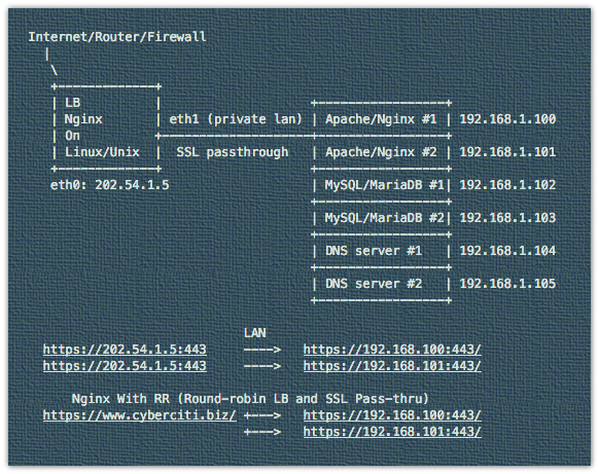
How to configure Nginx SSL/TLS passthrough with TCP load balancing – nixCraft

Posted by jpluimers on 2018/10/17

Explains how to configure Nginx with SSL Passthrough on Linux or Unix-like system to encrypt traffic on all backends.

Uses the stream module ngx_stream_core_module.

Source: [WayBackHow to configure Nginx SSL/TLS passthrough with TCP load balancing – nixCraft

via: [WayBackLearn how to setup TCP load balancing with Nginx and configure SSL Passthrough on Linux/Unix. – nixCraft – Google+

–jeroen

Read the rest of this entry »

Posted in Communications Development, Development, HTTP, Internet protocol suite, TCP, TLS | Leave a Comment »

Using Windows API function MoveFile to check if a filename is valid…  – via Stack Overflow

Posted by jpluimers on 2018/10/17

This has a really neat Windows API trick [WayBackdelphi – How can I sanitize a string for use as a filename? – Stack Overflow by [WayBack] Alex.

Via: [WayBack] Interesting use of MoveFile, with NIL as the first parameter. https://stackoverflow.com/a/961500/49925 – Thomas Mueller (dummzeuch) – Google+

  function IsValidFilePath(const FileName: String): Boolean;
  var
    S: String;
    I: Integer;
  begin
    Result := False;
    S := FileName;
    repeat
      I := LastDelimiter('\/', S);
      MoveFile(nil, PChar(S));
      if (GetLastError = ERROR_ALREADY_EXISTS) or
         (
           (GetFileAttributes(PChar(Copy(S, I + 1, MaxInt))) = INVALID_FILE_ATTRIBUTES)
           and
           (GetLastError=ERROR_INVALID_NAME)
         ) then
        Exit;
      if I>0 then
        S := Copy(S,1,I-1);
    until I = 0;
    Result := True;
  end;

–jeroen

Posted in Delphi, Development, Software Development, Windows Development | 3 Comments »

The part before the @ in email addresses is case sensitive

Posted by jpluimers on 2018/10/16

At [WayBackError when trying to signup using an email address with uppercase letters (#27898) · Issues · GitLab.org / GitLab Community Edition · GitLab, I commented this:

Both the :e-mail and :email_confirmation fields should get the same case processing treatment.

That treatment should consist of this:

  1. The part before the @ should be treated as case sensitive
  2. The part after the @ should be treated as case insensitive

This means that:

  • Foo@Example.Org and Foo@example.org are the same
  • Foo@example.org and foo@example.org are different

The main reason is that there are email systems expecting case sensitivity in the part before the @ sign.

I think excluding those users from being able to use GitLab is a bad idea.

See especially the comments at the Stack Overflow answer to Are email addresses case sensitive?

Relevant RFC 5321: Simple Mail Transfer Protocol sections:

Important comments:

I work at a large company and there is another person with the same first and last name. I discovered today that his local-part differs from mine only in capitalization. This has been working properly, so I was surprised to see “no widely used mail systems distinguish different addresses based on case”. We use MS Exchange which I would call “widely used”. – Matthew James Briggs Nov 24 ’15 at 20:14

RFC 5321 2.4. General Syntax Principles and Transaction Model – SMTP implementations MUST take care to preserve the case of mailbox local-parts. In particular, for some hosts, the user “smith” is different from the user “Smith”. Mailbox domains follow normal DNS rules and are hence not case sensitive. – Adam111p Apr 27 ’16 at 10:02

Most important parts of the answer:

From RFC 5321, section-2.3.11:

The standard mailbox naming convention is defined to be “local-part@domaiN“; contemporary usage permits a much broader set of applications than simple “user names”. Consequently, and due to a long history of problems when intermediate hosts have attempted to optimize transport by modifying them, the local-part MUST be interpreted and assigned semantics only by the host specified in the domain part of the address.

So yes, the part before the “@” could be case-sensitive, since it is entirely under the control of the host system. In practice though, no widely used mail systems distinguish different addresses based on case.

The part after the @ sign however is the domain and according to RFC 1035, section 3.1,

“Name servers and resolvers must compare [domains] in a case-insensitive manner”

 –jeroen

Posted in Communications Development, Development, Internet protocol suite, SMTP, Software Development | Leave a Comment »

Delphi Unit Dependency Scanner

Posted by jpluimers on 2018/10/16

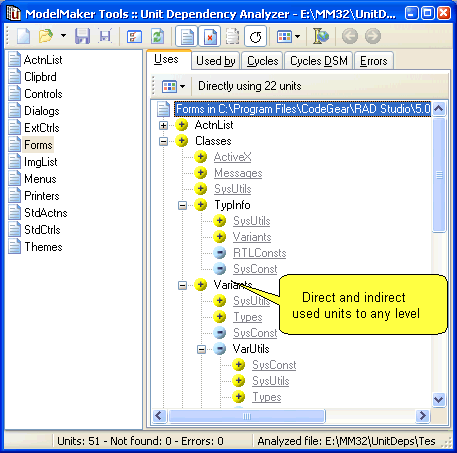
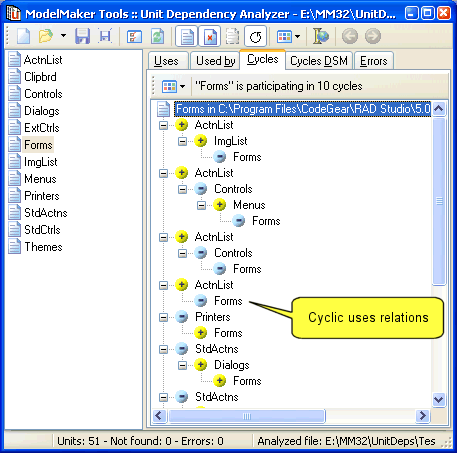
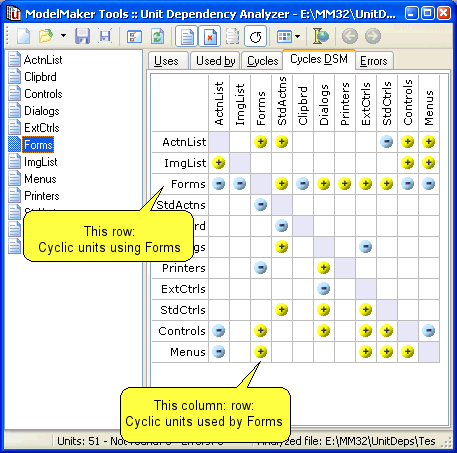
[WayBackDelphi Unit Dependency Scanner with sources at [WayBack] GitHub – norgepaul/DUDS

via:

Note the scanner mentioned by Stefan now generates a 404; however there is an archived page.

Future idea: use Delphi AST as parser instead of the current internal tokeniser/parser combination.

And of course there is one in MMX (which has been free for a while now): [WayBack] Unit Dependency Analyzer – MMX


–jeroen

Posted in Delphi, Development, Software Development | 3 Comments »

Quickly finding and debugging jQuery event handlers with findHandlersJS – The Blinking Caret

Posted by jpluimers on 2018/10/16

tl;dr: Finding event handlers registered using jQuery can be tricky. findHandlersJS makes finding them easy, all you need is the event type and a jQuery selector for the elements where the events might originate.

I need to invest some time in using this: [WayBackQuickly finding and debugging jQuery event handlers with findHandlersJS – The Blinking Caret

Sourcecode: [WayBackraw.githubusercontent.com/ruidfigueiredo/findHandlersJS/master/findEventHandlers.js

References:

Via: [WayBackjavascript – Chrome Dev Tools : view all event listeners used in the page – Stack Overflow

–jeroen

Posted in Chrome, Development, Google, JavaScript/ECMAScript, jQuery, Power User, Scripting, Software Development, Web Browsers, Web Development | Leave a Comment »

macOS Sierra: Change the order of the network ports your computer uses to connect

Posted by jpluimers on 2018/10/15

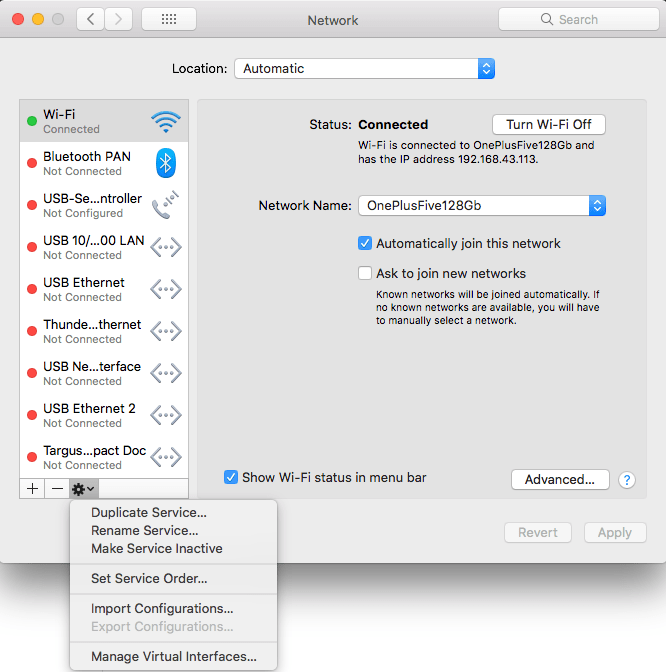
Very useful when you want to give your WiFi less priority than an USB or Thunderbolt network adapter: [WayBack] macOS Sierra: Change the order of the network ports your computer uses to connect.
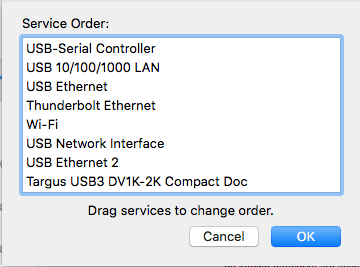
It is not just that the topmost adapter gets more priority: it also determines the DNS search!

Anyway: after choosing “Set Service Order” on the right, choose the order as seen below.

–jeroen

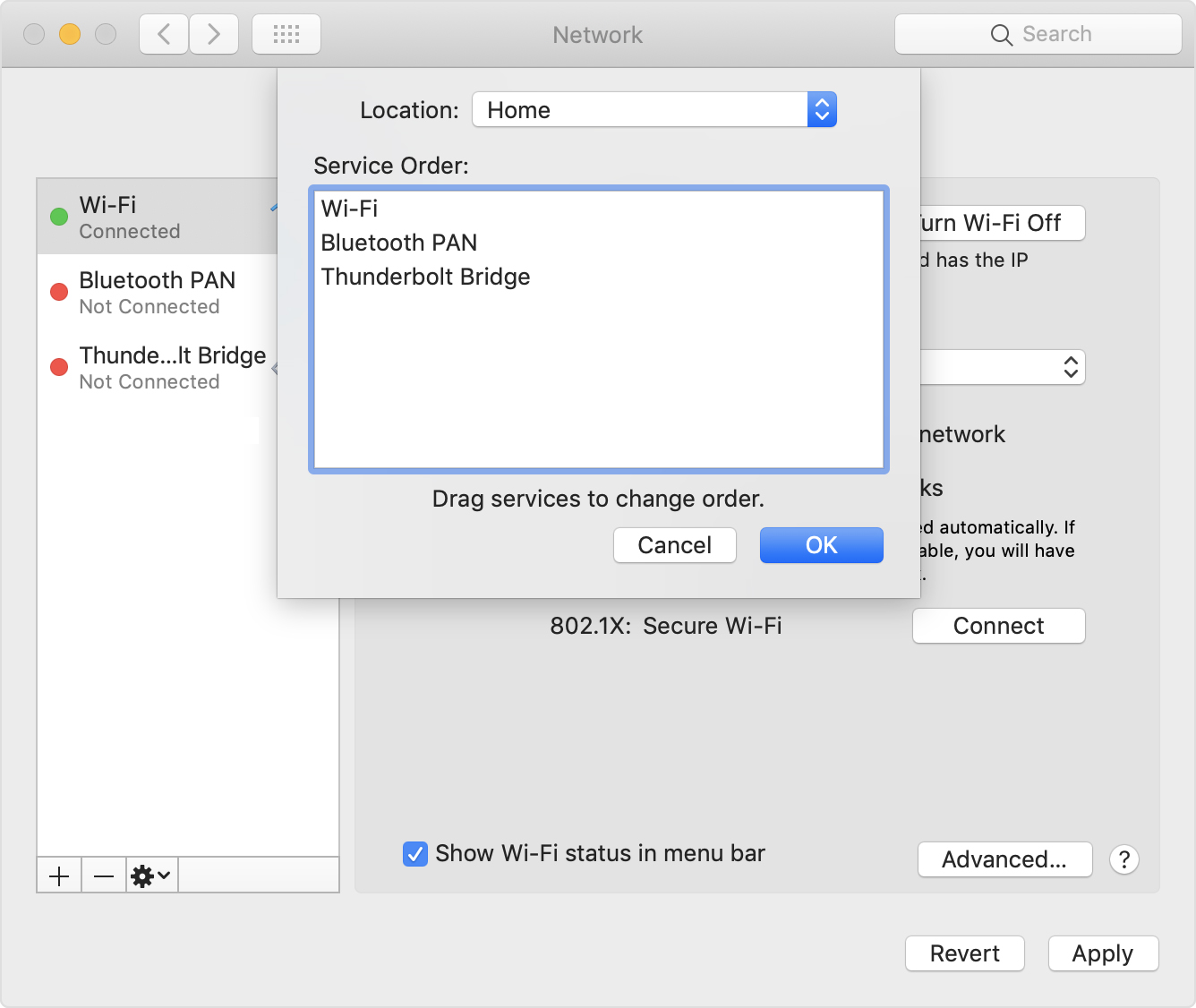
PS: Since Apple is cleaning up their site, only the above WayBack works, but luckily the below link explains it in a very similar way when using Locations:

[WayBack] How to use network locations on your Mac – Apple Support


Posted in Apple, iMac, Mac, Mac OS X / OS X / MacOS, MacBook, Power User | Leave a Comment »

Why Are My Text Messages Stuck Pending | Pushbullet Help Central

Posted by jpluimers on 2018/10/15

Try this fix first:

For many, this issue goes away by simply reinstalling our Android app on your phone. We suggest giving this a try first.

That didn’t work, but this did:

Check that the correct device is selected in the top left of the SMS interface.

You may have an old device selected, which is preventing SMS from working correctly. Check that the correct device is selected in the drop down. You can remove old devices here.

It looks like all my old smartphones were still there despite not being a SIM card in them. Removing all but my active phone solved the problem.

Source: [WayBackWhy Are My Text Messages Stuck Pending | Pushbullet Help Central

–jeroen

Posted in Android Devices, Chrome, Google, Power User | Leave a Comment »