The Wiert Corner – irregular stream of stuff

Jeroen W. Pluimers on .NET, C#, Delphi, databases, and personal interests

  • My badges

  • Twitter Updates

  • My Flickr Stream

  • Pages

  • All categories

  • Enter your email address to subscribe to this blog and receive notifications of new posts by email.

    Join 1,862 other subscribers

Archive for November, 2018

You are not Google (use UNPHAT) – The Isoblog.

Posted by jpluimers on 2018/11/02

and you are not Amazon or LinkedIn either.

Next time you find yourself Googling some cool new technology to (re)build your architecture around, I urge you to stop and follow UNPHAT instead:

  • Understand problem
  • eNumerate candidate solutions
  • Papers of candidates
  • Historical context of candidates
  • Advantages/disadvantages
  • Think!

More elaborate abstract: [WayBackYou are not Google (use UNPHAT) – The Isoblog.

Original article: [WayBackYou Are Not Google – Bradfield.

Video: Computer Science 186, 001 – Spring 2015 Introduction to Database Systems – Joseph Hellerstein Creative Commons 3.0: Attribution-NonCommercial-NoDerivs, Free Download & Streaming : Internet Archive

–jeroen

Posted in Infrastructure, LifeHacker, Power User | Leave a Comment »

Thread by @MaxFagin: “November is here, and that means a massive shift is coming. And by “massive” I am of course referring to the redefinition of the kilogram unit of mass […]”

Posted by jpluimers on 2018/11/02

Good read: Thread by @MaxFagin: “November is here, and that means a massive shift is coming. And by “massive” I am of course referring to the redefinitilogram unit of mass that the world has been building up to for more than 100 years. Let me explain: 1/ I’ve h […]” [WayBack]

via: [WayBack] Das Urkilogrann wird arbeitslos. Es wird durch eine Definition ersetzt, die auf physikalischen Effekten statt auf einem Sample basiert. – Kristian Köhntopp – Google+

–jeroen

Read the rest of this entry »

Posted in History, LifeHacker, Power User, science | Leave a Comment »

50 Battery Hacks – Battery Experts

Posted by jpluimers on 2018/11/02

I learned a few things from this list: [WayBack50 Battery Hacks – Battery Experts

Via: [WayBack] I learned a lot! – Lars Fosdal – Google+

–jeroen

Posted in LifeHacker, Power User | Leave a Comment »

Topic: “Request Feedback” button vanished | WordPress.com Forums

Posted by jpluimers on 2018/11/02

Too bad, as it was fun while it lasted:

Even worse: the change was not announced, so people find out after the fact. A similar thing happened back in the “Press This” removal process (which got restored).

Some notes on “The WordPress bookmarklet was deprecated. Please delete it from your web browser.” because the `/wp-admin/press-this.php` based URLs look very similar.

The cool things about the “Request Feedback” were these:

Read the rest of this entry »

Posted in Bookmarklet, Power User, SocialMedia, Web Browsers, WordPress | Leave a Comment »

Creating a full off-line installation directory for Visual Studio 2017 Community

Posted by jpluimers on 2018/11/01

Steps:

  1. mkdir C:\Installs\VS2017Community\VS2017CommunityLayout
  2. pushd C:\Installs\VS2017Community
  3. bitsadmin.exe /transfer "VS2017CommunityBootstrap" https://aka.ms/vs/15/release/vs_community.exe C:\Installs\VS2017Community\vs_community.exe
  4. vs_community.exe --lang en-US --layout C:\Installs\VS2017Community\VS2017CommunityLayout
  5. VS2017CommunityLayout\vs_community.exe

Step 3 needs a full path to the destination file.

Step 4 can take a relative path.

Step 4 takes considerable time (for 15.2 about 90 minutes on a 100 Mibit/s fiber connection with an ~8 millisecond ping time to download.visualstudio.microsoft.com; for 15.8 with 80 Mibit/s and a ~4 millisecond ping about 120 minutes) resulting in ~40 gigabyte download.

After download, run the vs_setup.exe in theVS2017CommunityLayout directory.

Note that upgrading to a newer version of Visual Studio 2017 will require downloads! See [WayBack] Offline Install Modify always goes to the WEB – Developer Community.

Note that after installation, Visual Studio 2017 needs considerable disk space as found via visual studio 2017 disk size – Google Search:

[WayBack] Visual Studio 2017 System Requirements | Microsoft Docs:

Find the minimum system requirements, supported hardware, and languages for the Visual Studio 2017 product family.

Hardware
  • 1.8 GHz or faster processor. Dual-core or better recommended
  • 2 GB of RAM; 4 GB of RAM recommended (2.5 GB minimum if running on a virtual machine)
  • Hard disk space: up to 130 GB of available space, depending on features installed; typical installations require 20-50 GB of free space.
  • Hard disk speed: to improve performance, install Windows and Visual Studio on a solid state drive (SSD).
  • Video card that supports a minimum display resolution of 720p (1280 by 720); Visual Studio will work best at a resolution of WXGA (1366 by 768) or higher.

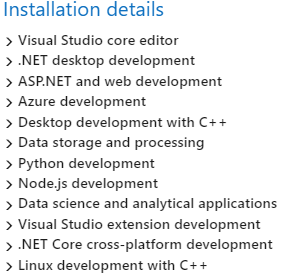
For instance, the choices below require about 22 gigabyte of space, while adding mobile .NET development adds another 13 gigabyte.
Via:

–jeroen

Posted in .NET, Development, Software Development, Visual Studio 2017, Visual Studio and tools | Leave a Comment »

PlasticSCM Workaround for “Can’t perform a checkout in an edited xlink.”

Posted by jpluimers on 2018/11/01

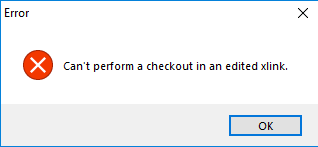
Error message during a commit (checkin) or shelve of some changes:

---------------------------
Error
---------------------------
Can't perform a checkout in an edited xlink.
---------------------------
OK
---------------------------

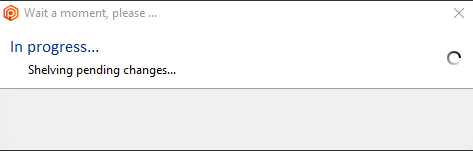
In this case it is during a shelve:

---------------------------
Wait a moment, please...
---------------------------
In progress...
Shelving pending changes
---------------------------
OK
---------------------------

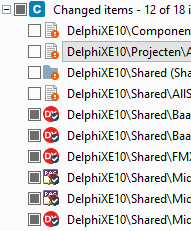
I cannot show all changes, but the third one is an xlink:

The error did not return any meaningful results when I searched for it, but the developers on the team indicated “Errors like these happen every now and then; there is no information in Google. Sit down, cry a little, then restart with a fresh repository”.

Workaround

The workaround for this undocumented behaviour is tedious, but works:

Read the rest of this entry »

Posted in Development, PlasticSCM, Software Development, Source Code Management | Leave a Comment »

PSBL: Passive Spam Block List powered by Spamikaze

Posted by jpluimers on 2018/11/01

On my research list: [WayBackPassive Spam Block List:

PSBL is an easy-on, easy-off blacklist that does not rely on testing and should reduce false positives because any user can remove their ISP’s mail server from the list.

The idea is that 99% of the hosts that send me spam never send me legitimate email, but that people whose mail server was used by spammers should still be able to send me email.

This results in a simple listing policy: an IP address gets added to the PSBL when it sends email to a spamtrap, that email is not identified as non-spam and the IP address is not a known mail server.

Via: Hans Wolters commenting at [WayBack] For my research list: Source: Bruteforce login prevention… – Jeroen Wiert Pluimers – Google+

References:

–jeroen

Posted in *nix, *nix-tools, Development, Perl, Power User, Scripting, Software Development | Leave a Comment »