


If I ever need to do something with GitLab notifications more than just look at the web-ui:
- [WayBack] GitLab Notification Emails – GitLab Documentation
- [WayBack] Notification settings API – GitLab Documentation
–jeroen
Posted by jpluimers on 2019/03/26
If I ever need to do something with GitLab notifications more than just look at the web-ui:
–jeroen

Posted in Uncategorized | Leave a Comment »
Posted by jpluimers on 2019/03/26
Cool article for doing image stuff from within C#: [Archive.is] Image recognition with C# and Emgu libraries – CodeProject
–jeroen
Posted in .NET, C#, Development, Software Development | Leave a Comment »
Posted by jpluimers on 2019/03/25
[WayBack] Call Everything with search pattern as parameter? – voidtools forum:
C:\Program Files\Everything\Everything.exe -search """aaa bbb"""
The extra quotes are needed to get through 2 layers of de-quoting.
Related: [WayBack] How to apply quotes from the command line – voidtools forum
–jeroen
Posted in Everything by VoidTools, Power User, Windows | Leave a Comment »
Posted by jpluimers on 2019/03/25
I’m surely going to need this gist one day: [WayBack] How to passthrough SATA drives directly on VMWare ESXI 6.5 as RDMs
–jeroen
Posted in ESXi6.5, Power User, Virtualization, VMware, VMware ESXi | Leave a Comment »
Posted by jpluimers on 2019/03/25
No Google results for “balloonVMCI loaded successfully”.
I had this when booting from a USB installation of ESXi 6.5.0.a.
It got resolved with ESXi 6.5.0 Update 1. Apparently the first version has issues booting on a SuperMicro-X10SRH-CF from a USB stick.
It’s a bit tricky to get the accompanying VMware-VMvisor-Installer-6.5.0.update01-5969303.x86_64.iso as the my VMware site is a bit broken (even if you have the license, it says you are not entitled), but luckily the ESXi 6.5 update 1 download page [Cache/Archive.is] has the hashes:
MD5SUM:
6d71ca1a8c12d73ca75952f411d16dc7
SHA1SUM:5a38ae10162e0a1395b12ea31cba6342796f6383
SHA256SUM:f6e5000dff423c275b3ffbdfe08145f369d04b8c4ade5a413f2ef2a029a5e3ef
You also need a good USB stick. If it’s not good enough, you get errors like “Host Local Swap Location has not been enabled” during boot**.
–jeroen
** full log at for instance [WayBack] 2017-02-03T03:00:01Z crond[66604]: crond: USER root pid 87677 cmd /usr/lib/vmwar – Pastebin.com
Posted in ESXi6.5, Mainboards, Power User, SuperMicro, Virtualization, VMware, VMware ESXi, X10SRH-CF | Leave a Comment »
Posted by jpluimers on 2019/03/22
Just out of curiosity, I wanted to try run a CHKDSK at boot time of a non-system disk.
The trick appears to be to ensure something locks the drive. An easy way to do that is have a command prompt open inside a directory on that drive.
The below example show just that: a regular command prompt locking the E: drive and an administrative command prompt scheduling the check at boot time:
Regular command prompt:
Microsoft Windows [Version 10.0.15063]
(c) 2017 Microsoft Corporation. All rights reserved.

C:\Users\jeroenp>e:

E:\>cd $RECYCLE.BIN

E:\$RECYCLE.BIN>
Administrative command prompt:
C:\WINDOWS\system32>chkdsk /R /F E:
The type of the file system is NTFS.

Chkdsk cannot run because the volume is in use by another
process.  Chkdsk may run if this volume is dismounted first.
ALL OPENED HANDLES TO THIS VOLUME WOULD THEN BE INVALID.
Would you like to force a dismount on this volume? (Y/N) n

Chkdsk cannot run because the volume is in use by another
process.  Would you like to schedule this volume to be
checked the next time the system restarts? (Y/N) y

This volume will be checked the next time the system restarts.

C:\WINDOWS\system32>
–jeroen

Posted in Power User, Windows, Windows 10, Windows 7, Windows 8, Windows 8.1 | Leave a Comment »
Posted by jpluimers on 2019/03/22
This thread also has a nice discussion on alternatives to scanning film and slides: [WayBack] New for the D850: Nikon ES-2 film digitizing adapter set – scan film at 45.7MP | Nikon Rumors
–jeroen
Posted in About, LifeHacker, Personal, Photography, Power User | Leave a Comment »
Posted by jpluimers on 2019/03/21
A few notes I wrote down when coaching a team to write better unit tests and test tooling form themselves.
References:
In the particular case for this team, testing was mostly done using DUnit for Delphi.
Here, these are worth mentioning:
GuiTestRunner: any DUnit based test runner can use it (though the default console TextTestRunner skips it, but https://github.com/graemeg/fptest/blob/master/src/TextTestRunner.pas and https://github.com/VSoftTechnologies/DUnit-XML/blob/master/Example/DUnitXMLTest.dpr shows how it can be used).
Suite.LoadConfiguration(IniFileName, UseRegistry, True) or RegisteredTests.LoadConfiguration(IniFileName, UseRegistry, True) where
IniFileName contains the INI filename, for instance from ExtractFilePath(ParamStr(0)) + 'dunit.ini' or from a ParamStr parameter on the command-line.UseRegistry usually is FalseBreak on Failures (see screenshot below) so breaking tests will throw an EBreakingTestFailure.ITestSuite implementing class in order to register a suite (just pass a SuitePath when registering multiple tests)ITestSuite implementing class (like descending from TTestSuite) are
SetUp or TearDown for that suite level\ backslash or / forward slash in test suite names (which is unwise because a lot of tooling sees those as suite hierarchy separators)function TestSuite(AName: string; const Tests: array of ITest): ITestSuite;procedure RegisterTest(SuitePath: string; test: ITest); overload;procedure RegisterTest(test: ITest); overload;procedure RegisterTests(SuitePath: string; const Tests: array of ITest); overload;procedure RegisterTests(const Tests: array of ITest); overload;function RegisteredTests: ITestSuite;procedure TTestSuite.LoadConfiguration(const iniFile: TCustomIniFile; const section: string);procedure TTestSuite.SaveConfiguration(const iniFile: TCustomIniFile; const section: string);DUnit.iniDUnit.ini file will be saved after the GUI tests are run (overwriting any changes) when the Auto Save Configuration is enabled (which is the default)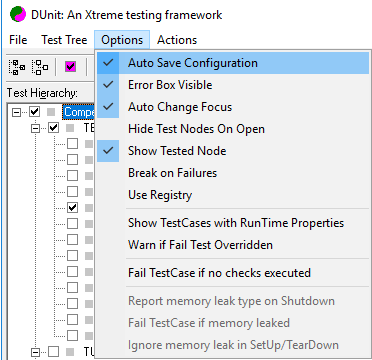
[] brackets) as Tests.TestPath, where TestPath either
. period separated path of suites ending in an test class0 to disable the test.RunCount with an integer value indicating how often that test needs to be executedTestName=1 or TestName.RunCount=1 will disappear from the ini file because those are default values.RunCount ) is at [WayBack] delphidicontainer/dunit.ini at master · danieleteti/delphidicontainer · GitHubRegistration and exclusion are two separate concerns.
To configure non-GUI tests, first run the GUI tester, configure it, then copy the resulting DUnit.ini file to the environment where the non-GUI tests are being run.
Be sure to check out test decorators, and maybe amend them with dependency injection. Example for apply database setup/teardown to a full suite of tests: [WayBack] How to organize testing of DB in dUnit — IT daily blog, news, magazine, technologies
Some resurrected documentation links because not all links from [WayBack] DUnit – Xtreme testing for Delphi and [WayBack] DUNIT: An Xtreme testing framework for Delphi programs succeed.

–jeroen

Posted in Agile, Conference Topics, Conferences, Development, Event, Software Development, Unit Testing | Leave a Comment »
Posted by jpluimers on 2019/03/21
 Cool stuff: [WayBack] Python Data Science Handbook | Python Data Science Handbook.
Based on that I learned a lot of things on book publishing:
The Jupyter Notebook is a web-based interactive computing platform. The notebook combines live code, equations, narrative text, visualizations, interactive dashboards and other media.
Via: [WayBack] You can read the Python Data Science Handbook by @jakevdp for free on his website – ThisIsWhyICode – Google+
–jeroen

Posted in Development, Python, Scripting, Software Development | Leave a Comment »
Posted by jpluimers on 2019/03/21
Interesting way to keep your ESXi rug up to date:
[WayBack] Keep track of VMware ESXi patches, subscribe by RSS, Twitter and E-Mail! – Brought to you by @VFrontDe: VMware ESXi 6.5.0 Patch History.
There is an RSS feed: http://feeds.feedburner.com/Esxi650PatchTracker and in depth information at [WayBack] VMware ESXi Patch Tracker – Help.
Clicking on the link next to Imageprofile will popup a screen with instructions how to upgrade your ESXi box to that level, for instance:
# Cut and paste these commands into an ESXi shell to update your host with this Imageprofile

# See the Help page for more instructions

#

esxcli network firewall ruleset set -e true -r httpClient

esxcli software profile update -p ESXi-6.5.0-20170702001-standard \

-d https://hostupdate.vmware.com/software/VUM/PRODUCTION/main/vmw-depot-index.xml

esxcli network firewall ruleset set -e false -r httpClient

#

# Reboot to complete the upgrade
I wish there was a similar thing for [WayBack] ESXi Embedded Host Client as I could not find any of the esxui VIB files mentioned there at esxui site:https://esxi-patches.v-front.de.
By the time you read this I really hope these two esxui things have been fixed:
–jeroen
Posted in ESXi6.5, Power User, Virtualization, VMware, VMware ESXi | Leave a Comment »

 The Wiert Corner - irregular stream of stuff