The Wiert Corner – irregular stream of stuff

Jeroen W. Pluimers on .NET, C#, Delphi, databases, and personal interests

  • My badges

  • Twitter Updates

  • My Flickr Stream

  • Pages

  • All categories

  • Enter your email address to subscribe to this blog and receive notifications of new posts by email.

    Join 1,861 other subscribers

Archive for May, 2020

Insomnia REST Client

Posted by jpluimers on 2020/05/12

[WayBack] Insomnia REST Client  A powerful REST API Client with cookie management, environment variables, code generation, and authentication for Mac, Window, and Linux.

Source code at [WayBack] GitHub – getinsomnia/insomnia: The most intuitive cross-platform REST API Client 😴.

Via: [WayBack] Paw is nice – The Isoblog.

–jeroen


Posted in Communications Development, Development, HTTP, Internet protocol suite, JavaScript/ECMAScript, JSON, REST, Scripting, Software Development, TCP, Web Development | Leave a Comment »

Bash Notes for Professionals book

Posted by jpluimers on 2020/05/12

For my reading list: Bash Notes for Professionals book

Download: [WayBack]  BashNotesForProfessionals.pdf

Via: [WayBack] Bash Notes for Professionals – a book compiled from Stack Overflow Documentation released under Creative Commons BY-SA  – ThisIsWhyICode – Google+

–jeroen

Posted in *nix, *nix-tools, bash, bash, Development, Power User, Scripting, Software Development | Leave a Comment »

Web accessibility is hard, so please let your sites not become worse over time

Posted by jpluimers on 2020/05/11

Despite clear guidelines (European level since 2016, W3C level since 2018), web accessibility is still hard, both for web site developers and their users.

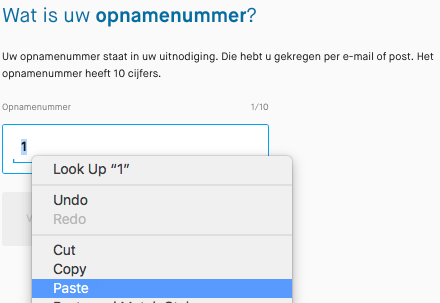
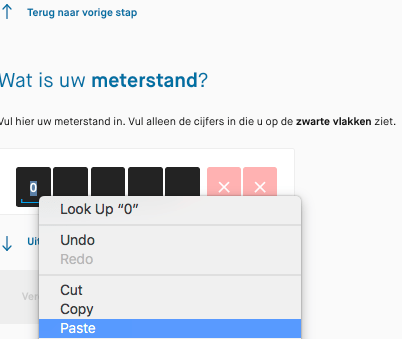
Two years ago, bumped into a Dutch government web site that had become worse over time: they disabled keyboard paste for numeric fields, only would paste 1 digit at a time, and managed to have the delete button delete the current digit (like what the backspace does and should do) instead of the next.

Please do not do that!

Here are the guidelines: [WayBack] Web Content Accessibility Guidelines (WCAG) 2.1

This is the (Dutch) story:

 [WayBack] Thread by @jpluimers: “Beste @Waternet, waarom kan ik niet meer het hele opnamenummer in 1 keer plakken? Cijfertje voor cijfertje uit de gescippen plakken is nogal veel werk. Vroeger ging dit wel goed. plakken werkt niet met het toetsenbord: alleen m […]”

[WayBack] Jeroen Pluimers on Twitter: “Beste @Waternet, waarom kan ik niet meer het hele opnamenummer in 1 keer plakken? Cijfertje voor cijfertje uit de gescande brief knippen plakken is nogal veel werk. Vroeger ging dit wel goed.… “

[WayBack] Jeroen Pluimers on Twitter: “plakken werkt niet met het toetsenbord: alleen maar met de muis, dus onhandig voor mensen met een beperking. Als je in het veld staat werken alleen de numerieke toetsen en pijltjes van je toetsenbord, en de delete knop haalt het verkeerde karakter weg. Wie verzint die ongein?”

[WayBack] Jeroen Pluimers Twitterissä: “Bij postcode werkt plakken weer wel (en de rest van het toetsenbord ook helemaal), maar bij meterstand weer niet. Hoe maak je je site onhandig voor mensen met een beperking les 1: het is helemaal gelukt. Jammer! Lees eens … en … “

[WayBackJeroen Pluimers Twitterissä: “Bij email adres werkt plakken weer wel (gelukkig, het zijn maar 40 karakters), maar er mist een cruciale stap: meternummer. Die controle is voor adressen met meerdere meters ontzettend belangrijk. Vroeger werd dat wel gecontroleerd. Het invoerproces is dus een achteruitgang.”

[WayBackJeroen Pluimers on Twitter: “Laatste probleem is een waarschuwing *achteraf* dat jullie geen email bevestiging kunnen sturen. Super onhandig, omdat je op dat moment de stand ook niet meer kunt afdrukken. Er is veel werk voor jullie aan de winkel. Hou me gaarne op de hoogte van de vorderingen. CC @matijn”

[WayBackJeroen Pluimers on Twitter: “Bij dit soort problemen denk ik altijd aan @matijn en anderen waar toegankelijkheid van onschatbaar belang is. Zo zonde dat organisaties het voor elkaar krijgen om dit te verslechteren in plaats van de verbeteren, ondanks de Europese richtlijnen uit 2016 “

–jeroen

Read the rest of this entry »

Posted in Development, Internet, Software Development, Usability, User Experience (ux), Web Development | Leave a Comment »

OpenSuSE: keeping an ssh connection alive (convenient for keeping port forwardings up)

Posted by jpluimers on 2020/05/11

Below the steps for ensuring port forwardings are up from an OpenSuSE system to an ssh server using autossh on the client system.

Autossh

Many have written about the benefits of autossh, so I can’t do better than that. A good abbreviated quote is from [WayBack] Autossh for persistent database connectivity – Compose Articles:

Autossh wraps SSH in an application which was designed to monitor the state of the connection. It will also restart SSH if it exits. The idea of the monitoring is that If it sees the packets aren’t going through, it would also restart SSH. …

the developers of OpenSSH added some options – ServerAliveInterval and ServerAliveCountMax – which activate built in connection checking in OpenSSH. Together the options set checking at a set interval and exiting SSH if the count maximum is exceeded. And when SSH exits, autossh will restart it so it serves as much improved replacement as there’s no extra ports needed.

Summary

The scenario is that a client user named autoSshClientUser automatically logs on to a server as user autosshServerUser using autossh from the client system.

The sequence is to first test this manually from the client system using a regular ssh command, then manually with the autossh command from the client system, then automate the starting (and keep alive) of the autossh instance from the client system.

Start configuring the server side first:

  1. Create a user specific for logon (below it is autosshServerUser).
  2. Limit the user to only allow only port forwarding: [WayBacksecurity – How to create a restricted SSH user for port forwarding? – Ask Ubuntu

Then finish confiruging the client side:

  1. Install autossh: zypper install autossh
  2. Ensure autoSshClientUser has an ssh key that does not require a password
  3. Transfer the public key to autosshServerUser on the remote system
  4. Test with an autossh command that suits your situation best
  5. Ensure autoSshClientUser runs a job at or shortly after system boot (after the network is up) that will start autossh with the correct parameters

If the autoSshClientUser is root, then you could use a service to start autossh, but be sure that service depends on a functioning network connection.

If the autoSshClientUser is not root, then usually a user based cron job works best.

Naming idea:

  • Assume the client system is Train and the server is Station
  • The server user could be autosshTrainAtStation
  • The client user could be autosshTrainToStation

Server side

  1. [Archive.is] Installing on other OSes (Debian / Ubuntu;  Debian / Ubuntu; CentOS / Fedora / RHEL; ArchLinux; FreeBSD; OSX)
  2. As root, add he user using [Archive.is]useradd:

    # useradd --create-home --shell /bin/false autosshServerUser

  3. As root use su to become autosshServerUser, then create an ssh key without a password (you need to specify the logon shell) using [WayBackssh-keygen.
    This generates bot a secure rsa and

    # su --shell /bin/bash autosshServerUser
    > cd ~
    > whoami
    autosshServerUser
    > rm -f ~/.ssh/id_rsa ~/.ssh/id_rsa.pub
    > ssh-keygen -t rsa -b 4096 -o -a 100 -f ~/.ssh/id_rsa -N ''
    Generating public/private rsa key pair.
    Your identification has been saved in /home/autosshServerUser/.ssh/id_rsa.
    Your public key has been saved in /home/autosshServerUser/.ssh/id_rsa.pub.
    The key fingerprint is:
    SHA256:... autossh24@linux
    The key's randomart image is:
    +---[RSA 2048]----+
    ...
    +----[SHA256]-----+
    > rm -f ~/.ssh/id_ed25519 ~/.ssh/id_ed25519.pub
    > ssh-keygen -t ed25519 -o -a 100 -f ~/.ssh/id_ed25519 -N ''
    Generating public/private ed25519 key pair.
    Your identification has been saved in /home/autossh24/.ssh/id_ed25519.
    Your public key has been saved in /home/autossh24/.ssh/id_ed25519.pub.
    The key fingerprint is:
    SHA256:... autossh24@linux
    The key's randomart image is:
    +--[ED25519 256]--+
    ...
    +----[SHA256]-----+
    

Client side

I need to check the below links on killing autossh (including the underlying ssh based connection), as you need to use the kill or pkill parameters signals -3 (SIGQUIT), not -9 (SIGKILL) as explained in [WayBack] ssh – How to stop/kill an autossh tunnel? – Super User (thanks mariusmatutiae and dviljoen).

Monitoring the state of the ssh connection needs some parameters (like ClientAliveInterval and ClientAliveCountMax). A good start on that is [WayBack] networking – autossh does not kill ssh when link down – Server Fault.

Setting up a service so root automatically logs on a remote system:

With non-root, it might actually be possible to do this  as a service too given there is a user= parameter in service files:

Though as non-root, most people seem to use cron [WayBack] ssh – Problems with Autossh: running from cron vs terminal – Super User

Please do not use /etc/init.d/after.local as mentioned often (for instance in [WayBack] TUMBLEWEED run a script a boot): this mechanism has been deprecated and won’t work on more recent systems (like 2012 and younger: [WayBack] openSUSE Forums – systemd and using the after.local script in openSUSE 12.1). The same holds for /etc/init.d/boot.local: don’t use, even though many people indicate it works, for instance [WayBack] Run a command at boot.

An interesting approach is at [WayBack] Autossh Startup Script for Multiple Tunnels | Surnia Ulula, though I will stick with what’s below.

Read:

Downloads:

References

Most of the above comes from these links:

–jeroen

Continuation of:

Read the rest of this entry »

Posted in *nix, Communications Development, Development, Internet protocol suite, Linux, Power User, SSH, TCP | Leave a Comment »

Exploits Database by Offensive Security

Posted by jpluimers on 2020/05/11

Interesting to monitor (it has a nice RSS feed!) so you can ensure your systems get patched sooner rather than later:

The Exploit Database – Exploits, Shellcode, 0days, Remote Exploits, Local Exploits, Web Apps, Vulnerability Reports, Security Articles, Tutorials and more.

–jeroen

Posted in Power User, Security | Leave a Comment »

How to remove a jammed label from a Dymo Labelwriter – via Dymo Label Printers from The Dymo Shop

Posted by jpluimers on 2020/05/08

Good instructions from:

A Video below the fold.

Via: [WayBack] SOLVED: Our dymo printer is jammed, it has what looks like – Fixya

–jeroen

Read the rest of this entry »

Posted in LifeHacker, Power User | Leave a Comment »

x11vnc encryption: ssl works better with the realVNC client than ssh tunneling

Posted by jpluimers on 2020/05/08

“Unencrypted connection” “This connection is unencrypted. Would you like to continue?”

When you run realVNC to an x11vnc server, even over an ssh tunneled connection, it will produce errors like the screenshots on the right (from an Android device) and below (from a Mac).

Before I had the realVNC client on the Mac, the Android message totally put me on the wrong foot. I tried searching x11vnc encryption, of which almost all results – especially the Google Search abstracts – will talk about ssh tunneling. So tried to setup the client to use the SSH endpoint, but it refused because it doesn’t talk SSH.

So then I installed a desktop realVNC client (in this case on my Mac) and got this message:

“Unencrypted connection” “The connection to this VNC Server will not be encrypted”

Then it occurred to me that maybe the VNC server itself could do encryption as well and would not need an SSH tunnel after all. And it does even in the first hit:

Read the rest of this entry »

Posted in *nix, *nix-tools, Power User, Screen sharing, VNC/Virtual_Network_Computing, X11 | Leave a Comment »

8 Brilliant Search Tools Hidden Within Google Photos

Posted by jpluimers on 2020/05/08

Boy, I totally missed that the Google Photos search has become this smart: [WayBack8 Brilliant Search Tools Hidden Within Google Photos:

Google Photos’ search tools have powerful algorithms that are on par with that of Google’s search engine.

Things I tried so far at photos.google.com and they all work, most way better than I anticipated:

  • Person names
  • Object names (like Fiat, BMW, Mercedes, Mitsubishi, Ford; Fiat got me way more car types than the other brands)
  • Area names (cities, places, countries, etc)
  • Time
  • Screenshot, screenshots, png, jpg
  • Tall, wide, but these worked better: portrait, landscape
  • WMC

–jeroen

Posted in Google, Google Photos, Power User | Leave a Comment »

How to set default apps on Mac | iMore

Posted by jpluimers on 2020/05/07

  1. Select a file in the Finder
  2. Press Command-I to show the “Get Info” for the file (or right click, and select “Get Info”)
  3. Expand the “Open with”
  4. Select a different application than the default, then press the “Change All…” button
  5. Confirm the change

Based on [WayBack] How to set default apps on Mac | iMore.

–jeroen

Posted in Apple, iMac, Mac, Mac OS X / OS X / MacOS, MacBook, MacBook Retina, MacBook-Air, MacBook-Pro, MacMini, Power User | Leave a Comment »

MultiBootUSB

Posted by jpluimers on 2020/05/07

Cool tool:

MultiBootUSB is a cross platform software written in python which allows you to install multiple live linux on a USB disk non destructively and option to uninstall distros. Try out the world’s first true cross platform multi boot live usb creator for free. Download Now!

Information and downloads on [WayBackMultiBootUSB.

There are actually a few repositories within [WayBack] mbusb (multibootusb) · GitHub of which one has a ruby implementation as well.

A more elaborate article is on [WayBack] How to Install Multiple Linux Distributions on One USB, but the site should get you going just fine.

Via: [WayBack] Multiple Linux distributions on one UBS stick. I just tried it with: * CloneZilla * Lubuntu * LiteLinux The tool they describe – MultiBootUSB – comes w… – Thomas Mueller (dummzeuch) – Google+

–jeroen

Posted in *nix, *nix-tools, Development, Hardware, Linux, Power User, Python, Software Development, USB | Leave a Comment »