The Wiert Corner – irregular stream of stuff

Jeroen W. Pluimers on .NET, C#, Delphi, databases, and personal interests

  • My badges

  • Twitter Updates

  • My Flickr Stream

  • Pages

  • All categories

  • Enter your email address to subscribe to this blog and receive notifications of new posts by email.

    Join 1,860 other subscribers

Archive for November, 2020

OSX 10.13 with vSphere 6.7 – Virtual Odyssey

Posted by jpluimers on 2020/11/16

Interesting: I never realised that getting MacOS installed on ESXi was relatively easy!

[WayBack] OSX 10.13 with vSphere 6.7 – Virtual Odyssey:

vCenter 6.7a/ESXi 6.7a Installing OSX 10.13 seemed pretty straight forward on 6.7. Essentially, you mount the ISO as per usual, and the only thing I had to do before starting the installation was to format the disk via terminal. Once…

So no need for all this:

–jeroen


Posted in ESXi6.5, ESXi6.7, Power User, Virtualization, VMware, VMware ESXi | Leave a Comment »

Wifispots instellen | Klantenservice | Ziggo

Posted by jpluimers on 2020/11/16

Voor mijn archief: de truc is het certificaat. Zonder dat werkt het niet, ondanks juiste credentials.

Wifispots instellen

Gratis wifi tappen terwijl je de hort op bent? Stel Wifispots in op je smartphone, tablet en laptop. Als je favoriete hotspot in Nederland Wifispots heeft ingesteld, bespaar je mobiele data voor de momenten dat je er even echt helemaal uit bent. Kun je lekker een ijsje kopen in plaats van extra MB’s.

Wil je deze tocht voltooien? Zorg dat je dit afvinkt:

  • Je persoonlijke inloggegevens voor Wifispots,die staan in Mijn Ziggo.
  • Een internetabonnement van Ziggo
  • Een voor wifi geschikt toestel (bijvoorbeeld een laptop, smartphone of tablet)

  Het zijn behoorlijk veel stappen, maar de meeste klanten hebben in 10 minuten Wifispots ingesteld.
1

Voordat je begint

Het is niet mogelijk om een verbinding te maken met je eigen Wifispot. Dat komt omdat je eigen wifi-netwerk een veel sterker signaal uitzendt dan je Wifispot. Als je eigen wifi-netwerk binnen bereik is, raden we je altijd aan om daar verbinding mee te maken.

Wifispots kun je het best gebruiken buiten de deur. Bijvoorbeeld bij vrienden thuis, bij een klant op kantoor of in het winkelcentrum.

Verbind je voor het eerst met Wifispots en ben je thuis? Maak dan bijvoorbeeld verbinding met de Wifispot van de buren. Je hoeft maar één keer een verbinding te maken en daarna ben je automatisch verbonden met alle Wifispots van Ziggo als je in de buurt bent.

Ga verder
2

In de volgende stappen laten we zien hoe je Wifispots handmatig instelt op je apparaat. Daarvoor heb je een Wifispots gebruikersnaam en wachtwoord nodig. Je vindt ze in Mijn Ziggo.

Stel je Wifispots in op je smartphone of tablet? Gebruik dan een ander apparaat (bijvoorbeeld je laptop) om dit stappenplan te doorlopen. Zo lees je alle aanwijzingen in dit stappenplan op het ene scherm en installeer je Wifispots op je smartphone of tablet op het andere scherm.

a.

 Klik op Log in om Mijn Ziggo te openen in een nieuw venster. Voer je inloggegevens in om in te loggen op Mijn Ziggo.

Ben je je Mijn Ziggo inloggegevens vergeten? Vraag ze opnieuw op.

b.

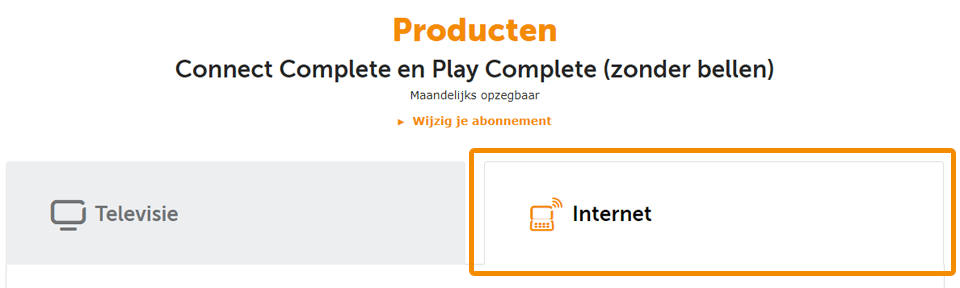
Kies na het inloggen voor Producten en klik op het tabblad Internet.

c.

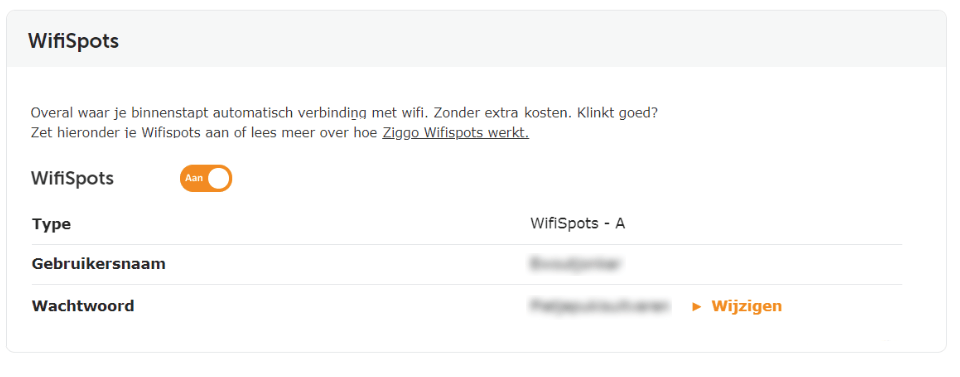
Scroll naar beneden naar Wifispots. Hier zie je je Wifispots gebruikersnaam en wachtwoord. Noteer deze gegevens. We hebben ze straks nodig.

Ook zie je hier je welke Type Wifispots je hebt.

Welk typeWifispots zie je in Mijn Ziggo staan?

A B
3

Wat wil je instellen?

Naast Wifispots van Ziggo kun je in Zeeland gebruik maken van de DELTA WifiSpots, handig voor als je in Zeeland op vakantie bent.

Welke Wifispots wil je instellen?

Ziggo Wifispots DELTA WifiSpots
4

Kies het merk of besturingssysteem van je apparaat

Android

Apple

Windows

Overige

5

Kies het merk of besturingssysteem van je apparaat

Samsung

Huawei

LG

HTC

Sony

Overige

6

Download het Wifispots certificaat

Bekijk je dit stappenplan op een ander apparaat? 
Scan de QR-code op deze pagina om het certificaat meteen te downloaden.

Heb je geen QR-scanner? 
Ga dan naar ziggo.nl/certificaat om het certificaat te downloaden.

Verder
7
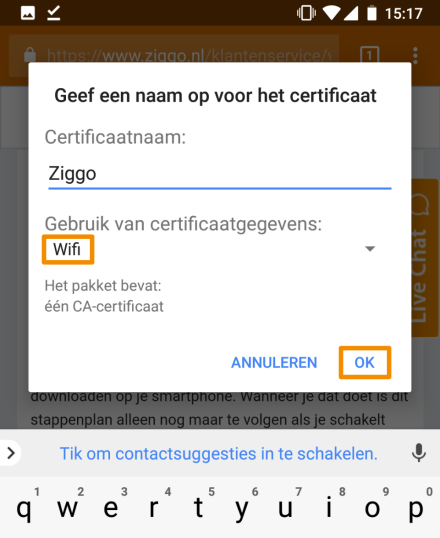
  • Vul bij Certificaatnaamin: Ziggo
  • Gebruik van certificaatgegevens: Wifi
  • Druk op OK
Verder
8

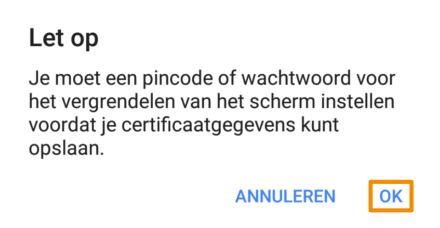
Heeft je toestel nog geen vergrendelbeveiliging? Dan wordt je nu gevraagd deze in te stellen.

Krijg je een melding om vergrendelbeveiliging in te stellen?

ja nee
9

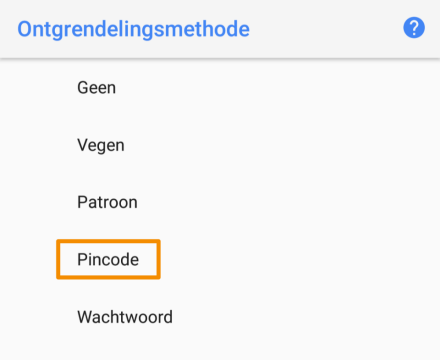
Druk op Pincode.

Verder
10

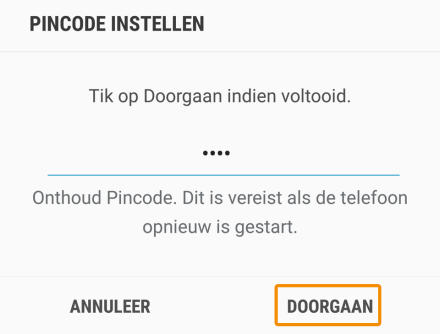
Kies een pincode en druk op Doorgaan.

Verder
11

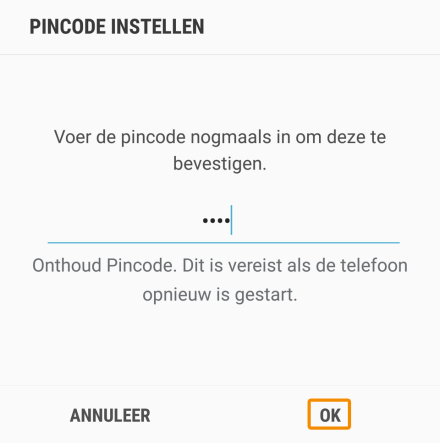
Bevestig de pincode en druk op OK.

Verder
12

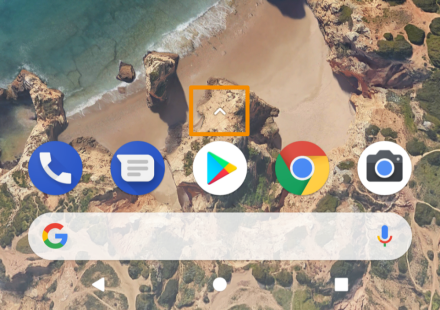
Sluit je internetbrowser ga naar je Apps.

Hoe je precies bij al je apps komt, verschilt per merk. In dit geval swipe je omhoog of druk je op het pijltje.

Verder
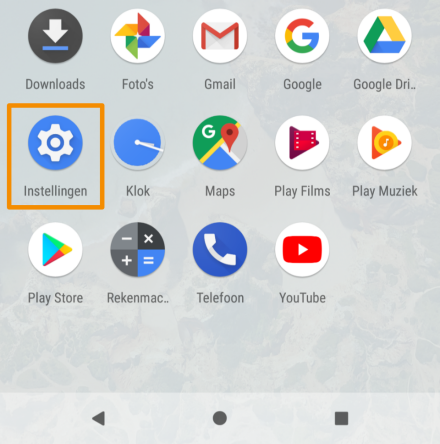
13

Druk op Instellingen.

verder
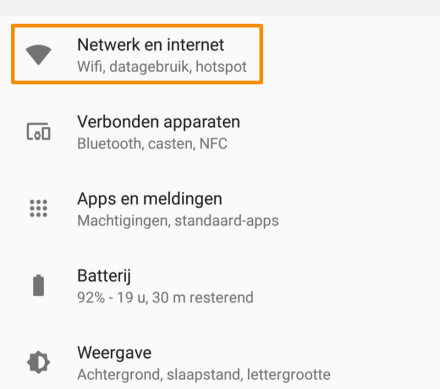
14

Druk op Netwerk en internet.

Verder
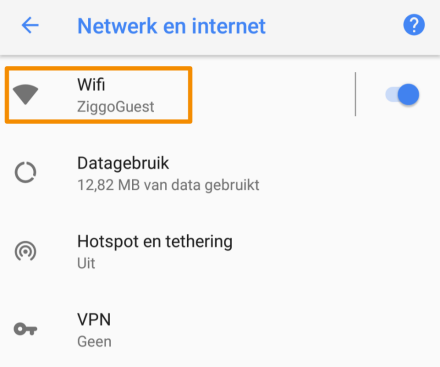
15

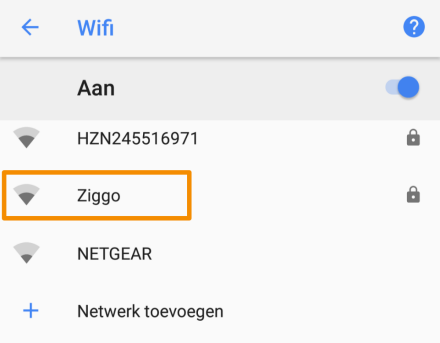
Druk op Wifi.

Verder
16

Druk op het draadloze netwerk met de naam Ziggo. Je apparaat logt vanaf nu altijd vanzelf in op alle WifiSpots. Goed om te weten: wanneer je de stappen uit dit stappenplan voor je apparaat hebt gevolgd, wordt je nooit meer gevraagd om de verbinding met WifiSpots met ‘OK’ of ‘accept’ te bevestigen.

Tip: We raden je aan om nooit verbinding te maken met wifi-netwerken die je niet vertrouwt. Doe je dat wel dan loop je het risico dat je hackers toegang geeft tot je smartphone, tablet of laptop. Zonder dat je het doorhebt.

Let op: zie je geen draadloos netwerk met de naam Ziggo? Schakel de wifi op je smartphone even uit en vervolgens weer aan. En controleer ook of je in de buurt zit van een Ziggo wifi-modem.


Krijg je nu een pop-up melding te zien of zie je bij het netwerk Ziggo ‘verbonden’ staan?

Ik krijg een pop-up melding Ik zie staan ‘verbonden’
17
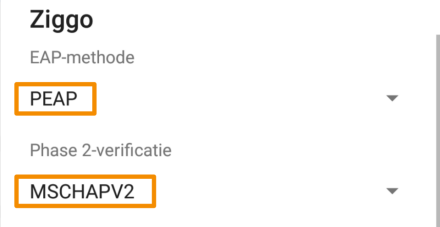
  • Kies bij EAP-methode voor PEAP.
  • Kies bij Phase 2-verificatie voor MSCHAPV2.
Verder
18

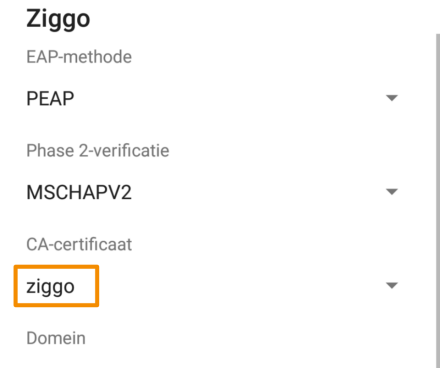
Selecteer bij CA-certificaat het certificaat met de naam Ziggo uit Stap 6.

Verder
19
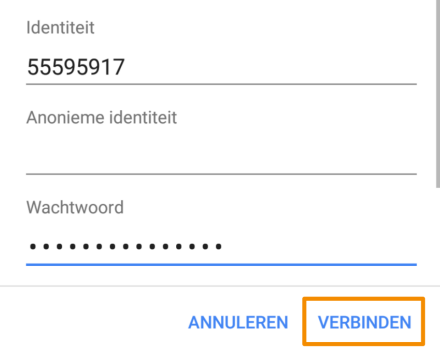
  • Geef bij Identiteit je WifiSpots gebruikersnaam op.
  • Laat Anonieme identiteit leeg.
  • Vul bij Wachtwoord je Wifispots wachtwoord in.
  • Druk op Verbinden.

Zie je een melding over netwerkcontrole?

Ja Nee

Gefeliciteerd!

Je hebt Wifispots succesvol ingesteld.

Goed om te weten:

  • Je kunt vijf apparaten instellen voor gebruik met Wifispots. Wil je WifiSpots gebruiken op een ander apparaat? Vergeet dan niet de Wifispots instellingen op een van de eerder ingestelde apparaten te verwijderen.
  • Voortaan ben je automatisch verbonden als je in de buurt bent van een Wifispot. Bijvoorbeeld bij vrienden of relaties, in je favoriete koffietentje of in het winkelcentrum.
  • Op je eigen wifi-modem kun je geen verbinding maken met Wifispots. Dat is omdat je eigen modem een veel snellere wifi-verbinding heeft dan de Wifispots. Je bent nu wel automatisch verbonden met Wifispots op alle andere plekken waar ze beschikbaar zijn.
–jeroen

Posted in Power User, WiFi | Leave a Comment »

Pokestop not turning purple in Pokemon go

Posted by jpluimers on 2020/11/16

Found the cause of Pokemon stops not turning purple via [WayBackHas anyone else had issues with lures/incense not attracting pokemon? : pokemongo: phone was set on manual time (which was correct), and had time zone wrong for the current GPS location.

Now Pokeomon go gets confused, so does not want to guess the state of the Pokestop.

Via: [WayBackLures not spawning anything. Pokestops won’t turn purple. [BUG] : pokemongo

–jeroen

Read the rest of this entry »

Posted in LifeHacker, Power User | Leave a Comment »

Archiving Google Product Forums URLs

Posted by jpluimers on 2020/11/13

Archiving Google Product Forum URLs is a pain in the butt for a couple of reasons:

So the trick for saving is:

  1. Get from the /forum/#!topic/ based URL to the /d/topic/ based one
  2. Put it after the archive.is/?run=1&url=, then save

--jeroen


Posted in Conference Topics, Conferences, Event, Internet, InternetArchive, Power User, WayBack machine | Leave a Comment »

Apple M1 ARM based Mac as a developer: docker and brew will take a while to be working at all or supported

Posted by jpluimers on 2020/11/13

Important to consider as both a developer and end-user when switching architectures:

Is all my software working and supported on the new architecture.

For many Mac developers, at least docker and brew are important.

Bad news here:

  • Docker will likely take months before it runs, and then only support ARM images
  • Brew will likely take months to get supported.

Background links:

https://github.com/docker/for-mac/issues/4733

https://github.com/Homebrew/brew/issues/7857

Via:

https://twitter.com/IanColdwater/status/1326929654368792576

Oh, there is plenty more that does not work yet or never will:

https://twitter.com/craigstuntz/status/1328482376125657091

Apple MacBook Pro 13” M1 Review- Why You Might Want To Pass

https://www.forbes.com/sites/patrickmoorhead/2020/11/21/apple-macbook-pro-13-m1-reviewwhy-you-might-want-to-pass/amp/

Posted in Uncategorized | Leave a Comment »

Using both Google Fi and Google Voice means you need to use two Google accounts on the same phone

Posted by jpluimers on 2020/11/13

A while ago at [WayBack] The only bad thing about getting Google Fi is giving up Google Voice — Mike Elgan wrote

You can use Google Voice or you can use Google Fi, but you can’t use both. I just bought a Google Pixel 3 in order to move off AT&T and onto Google Fi fulltime. (We used to use Google Fi using my wife’s account, but only as a WiFi hotspot while traveling abroad.) It’s kind of a bummer, b

But the first comment has a solution that works, if you use two Google accounts that is:

I have Fi and use Google Voice on the same phone. I have to sign in to Voice with a separate Google account so there are some compromises but it works for how I use it.

–jeroen

Posted in Google, GoogleVoice, LifeHacker, Power User | Leave a Comment »

Chrome not asking to save or saving passwords? – Google Product Forums

Posted by jpluimers on 2020/11/13

From [Archive.is] Chrome not asking to save or saving passwords? – Google Product Forums

Hemanth M said:

After a lot of playing around, I’ve arrived at an elegant solution. Here are the steps:Steps to make Google Chrome offer to save (prompt) password for a particular site (for e.g abcd.com) and Auto-login the site with the credentials thus saved.

  1. Go to the given URL ‘abcd.com
  2. Right-click Page Info and disable ‘JavaScript’
  3. Reload the page.
  4. Enter the credentials (uid,pwd)
  5. A prompt appears to save password.
  6. Click on Save password.
  7. Auto-Login Extension bubble appears on this page.

At this point it is important because the extension ‘Auto-Login’ (like many other extensions) require JavaScript to be enabled.

  1. Re-enable the JavaScript for this page and reload the page.
  2. Now Click on the ‘Auto-Login’ bubble for remembering automatically logging into the site hereafter!

In my case, this was for ESXi credentials. Do not go the cheap way or revealing them inside javascript like these guys:

–jeroen

Posted in Chrome, Chrome, Google, Power User, Web Browsers | Leave a Comment »

powershell – Format-Table forgets some properties, but Format-List shows them all. Why? – Stack Overflow

Posted by jpluimers on 2020/11/12

Reminder to self: finish the script that initiated this 2013 question (yes ages ago!) [WayBack] powershell – Format-Table forgets some properties, but Format-List shows them all. Why? – Stack Overflow.

The question was based on code I was really happy I saved in the WayBack machine: WayBack: how-to: Print/List installed programs/applications sorted by date | Tech Off | Forums | Channel 9

So here the question and the answer.

Read the rest of this entry »

Posted in .NET, CommandLine, Development, PowerShell, PowerShell, Scripting, Software Development | Leave a Comment »

Me starting to understand the real life meanings of Shim

Posted by jpluimers on 2020/11/12

The combination of being partially word blind and having learned English initially from my urge to understand computing books during my (Dutch) secondary education in the mid 1980s, I often have a gap between understanding “daily life” or “real life” English words, especially when they also have a meaning in the computing world.

So it took me a while to get the non-computing meaning of shim.

In computing, shim is used as word for tiny shell that separates two layers, which means my original association was with “sphere”.

Had I associated with an adapter or something that puts space between to layers, it would have been much easier to understand the “real life” meaning of a spacer shim.

Similarly, I had trouble understanding washer (which I associated with washing, and is right: it often means washing machine, but can also mean dish washer, which is an odd word for me as it washes much more than dishes). It took me much longer to get there is an additional meaning for a mechanical construction washer, which is a thin disc (so not a tube-like ring) often used as spacers, so in a sense similar to a shim.

In Dutch, I have the same problem with “wasmachine” (English washing machine) and “afwasmachine” (Dish washer).

To add to the confusion, hardware washers in Dutch are called rings.

–jeroen

All of the above links are from Wikipedia.

Posted in About, LifeHacker, Personal, Power User | Leave a Comment »

Tracking down Delphi “abstract error” occassions.

Posted by jpluimers on 2020/11/12

A few tips.

  1. Set breakpoints in these units:
    • System.pas:
      procedure _AbstractError;
      begin
        if Assigned(AbstractErrorProc) then
          AbstractErrorProc;
        RunErrorAt(210, ReturnAddress);
      end;
    • System.SysUtils.pas:
      procedure AbstractErrorHandler;
      begin
        raise EAbstractError.CreateRes(@SAbstractError);
      end;
  2. add a watch for ClassName that has “Allow side effects and function calls” enabled
  3. run your code until it breaks or stops (usually in the first method above)
  4. double click on each entry in the “Call Stack” pane, and for each entry:
    • set a break point on the call to the method above it in the stack trace
    • note that sometimes this is on the line you arrived, but sometimes one more more lines higher in your code
    • the cause is that the stack trace will show you where your code will RETURN to, not the place it was CALLED FROM.
  5. abort your program
  6. run your program again
  7. on each hit breakpoint, watch the value of ClassName:
    • if it becomes [WayBackE2003: Undeclared identifier: 'ClassName', then:
      • observe the method directives
      • if it includes static, but it is actually inside a class, then remove the static

Sometimes you cannot perform the last step: class property definitions have to be backed by static class methods.

This usually means you have a bad design anyway: you depend on global/singleton kind of behaviour that is almost impossible to properly test.

A better approach is to have regular object instances for that, then use constructor dependency injection (maybe combined with factory or dependency injection container) to setup the structures of dependencies.

TODO

Create a conference summary on the use of class versus instance methods, and static/regular.

Base materials:

–jeroen

Posted in Conference Topics, Conferences, Delphi, Development, Event, Software Development | Leave a Comment »