When migrating to a new machine, or syncing settings between machines, I hoped these are useful steps (in reverse order: export, then import, just like to reset a machine you turn it off first, then on): [WayBack] Import and Export Registered SQL Servers To Other Machines.
TL;DR: don’t bother exporting the SQL Server login passwords over: doing so will break your registered servers list.
Trying this myself between co-workers, exporting from one person, then importing for another can cause a very unstable SSMS environment giving errors like these during startup even using SSMS 2017:
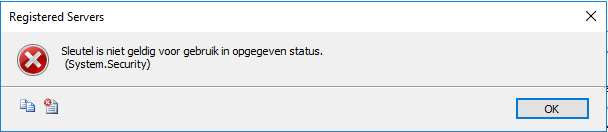 TITLE: Registered Servers
------------------------------
Sleutel is niet geldig voor gebruik in opgegeven status.
(System.Security)
------------------------------
BUTTONS:
OK
------------------------------
===================================
Sleutel is niet geldig voor gebruik in opgegeven status.
(System.Security)
------------------------------
Program Location:
at System.Security.Cryptography.ProtectedData.Unprotect(Byte[] encryptedData, Byte[] optionalEntropy, DataProtectionScope scope)
at Microsoft.SqlServer.Management.RegisteredServers.RegisteredServer.ProtectData(String input, Boolean encrypt)
at Microsoft.SqlServer.Management.RegisteredServers.RegisteredServer.get_SecureConnectionString()
at Microsoft.SqlServer.Management.RegisteredServers.RegisteredServer.get_ConnectionString()
at Microsoft.SqlServer.Management.RegisteredServers.RegisteredServer.get_ServerName()
at Microsoft.SqlServer.Management.RegisteredServers.RegisteredServerTree.AddRegisteredServerNode(RegisteredServer regSrv, TreeNodeCollection nodes)
TITLE: Registered Servers
------------------------------

Sleutel is niet geldig voor gebruik in opgegeven status.
 (System.Security)

------------------------------
BUTTONS:

OK
------------------------------
===================================

Sleutel is niet geldig voor gebruik in opgegeven status.
 (System.Security)

------------------------------
Program Location:

   at System.Security.Cryptography.ProtectedData.Unprotect(Byte[] encryptedData, Byte[] optionalEntropy, DataProtectionScope scope)
   at Microsoft.SqlServer.Management.RegisteredServers.RegisteredServer.ProtectData(String input, Boolean encrypt)
   at Microsoft.SqlServer.Management.RegisteredServers.RegisteredServer.get_SecureConnectionString()
   at Microsoft.SqlServer.Management.RegisteredServers.RegisteredServer.get_ConnectionString()
   at Microsoft.SqlServer.Management.RegisteredServers.RegisteredServer.get_ServerName()
   at Microsoft.SqlServer.Management.RegisteredServers.RegisteredServerTree.AddRegisteredServerNode(RegisteredServer regSrv, TreeNodeCollection nodes)
and errors like these when exporting information:
 TITLE: Export Registered Servers
------------------------------
The operation 'Export' failed. (Microsoft.SqlServer.Management.RegisteredServers)
For help, click: http://go.microsoft.com/fwlink?ProdName=Microsoft+SQL+Server&ProdVer=14.0.17254.0+((SSMS_Rel_17_4).180502-0908)&LinkId=20476
------------------------------
ADDITIONAL INFORMATION:
Serialization operation on RegisteredServer[@Name='servername'] has failed. (Microsoft.SqlServer.Management.Sdk.Sfc)
For help, click: http://go.microsoft.com/fwlink?ProdName=Microsoft+SQL+Server&ProdVer=14.0.17254.0+((SSMS_Rel_17_4).180502-0908)&LinkId=20476
------------------------------
Sleutel is niet geldig voor gebruik in opgegeven status.
(System.Security)
------------------------------
BUTTONS:
OK
------------------------------
===================================
The operation 'Export' failed. (Microsoft.SqlServer.Management.RegisteredServers)
------------------------------
For help, click: http://go.microsoft.com/fwlink?ProdName=Microsoft+SQL+Server&ProdVer=14.0.17254.0+((SSMS_Rel_17_4).180502-0908)&LinkId=20476
------------------------------
Program Location:
at Microsoft.SqlServer.Management.RegisteredServers.RegisteredServersStore.Export(SfcInstance obj, String file, CredentialPersistenceType cpt)
at Microsoft.SqlServer.Management.RegisteredServers.Utils.Export(Object obj, String filename, Boolean includeUserNames, ServerType serverType)
at Microsoft.SqlServer.Management.RegisteredServers.RegisteredServersContextMenuManager.ContextExport(Object sender, EventArgs e)
===================================
Serialization operation on RegisteredServer[@Name='SQLServerName'] has failed. (Microsoft.SqlServer.Management.Sdk.Sfc)
------------------------------
For help, click: http://go.microsoft.com/fwlink?ProdName=Microsoft+SQL+Server&ProdVer=14.0.17254.0+((SSMS_Rel_17_4).180502-0908)&LinkId=20476
------------------------------
Program Location:
at Microsoft.SqlServer.Management.Sdk.Sfc.SfcSerializer.Write(XmlWriter instanceWriter, Object instance, Dictionary`2 namespaces)
at Microsoft.SqlServer.Management.Sdk.Sfc.SfcSerializer.WriteAllInstances()
at Microsoft.SqlServer.Management.Sdk.Sfc.SfcSerializer.Write(XmlWriter xmlWriter)
at Microsoft.SqlServer.Management.RegisteredServers.RegisteredServersStore.Export(SfcInstance obj, String file, CredentialPersistenceType cpt)
===================================
Sleutel is niet geldig voor gebruik in opgegeven status.
(System.Security)
------------------------------
Program Location:
at System.Security.Cryptography.ProtectedData.Unprotect(Byte[] encryptedData, Byte[] optionalEntropy, DataProtectionScope scope)
at Microsoft.SqlServer.Management.RegisteredServers.RegisteredServer.ProtectData(String input, Boolean encrypt)
at Microsoft.SqlServer.Management.RegisteredServers.RegisteredServer.get_SecureConnectionString()
at Microsoft.SqlServer.Management.RegisteredServers.RegisteredServer.GetConnectionStringWithEncryptedPassword(CredentialPersistenceType cpt)
at Microsoft.SqlServer.Management.RegisteredServers.RegisteredServersStore.FilterProperty(SfcSerializer serializer, FilterPropertyEventArgs propertyArgs)
at Microsoft.SqlServer.Management.Sdk.Sfc.SfcSerializer.WriteInternal(XmlWriter instanceWriter, Object instance, Dictionary`2 namespaces)
at Microsoft.SqlServer.Management.Sdk.Sfc.SfcSerializer.Write(XmlWriter instanceWriter, Object instance, Dictionary`2 namespaces)
TITLE: Export Registered Servers
------------------------------

The operation 'Export' failed. (Microsoft.SqlServer.Management.RegisteredServers)

For help, click: http://go.microsoft.com/fwlink?ProdName=Microsoft+SQL+Server&ProdVer=14.0.17254.0+((SSMS_Rel_17_4).180502-0908)&LinkId=20476

------------------------------
ADDITIONAL INFORMATION:

Serialization operation on RegisteredServer[@Name='servername'] has failed. (Microsoft.SqlServer.Management.Sdk.Sfc)

For help, click: http://go.microsoft.com/fwlink?ProdName=Microsoft+SQL+Server&ProdVer=14.0.17254.0+((SSMS_Rel_17_4).180502-0908)&LinkId=20476

------------------------------

Sleutel is niet geldig voor gebruik in opgegeven status.
 (System.Security)

------------------------------
BUTTONS:

OK
------------------------------

===================================

The operation 'Export' failed. (Microsoft.SqlServer.Management.RegisteredServers)

------------------------------
For help, click: http://go.microsoft.com/fwlink?ProdName=Microsoft+SQL+Server&ProdVer=14.0.17254.0+((SSMS_Rel_17_4).180502-0908)&LinkId=20476

------------------------------
Program Location:

   at Microsoft.SqlServer.Management.RegisteredServers.RegisteredServersStore.Export(SfcInstance obj, String file, CredentialPersistenceType cpt)
   at Microsoft.SqlServer.Management.RegisteredServers.Utils.Export(Object obj, String filename, Boolean includeUserNames, ServerType serverType)
   at Microsoft.SqlServer.Management.RegisteredServers.RegisteredServersContextMenuManager.ContextExport(Object sender, EventArgs e)

===================================

Serialization operation on RegisteredServer[@Name='SQLServerName'] has failed. (Microsoft.SqlServer.Management.Sdk.Sfc)

------------------------------
For help, click: http://go.microsoft.com/fwlink?ProdName=Microsoft+SQL+Server&ProdVer=14.0.17254.0+((SSMS_Rel_17_4).180502-0908)&LinkId=20476

------------------------------
Program Location:

   at Microsoft.SqlServer.Management.Sdk.Sfc.SfcSerializer.Write(XmlWriter instanceWriter, Object instance, Dictionary`2 namespaces)
   at Microsoft.SqlServer.Management.Sdk.Sfc.SfcSerializer.WriteAllInstances()
   at Microsoft.SqlServer.Management.Sdk.Sfc.SfcSerializer.Write(XmlWriter xmlWriter)
   at Microsoft.SqlServer.Management.RegisteredServers.RegisteredServersStore.Export(SfcInstance obj, String file, CredentialPersistenceType cpt)

===================================

Sleutel is niet geldig voor gebruik in opgegeven status.
 (System.Security)

------------------------------
Program Location:

   at System.Security.Cryptography.ProtectedData.Unprotect(Byte[] encryptedData, Byte[] optionalEntropy, DataProtectionScope scope)
   at Microsoft.SqlServer.Management.RegisteredServers.RegisteredServer.ProtectData(String input, Boolean encrypt)
   at Microsoft.SqlServer.Management.RegisteredServers.RegisteredServer.get_SecureConnectionString()
   at Microsoft.SqlServer.Management.RegisteredServers.RegisteredServer.GetConnectionStringWithEncryptedPassword(CredentialPersistenceType cpt)
   at Microsoft.SqlServer.Management.RegisteredServers.RegisteredServersStore.FilterProperty(SfcSerializer serializer, FilterPropertyEventArgs propertyArgs)
   at Microsoft.SqlServer.Management.Sdk.Sfc.SfcSerializer.WriteInternal(XmlWriter instanceWriter, Object instance, Dictionary`2 namespaces)
   at Microsoft.SqlServer.Management.Sdk.Sfc.SfcSerializer.Write(XmlWriter instanceWriter, Object instance, Dictionary`2 namespaces)
Solution
- Stop SSMS
- Make a back-up, then delete
%APPDATA%\Microsoft\Microsoft SQL Server\140\Tools\Shell\RegSrvr.xml,
- Start SSMS.
Cause
You cannot import SQL Server credentials exported on another machine. It will break your server registrations list, and you cannot repair them.
See:
More background:
–jeroen


 The Wiert Corner - irregular stream of stuff