The Wiert Corner – irregular stream of stuff

Jeroen W. Pluimers on .NET, C#, Delphi, databases, and personal interests

  • My badges

  • Twitter Updates

  • My Flickr Stream

  • Pages

  • All categories

  • Enter your email address to subscribe to this blog and receive notifications of new posts by email.

    Join 1,862 other subscribers

Archive for January, 2021

Why a study with only 7 respondents can be good – from Dutch paper “De Volkskrant”

Posted by jpluimers on 2021/01/07

[Archive.is] Waarom een onderzoek met maar 7 respondenten toch goed kan zijn | De Volkskrant: Denkfouten in het hedendaags ontwerp gefileerd door innovatie-expert (en cabaretier) Jasper van Kuijk. Deze week: gebruikstest.

Google translated in English.

TL;DR

Quantitative studies often require large numbers of respondents, but quantitative studies can be done with a very small group.

While quantitative studies often will get you just one result (I rate this application a 7 out of 10, or with this A/B change, click through increases by 5%), qualitative studies will get you much more specific comments like “the main menu is cluttered”, or “the design is slick” (translated from the Image in the article).

Extensive research was done for a 2003 published paper [Archive.is] Beyond the five-user assumption: Benefits of increased sample sizes in usability testing which you can read as PDF [WayBack].

Via

[WayBack] Jasper van Kuijk on Twitter: “Mijn ‘Hoe moeilijk kan het zijn?’ van vandaag. Waarom voor gebruiksgemak een gebruikstest met 7 participanten nuttiger is dan een enquête met 1500 respondenten. #HMKHZ via de @volkskrant”

Related

[WayBack] Ionica Smeets on Twitter: “Hear, hear! Aldus een wiskundige die heel wat jaren nodig had om waarde van kwalitatief onderzoek in te zien…”

and

and

–jeroen

Read the rest of this entry »

Posted in Development, Software Development, Testing, Usability, User Experience (ux) | Leave a Comment »

Fiber cables: speed and connectors

Posted by jpluimers on 2021/01/07

Similar to the CAT# designation for speed categories, fiber cables have an OM# designation. [WayBack] OM1 fiber, OM2 fiber, OM3 fiber and OM4 fiber overview explain this well, and has this quote and image tables:

There are four kinds of multimode fibers: OM1 fiber, OM2 fiber, OM3 fiber and OM4 fiber. The letters “OM” stand for optical multi-mode.

Both OM1 and OM2 work with LED based equipment that can send hundreds of modes of light down the cable, while OM3 and OM4 are optimized for laser (eg. VCSEL) based equipment.

I have combined the tables in html as:

OM1 OM2 OM3 OM4
Maximum distance for 100 Mbit/s 2000m 2000m 2000m 2000m 100BASE -FX
Maximum distance for 1 Gbit/s 275m 550m 550m 1000m 1000BASE-SX
Maximum distance for 10 Gbit/s 33m 82m 300m 550m 10GBASE-SR
Maximum distance for 40 Gbit/s not specified not specified 100m 150m 40GBASE-SR4
Maximum distance for 100 Gbit/s not specified not specified 100m 150m 100GBASE-SR10 / 100GBASE-SR4
Diameter 62.5/125µm 50/125µm 50/125µm 50/125µm
Jacket coulors (often also cable colours) Orange Orange Aqua Aqua
Optical source LED LED VCSEL VCSEL
Bandwidth 200MHz*km 500MHz*km 2000MHz*km 4700MHz*km


Unlike CAT cabling, fiber cables can have various connectors, of which SC and LC are the most common as explained in [WayBack] SC vs LC—What’s the difference? which has this quote and image table:

  • Size: LC is half the size of SC. Actually, one SC-adapter is exactly the same size as a duplex LC-adapter. Therefore LC is more and more common in central offices where packing density (number of connections per area) is an important cost factor
  • Handling: SC is a true “push-pull-connector” and LC is a “latched connector”, although there are very innovative, real “push-pull-LCs” available which have the same handling capabilities like SC.
  • The History of Connector: The LC is the “younger” connector of the two, SC is wider spread around the world but LC is catching up. Both connectors have the same insertion loss and return loss capabilities. Generally, it depends where in the network you want to use the connector, no matter SC or LC, even the other different kinds of connector.

In html:

Name Mating
cycles
Ferrule
size
Typical
insertion loss
(dB)
IEC
specification
Cost Ease
of
use
Application
features
SC 1000 Ø 2.5mm
ceramic
0.25-0.5 61754-4 $$ ••••• Mainstream, reliable, fast deployment, field fit
LC 500 Ø 1.25mm
ceramic
0.25-0.5 61754-20 $$ ••••◦ High density, cost effective, field fit

Related:

–jeroen

Posted in Ethernet, Network-and-equipment, Power User | Leave a Comment »

Named Pipes unit for Delphi | Mick’s Mix

Posted by jpluimers on 2021/01/07

[WayBack] Named Pipes unit for Delphi | Mick’s Mix  by Russell Libby, for which (Apr 7, 2013) Francoise Piette has updated this source code for Delphi XE3 and put it on his website at [WayBackOverByte – Blog Source Code as [WayBack] IpcUsingPipes.zip.

–jeroen

Posted in Delphi, Development, Software Development | Leave a Comment »

Automating the closing of the Creative Cloud signing and ABBY FindReader for ScanSnap 5.0 dialogs

Posted by jpluimers on 2021/01/06

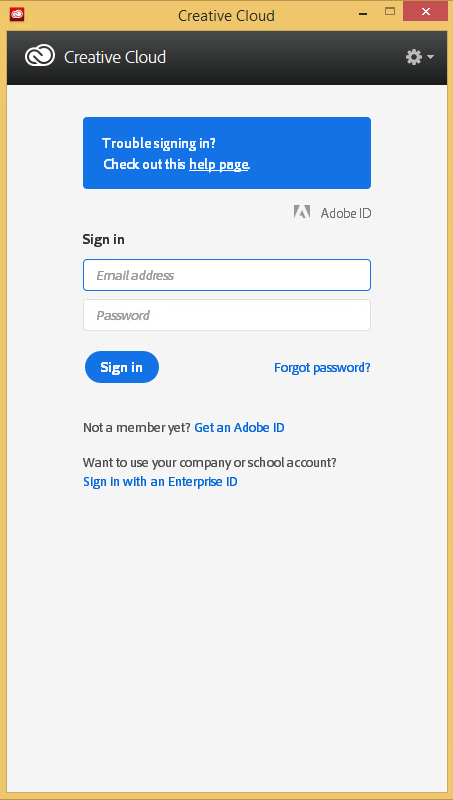
Every time my scan VM logs on I get the dialog on the right.
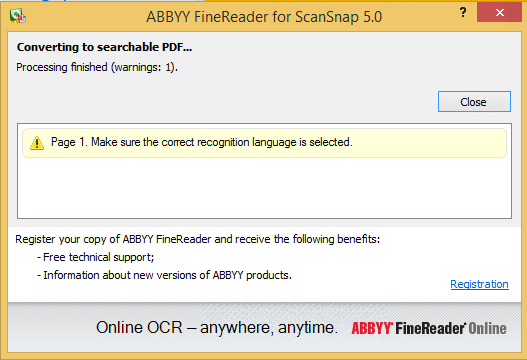
Every time I finish an OCR scan, I get the dialog below.

There are two reasons I want to close the ABBY dialog:

  1. While open, it will keep both the original PDF and OCR PDF files alive.When after a while, Windows updates auto-reboots the machine, before clicking the OK buttons I have to manually check if the conversion succeeded before removing the non-OCR PDF.This is time consuming.
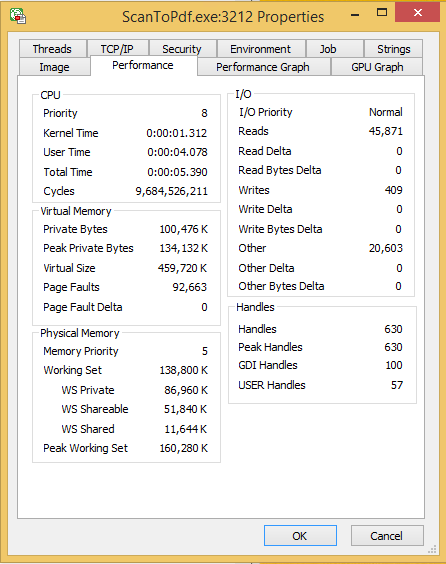
  2. While open, it still consumes a lot of system resources: about 100 megabyte for a simple single monochrome A4 page. Much more for complex, multi-page or colour documents.When scanning a lot of document this causes the system to run out of memory, after becoming much much slower because the truckload of Window handles and underlying threads drags Windows down.

I do not want to fully get rid of these dialogs, as often being aware of the progress is important, and I always forget how to re-enable things. If you can do without the dialogs, then try these:

Finding the Windows and controls

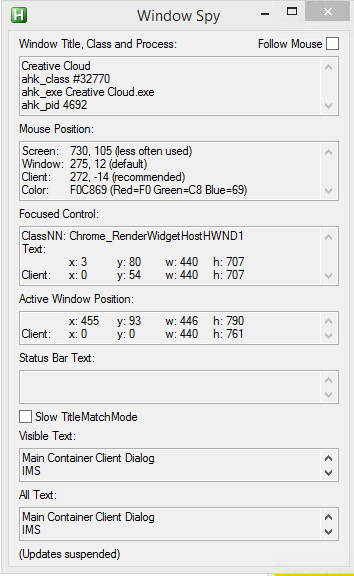
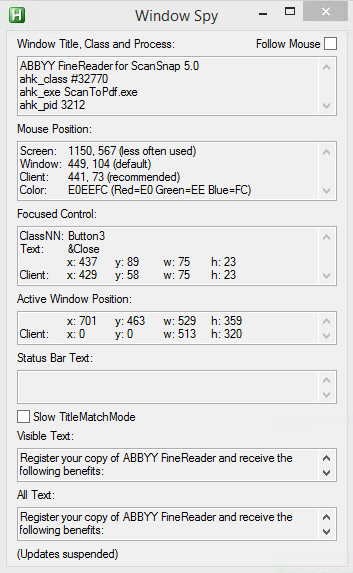
I did use one nice feature of AutoHotKey: their Windows Spy utility, which is implemented as a AHK script: [WayBack] AutoHotKey-scripts/WindowSpy.ahk at master · elig0n/AutoHotKey-scripts · GitHub. In the past this was a separate executable, so do not start looking for that any more. You can get it either after a full install of the [WayBack] Releases · Lexikos/AutoHotkey_L · GitHub, or by extracting from the most current AutoHotKey.zip from [Archive.is] AutoHotkey Downloads.

Related:

This gets these for the Create Cloud and ABBY windows:

Automating the click

I contemplated about using AutoIt (freeware, but closed source) or AutoHotKey_L (the current active fork of AutoHotKey).

AutoIt is now closed source, forked in the past as AutoHotKey, which has a lot of half backed – usually poorly documented – scripts needing you to learn a new API wrapper around existing Windows API functionality.

So I reverted back to using the Windows API using Delphi: a simple repeat loop, to check for the existence of the underlying processes, windows and controls, plus some logic to terminate then the user stops the application (Ctrl-C, Ctrl-Break), logs off, or Windows shuts down.

Releated Windows API  keywords and posts:


I could have used AutoHotKey with these hints to get it working:

MacOS

Note that when you run on MacOS, you need an alternative like for instance the video below shows via [WayBack] Stop ScanSnap From Prompting You When You Scan.

–jeroen

Read the rest of this entry »

Posted in Development, Fujitsu ScanSnap, Hardware, ix100, ix500, Power User, Scanners, Scripting, Software Development, Windows, Windows 10, Windows 8.1 | Leave a Comment »

Batch files: deleting first/middle/ending parts of environment variables

Posted by jpluimers on 2021/01/06

Batch files are often a pain to write, but you cannot always rewrite them in PowerShell.

The pain below is about deleting parts of environment variables in batch files.

I’ll just redirect to and quote from posts that can way better describe this than I do:

  • [WayBack] Check if Batch variable starts with “…” – Stack Overflow made me find
  • [WayBack] windows – Batch – Delete Characters in a String – Super User
  • [WayBack] CMD Variable edit replace – Windows CMD – SS64.com

    The variable _test containing 12345abcabc is used for all the following examples:

    ::Replace '12345' with 'Hello '
       SET _test=12345abcabc
       SET _result=%_test:12345=Hello %
       ECHO %_result%          =Hello abcabc
    
    ::Replace the character string 'ab' with 'xy'
       SET _test=12345abcabc
       SET _result=%_test:ab=xy%
       ECHO %_result%          =12345xycxyc
    
    ::Delete the character string 'ab'
       SET _test=12345abcabc
       SET _result=%_test:ab=%
       ECHO %_result%          =12345cc
    
    ::Delete the character string 'ab' and everything before it
       SET _test=12345abcabc
       SET _result=%_test:*ab=% 
       ECHO %_result%          =cabc
    
    ::Replace the character string 'ab' and everything before it with 'XY'
       SET _test=12345abcabc
       SET _result=%_test:*ab=XY% 
       ECHO %_result%          =XYcabc
    
    
    :: To remove characters from the right hand side of a string is 
    :: a two step process and requires the use of a CALL statement
    :: e.g.
    
       SET _test=The quick brown fox jumps over the lazy dog
    
       :: To delete everything after the string 'brown'  
       :: first delete 'brown' and everything before it
       SET _endbit=%_test:*brown=%
       Echo We dont want: [%_endbit%]
    
       ::Now remove this from the original string
       CALL SET _result=%%_test:%_endbit%=%%
       echo %_result%

    All the examples on this page assume the default Expansion of variables, if you are using DelayedExpansion then you can choose to change the variable references to !_variable! instead of %_variable%

    One advantage of DelayedExpansion is that it will allow you to replace the % character, it will still have to be escaped as %% but the replace action will then treat it like any other character:

    Replace the letter P with a percent symbol:
    Setlocal EnableDelayedExpansion
    _demo=somePdemoPtextP
    _demo=!_demo:P=%%!

    Remove spaces from a text string

    To delete space characters use the same syntax as above:

    SET _no_spaces=%_some_var: =%

–jeroen

Posted in Batch-Files, Development, Scripting, Software Development | Leave a Comment »

Want to use SmartPointers in Delphi? Use the Spring4D one: it is unit tested and optimised

Posted by jpluimers on 2021/01/06

A while ago, there was a nice discussion on smart pointers at [WayBack] Smart Pointers – Generics vrs non-generic implementastion – RTL and Delphi Object Pascal – Delphi-PRAXiS [en].

Conclusion from that:

  • many people think that reference counted interfaces are the same as Smart Pointers
    (basically Smart Pointers are the next level and of course they are based on reference counting)
  • there are a lot of Smart Pointer implementations, but few have a test suite, nor are optimised , nor easy to use
  • The combo Shared/IShared<T>/TShared<T> from Spring4D has all of the above advantages
  • in order to optmise Smart Pointer implementations, you really have to well know the effects of modern Delphi language constructs on the compiler in various target platforms

The discussion mentioned above includes both feature and speed comparisons.

I was a bit amazed that at CodeRage 2018, Marco Cantu introduced yet another smart pointer implementation: one worse than existing implementations, and one with only basic demonstration code, leaving out a test suite.

There have many posts on my blog about smart pointers (see the list below), but Spring4D smart pointer implementation has been around for such a long time that any well respected Delphi developer by now should use them. The source is at  Shared/IShared (search for {$REGION 'Shared smart pointer'} at the current repository).

This list below on my Smart Pointer related blog posts might not be fully complete, but at least mentions that by now you should be using Spring4D.

Some comments on the CodeRage 2018 demos

Read the rest of this entry »

Posted in Conference Topics, Conferences, Delphi, Development, Event, Software Development, Spring4D | Leave a Comment »

GitHub – andOTP/andOTP: Open source two-factor authentication for Android

Posted by jpluimers on 2021/01/05

[WayBack] GitHub – andOTP/andOTP: Open source two-factor authentication for Android.

A few highlights:

  • andOTP is a two-factor authentication App for Android 4.4+.It implements Time-based One-time Passwords (TOTP) and HMAC-Based One-Time Passwords (HOTP). Simply scan the QR code and login with the generated 6-digit code.
  • OpenPGP: OpenPGP can be used to easily decrypt the OpenPGP-encrypted backups on your PC.
  • BroadcastReceivers: AndOTP supports a number of broadcasts to perform automated backups, eg. via Tasker. These will get saved to the defined backup directory. These only work when KeyStore is used as the encryption mechanism
    • org.shadowice.flocke.andotp.broadcast.PLAIN_TEXT_BACKUP: Perform a plain text backup. WARNING: This will save your 2FA tokens onto the disk in an unencrypted manner!
    • org.shadowice.flocke.andotp.broadcast.ENCRYPTED_BACKUP: Perform an encrypted backup of your 2FA database using the selected password in settings.
  • All three versions (Google Play, F-Droid and the APKs) are not compatible (not signed by the same key)! You will have to uninstall one to install the other, which will delete all your data. So make sure you have a current backup before switching!

PlayStore: [WayBack] andOTP – Android OTP Authenticator – Apps on Google Play

•  Free and Open-Source
•  Requires minimal permissions:
•  Camera access for QR code scanning
•  Storage access for import and export of the database
•  Encrypted storage with two backends:
•  Android KeyStore (can cause problems, please only use if you absolutely have to)
•  Password / PIN
•  Multiple backup options:
•  Plain-text
•  Password-protected
•  OpenPGP-encrypted
•  Sleek minimalistic Material Design with three different themes:
•  Light
•  Dark
•  Black (for OLED screens)
•  Great Usability
•  Compatible with Google Authenticator

Via: [WayBack] ‘Aanvallen via ss7-protocol om 2fa-sms’jes te onderscheppen nemen toe’ – Computer – Nieuws – Tweakers

Check out @Jaykul’s Tweet: https://twitter.com/Jaykul/status/1091200778121957377

Instead of Google authenticator and Authy

Via https://twitter.com/martinfowler/status/1091097388201230339

Related :

Nope. It’s just a secret encoded in a QR code.

Here’s the docs on the format of the URI in the QR code: https://t.co/AJhT6PFAzx

The QR code delivers a simple, durable, shared secret.

Use U2F if you can. It is much safer, as it cannot be phished or copied.

Depends on your risk model. Device to device transfer would be a good mid-ground, but doesn’t solve the “my phone was stolen/bricked/damaged” scenario.

Which is your bigger risk – duplicating (normally encrypted) secrets or losing your device and access to everything?


–jeroen

Posted in Android, Development, Mobile Development, Security, Software Development | Leave a Comment »

Batch file: check for (non-)existence of registry key

Posted by jpluimers on 2021/01/05

Small batch file that only deletes a registry key if it exists:

:DeleteKeyIfItExists
reg query %1 >nul 2>&1
if %errorlevel% equ 0 reg delete %1 /f
goto :eof

It is based on:

  • redirecting both stderr and stdout to nul (the >nul 2>&1 bit)
  • checking reg query with the appropriate errorlevel value for equality (equ operator) for 0 (existence); you can also use 1 for non-existence.

Based on:

–jeroen

Posted in Batch-Files, Development, Scripting, Software Development | Leave a Comment »

IDEIds11…IDEIds21 – RAD Studio

Posted by jpluimers on 2021/01/05

It looks like there are pages  [WayBack] IDEIds21 – RAD Studio … [WayBack] IDEIds21 – RAD Studio.

Maybe I ever find time to find out where they are referenced from and why there is no IDEIds1 page.

–jeroen

Posted in Delphi, Development, Software Development | Leave a Comment »

Releases · upx/upx · GitHub

Posted by jpluimers on 2021/01/04

I totally forgot that upx – UPX – the Ultimate Packer for eXecutables has been on GitHub for quite a while, which meant I was running a really old version 3.91.

There have been quite a few things updated and documented in [Archive.is] upx-news.txt covering these milestones:

  1. [Archive.is] milestone 1 (for version 3.92)
  2. [Archive.is] milestone 2 (for version 3.93)
  3. [Archive.is] milestone 3 (for version 3.94)

Via UPX – Wikipedia

–jeroen

Posted in Development, Power User, Software Development, Windows, Windows Development | Leave a Comment »