The Wiert Corner – irregular stream of stuff

Jeroen W. Pluimers on .NET, C#, Delphi, databases, and personal interests

  • My badges

  • Twitter Updates

  • My Flickr Stream

  • Pages

  • All categories

  • Enter your email address to subscribe to this blog and receive notifications of new posts by email.

    Join 1,854 other subscribers

Archive for May, 2021

Connectors/cables for Serial Attached SCSI and SATA – Wikipedia

Posted by jpluimers on 2021/05/10

Since I always get confused with SAS and SATA connectors, some tables from Wikipedia:

  • Serial Attached SCSI Connectors- Wikipedia
    Codename Other names Ext./int. Pins No of devices / lanes Comment Image
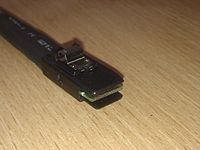
    SFF-8086 Internal mini-SAS, internal mSAS Internal 26 4 This is a less common implementation of SFF-8087 than the 36-circuit version. The fewer positions is enabled by it not supporting sidebands. SFF 8086.jpg
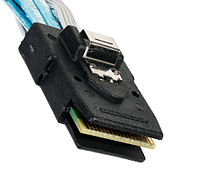
    SFF-8087 Internal mini-SAS, internal mSAS, internal iSAS, internal iPass Internal 36 4 Unshielded 36-circuit implementation of SFF-8086. Molex iPass reduced width internal 4× connector, 12 Gbit/s capability. SFF-8087 SMC.jpg
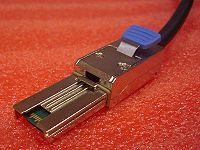
    SFF-8088 External mini-SAS, external mSAS, external iSAS, external iPass External 26 4 Shielded 26-circuit implementation of SFF-8086. Molex iPass reduced width external 4× connector, 12 Gbit/s capability. SFF 8088.jpg
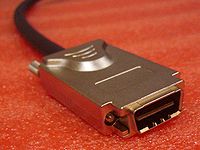
    SFF-8470 InfiniBandCX4 connector, Molex LaneLink External 34 4 High-density external connector (also used as an internal connector). SFF 8470.jpg
    SFF-8482 Internal 29 2 lanes This form factor is designed for compatibility with SATA but can drive a SAS device. A SAS controller can control SATA drives, but a SATA controller cannot control SAS drives. SFF-8482 SAS Plug - Bokeh at f22.jpg
    SFF-8484 Internal 32 or 19 4 or 2 High-density internal connector, 2 and 4 lane versions are defined by the SFF standard. SFF-8484 straight connector.jpg
    SFF-8485 Defines SGPIO (extension of SFF 8484), a serial link protocol used usually for LED indicators.
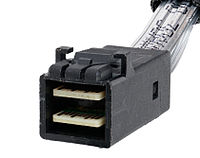
    SFF-8613 (SFF-8643) Internal 36 4 or 8 with dual connector Mini-SAS HD (introduced with SAS 12 Gbit/s) SFF-8643 SMC.jpg
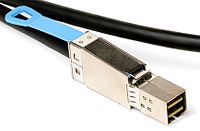
    SFF-8614 (SFF-8644) External 4 or 8 with dual connector Mini-SAS HD (introduced with SAS 12 Gbit/s) SFF-8644 cable.jpg
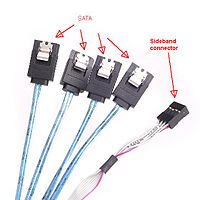
    Sideband connector Internal Often seen with 1× SFF-8643 or 1× SFF-8087 on the other end – internal fan-out for 4× SATA drives. Connects the controller to drives without backplane or to the (SATA) backplane and optionally, to the status LEDs. Sideband.jpg
    SFF-8680 Internal
    • 1
    • (2 ports)
    SAS 12 Gbit/s backplane connector
    SFF-8639 Internal 68
    • 1
    • (2 ports)
    • SAS 12 Gbit/s backplane connector;
    • revision of the SFF-8680.
    • Also known as “U.2”.[17]
    SFF-8639.jpg
    SFF-8638
    • Four 1x ports at up to 24 Gb/s each;
    • two 2x ports at up to 48 Gb/s each;
    • one 4x port at up to 96 Gb/s.
    SFF-8640
    • Four 1x ports at up to 24 Gb/s each;
    • two 2x ports at up to 48 Gb/s each;
    • one 4x port at up to 96 Gb/s.[18]
    SFF-8681
    • Two 1x ports at up to 24 Gb/s each;
    • one 2x ports at up to 48 Gb/s each.
  • Serial ATA: Cables, connectors, and ports – Wikipedia

    Data

    Standard connector, data segment[42]
    Pin # Mating Function
    1 1st Ground
    2 2nd A+ (transmit)
    3 2nd A− (transmit)
    4 1st Ground
    5 2nd B− (receive)
    6 2nd B+ (receive)
    7 1st Ground
     — Coding notch


    • A seven-pin SATA data cable (left-angled version of the connector)

    • SATA connector on a 3.5-inch hard drive, with data pins on the left and power pins on the right. The two different pin lengths ensure a specific mating order; the longer lengths are ground pins and make contact first.

    Power

    Standard

    Standard connector, power segment
    Pin # Mating Function
     — Coding notch
    1 3rd 3.3 V Power
    2 3rd
    3 2nd Enter/exit Power Disable (PWDIS) mode
    (3.3 V Power, Pre-charge prior to SATA 3.3)
    4 1st Ground
    5 2nd
    6 2nd
    7 2nd 5 V Power, Pre-charge
    8 3rd 5 V Power
    9 3rd
    10 2nd Ground
    11 3rd Staggered spinup/activity
    12 1st Ground
    13 2nd 12 V Power, Pre-charge
    14 3rd 12 V Power
    15 3rd

    A fifteen-pin SATA power connector (this particular connector is missing the orange 3.3 V wire)

    Slimline

    Slimline connector, power segment
    Pin # Mating Function
     — Coding notch
    1 3rd Device presence
    2 2nd 5 V Power
    3 2nd
    4 2nd Manufacturing diagnostic
    5 1st Ground
    6 1st

    Micro

    Micro connector, power segment
    Pin # Mating Function
    1 3rd 3.3 V Power
    2 2nd
    3 1st Ground
    4 1st
    5 2nd 5 V Power
    6 3rd
    7 3rd Reserved
     — Coding notch
    8 3rd Vendor specific
    9 2nd

    A 1.8-inch (46 mm) micro SATA hard drive with numbered data and power pins on the connector.

–jeroen

Posted in Hardware, Power User, SAS/SATA, SFF-8087 | Leave a Comment »

SC732D4-500B | Mid-tower | Chassis | Products | Super Micro Computer, Inc.

Posted by jpluimers on 2021/05/10

The [WayBack] SC732D4-500B | Mid-tower | Chassis | Products | Super Micro Computer, Inc. is a nice tower case, but remember that it has 2 USB 3.0 ports on the outside.

If you have a motherboard without onboard USB 3.0 pin headers, or one with incompatible pin headers, then you cannot use these ports with this standard cable that comes with the case:

Cable(S) CBL-0453L 1 USB 3.0,INT,19 PIN/F TO 19PIN/F,60CM,CONNECT TO CBL-0454L

Most of the X9 motherboards have no compatible pin headers.

These boards are an exception:

Too bad my boards are X9SRI-F and X9SRI-3F (do NOT get the bare X9SRI: it has no iPMI) with C6xx Dual processor Sandy Bridge-based Xeon chipsets (List of Intel Xeon chipsets) – Wikipedia:

This cable might fix this, though there is very little documentation on either of these cables:

Adapter Cable CBL-0454L USB3.0 to 2.0 adapter cable – 30cm(19pin male to 9pin female)

I could find no site with a picture of the first cable, and only newegg had pictures of the last one.

[WayBack] Supermicro CBL-0454L Supermicro CBL-0454L USB 3.0 to USB 2.0 Adapter Cable – Newegg.com

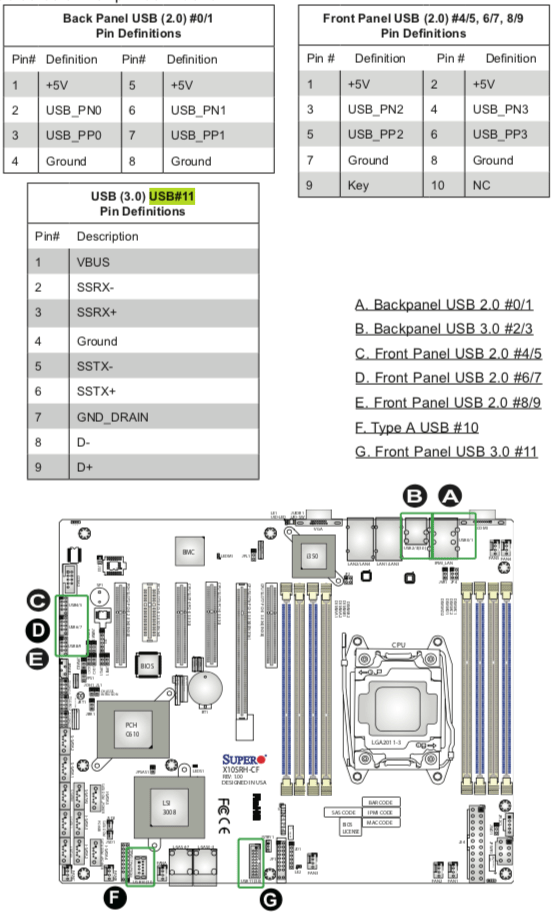
Luckily I had an X10 manual at hand, so here you can see the various pin-outs.

One end of the CBL-0454L has the same pin out as “USB (3.0) USB#11 Pin Definitions” (actually you need to double the rows) so CBL-0453L fits into it.

The other end of CBL-0454L fits into “Front Panel USB (2.0) #4/5, 6/7, 8/9” headers.

Fitting 2.5 inch drives in it

Another interesting aspect is part:

2.5″ HDD Bracket MCP-220-73201-0N HDD Cage (4x Internal 2.5″ fixed HDD bays)

Again hard to find pictures. There is only one at the whole supermicro site:

[WayBack] Supermicro | Products | SuperWorkstation | Mid-Tower | 5039C-T with Part List

[WayBack] 5039C-T_side.jpg

The part is [WayBack] Supermicro MCP-220-73201-0N Accessories with 0091016_2-5in-hdd-cage-4x-internal-2-5in-hdd.jpg (500×500)

–jeroen

Posted in Hardware, Mainboards, Power User, SuperMicro, X9SRi-3F, X9SRi-F | Leave a Comment »

Supermicro X9SRi-F Mainboard with SCU – Motherboards and CPUs – Unraid

Posted by jpluimers on 2021/05/10

Passthrough should work with these: [WayBack] Supermicro X9SRi-F Mainboard with SCU – Motherboards and CPUs – Unraid

Both unRaid and eESXi success in that thread.

–jeroen

Posted in Hardware, Mainboards, Power User, SuperMicro, X9SRi-F | Leave a Comment »

Alternatives to VMware ESXi: working around “[Errno 28] No space left on device” when updating (especially when booting from USB-stick)

Posted by jpluimers on 2021/05/07

Yesterday I talked about VMware ESXi: working around “[Errno 28] No space left on device” when updating (especially when booting from USB-stick).

There are some alternative workarounds mentioned on the interwebz. Below are a the ones I found. I discuss which ones won’t work, and why I dislike others.

Alternative workarounds that failed

Configuring host-swap

This was suggested by:

Host swap was already configured, and it still failed.

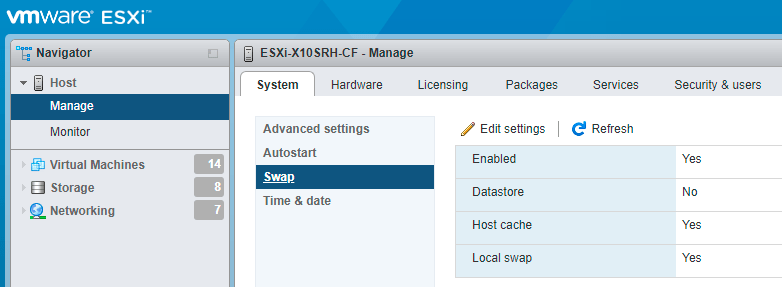
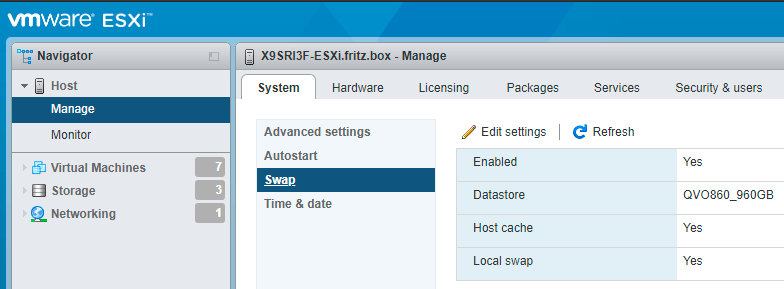
Just in case you ever want to configure host swap, it is under an URL like https://esxi67.example.org/ui/#/host/manage/system/swap and looks like this:

ESXi 6.7: configuring host swap

ESXi 6.7: configuring host swap

You get there by:

  1. logging on to the web UI
  2. clicking Host
  3. clicking Manage under Host
  4. clicking Swap under the System tab
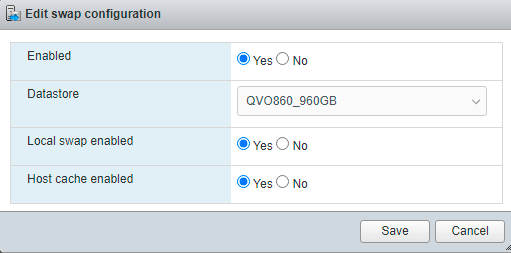
  5. clicking Edit settings when you want to change them
    ESXi 6.7: edit host swap settings

    ESXi 6.7: edit host swap settings

More information about host swap:

Alternative workarounds I like less

Below are a few alternative workarounds. I will include them as they gained me more knowledge, but I will also describe why I like them less.

  • [Wayback] ESXI 6.7 update: No space left on device | eknori.de after explaining that directing the swap space to a datastore fails, also mentions alternative this:

    Unfortunately, in this situation, host swap already was enabled.

    There is though, a workaround. You can use an image that doesn’t have the tools vib included with this command:

    esxcli software profile update -p ESXi-6.7.0-20190802001-no-tools -d https://hostupdate.vmware.com/software/VUM/PRODUCTION/main/vmw-depot-index.xml

    You can then manually install the troublesome vib (if you have a need for tools) with this command:

    esxcli software vib install -v https://hostupdate.vmware.com/software/VUM/PRODUCTION/main/esx/vmw/vib20/tools-light/VMware_locker_tools-light_10.3.10.12406962-14141615.vib

    I had to edit it as the post itself shows the filename as

    vmw-depot
     -index.xml

    Yup: bitching again, as markup issues make code unreliable. It also allows me to explain why I do not like the solution, which is because of two reasons:

    1. It doesn’t explain why this solution works and if it is future proof. Does a future upgrade that includes changed VMware_locker_tools-light also fail? If it does not fail, does it update the VMware_locker_tools-light?
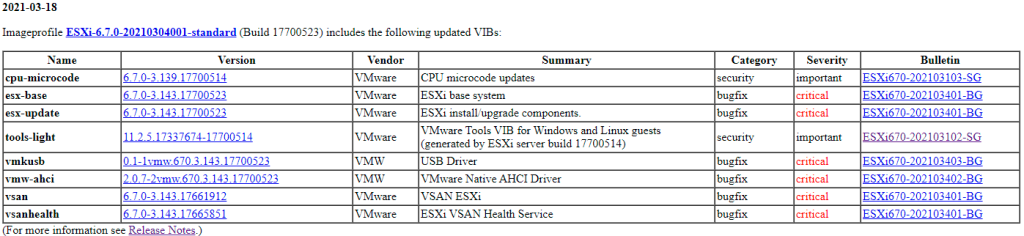
    2. It does not explain how to get the path of https://hostupdate.vmware.com/software/VUM/PRODUCTION/main/esx/vmw/vib20/tools-light/VMware_locker_tools-light_10.3.10.12406962-14141615.vib.  I did some mor research on this, and it is actually pretty straightforward: the [Wayback] VMware ESXi 6.7 Patch History has it in the table
      ESXi-6.7.0-20210304001-standard patch table

      ESXi-6.7.0-20210304001-standard patch table

      The “Version” link for “tools-light” [Wayback] 11.2.5.17337674-17700514 actually links to the VMware_locker_tools-light_11.1.1.16303738-16701467.vib file.

  • [Wayback] ESXi 6.7.0 – [Errno 28] No space left on devicevibs = VMware_locker_tools-light_11.1.1.16303738-16701467 does not explain where to get the VMware_locker_tools-light_11.1.1.16303738-16701467.vib link from, does not have the code formatted as such (so I did that below), but does actually answers part of the above questions, but not if a future upgrade will also fail. In short: re-running the upgrade after manually installing the VMware_locker_tools-light_11.1.1.16303738-16701467.vib will succeed:

    Unfortunately swap was already enabled to I had to manually install the tools-light with this command:

    esxcli software vib install -v https://hostupdate.vmware.com/software/VUM/PRODUCTION/main/esx/vmw/vib20/tools-light/VMware_locker_tools-light_11.1.1.16303738-16701467.vib

    Then re-ran the upgrade and it was successful.

  • [Wayback] ESXi 6 Update error – No Space left on device /locker which suggests to delete “find all big files in /locker and remove it”. I think that is a bad idea, as the /locker directory is maintained by your ESXi system and you should not remove any big file without knowing if it is relied upon by ESXi.
  • While updating VMware ESXi servers, VMware vSphere users may encounter the “No space left on device” error that pops up while executing “esxcli software vib update” command. Interestingly, the problem occurs even though disks are doing well and have enough free space and df -h command proves that.[Wayback] No Space Left on Device? Updating VMware ESXi | StarWind Blog has bad code markup, but explains
    • how to get disk usage with df -h where the vfat volumes usually indicate the ones on USB or SD-card media.
    • that hardly the number of inodes is a problem, and that stat -f / can help you figure out if that is the case on the volume where the upgrade files are stored
    • how to find large files not in data stores; I have changed added -h to the ls command so it becomes human readable:
      find / -path "/vmfs" -prune -o -type f -size +50000k -exec ls -lh '{}' \;
    • suggests how to put the swap space on a data store (which doesn’t work on ESXi 6.7 systems any more)
  •  

    [Wayback] Intel NUC Kit NUC5i3RYH met ESXi 6.0 updaten naar 6.7 – Gahan Zwart’s Blog

    • I like the upgrade copying the ISO to an USB stick with Rufus
    • I do not like the VMware_locker_tools-light... intermediate step, as the last step (download the full depot to a datastore, then update from there)
    • ESXi 7.0 has the same ErrNo 28 update problem as ESXi 6.7 and 6.5, so I will default to the depot download.

–jeroen

Posted in ESXi6, ESXi6.5, ESXi6.7, ESXi7, Power User, Virtualization, VMware, VMware ESXi | Leave a Comment »

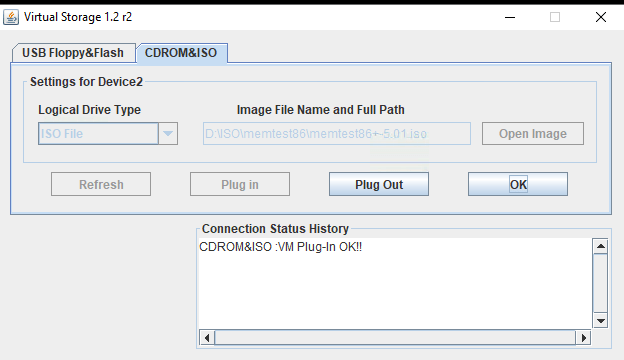
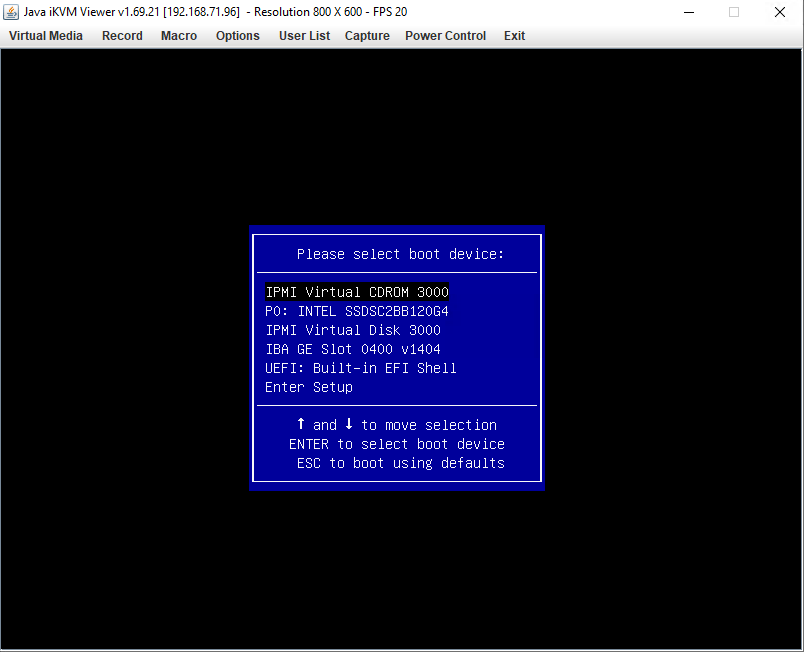
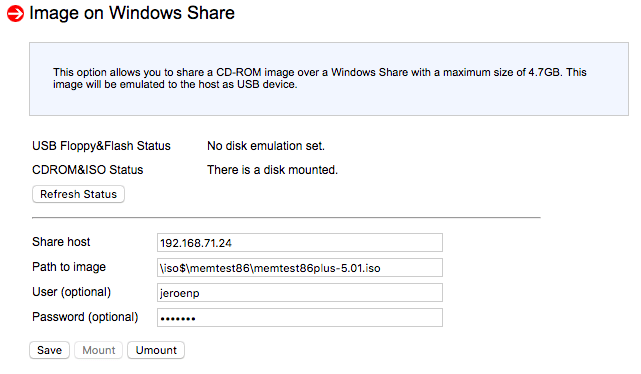
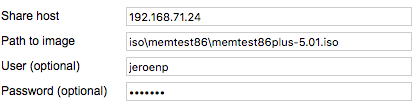
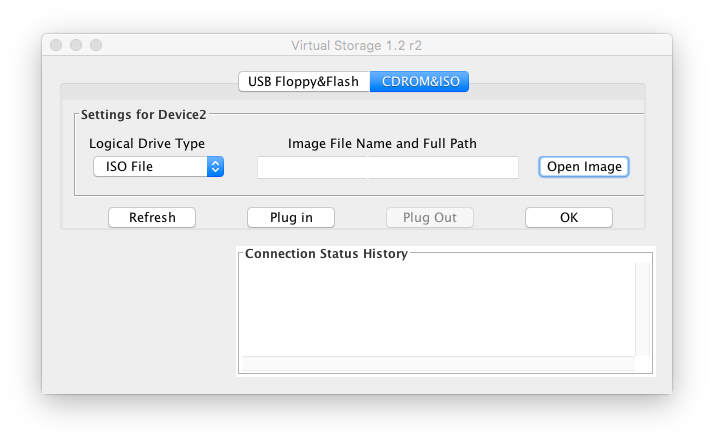
MacOS IPMIView and Supermicro X9SRi-F web interface cannot mount ISOs; on Windows, the web started Java iKVM console can

Posted by jpluimers on 2021/05/07

Screenshots so I do not forget.

Works from Windows Java iKVM Viewer v1.69.21 started via the web interface:

C:\Users\jeroenp>java -version
java version "1.8.0_211"
Java(TM) SE Runtime Environment (build 1.8.0_211-b12)
Java HotSpot(TM) 64-Bit Server VM (build 25.211-b12, mixed mode)

Fails from web interface:

It does not matter if the share is iso$ or iso: both fail in the same way.

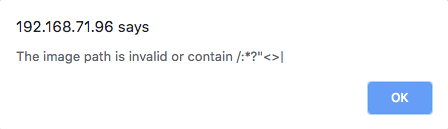
Note this was after working around this very confusion error message from the web interface:

The image path is invalid or contain /:*?"<>|

The error message is just telling that the path should start with a back-slash:

[WayBack] Supermicro IPMI and Windows Share – Server Fault

With HTML5 iKVM this seems to work fine, but that requires more recent motherboards:

[WayBack] How to map a network share to boot from ISO, moving Supermicro Java iKVM to browser-only HTML5 iKVM | TinkerTry IT @ Home

Fails on MacOs with Java iKVM Viewer v1.69 r14.

# java -version
java version "1.8.0_74"
Java(TM) SE Runtime Environment (build 1.8.0_74-b02)
Java HotSpot(TM) 64-Bit Server VM (build 25.74-b02, mixed mode)

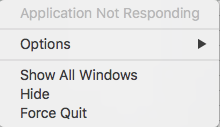
Gets you the rainbow circle of death and an “application not responding”

The success and failure are the same no matter the firmware; the same results were obtained both before and after upgrading the IPMI firmware:

–jeroen


PS: from Twitter


Posted in Hardware, IPMI, Mainboards, Power User, SuperMicro, X9SRi-F | Leave a Comment »

Need to research alternative IPMI tooling

Posted by jpluimers on 2021/05/07

Since IPMIView cannot mount ISOs and some tasks are not that convenient in GUI tools, I want to look more deeply in console based IPMI tooling.

Though my machine to remotely manage stuff is a MacOS based machine, most of my sites have Raspberry Pi devices, so some compatibility there would be nice. imputil seems to work there given IPMI firmware is recent:

Here are some names for future research:

  • impmiutil
    • [WayBack] ipmiutil – IPMI Management Utilities

      IPMI Management Utilities Project provides a series of common utilities for IPMI server management locally or via LAN. The utilities provide source and scriptable command binaries for automating server management functions.

      IPMIUTIL performs a series of common IPMI server management functions to allow administrators to perform management functions without a learning curve. It can gather FRU inventory data, SEL firmware log, sensors, watchdog, power control, health, monitoring, and has an SOL console. It can write sensor thresholds, FRU asset tags, and supports a full IPMI configuration save/restore. Ease-of-use examples with IPMIUTIL:

      • Native builds on many OSs: Linux, Windows, BSD, Solaris, MacOSX, HPUX
      • The only IPMI project natively supporting Windows drivers
      • IPMIUTIL supports any IPMI-compliant vendor firmware
      • IPMIUTIL detects and handles OEM-specific IPMI firmware variants
      • IPMIUTIL interprets various vendor OEM-specific sensor values automatically.
      • Any IPMI values not yet recognized at least return the values, rather than just ‘na’ or Unknown.
      • Shared library for custom applications, sample source included
      • IPMIUTIL BSD license is compatible with open-source or commercial use
      • Linux driverless support is ideal for boot media or embedded
      • Configuring the IPMI LAN requires just a single command
      • The decoding of IPMI SEL events includes a severity.
      • A soft-reboot can be easily performed instead of a hard reboot by using ipmiutil_asy, even if the platform does not support ACPI.
      • IPMI SEL management is automated via checksel.
      • Watchdog management is automated via ipmiutil_wdt.
    • [WayBack] homebrew-core/ipmiutil.rb at master · Homebrew/homebrew-core · GitHub
    • [WayBack] ipmiutil — Homebrew Formulae
    • [WayBack] Install ipmiutil on Mac with Brew | BrewInstall
  • ipmitool
  • freeipmi
    • [WayBack] FreeIPMI – Home

      FreeIPMI provides in-band and out-of-band IPMI software based on the IPMI v1.5/2.0 specification. The IPMI specification defines a set of interfaces for platform management and is implemented by a number vendors for system management. The features of IPMI that most users will be interested in are sensor monitoring, system event monitoring, power control, and serial-over-LAN (SOL). The FreeIPMI tools and libraries listed below should provide users with the ability to access and utilize these and many other features. A number of useful features for large HPC or cluster environments have also been implemented into FreeIPMI. See the README or FAQ for more info.


    • [WayBack] homebrew-core/freeipmi.rb at master · Homebrew/homebrew-core · GitHub
    • [WayBack] freeipmi — Homebrew Formulae

Things I am interested in:

  • discovering IPMI capable devices in a network
  • reading sensors
  • setting power state
  • mounting/unmounting ISO images

–jeroen

Posted in Hardware, IPMI, Mainboards, Power User, SuperMicro | 3 Comments »

VMware ESXi: working around “[Errno 28] No space left on device” when updating (especially when booting from USB-stick)

Posted by jpluimers on 2021/05/06

A while ago, I had this error while upgrading an ESXi 6.7 system:

# esxcli system maintenanceMode get
Enabled
# esxcli software profile update -p ESXi-6.7.0-20210304001-standard -d https://hostupdate.vmware.com/software/VUM/PRODUCTION/main/vmw-depot-
index.xml
 [InstallationError]
 [Errno 28] No space left on device
       vibs = VMware_locker_tools-light_11.2.5.17337674-17700514
 Please refer to the log file for more details.

This seems to be kind of a known issue, especially on systems that boot from USB sticks (see [Archive.is] “ESXi” “[Errno 28] No space left on device” – Google Search). Despites these sticks having gotten larger over time, VMware uses very little storage on them, so runs out of storage spice while processing installs from the depot.

This is kind of disappointing, and with the ever growing updates, the only workaround is to download an offline bundle, then install it.

Below I will explain how to get the offline bundle, as it involves a few more steps all aimed at this simple installation of the offline bundle file:

# esxcli system maintenanceMode get
Enabled
# esxcli software profile update -p ESXi-6.7.0-20210304001-standard -d /vmfs/volumes/EVO860_500GB/OfflineBundles/ESXi670-202103001.zip 
Update Result
   Message: The update completed successfully, but the system needs to be rebooted for the changes to be effective.
   Reboot Required: true
   VIBs Installed: VMW_bootbank_ixgben_1.7.1.16-2vmw.670.3.104.16075168, VMW_bootbank_lpfc_11.4.33.26-14vmw.670.3.104.16075168, VMW_bootbank_net-e1000_8.0.3.1-5vmw.670.3.112.16701467, VMW_bootbank_net-vmxnet3_1.1.3.0-3vmw.670.3.104.16075168, VMW_bootbank_nfnic_4.0.0.44-0vmw.670.3.104.16075168, VMW_bootbank_ntg3_4.1.5.0-0vmw.670.3.116.16713306, VMW_bootbank_nvme_1.2.2.28-4vmw.670.3.132.17167734, VMW_bootbank_qfle3f_1.0.25.0.2-15vmw.670.3.104.16075168, VMW_bootbank_sfvmk_1.0.0.1003-7vmw.670.3.104.16075168, VMW_bootbank_vmkusb_0.1-1vmw.670.3.143.17700523, VMW_bootbank_vmw-ahci_2.0.7-2vmw.670.3.143.17700523, VMware_bootbank_cpu-microcode_6.7.0-3.139.17700514, VMware_bootbank_elx-esx-libelxima.so_11.4.1184.2-3.89.15160138, VMware_bootbank_esx-base_6.7.0-3.143.17700523, VMware_bootbank_esx-ui_1.33.7-15803439, VMware_bootbank_esx-update_6.7.0-3.143.17700523, VMware_bootbank_native-misc-drivers_6.7.0-3.89.15160138, VMware_bootbank_vmware-esx-esxcli-nvme-plugin_1.2.0.36-2vmw.670.3.116.16713306, VMware_bootbank_vsan_6.7.0-3.143.17661912, VMware_bootbank_vsanhealth_6.7.0-3.143.17665851, VMware_locker_tools-light_11.2.5.17337674-17700514
   VIBs Removed: VMW_bootbank_ixgben_1.7.1.16-1vmw.670.3.73.14320388, VMW_bootbank_lpfc_11.4.33.25-14vmw.670.3.73.14320388, VMW_bootbank_net-e1000_8.0.3.1-5vmw.670.0.0.8169922, VMW_bootbank_net-vmxnet3_1.1.3.0-3vmw.670.2.48.13006603, VMW_bootbank_nfnic_4.0.0.29-0vmw.670.3.73.14320388, VMW_bootbank_ntg3_4.1.3.2-1vmw.670.1.28.10302608, VMW_bootbank_nvme_1.2.2.28-1vmw.670.3.73.14320388, VMW_bootbank_qfle3f_1.0.25.0.2-14vmw.670.0.0.8169922, VMW_bootbank_sfvmk_1.0.0.1003-6vmw.670.3.73.14320388, VMW_bootbank_vmkusb_0.1-1vmw.670.2.48.13006603, VMW_bootbank_vmw-ahci_1.2.8-1vmw.670.3.73.14320388, VMware_bootbank_cpu-microcode_6.7.0-2.69.14141615, VMware_bootbank_elx-esx-libelxima.so_11.4.1184.1-2.48.13006603, VMware_bootbank_esx-base_6.7.0-3.73.14320388, VMware_bootbank_esx-ui_1.33.4-14093553, VMware_bootbank_esx-update_6.7.0-3.73.14320388, VMware_bootbank_native-misc-drivers_6.7.0-2.48.13006603, VMware_bootbank_vmware-esx-esxcli-nvme-plugin_1.2.0.36-2.48.13006603, VMware_bootbank_vsan_6.7.0-3.73.14263135, VMware_bootbank_vsanhealth_6.7.0-3.73.14263064, VMware_locker_tools-light_10.3.10.12406962-14141615
   VIBs Skipped: VMW_bootbank_ata-libata-92_3.00.9.2-16vmw.670.0.0.8169922, VMW_bootbank_ata-pata-amd_0.3.10-3vmw.670.0.0.8169922, VMW_bootbank_ata-pata-atiixp_0.4.6-4vmw.670.0.0.8169922, VMW_bootbank_ata-pata-cmd64x_0.2.5-3vmw.670.0.0.8169922, VMW_bootbank_ata-pata-hpt3x2n_0.3.4-3vmw.670.0.0.8169922, VMW_bootbank_ata-pata-pdc2027x_1.0-3vmw.670.0.0.8169922, VMW_bootbank_ata-pata-serverworks_0.4.3-3vmw.670.0.0.8169922, VMW_bootbank_ata-pata-sil680_0.4.8-3vmw.670.0.0.8169922, VMW_bootbank_ata-pata-via_0.3.3-2vmw.670.0.0.8169922, VMW_bootbank_block-cciss_3.6.14-10vmw.670.0.0.8169922, VMW_bootbank_bnxtnet_20.6.101.7-24vmw.670.3.73.14320388, VMW_bootbank_bnxtroce_20.6.101.0-20vmw.670.1.28.10302608, VMW_bootbank_brcmfcoe_11.4.1078.25-14vmw.670.3.73.14320388, VMW_bootbank_char-random_1.0-3vmw.670.0.0.8169922, VMW_bootbank_ehci-ehci-hcd_1.0-4vmw.670.0.0.8169922, VMW_bootbank_elxiscsi_11.4.1174.0-2vmw.670.0.0.8169922, VMW_bootbank_elxnet_11.4.1097.0-5vmw.670.3.73.14320388, VMW_bootbank_hid-hid_1.0-3vmw.670.0.0.8169922, VMW_bootbank_i40en_1.8.1.9-2vmw.670.3.73.14320388, VMW_bootbank_iavmd_1.2.0.1011-2vmw.670.0.0.8169922, VMW_bootbank_igbn_0.1.1.0-5vmw.670.3.73.14320388, VMW_bootbank_ima-qla4xxx_2.02.18-1vmw.670.0.0.8169922, VMW_bootbank_ipmi-ipmi-devintf_39.1-5vmw.670.1.28.10302608, VMW_bootbank_ipmi-ipmi-msghandler_39.1-5vmw.670.1.28.10302608, VMW_bootbank_ipmi-ipmi-si-drv_39.1-5vmw.670.1.28.10302608, VMW_bootbank_iser_1.0.0.0-1vmw.670.1.28.10302608, VMW_bootbank_lpnic_11.4.59.0-1vmw.670.0.0.8169922, VMW_bootbank_lsi-mr3_7.708.07.00-3vmw.670.3.73.14320388, VMW_bootbank_lsi-msgpt2_20.00.06.00-2vmw.670.3.73.14320388, VMW_bootbank_lsi-msgpt35_09.00.00.00-5vmw.670.3.73.14320388, VMW_bootbank_lsi-msgpt3_17.00.02.00-1vmw.670.3.73.14320388, VMW_bootbank_misc-cnic-register_1.78.75.v60.7-1vmw.670.0.0.8169922, VMW_bootbank_misc-drivers_6.7.0-2.48.13006603, VMW_bootbank_mtip32xx-native_3.9.8-1vmw.670.1.28.10302608, VMW_bootbank_ne1000_0.8.4-2vmw.670.2.48.13006603, VMW_bootbank_nenic_1.0.29.0-1vmw.670.3.73.14320388, VMW_bootbank_net-bnx2_2.2.4f.v60.10-2vmw.670.0.0.8169922, VMW_bootbank_net-bnx2x_1.78.80.v60.12-2vmw.670.0.0.8169922, VMW_bootbank_net-cdc-ether_1.0-3vmw.670.0.0.8169922, VMW_bootbank_net-cnic_1.78.76.v60.13-2vmw.670.0.0.8169922, VMW_bootbank_net-e1000e_3.2.2.1-2vmw.670.0.0.8169922, VMW_bootbank_net-enic_2.1.2.38-2vmw.670.0.0.8169922, VMW_bootbank_net-fcoe_1.0.29.9.3-7vmw.670.0.0.8169922, VMW_bootbank_net-forcedeth_0.61-2vmw.670.0.0.8169922, VMW_bootbank_net-igb_5.0.5.1.1-5vmw.670.0.0.8169922, VMW_bootbank_net-ixgbe_3.7.13.7.14iov-20vmw.670.0.0.8169922, VMW_bootbank_net-libfcoe-92_1.0.24.9.4-8vmw.670.0.0.8169922, VMW_bootbank_net-mlx4-core_1.9.7.0-1vmw.670.0.0.8169922, VMW_bootbank_net-mlx4-en_1.9.7.0-1vmw.670.0.0.8169922, VMW_bootbank_net-nx-nic_5.0.621-5vmw.670.0.0.8169922, VMW_bootbank_net-tg3_3.131d.v60.4-2vmw.670.0.0.8169922, VMW_bootbank_net-usbnet_1.0-3vmw.670.0.0.8169922, VMW_bootbank_nhpsa_2.0.22-3vmw.670.1.28.10302608, VMW_bootbank_nmlx4-core_3.17.13.1-1vmw.670.2.48.13006603, VMW_bootbank_nmlx4-en_3.17.13.1-1vmw.670.2.48.13006603, VMW_bootbank_nmlx4-rdma_3.17.13.1-1vmw.670.2.48.13006603, VMW_bootbank_nmlx5-core_4.17.13.1-1vmw.670.3.73.14320388, VMW_bootbank_nmlx5-rdma_4.17.13.1-1vmw.670.2.48.13006603, VMW_bootbank_nvmxnet3-ens_2.0.0.21-1vmw.670.0.0.8169922, VMW_bootbank_nvmxnet3_2.0.0.29-1vmw.670.1.28.10302608, VMW_bootbank_ohci-usb-ohci_1.0-3vmw.670.0.0.8169922, VMW_bootbank_pvscsi_0.1-2vmw.670.0.0.8169922, VMW_bootbank_qcnic_1.0.2.0.4-1vmw.670.0.0.8169922, VMW_bootbank_qedentv_2.0.6.4-10vmw.670.1.28.10302608, VMW_bootbank_qfle3_1.0.50.11-9vmw.670.0.0.8169922, VMW_bootbank_qfle3i_1.0.2.3.9-3vmw.670.0.0.8169922, VMW_bootbank_qflge_1.1.0.11-1vmw.670.0.0.8169922, VMW_bootbank_sata-ahci_3.0-26vmw.670.0.0.8169922, VMW_bootbank_sata-ata-piix_2.12-10vmw.670.0.0.8169922, VMW_bootbank_sata-sata-nv_3.5-4vmw.670.0.0.8169922, VMW_bootbank_sata-sata-promise_2.12-3vmw.670.0.0.8169922, VMW_bootbank_sata-sata-sil24_1.1-1vmw.670.0.0.8169922, VMW_bootbank_sata-sata-sil_2.3-4vmw.670.0.0.8169922, VMW_bootbank_sata-sata-svw_2.3-3vmw.670.0.0.8169922, VMW_bootbank_scsi-aacraid_1.1.5.1-9vmw.670.0.0.8169922, VMW_bootbank_scsi-adp94xx_1.0.8.12-6vmw.670.0.0.8169922, VMW_bootbank_scsi-aic79xx_3.1-6vmw.670.0.0.8169922, VMW_bootbank_scsi-bnx2fc_1.78.78.v60.8-1vmw.670.0.0.8169922, VMW_bootbank_scsi-bnx2i_2.78.76.v60.8-1vmw.670.0.0.8169922, VMW_bootbank_scsi-fnic_1.5.0.45-3vmw.670.0.0.8169922, VMW_bootbank_scsi-hpsa_6.0.0.84-3vmw.670.0.0.8169922, VMW_bootbank_scsi-ips_7.12.05-4vmw.670.0.0.8169922, VMW_bootbank_scsi-iscsi-linux-92_1.0.0.2-3vmw.670.0.0.8169922, VMW_bootbank_scsi-libfc-92_1.0.40.9.3-5vmw.670.0.0.8169922, VMW_bootbank_scsi-megaraid-mbox_2.20.5.1-6vmw.670.0.0.8169922, VMW_bootbank_scsi-megaraid-sas_6.603.55.00-2vmw.670.0.0.8169922, VMW_bootbank_scsi-megaraid2_2.00.4-9vmw.670.0.0.8169922, VMW_bootbank_scsi-mpt2sas_19.00.00.00-2vmw.670.0.0.8169922, VMW_bootbank_scsi-mptsas_4.23.01.00-10vmw.670.0.0.8169922, VMW_bootbank_scsi-mptspi_4.23.01.00-10vmw.670.0.0.8169922, VMW_bootbank_scsi-qla4xxx_5.01.03.2-7vmw.670.0.0.8169922, VMW_bootbank_shim-iscsi-linux-9-2-1-0_6.7.0-0.0.8169922, VMW_bootbank_shim-iscsi-linux-9-2-2-0_6.7.0-0.0.8169922, VMW_bootbank_shim-libata-9-2-1-0_6.7.0-0.0.8169922, VMW_bootbank_shim-libata-9-2-2-0_6.7.0-0.0.8169922, VMW_bootbank_shim-libfc-9-2-1-0_6.7.0-0.0.8169922, VMW_bootbank_shim-libfc-9-2-2-0_6.7.0-0.0.8169922, VMW_bootbank_shim-libfcoe-9-2-1-0_6.7.0-0.0.8169922, VMW_bootbank_shim-libfcoe-9-2-2-0_6.7.0-0.0.8169922, VMW_bootbank_shim-vmklinux-9-2-1-0_6.7.0-0.0.8169922, VMW_bootbank_shim-vmklinux-9-2-2-0_6.7.0-0.0.8169922, VMW_bootbank_shim-vmklinux-9-2-3-0_6.7.0-0.0.8169922, VMW_bootbank_smartpqi_1.0.1.553-28vmw.670.3.73.14320388, VMW_bootbank_uhci-usb-uhci_1.0-3vmw.670.0.0.8169922, VMW_bootbank_usb-storage-usb-storage_1.0-3vmw.670.0.0.8169922, VMW_bootbank_usbcore-usb_1.0-3vmw.670.0.0.8169922, VMW_bootbank_vmkata_0.1-1vmw.670.0.0.8169922, VMW_bootbank_vmkfcoe_1.0.0.1-1vmw.670.1.28.10302608, VMW_bootbank_vmkplexer-vmkplexer_6.7.0-0.0.8169922, VMW_bootbank_xhci-xhci_1.0-3vmw.670.0.0.8169922, VMware_bootbank_esx-dvfilter-generic-fastpath_6.7.0-0.0.8169922, VMware_bootbank_esx-xserver_6.7.0-3.73.14320388, VMware_bootbank_lsu-hp-hpsa-plugin_2.0.0-16vmw.670.1.28.10302608, VMware_bootbank_lsu-intel-vmd-plugin_1.0.0-2vmw.670.1.28.10302608, VMware_bootbank_lsu-lsi-drivers-plugin_1.0.0-1vmw.670.2.48.13006603, VMware_bootbank_lsu-lsi-lsi-mr3-plugin_1.0.0-13vmw.670.1.28.10302608, VMware_bootbank_lsu-lsi-lsi-msgpt3-plugin_1.0.0-9vmw.670.2.48.13006603, VMware_bootbank_lsu-lsi-megaraid-sas-plugin_1.0.0-9vmw.670.0.0.8169922, VMware_bootbank_lsu-lsi-mpt2sas-plugin_2.0.0-7vmw.670.0.0.8169922, VMware_bootbank_lsu-smartpqi-plugin_1.0.0-3vmw.670.1.28.10302608, VMware_bootbank_qlnativefc_3.1.8.0-5vmw.670.3.73.14320388, VMware_bootbank_rste_2.0.2.0088-7vmw.670.0.0.8169922
# reboot

Note that I always perform a  esxcli system maintenanceMode get in order to verify the system is indeed in maintenance mode.

Steps to get the offline bundle

0. determining the profile

Actually there is a pre-step: checking which update profile is needed. I use the VMware Patch Tracker from VFrontDe, as you can subscribe through RSS (by ESXi version) Twitter (all versions) for that.

For ESXi 7, I use moved from the [Wayback] regular ESXi 6.7 patch RSS feed to the Feedly ESXi 6.7 patch RSS feed (which integrates in my daily news reading) of [Wayback] VMware ESXi 6.7 Patch History:

Keep track of VMware ESXi patches, subscribe by [Archive.is] RSS and [Archive.is] Twitter! – Brought to you by @VFrontDe

For the current (as of writing) update, it shows two out of four profiles:

  1. Imageprofile ESXi-6.7.0-20210304001-standard (Build 17700523) … (For more information see [Wayback] Release Notes.)
  2. Imageprofile ESXi-6.7.0-20210301001s-standard (Build 17700514) … (For more information see [Wayback] Release Notes.)

There can be two more “...-no-tools” profiles as described by [Wayback] VMware ESXi Image Profiles | virten.net

Example – ESXi 5.5 Patch 2 contains 4 Image Profiles:
  1. ESXi-5.5.0-20140704001-standard – Contains all patches
  2. ESXi-5.5.0-20140704001-no-tools – Contains all patches but no VMware Tools
  3. ESXi-5.5.0-20140701001s-standard – Contains security patches only
  4. ESXi-5.5.0-20140701001s-no-tools – Contains security patches only and no VMware Tools

vSphere ESXi 6.7 Image Profiles
Image Profile ESX Build Release Date
ESXi-6.7.0-20210304001-standard 17700523 2021-03-18
ESXi-6.7.0-20210304001-no-tools 17700523 2021-03-18
ESXi-6.7.0-20210301001s-standard 17700514 2021-03-18
ESXi-6.7.0-20210301001s-no-tools 17700514 2021-03-18

Given that I my environment as complete as possible (the original ESXi install contains everything, so I do want to include the “VMware Tools“, and update the full software, nut just security issues), I opt for “###...-standard” and not for “###s...-standard“.

1. determine the download

The page [Wayback] VMware ESXi 6.7 Patch History (and similar pages for other ESXi versions) contains a tiny link in the upper left hand side named “[MyVMware Patch Download]” (I saved it in the Wayback machine) which brings you a patch search page on the VMware patch site.

The big drawback is that you need to be signed on into yout VMware account to actually see this page. The VMware account validation is implemented in a “corporate” way, so often does not work (especially when you need it, which for me often is on weekends, a period in the week that corporates seem to ar less monitor their systems than during USA work-day hours). I might sound cynical, but this set me back quite some time even trying to get an ESXi 7 license.

Here are some screenshots:
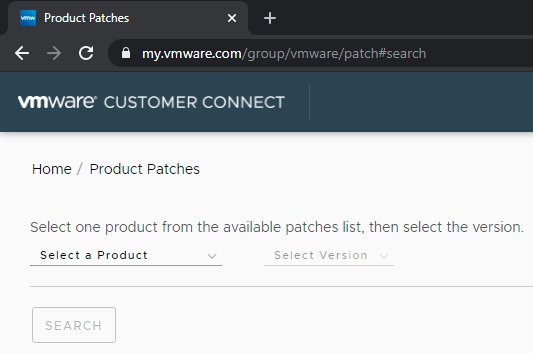
VMware HomeP/roduct Patches

VMware Home/Product Patches

The site is so corporate, that when your screen is not wide enough, the selection box is drawn outside your screen area:
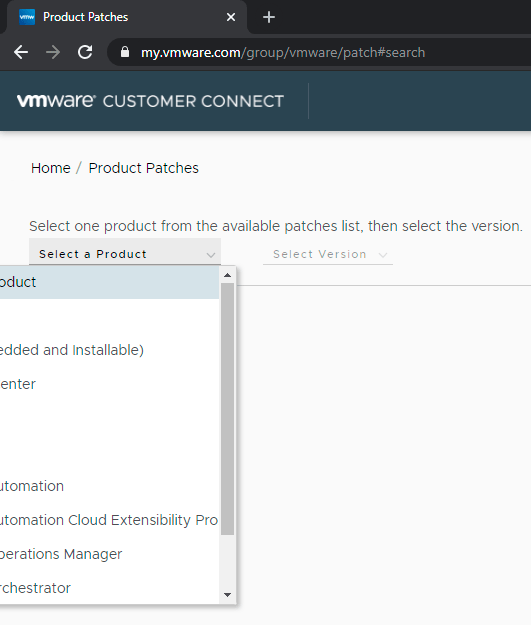
VMware being very corporate: drawing selection box outside the screen area.

VMware being very corporate: drawing selection box outside the screen area.

Anyway the one ending in “and Installable” is the one we want, cutting off the other part (you are a corporate or you aren’t, right?):
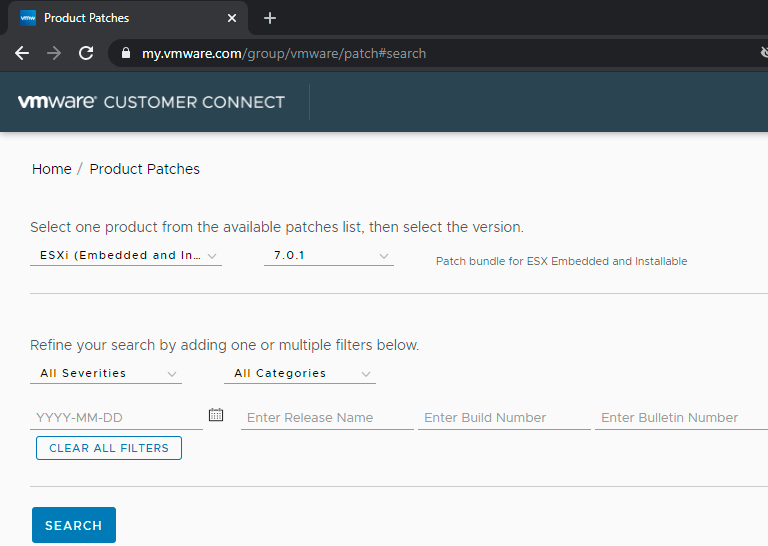
"ESXi (Embedded and ..." is cut off as the layout has been designed to cut off either way.

“ESXi (Embedded and …” is cut off as the layout has been designed to cut off either way.

So for ESXi 6.7.0, when writing this, the offline bundles were these:
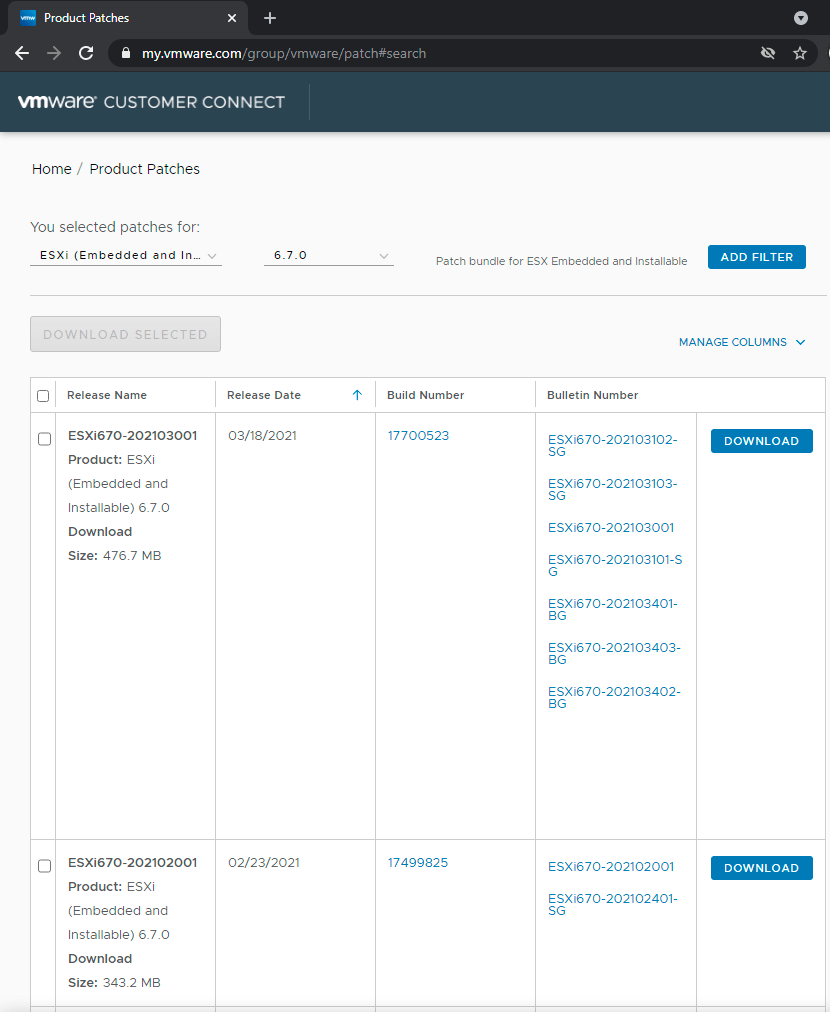
ESXi 6.7.0 offline bundles

ESXi 6.7.0 offline bundles (unlike the YYYYMM### release name and YYYYMM### bulletin numbers, the dates are in MM/DD/YYYY format)

Release Name Release Date Build Number Bulletin Number

ESXi670-202103001

Product:ESXi (Embedded and Installable) 6.7.0

Download Size:476.7 MB

03/18/2021

ESXi670-202103102-SG

ESXi670-202103103-SG

ESXi670-202103001

ESXi670-202103101-SG

ESXi670-202103401-BG

ESXi670-202103403-BG

ESXi670-202103402-BG

Download

So, for imageprofile ESXi-6.7.0-20210304001-standard (Build 17700523), the release name is ESXi670-202103001 (as it matches Build Number [Wayback] 17700523).

From the above, we now have these links and numbers:

The two common parts above are:

  1. ESXi670-202103001 (both as identifier and as filename ESXi670-202103001.zip)
  2. https://docs.vmware.com/en/VMware-vSphere/6.7/rn/esxi670-202103001.html which contains a table like this that has both a (deprecated!) md5sum and sha1sum value:
    Download Filename: ESXi670-202103001.zip
    Build: 17700523
    Download Size: 476.7 MB
    md5sum: 26f177706bce4a0432d9e8af016a5bad
    sha1checksum: 0263a25351d003d34321a062b391d9fe5c312bd2
    Host Reboot Required: Yes
    Virtual Machine Migration or Shutdown Required: Yes


Back to the download button, where you can validate the filename of the off-line bundle:

The Download button points to a complex URL with these parts:

  • scheme:[//authority]pathhttps://download2.vmware.com/patch/software/VUM/OFFLINE/release-767-20210316-739878/ESXi670-202103001.zip
  • [?query] is of the form ?HashKey=<32-hexadecimal-digits>&params=<URI-escaped-JSON-string>&AuthKey=<10-decimal-digits>_<32-hexadecimal-digits>
  • Sample values included in params:
    • "custnumber":"ABCDEFGHIJKLMNOP==" 16-digit == padded base64 encoded customer identification
    • "sourcefilesize":"476.7+MB"
    • "dlgcode":"ESXi670-202103001"
    • "languagecode":"en"
    • "source":"PATCH"
    • "downloadtype":"manual"
    • "downloaduuid":"12345678-490a-abcd-efgh12345678" (version 4 variant 1 uuid)
    • "productname":"ESXi+(Embedded+and+Installable)"
    • "productversion":"6.7.0"

2. downloading the offline bundle file and verifying it

The steps taken until now:

  1. Find the most recent imageprofile name at [Wayback] VMware ESXi 6.7 Patch History (in my case ESXi-6.7.0-20210304001-standard)
  2. Find the “Release notes” link right under the table below it (in my case https://docs.vmware.com/en/VMware-vSphere/6.7/rn/esxi670-202103001.html#esxi-6-7-0-20210301001s-standard-resolved)
  3. Browse to the top of that page for the table with the offline bundle identifier and filename

Now

  1. search for the filename (like [Wayback/Archive.is] “ESXi670-202103001.zip” – Google Search) to download, or get the download URL from the VMware patch site (note this URL expires usually within 20 minutes).
  2. download the file using that URL:
    # wget "download-URL" -O /vmfs/volumes/EVO860_500GB/OfflineBundles/ESXi670-202103001.zip
    Connecting to download.example.org (192.0.2.0:443)
    ESXi670-202103001.zi 100% |****************************************************************************************************************|  454M  0:00:00 ETA

    Yes, that strange IP address is for documentation purposes as you can see in [Wayback] RFC 5737 – IPv4 Address Blocks Reserved for Documentation and Reserved IP addresses – Wikipedia.

  3. verify the download with the above sha1sum (which is included in the ESXi BusyBox shell)
    # sha1sum /vmfs/volumes/EVO860_500GB/OfflineBundles/ESXi670-202103001.zip 
    0263a25351d003d34321a062b391d9fe5c312bd2  /vmfs/volumes/EVO860_500GB/OfflineBundles/ESXi670-202103001.zip
  4. shutdown all the VM’s, put the machine in maintenance mode, upgrade, verify result, reboot, put the machine out of maintenance mode, start any VM’s that should be up

[Archive.is] [OSError] [Errno 28] No space left on device even … – VMware Technology Network VMTN very importantly mentions to do a dry-run before actually upgrading:

esxcli software profile update --dry-run -p ESXi-6.7.0-20201103001-standard -d /vmfs/volumes/datastore1/update/ESXi670-202011001.zip

If the dry run is successful, do the update with

esxcli software profile update -p ESXi-6.7.0-20201103001-standard -d /vmfs/volumes/datastore1/update/ESXi670-202011001.zip

jeroen

Posted in ESXi6, ESXi6.5, ESXi6.7, ESXi7, Power User, Virtualization, VMware, VMware ESXi | Leave a Comment »

Chocolatey: I favor ‘choco upgrade’ over ‘choco install’

Posted by jpluimers on 2021/05/06

A while ago I found out that choco upgrade will install a package when it is not installed, and that choco upgrade all will upgrade all installed packages.

So I looked up the documentation of both choco install and choco upgrade (and choco update which will be deprecated) where I bolded parts of the upgrade command:

Given that upgrade can do both an upgrade and an install, I have switched all my install scripts to use upgrade in steaf of install.

Not all of the above commands accept the same set of [Wayback] Chocolatey Software Docs | Commands: Default Options and Switches

-?, --help, -h
     Prints out the help menu.

 -d, --debug
     Debug - Show debug messaging.

 -v, --verbose
     Verbose - Show verbose messaging. Very verbose messaging, avoid using 
       under normal circumstances.

     --trace
     Trace - Show trace messaging. Very, very verbose trace messaging. Avoid 
       except when needing super low-level .NET Framework debugging. Available 
       in 0.10.4+.

     --nocolor, --no-color
     No Color - Do not show colorization in logging output. This overrides 
       the feature 'logWithoutColor', set to 'False'. Available in 0.10.9+.

     --acceptlicense, --accept-license
     AcceptLicense - Accept license dialogs automatically. Reserved for 
       future use.

 -y, --yes, --confirm
     Confirm all prompts - Chooses affirmative answer instead of prompting. 
       Implies --accept-license

 -f, --force
     Force - force the behavior. Do not use force during normal operation - 
       it subverts some of the smart behavior for commands.

     --noop, --whatif, --what-if
     NoOp / WhatIf - Don't actually do anything.

 -r, --limitoutput, --limit-output
     LimitOutput - Limit the output to essential information

     --timeout, --execution-timeout=VALUE
     CommandExecutionTimeout (in seconds) - The time to allow a command to 
       finish before timing out. Overrides the default execution timeout in the 
       configuration of 2700 seconds. '0' for infinite starting in 0.10.4.

 -c, --cache, --cachelocation, --cache-location=VALUE
     CacheLocation - Location for download cache, defaults to %TEMP% or value 
       in chocolatey.config file.

     --allowunofficial, --allow-unofficial, --allowunofficialbuild, --allow-unofficial-build
     AllowUnofficialBuild - When not using the official build you must set 
       this flag for choco to continue.

     --failstderr, --failonstderr, --fail-on-stderr, --fail-on-standard-error, --fail-on-error-output
     FailOnStandardError - Fail on standard error output (stderr), typically 
       received when running external commands during install providers. This 
       overrides the feature failOnStandardError.

     --use-system-powershell
     UseSystemPowerShell - Execute PowerShell using an external process 
       instead of the built-in PowerShell host. Should only be used when 
       internal host is failing. Available in 0.9.10+.

     --no-progress
     Do Not Show Progress - Do not show download progress percentages. 
       Available in 0.10.4+.

     --proxy=VALUE
     Proxy Location - Explicit proxy location. Overrides the default proxy 
       location of ''. Available for config settings in 0.9.9.9+, this CLI 
       option available in 0.10.4+.

     --proxy-user=VALUE
     Proxy User Name - Explicit proxy user (optional). Requires explicit 
       proxy (`--proxy` or config setting). Overrides the default proxy user of 
       ''. Available for config settings in 0.9.9.9+, this CLI option available 
       in 0.10.4+.

     --proxy-password=VALUE
     Proxy Password - Explicit proxy password (optional) to be used with 
       username. Requires explicit proxy (`--proxy` or config setting) and 
       user name.  Overrides the default proxy password (encrypted in settings 
       if set). Available for config settings in 0.9.9.9+, this CLI option 
       available in 0.10.4+.

     --proxy-bypass-list=VALUE
     ProxyBypassList - Comma separated list of regex locations to bypass on 
       proxy. Requires explicit proxy (`--proxy` or config setting). Overrides 
       the default proxy bypass list of ''. Available in 0.10.4+.

     --proxy-bypass-on-local
     Proxy Bypass On Local - Bypass proxy for local connections. Requires 
       explicit proxy (`--proxy` or config setting). Overrides the default 
       proxy bypass on local setting of 'True'. Available in 0.10.4+.

     --log-file=VALUE
     Log File to output to in addition to regular loggers. Available in 0.1-
       0.8+.

–jeroen

Posted in Batch-Files, Chocolatey, Development, Power User, Scripting, Software Development, Windows | Leave a Comment »

Delphi: types you cannot deprecate

Posted by jpluimers on 2021/05/06

Deprecating all types in a unit besides deprecating the unit itself will cause a hint and warning storm. Especially in projects having a lot of hints and warnings (taking over maintenance of a legacy project comes to mind) this can be very helpful to spot these locations inside many files where some obscure unmaintained unit like GIFImage.pas is still used.

[WayBack] TGIFImage for Delphi | MelanderBlog got donated to (then CodeGear, now Embarcadero) for inclusion in Delphi 2007. It was, as GifImg unit, but only documented since the [WayBack] Delphi 2009 GIFImg Namespace). For more information: delphi 2007 gifimg unit – Google Search

Delphi allows you to deprecate a lot of types, but you cannot deprecate these forms:

  • array [...] of TSomeType
  • ^TSomeType
  • class of TSomeType
  • procedure(...) ...
  • function(...): TSomeType ...
  • reference to procedure(...) ...
  • reference to function(...): TSomeType ...

Putting a deprecated 'use SomeUnit.TSomeOtherType' will fail with:

  • either a compiler error  pair
    • E2029 ';' expected but identifier 'deprecated' found“.
    • E2029 '=' expected but string constant found
  • a compiler error
    • E1030 Invalid compiler directive: 'DEPRECATED'

You can enumerate these kinds of types:

  • enumerations
  • records
  • classes, but only a full class declaration, so
    • not the class forward declaration like TMyClass = class
    • not a shortened class declaration like TMyException = class(Exception), this has to be the full TMyException = class(Exception) end deprecated 'reason';
  • methods only after the last separating ; of the method (so the virtual form is like procedure Name(...); virtual; deprecated 'use another method';)
  • named constants
  • global variables

The last few are not technically types, but included for completeness.

–jeroen

Posted in Conference Topics, Conferences, Delphi, Development, Event, Software Development | Leave a Comment »

ESXi: where are my log files actually stored? Actually, most of them are in `/scratch/log` which points to a hidden `.locker` directory in a datastore.

Posted by jpluimers on 2021/05/05

A summary of the full gist at [Wayback/Archive.is] ESXi-where-are-my-log-files-stored.txt:

# ls -al / /var/ /var/log/ /var/run/ /scratch/ /scratch/log/ | grep "/\|log\|-\>"
/:
...
lrwxrwxrwx    1 root     root            57 Apr  4 18:16 scratch -> /vmfs/volumes/5ce2d440-72311161-75c5-0025907d9d5c/.locker
...
/scratch/:
drwxr-xr-x    1 root     root        106496 Apr 10 08:40 log
/scratch/log/:
-rw-------    1 root     root           411 Apr  4 18:20 Xorg.log
...
-rw-------    1 root     root         78835 Apr  4 10:30 syslog.0.gz
-rw-------    1 root     root         61136 Mar 18 15:05 syslog.1.gz
-rw-------    1 root     root         60589 Feb 24 00:30 syslog.2.gz
-rw-------    1 root     root         60373 Feb  1 08:01 syslog.3.gz
-rw-------    1 root     root         60203 Jan  9 15:50 syslog.4.gz
-rw-------    1 root     root         59889 Dec 17 23:20 syslog.5.gz
-rw-------    1 root     root         60398 Nov 25 06:50 syslog.6.gz
-rw-------    1 root     root         60563 Nov  2 14:25 syslog.7.gz
-rw-------    1 root     root        531794 Apr 10 09:35 syslog.log
...
-rw-------    1 root     root        157255 Apr  4 18:17 vvold.log
/var/:
...
drwxr-xr-x    1 root     root           512 Apr  5 19:19 log
...
/var/log/:
-rw-r--r--    1 root     root           416 Apr  4 18:16 .vmsyslogd.err
...
-rw-r--r--    1 root     root         38069 Apr  4 18:20 configRP.log
-rw-r--r--    1 root     root             0 Apr  4 18:16 cryptoloader.log
...
-rw-r--r--    1 root     root            87 Apr  5 21:57 esxcli.log
...
-rw-------    1 root     root          3350 Apr  4 18:16 init.log
-rw-r--r--    1 root     root           966 Apr  4 18:16 iofilter-init.log
...
-rw-r--r--    1 root     root         21769 Apr  4 18:16 jumpstart-esxcli-stdout.log
-rw-r--r--    1 root     root         18857 Apr  4 18:16 jumpstart-native-stdout.log
-rw-r--r--    1 root     root         10837 Apr  4 18:16 jumpstart-stdout.log
-rw-r--r--    1 root     root             0 Apr  4 18:16 kickstart.log
...
-rw-------    1 root     root         10916 Apr  4 18:16 sysboot.log
...
-rw-------    1 root     root            64 Apr 10 09:13 tallylog
...
/var/run/:
lrwxrwxrwx    1 root     root            12 Apr  4 18:16 log -> /scratch/log
  • Almost all log files (most from /var/log and all from /var/run/log) are actually persistently stored in /scratch/log and survive reboots. Just a few are non-persistent.
  • /var/log/syslog is being archived as .gz files (compressed by gzip).
  • syslog is special: the location can be configured, and even be external: [Wayback] Configuring syslog on ESXi (2003322)

    VMware vSphere ESXi 5.0 and higher hosts run a Syslog service (vmsyslogd) that provides a standard mechanism for logging messages from the VMkernel and other system components. By default in ESXi, these logs are placed on a local scratch volume or a ramdisk. To preserve the logs further, ESXi can be configured to place these logs to an alternate storage location on disk and to send the logs across the network to a Syslog server.

  • A summary of some of the above log files is at [Wayback] ESXi Log File Locations

–jeroen

Posted in *nix, *nix-tools, ash/dash, ash/dash development, BusyBox, Development, ESXi6, ESXi6.5, ESXi6.7, ESXi7, gzip, Power User, Scripting, Software Development, Virtualization, VMware, VMware ESXi | Leave a Comment »