


Windows on VMware ESXi: fixing “Unknown USB Device” or “The USB device returned an invalid USB device descriptor”
Posted by jpluimers on 2021/08/27
Sometimes, the Windows device manager shows any of the below errots for an USB 3.x device that is physically connected to the ESXi host and passes through a VM (via a virtual USB controller and virtual USB device).
- [WayBack] “Unknown USB Device (Device Descriptor Request Failed)” – Google Search
- [WayBack] “Unknown USB Device (Invalid Device Descriptor)” – Google Search
- [WayBack] “The USB device returned an invalid USB device descriptor” – Google Search
This solution usually works: use a USB 2.0 cable instead of a USB 3.x cable.
If it doesn’t work, then the solutions are the same as when this happens in a pure physical solution:
- ensure the cables and devices do not physically fail
- [WayBack] 6 Ways to Fix Unknown USB Device (Device Descriptor Request Failed)
- [WayBack] What to Try When Your USB Device is an “Unknown Device” – Microsoft Tech Community – 270739
- [WayBack] Why is my USB device not detected or comes up as “Unknown Device”? – Microsoft Tech Community – 270686
- [WayBack] New for Windows 8: Problem Descriptions for USB Devices and Hubs in Device Manager – Microsoft Tech Community – 270743
In my case, I needed a USB connection, because it is the only way to reset a Fujitsu ScanSnap scanner to correct WiFi settings after it gets confused (which happens a few times per year).
Sreenshots
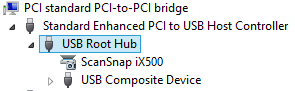
The difference for devices with a known driver:
- USB 3 cable
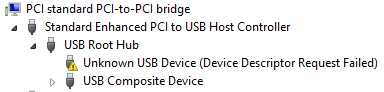
- USB 2 cable
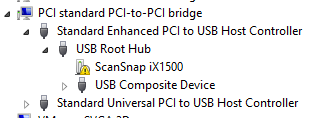
The difference for devices with an unknown driver:
- USB 3 cable
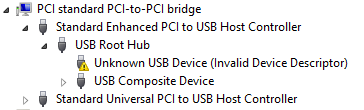
- USB 2 cable
Related information
This happened with me on both a ScanSnap iX500 and iX1500, and this did not help (as I was on a more recent Windows version): [WayBack] When setting up your scanner 502: My computer does not recognize ScanSnap iX500 with a USB 3.0 port. – Fujitsu Global.
More on USB passthrough:
- [WayBack] Configuring USB passthrough from an ESXi host
A tutorial explaining how to add USB devices connected to a ESXi host to a virtual machine residing on the host itself. A feature called USB passthrough.
- [WayBack] Add USB Devices from an ESXi Host to a Virtual Machine
You can add one or more USB passthrough devices from an ESXi host to a virtual machine if the physical devices are connected to the host on which the virtual machine runs.
More on USB virtualisation:
–jeroen

 The Wiert Corner - irregular stream of stuff
Leave a comment