The Wiert Corner – irregular stream of stuff

Jeroen W. Pluimers on .NET, C#, Delphi, databases, and personal interests

  • My badges

  • Twitter Updates

  • My Flickr Stream

  • Pages

  • All categories

  • Enter your email address to subscribe to this blog and receive notifications of new posts by email.

    Join 1,854 other subscribers

Archive for 2021

Next time traveling in countries I do not speak the language of: use live (real time!) Google Translate of signage and voice.

Posted by jpluimers on 2021/03/29

Google translate is so useful.

The thread below is [WayBack] Thread by @shanselman: “Anytime I’m traveling I use Google Translate to check translations in real time on signage. You have to see it to belis real and LIVE while you move your camera. @ Paris Sorry, your browser doesn’t support embedded videos Folk […]”

But first one via [WayBack] Hadi Hariri on Twitter: “This is pretty damn cool.… “

[WayBack] Leon Fayer on Twitter: “Another point for Google docs… “

https://twitter.com/papa_fire/status/1111994073609633792

Live translate (Via Danny Thorpe and Mark Miller):

Read the rest of this entry »

Posted in Google, GoogleTranslate, Power User | Leave a Comment »

Disable ESXi Password Complexity – Perfect Cloud

Posted by jpluimers on 2021/03/29

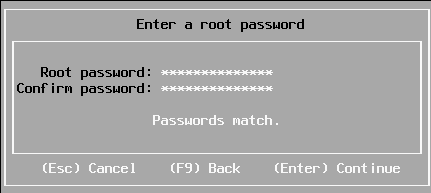
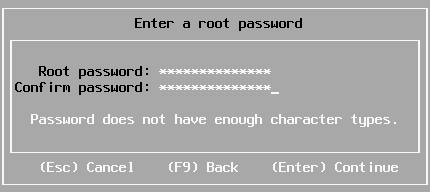
Sometimes you have a long enough password, that matches with the confirmation, but pressing “Enter” to continue gives “Password does not have enough character types”:

From [WayBack] Disable ESXi Password Complexity – Perfect Cloud:

A part of my job as a VMware Certified Instructor is to update our lab systems whenever new vSphere versions come out.   After upgrading from 5.5 to 6.0 I decided we should change passwords, h…

This is the workflow:

  1. Make a backup of /etc/pam.d/passwd.
  2. Use vi to edit /etc/pam.d/passwd, and:
    1. Put a # in front of the lines starting with password requisite
    2. Remove the use_authtok bit of the line starting with password sufficient
    3. Put a # in front of the line starting with password required
    4. Quit vi while saving (press Esc, then enter :wq on the prompt)
  3. Change the password to a less secure one
  4. Restore the original /etc/pam.d/passwd.

Via: esxi 6 force short password – Google Search

Working around this on during ESXi installation fails

I tried this:

  1. Press Alt-F1 to go from the installation screen to the console screen
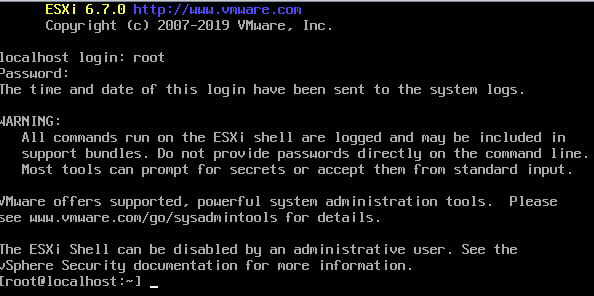
  2. Logon as root, with no password at all to get to the command-prompt:

  3. Perform the /etc/pam.d/passwd editing steps above
  4. Press Alt-F2 to go back to the install screen
  5. Enter root password

The password requirements stayed.

(more screenshots at [WayBack] ESXi 6.7 installation Guide – Let We-i Go)

Related

On my ESXI 6.5 system where the italic bit is removed, besides the two lines being commented out:

  1. original /etc/pam.d/passwd:
    #%PAM-1.0
    
    # Change only through host advanced option "Security.PasswordQualityControl".
    password   requisite    /lib/security/$ISA/pam_passwdqc.so retry=3 min=disabled,disabled,disabled,7,7
    password   sufficient   /lib/security/$ISA/pam_unix.so use_authtok nullok shadow sha512
    password   required     /lib/security/$ISA/pam_deny.so
    
  2. modified /etc/pam.d/passwd:
    #%PAM-1.0
    
    # Change only through host advanced option "Security.PasswordQualityControl".
    #password   requisite    /lib/security/$ISA/pam_passwdqc.so retry=3 min=disabled,disabled,disabled,7,7
    password   sufficient   /lib/security/$ISA/pam_unix.so nullok shadow sha512
    #password   required     /lib/security/$ISA/pam_deny.so
    

On my ESXI 6.7 system (which adds the bold lines below):

  1. original /etc/pam.d/passwd:
    #%PAM-1.0
    
    # Change only through host advanced option "Security.PasswordQualityControl".
    password   requisite    /lib/security/$ISA/pam_passwdqc.so retry=3 min=disabled,disabled,disabled,7,7
    
    # Change only through host advanced option "Security.PasswordHistory"
    password   requisite    /lib/security/$ISA/pam_pwhistory.so use_authtok enforce_for_root retry=2 remember=0
    
    password   sufficient   /lib/security/$ISA/pam_unix.so use_authtok nullok shadow sha512
    password   required     /lib/security/$ISA/pam_deny.so
    
  2. modified /etc/pam.d/passwd:
    #%PAM-1.0
    
    # Change only through host advanced option "Security.PasswordQualityControl".
    #password   requisite    /lib/security/$ISA/pam_passwdqc.so retry=3 min=disabled,disabled,disabled,7,7
    
    # Change only through host advanced option "Security.PasswordHistory"
    #password   requisite    /lib/security/$ISA/pam_pwhistory.so use_authtok enforce_for_root retry=2 remember=0
    
    password   sufficient   /lib/security/$ISA/pam_unix.so nullok shadow sha512
    #password   required     /lib/security/$ISA/pam_deny.so
    

–jeroen

Posted in *nix, ESXi6, ESXi6.5, ESXi6.7, Power User, Virtualization, VMware, VMware ESXi | Leave a Comment »

GGD GHOR vaccination notes

Posted by jpluimers on 2021/03/28

Notes:

Phone tel:+318001533

You get confirmation by SMS and e-mail and you need to bring the following things to the vaccination site:

  • A mask
  • Your passport, driver’s license or ID
  • This appointment confirmation letter
  • A completed health statement.

More information: GGD Vaccination Medical Information Line (088 767 40 80).

Related:

Read the rest of this entry »

Posted in About, LifeHacker, Personal, Power User | Leave a Comment »

email file decoding: Encode/Decode Quoted Printable – Webatic

Posted by jpluimers on 2021/03/26

For my link archive: [WayBack] Encode/Decode Quoted Printable – Webatic.

It did a splendid job at decoding email files in MIME format Quoted-printable.

–jeroen

Posted in *nix, *nix-tools, Communications Development, Development, eMail, Encoding, Internet, Internet protocol suite, Power User, sendmail, SMTP, SocialMedia, Software Development | Leave a Comment »

Chocolatey: installing Forticlient

Posted by jpluimers on 2021/03/26

I needed Forticlient on a machine one day, so this is how to install the most recent Forticlient 6 using chocolatey:

choco install --yes forticlient --source https://www.myget.org/F/public-choco/api/v2

This ensures you can automatically update from Chocolatey instead of manually from the Forticlient GUI.

The update command is slightly different as a choco update will complain it cannot find the source for forticlient; you need this in stead:

choco update forticlient --source https://www.myget.org/F/public-choco/api/v2

Based on [WayBack] public-choco – forticlient 6.0.4.0182 | MyGet.

–jeroen

Posted in Chocolatey, Power User, Windows | Leave a Comment »

Interactive tool to record a web-site, then archive it as WARC: GitHub – webrecorder/webrecorder-user-guide: webrecorder user guide and glossary

Posted by jpluimers on 2021/03/26

Learned about this in the fall of G+: [WayBack] GitHub – webrecorder/webrecorder-user-guide: webrecorder user guide and glossary

Back then, fully automated tools were easier.

So it is on my list of things to try one day for smaller projects.

From the glossary:

Quick Start

  1. Enter a URL in the box in the center of the screen labeled ‘URL to capture’.
  2. Press the ‘start’ button (look down and to the right of the box where you entered the URL).
  3. Interact with the web page that loads so Webrecorder can capture the content displayed on this page. To collect audio or video from a page be sure to press ‘play’ so the file will load into the browser.
  4. Continue to visit and browse the pages you would like to capture. Each page you view will be included in your capture session. Note: you will be capturing the contents of each page you visit but will not automatically obtain pages that are linked to on the pages you collect (hyperlinks).
  5. To end your capture session hover over the ‘Capture’ button in the upper left corner of the screen so it changes to read ‘Stop’ then click that button.
  6. Your capture will then be browsable. Note: the capture will not ‘replay’ like a linear recording but instead be an interactive copy of the pages you have collected.
  7. If you are a logged-in user, this session will be saved to your account automatically. If you are not logged in an account, you can sign up for an account or log in to your existing account to save the collection after you create it. If you do not log in you can still download your collection for a limited time (approximately 90 minutes from when you stop your recording session).

–jeroen

Posted in Internet, InternetArchive, Power User | Leave a Comment »

JSONPlaceholder – Fake online REST API for developers

Posted by jpluimers on 2021/03/25

A great way for testing REST JSON calls is using the [WayBack] JSONPlaceholder – Fake online REST API for developers:

Fake Online REST API for Testing and Prototyping
Serving ~200M requests per month
Powered by JSON Server [WayBack] + LowDB [WayBack]

It is like [WayBack] Placeholder.com: Placeholder Images Done For You [JPG, GIF & PNG] but for JSON and supports both CORS and JSON-P for cross domain requests.

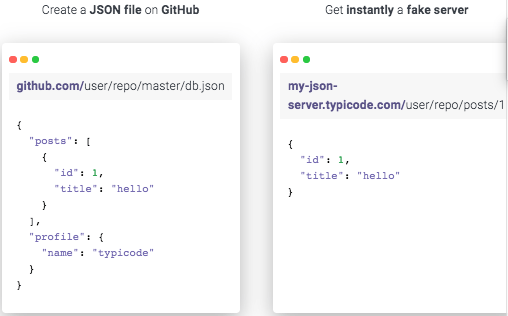
You can either use that site (which has a predefined set of REST calls) or the basic [WayBack] My JSON Server – Fake online REST server for teams that allows you to respond it to a db.json file from github:

Fake Online REST server for teams

Create a JSON file on GitHub

github.com/user/repo/master/db.json
{
  "posts": [
    {
      "id": 1,
      "title": "hello"
    }
  ],
  "profile": {
    "name": "typicode"
  }
}

Get instantly a fake server

my-json-server.typicode.com/user/repo/posts/1
{
  "id": 1,
  "title": "hello"
}

Related

Documentation

There is basic documentation at the repository [WayBack] GitHub – typicode/jsonplaceholder: A simple online fake REST API server:

Read the rest of this entry »

Posted in Communications Development, Development, HTTP, Internet protocol suite, JavaScript/ECMAScript, JSON, REST, Scripting, Software Development, TCP | Leave a Comment »

Delphi: Any idea why Delphi (At least since Seattle) does this to Dproj files:  nodes change places – Tommi Prami – Google+

Posted by jpluimers on 2021/03/25

From a while back, but still so very relevant: [WayBackAny idea why Delphi (At least since Seattle) does this to Dproj files:  <DeployClass …> nodes change places – Tommi Prami – Google+.

Luckily most of the thread is archived by now, as G+ is dead.

This thread brought DProjNormalizer to my attention, but by now you should be better using Project Magician.

DProjNormalizer normalizes the XML structure of Delphi .dproj files, both during IDE save actions, and manually using the command-line tool DprojNormalizerCmd.exe too.

Note that the manual tool does an in-place modification of your .dproj files, so better use version control, have good backups, or use InplaceExeWrapper .

In the mean time, Project Magician has been released that too has a command-line tool ProjectMagicianCmd.exe:

The general usage is:
ProjectMagicianCmd [-v:<version> | -n | -r | -x | -f] [<filepath>]<filename> [-l:<logfile>] [-s]

The parameters have the following meaning:

  • -v = Sets VersionInfo in dproj files to a given value. Clears all version info entries in child build configurations.
    <version> up to 4 numbers separated by dots
  • -n = Normalize
  • -r = Removes unused platforms
  • -x = Removes “Excluded Packages”
  • -f = Refreshes and adds missing form type entries
  • <filename> may contain wildcards. If no extension is given .dproj is assumed

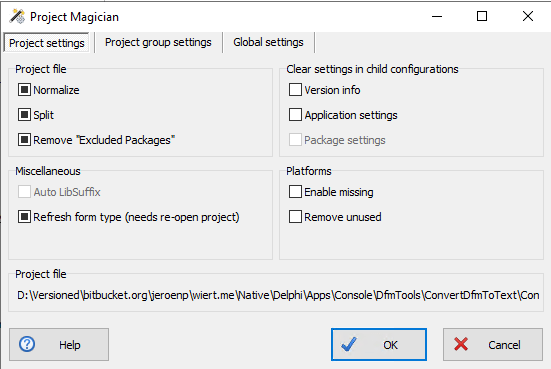
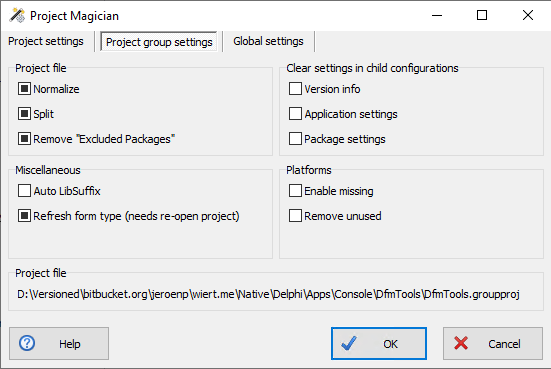
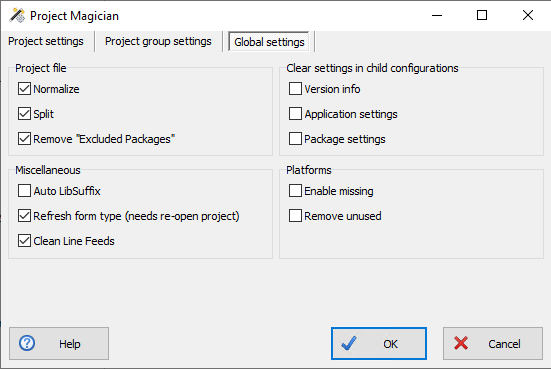
Project Magician adds more functionality, including the ability to specify settings on project, project group and global levels. An explanation of settings is at [WayBack] Keep Your Project Files Clean With Project Magician – The Art of Delphi Programming.

These are my global default settings from the Tools -> Options menu option, then following these bits of the tree:

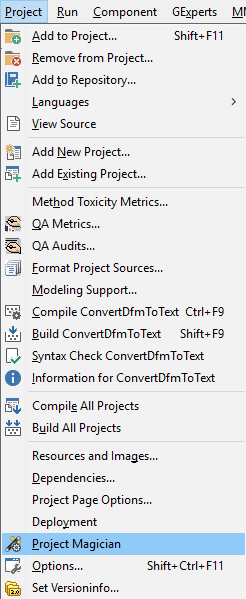
You can get to all levels via the Project -> Project Magician menu option, then following the various tabs:
Note that if you have combinations of installed previous versions before, that you should ensure you install the most recent versions of these, as there have been incompatibility issues between them:

  • ProjectMagician (or DProjNormalizer)
  • SelectiveDebugging

Related searches

Thread

  • Jeroen Wiert Pluimers's profile photo

    +Walter Prins interesting tool! Do you know of a tool that can downgrade .dproj files so you can use them with older Delphi versions? (the opposite of what the IDE does)?

    Or someone that has written more than my XSD on .dproj files? My one is so small that’s hardly a real attempt. https://wiert.me/2013/08/31/delphi-first-try-on-an-xsd-for-groupproj-files/

  • Walter Prins's profile photo
    +Jeroen Wiert Pluimers No, but interesting idea. I suppose you’re probably aware that the JEDI JCL/JVCL takes a somewhat similar (ish) related approach, in that it generates project and package files that are compatible with every desired version of Delphi from minimalist (XML) template files. Every so often I think it might be worth looking whether one can re-use the code from there easily but haven’t gotten around to it. Always something else to do first. :/
  • Jeroen Wiert Pluimers's profile photo
    +Walter Prins no I didn’t. Where should I start reading on that minimalist template approach?
  • Walter Prins's profile photo

    +Jeroen Wiert Pluimers  Sorry I see I missed out the word installer in my comment: It’s the Jedi JCL/JVCL installers that uses xml templates etc.

    But the point stands: I guess it should be (perhaps) possible to reuse its infrastructure for ones own projects, though as I say I keep meaning to look into this but haven’t really done so.

    (BTW I’m assuming you are familiar with the JCL/JVCL and in in particular their installers that bootstrap from source code? If not then perhaps my comments may not be that useful?)

    Anyway, not sure if or where there’s particular documentation about this (kind of doubt it), but if you have the JCL/JVCL installed somewhere, then first of all have a look at the “xml” folders e.g. “<jclroot>\jcl\packages\xmls” and “<jvclroot>\jvcl\packages\xml“.

    These files appear to define projects and packages in a seemingly abstract/somewhat minimal way using XML. This seemingly is then used to automatically produce .dproj and .dpk files which are placed in e.g. “<jclroot>\jcl\packages\dXX” and “<jvclroot>\jvcl\packages\dXX” where dXX corresponds to a folder for each of the supported Delphi versions and compiled/used during installation.

    Having just looked into this briefly a bit further as a result of this conversation: Key units here (in the case of JVCL) seems to be “jvclroot>\devtools\PackagesGenerator\PackageGenerator.pas“, “<jvclroot>\install\JVCLInstall\PackageUtils.pas” and “jvclroot>\devtools\common\PackageInformation.pas” (used predictably by <jvclroot>\JVCLInstall.dproj)

    (Additionally, having looked at this a bit more closely, it also appears that the JCL does not actually replace all or even most of its .dproj and .dpk files after all, but ships version specific .dproj and .dpk files in most cases, though the JVCL does appear to mostly do so. )

    Edit: The JCL also has this interesting sounding unit “<jclroot>\source\windows\JclMsBuild.pas” which appears to be an MSBuild project file parser…

  • Jeroen Wiert Pluimers's profile photo
    +Walter Prins​ I was aware of the bootstrap and it’s been on my “eventually I’ll take a look” list like forever. One day…
  • Walter Prins's profile photo
    Same as me then basically, ha. ^^

–jeroen

Posted in Conference Topics, Conferences, Delphi, Development, Event, Software Development | Leave a Comment »

Mixed JScript/batch file hybrid to create Windows shortcuts

Posted by jpluimers on 2021/03/25

I bumped into this amazing JScript/batch file hybrid. It starts as a batch file, then continues as a JScript script, and creates/updates .lnk files: [WayBack] batch.scripts/shortcutJS.bat at master · npocmaka/batch.scripts · GitHub.

Wow. Just wow.

Not that I would want to be the one maintaining it (:

Via [WayBack] batch file – How do I create a shortcut via command-line in Windows? – Stack Overflow of which I like these answers most:

  • Check the shortcutJS.bat – it is a jscript/bat hybrid and should be used with .bat extension:

    call shortcutJS.bat -linkfile "%~n0.lnk" -target  "%~f0" -linkarguments "some arguments"
    

    With -help you can check the other options (you can set icon , admin permissions and etc.)

  • Nirsoft’s NirCMD can create shortcuts from a command line, too. (Along with a pile of other functions.) Free and available here:

    http://www.nirsoft.net/utils/nircmd.html

    Full instructions here: http://www.nirsoft.net/utils/nircmd2.html#using (Scroll down to the “shortcut” section.)

    Yes, using nircmd does mean you are using another 3rd-party .exe, but it can do some functions not in (most of) the above solutions (e.g., pick a icon # in a dll with multiple icons, assign a hot-key, and set the shortcut target to be minimized or maximized).

    Though it appears that the shortcutjs.bat solution above can do most of that, too, but you’ll need to dig more to find how to properly assign those settings. Nircmd is probably simpler.

–jeroen

Posted in Batch-Files, Development, Scripting, Software Development | Leave a Comment »

Thread by @mathdroid: “I now have the most swagger @github profile, EVER Sorry, your browser doesn’t support embedded videos @github Method: Download and install G […]”

Posted by jpluimers on 2021/03/24

That was such a cool idea: rickrolling your own git profile. [WayBack] Thread by @mathdroid: “I now have the most swagger @github profile, EVER […]”.

Github profile (which in the mean time changed): [WayBack] mathdroid (Odi) · GitHub.

–jeroen

Read the rest of this entry »

Posted in Development, DVCS - Distributed Version Control, Fun, GitHub, Source Code Management | Leave a Comment »