The Wiert Corner – irregular stream of stuff

Jeroen W. Pluimers on .NET, C#, Delphi, databases, and personal interests

  • My badges

  • Twitter Updates

  • My Flickr Stream

  • Pages

  • All categories

  • Enter your email address to subscribe to this blog and receive notifications of new posts by email.

    Join 1,854 other subscribers

Author Archive

Test telefoonnummer en -adres voor wanneer marketing je gegeven wil

Posted by jpluimers on 2022/04/01

Het is erg vermoeiend als de drogist, nagelstylist, of supermarkt het prive-hemd van je lijf vraagt. Meestal lekken die gegevens, dus het is handig om daar een persona voor te hebben met gegevens die weinig kwaad kunnen.

Voorbeeld:

  • Telefoon: Nul zes, twalf, vier-en-dertig, zes-en-vijftig, acht-en-zeventig.
  • Bezoekadres:
    Bezuidenhoutseweg 30
    2594 AV DEN HAAG
  • Postadres:
    Postbus 93374
    2509 AJ  DEN HAAG

Ja, 0612345678 is inderdaad een KPN test nummer.

En bij de Autoriteit Persoonsgegevens zijn ze meteen aan het goede adres om een melding lekkage persoonsgegevens te melde.

En als je echt random-persona’s wilt samenstellen met BSN, bank, foto, noem maar op, probeer het dan eens met deze sites:

Read the rest of this entry »

Posted in Apri1st, Fun, LifeHacker, Power User, Privacy | Leave a Comment »

Wow, the Windows 3.x winfile.exe File Manager still lives on!

Posted by jpluimers on 2022/04/01

By sheer luck, Jen Gentleman pointed out that winfile.exe still lives on:

The source is at [Wayback/Archive.is] microsoft/winfile: Original Windows File Manager (winfile) with enhancements, and it looks exactly like the Windows 3.x through Windows NT 4.0 days.

Read the rest of this entry »

Posted in Apri1st, Fun, Power User, Windows, Windows 10, Windows 3.11, Windows 7, Windows 8, Windows 8.1, Windows NT | Leave a Comment »

Mumen Rusto: “Ceci n’est pas une Captcha.… “

Posted by jpluimers on 2022/04/01

Every site should present this as a captcha today.

Via [WayBack] Mumen Rusto on Twitter: “Ceci n’est pas une Captcha.… “

The captcha is by [WayBack] Senior Oops Engineer on Twitter: “Captcha: select all squares that contain a pipe Magritte: 😓”.

He posted it about 2 years ago as [WayBack] Senior Oops Engineer on Twitter: “oh fuck oh no… “.

–jeroen

Read the rest of this entry »

Posted in Apri1st, Development, Fun, Hosting, Power User, Software Development, Web Browsers, Web Development | Leave a Comment »

View multiple panes, sheets, or workbooks – Excel for Mac

Posted by jpluimers on 2022/03/31

Usually, I work in a single worsheet and workbook at a time.

Sometimes I use multiple worksheets or workbooks, and I never knew about the below feature.

The really cool aspect which is not in the below documentation: if you re-open a worksheet, it remembers the views and positions!

Learned a new thing and discovered a new thing (:

[WayBack] View multiple panes, sheets, or workbooks – Excel for Mac:

In Excel for Mac, you can split a sheet in to panes, view multiple sheets in one workbook, or view multiple workbooks at a time.

View multiple sheets in one workbook

  1. Open the workbook that you want to view.
  2. On the Window menu, click New Window.
  3. Switch to the new window, and then click the tab for the sheet that you want to view.Repeat steps 2 and 3 for each sheet that you want to view.
  4. On the Window menu, click Arrange.
  5. Do one of the following:
    To arrange windows So that they appear like this Click
    As equally sized, tiled squares Tiled windows Tiled
    Horizontally from top to bottom Horizontal windows Horizontal
    Vertically from right to left Vertical windows Vertical
    In an overlapping cascade from top to bottom Cascading windows Cascade
  6. Select the Windows of active workbook check box.

View multiple workbooks

  1. Open all the workbooks that you want to view.
  2. On the Window menu, click Arrange.
  3. Do one of the following:
    To arrange windows So that they appear like this Click
    As equally sized, tiled squares Tiled windows Tiled
    Horizontally from top to bottom Horizontal windows Horizontal
    Vertically from right to left Vertical windows Vertical
    In an overlapping cascade from top to bottom Cascading windows Cascade

–jeroen

Posted in Excel, Office, Office 2011 for Mac, Power User | Leave a Comment »

Speed up Upload and Download Speeds in Google Backup and Sync (formerly Google Drive)

Posted by jpluimers on 2022/03/31

[Wayback] Speed up Upload and Download Speeds in Google Drive is still relevant, despite the name change of Google Drive to Google Backup and Sync.

In my experience (fiber 100 mebibit symmetric with less than 5 milliseconds latency to the Amsterdam Internet Exchange) the only option that really matters is to set the Proxy Settings from “auto-detect” to “direct connection”. This saves as much as 25% on latency, which plays a big role when syncing many small files.

These are the steps in pictures:

Read the rest of this entry »

Posted in Google, GoogleBackupAndSync, GoogleDrive, Power User | Leave a Comment »

Figuring out which processes are preventing to eject/unmount my MacOS Time Machine backup USB drive

Posted by jpluimers on 2022/03/31

One day, a MacOS Time Machine backup USB drive could not me ejected/unmount.

These links helped me figure out what was wrong via [Wayback] find which macos program prevents unmount – Google Search:

  • [Wayback] macos – The volume can’t be ejected because it’s currently in use – Ask Different (Thanks [Wayback] CousinCocaine, [Wayback] Paul Gilfedder and [Wayback] Alan W. Smith)

    Q:

    • The volume can’t be ejected because it’s currently in use.
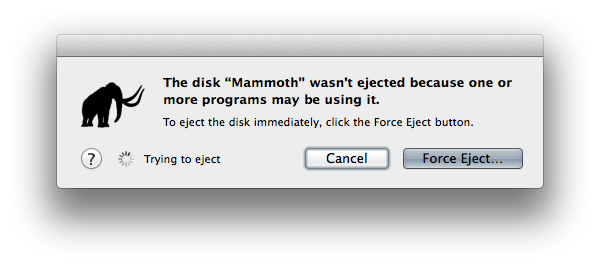
    • The disk “Diskname” wasn’t ejected because one or more programs may be using it.“.
    • umount(/Volumes/Diskname): Resource busy -- try 'diskutil unmount'

    My question: How do I know what program is using my drive so I can properly quit that program and eject my drive?

    The volume can't be ejected because it's currently in use. The disk "Camel" wasn't ejected because one or more programs may be using it. The disk "Mammtoh" wasn't ejected because one or more programs... xkcd

    A:

    lsof is indeed your best bet. The fastest and easiest way would be this :-

    sudo lsof /Volumes/myDrive
    

    It can take a couple minutes to run, but once it’s complete, it gives you a list of open files on the disk. The output will look something like this:

    COMMAND    PID  USER   FD   TYPE DEVICE SIZE/OFF  NODE NAME
    mds         89  root   19r   DIR   52,3      432     2 /Volumes/Photos
    mds         89  root   23r   DIR   52,3      432     2 /Volumes/Photos
    Finder     681 alans   14r   DIR   52,3      432     2 /Volumes/Photos
    QuickLook 2158 alans    9r   REG   52,3  1141591 78651 /Volumes/Photos/_tmp_iphone_10_backup/APC_1546.JPG  
    

    In this case, it’s the QuickLook application that has a file open. Closing the application directly is the best way to fix the issue. However, that’s not always possible. For example, QuickLook doesn’t show up as an application you can get to in the Dock.

    If you can’t close the application manually, you can use the kill command to terminate it from the command line. To do that, use the PID from the second column as the ID to kill. From the above example, it would be:

    kill 2158
    

    Note that sometimes that doesn’t work and a more aggressive form of kill must be used. Here’s a series of escalating aggressiveness (using the example PID of 2158):

    kill 2158
    sudo kill 2158
    sudo kill -INT 2158
    sudo kill -KILL 2158
    

    You should be able to eject the disk once the process/application has been killed.

    One final note, lsof can take a minute or two. It can also hang, but you should give it at least a few minutes before you decide that’s what happened.

    Also, sometimes the base command sudo lsof /Volumes/myDrive won’t find anything. If that happens, try adding the +D argument (i.e. sudo lsof +D /Volumes/myDrive). That will do a top down scan of the disk. It’ll take longer, but it should pick up anything that’s causing the disk to be un-ejectable.

    (Hat tip to Alec Jacobson’s post for extra details.)

    C:

    sudo lsof /Volumes/drive is much faster than sudo lsof | grep /Volumes/drive

  • [Wayback] Find out which application is using external hard drive in order to eject it « Alec’s Web Log
    sudo lsof +D "/Volumes/[name of drive]"

    You can always run the lsof command again to see if the process really died.

    kill [PID of process]
    sudo kill [PID of process]
    sudo kill -INT [PID of process]
    sudo kill -KILL [PID of process]
  • [Wayback] time machine – How do I make Spotlight stop indexing my Backup drive? – Ask Different (thanks [Wayback] hectorpal!)

    I finally found you cannot disable Spotlight to index Backups.backupdb.

    [Wayback] Apple Support. OS X El Capitan: Spotlight preferences

    If you add a Time Machine backup disk to the privacy list, you will continue to see messages that Spotlight is indexing your backup disk. This indexing is necessary for Time Machine to function properly and can’t be disabled. Spotlight does exclude from searches any items you store on your backup disk that are not part of a Time Machine backup.

  • [Wayback] If you can’t eject a disk from Mac – Apple Support

    If you can’t eject an external disk or storage device

    1. On your Mac, choose Apple menu  > Log Out, then log in again. Try to eject the disk again.
    2. If you still can’t eject the disk, choose Apple menu  > Shut Down. Disconnect the disk from your computer, then start up your computer again.

This figured out which processes were involved:

# sudo su -

# lsof +D /Volumes/Samsumg860Evo4TB

The main processes keeping file handles in use on the SSD device where mds and mds_stores (similar as in [Wayback] How to fix: The volume can’t be ejected because it’s currently in use). Killing spotlight did not help, and logoff failed as well: I had to shutdown the whole machine to be able to detach the USB drive.

So it was Spotlight galore all over again, which is odd, as this is a USB3 SSD for which the Time Machine backup had tried to update for more than 12 hours, so Spotlight – if indexing at all – should have been long done.

Spotlight galore:

The final solution was to perform a shutdown of the machine. It had not been for over 3 months, so apparently that caused some confusion for the combination of Spotlight and Time Machine.

–jeroen

Posted in Apple, Mac OS X / OS X / MacOS, Power User, SpotLight | Leave a Comment »

10 things you can do when Windows XP won’t boot – TechRepublic

Posted by jpluimers on 2022/03/30

For my link archive:

If your computer powers up okay, but the Windows XP operating system won’t boot properly, you have some troubleshooting ahead of you. Here’s a look at the likely culprits and what you can do to fix the problem.

[Wayback] 10 things you can do when Windows XP won’t boot – TechRepublic

Via: [Wayback/Archive.is] Product IDs – Lunarsoft Wiki

–jeroen

Posted in Power User, Windows, Windows XP | Leave a Comment »

Ziggo gooit ook analoog FM-signaal eruit: Televisie kijken zonder traditioneel abonnement? Dit zijn de opties – Kassa – BNNVARA

Posted by jpluimers on 2022/03/30

For my link archive as Ziggo is ditching the analog FM-signal rendering many devices inoperable in order to boost internet connectivity with a whopping 20 Mhz.

Switching to new hardware might as well give a much cheaper solution without Ziggo (need to check out at least NLZiet).

I wonder if Ziggo will really switch of the complete cable signal when ditching them, as I hear mixed information about that:

–jeroen

Posted in About, Cable TV/Radio, Personal, Power User | Leave a Comment »

Perkeep lets you permanently keep your stuff, for life.

Posted by jpluimers on 2022/03/30

For my link archive: [Wayback] Perkeep

Via [Wayback] bradfitz – Joining Tailscale: Simplifying Networking, Authentication, and Authorization (which has many interesting linkis, including [Archive.is] bradfitz/homelab: Brad’s homelab setup)

–jeroen

Posted in Cloud, Hardware, Infrastructure, Network-and-equipment, Perkeep, Power User, Storage, Tailscale, VPN, Wireguard | Leave a Comment »

windows xp – How to know which license version has an XP installed system – Super User

Posted by jpluimers on 2022/03/29

When virtualising your final physical Windows XP machines (just in case you need to hook up old hardware that is unsupported from newer Windows versions), you need to figure out the kind of license of each physical Windows XP machine in order to stand a chance to keep it licensed.

This answer by [Wayback] Moab [Wayback] windows xp – How to know which license version has an XP installed system – Super User helped me a lot.

I tried to make it a bit easier to read:

  1. First obtain the “Product ID” from the Windows XP machine. It is derived from the original Windows XP installation product key and displays a few values:

    xxxxx-yyy-zzzzzzz-zzzzz

    • xxxxx: the MCP (Microsoft Product Code) describing which product version, or in case of Windows XP: what language, edition (like “Home” and “Pro”) and often some more information)
    • yyy: the Channel ID (especially important to set apart OEM from other channels; OEM is not allowed to be virtualised, so would need a complete new Windows XP key to be activated as Virtual Machine; Channel IDs being neither OEM nor VLK (volume license key) can often be re-activated, sometimes over the phone to explain the situation; I’ve not tried virtualising a VLK based Windows XP yet.
    • zzzzzzz-zzzzz: semi-random values

    [Wayback/Archive.is] Product IDs – Lunarsoft Wiki has quite detailed lists of not just the MCP and Channel ID values for Windows XP and Windows Server 2003, but also the disk volume labels and setup.ini label values.

    Often this is easier to do from the physical machine before virtualising it, but even afterwards you can get it by running Windows in Safe Mode, then use either of these to get the Product ID:

    1. Run the Windows Contol Panel applet sysdm.cpl which shows the “Product ID” us under the “Registerd to” information.
    2. From the console, run reg query "hklm\software\microsoft\windows nt\currentversion" /v ProductID
    3. From another machine or boot CD (like Hiren’s Boot CD or Windows Ultimate Boot CD), mount the hard disk, mount the registry hive, then show the above registry key value
    4. Download and run NirSoft [Wayback] ProduKey (which usually will give you both the Product ID and Product Key)
  2. From the product key, determine if you can re-activate Windows, either by phone, or by this link:

    [Archive.is] Self Service for Mobile

    I got the link from [Wayback] activate windows xp – Microsoft Community via [Wayback] windows xp – How do I activate WindowsXP now that support has ended? – Super User.

    Phone (in most countries) and on-line activation should still work; it worked in 2016 (see [Wayback] license – Will I still be able to activate Windows XP after support ends? – Super User) 2019 (see [Wayback] windows xp – How do I activate WindowsXP now that support has ended? – Super User) and 2020 (see [Wayback] XP activation – Windows XP Home and Professional).

  3. When OEM, try to obtain a legal Windows XP license key that matches the MCP, then change the key using steps in for instance:

    Note that it is no use searching Google for Windows XP License keys: Microsoft did and invalidated them back in the Windows XP SP1, SP2 and SP3 days: Wayback: Error message when you install Windows XP Service Pack 1 (SP1) or Service Pack 2 (SP2): “The product key used to install Windows is invalid


The 2001 Windows XP Professional License is archived in the Wayback machine as Microsoft Windows XP Professional END-USER LICENSE AGREEMENT: Windows%20XP_Professional_English_9e8a2f82-c320-4301-869f-839a853868a1.pdf (via [Wayback] Convert your existing Windows XP system into a virtual machine – TechRepublic).

Note this does not cover OEM or Volume Licenses.

–jeroen

Posted in ESXi6, ESXi6.5, ESXi6.7, Power User, Virtualization, VMware, VMware ESXi, Windows, Windows XP | Leave a Comment »