


Cool little web app at [Wayback/Archive] Wie gut wirkt die Coronaimpfung noch? | Tagesspiegel

Via:
Posted by jpluimers on 2021/12/03
Cool little web app at [Wayback/Archive] Wie gut wirkt die Coronaimpfung noch? | Tagesspiegel
Via:

Posted in Covid-19 / Coronavirus, LifeHacker, Power User | Leave a Comment »
Posted by jpluimers on 2021/12/03
For my link archive: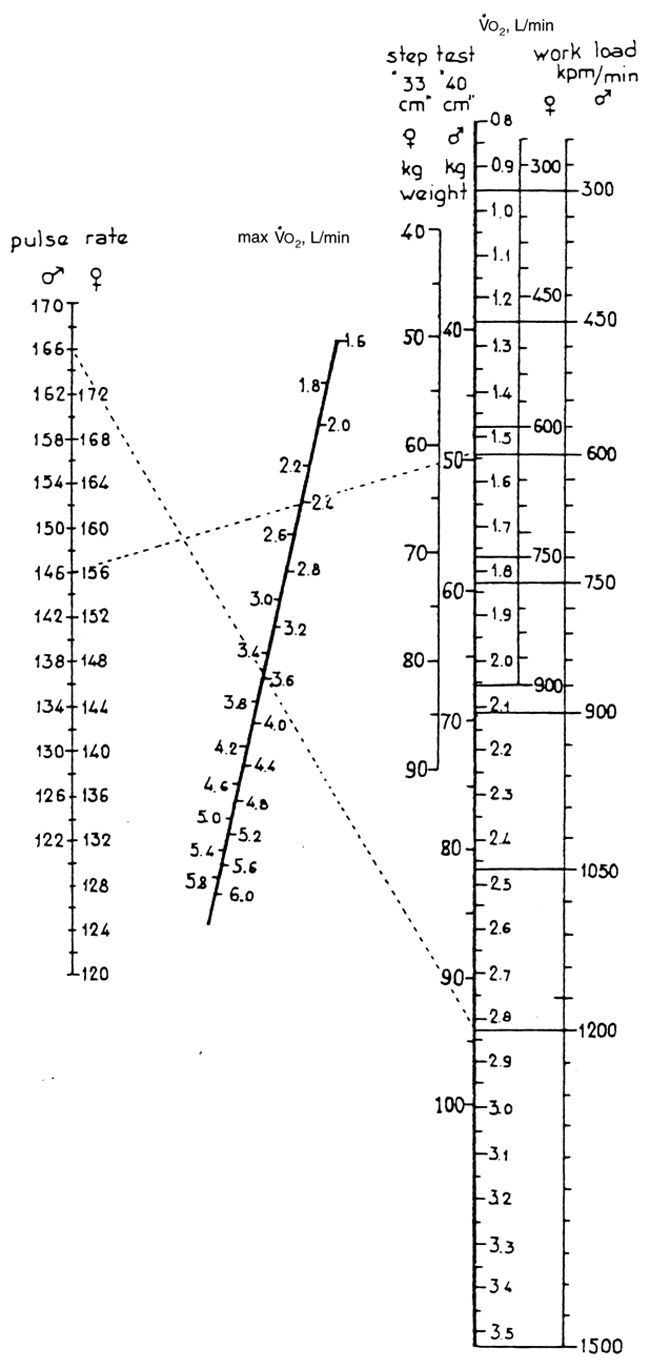
In februari 2020, I was at 43.5 aged 50 while starting preparation for rectum cancer surgery (weight 85 kg, after 6 minutes warming up at 125 watt, a steady 138 bpm after 6 minute cycling at 150 watt with 60 rpm).
I thought this was remarkably high for how I felt, which was likely because I had had 35 years of training in a marching band on abdominal breathing.
–jeroen

Posted in About, LifeHacker, Personal, Power User | Leave a Comment »
Posted by jpluimers on 2021/12/02
Github officially does not support coloured text, but with a small trick, you can get a few colours by including a diff file in the markdown.
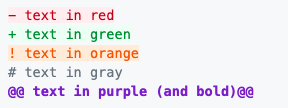
I did it when I had to put on hold open source projects due to rectum cancer recovery, for instance [Wayback] this fritzcap diff added the [Wayback] text:
which [Wayback] rendered becomes a kind of red bulleted list:
I learned this trick via [Wayback] How to add color to Github’s README.md file – Stack Overflow (thanks to [Wayback] revisions by [Wayback] craigmichaelmartin, [Wayback] Noam Manos and [Wayback] GalaxyCat105):
You can use the
difflanguage tag to generate some colored text:```diff - text in red + text in green ! text in orange # text in gray @@ text in purple (and bold)@@ ```However, it adds it as a new line starting with either
- + ! #or starts and ends with@@
This issue was raised in [Wayback] github markup #369, but they haven’t made any change in decision since then (2014).
By now there is a new issue, again with little progress: [Wayback] Color text in markdown · Issue #1440 · github/markup
–jeroen

Posted in Color (software development), Development, Lightweight markup language, MarkDown, Software Development | Leave a Comment »
Posted by jpluimers on 2021/12/02
Cool when writing texts in languages I don’t often write in, so I can read them better than I write them:
[Wayback/Archive.is] LanguageTool – Online Grammar, Style & Spell Checker
It supports English (many variations, including US and UK English), German (Swiss and Austrian German too!), Dutch, and many other languages.
–jeroen

Posted in Development, LifeHacker, Power User, Software Development | Leave a Comment »
Posted by jpluimers on 2021/12/02
From a while back a totally non-optimised code example by me (intentionally limiting to AnsiStr as it was about filtering ASCII, and UniCode has way many code points for the Latin script).
// For those who need a disclaimer:
// This code is meant as a sample to show you how the basic check for non-ASCII characters goes
// It will give low performance with long strings that are called often.
// Use a TStringBuilder, or SetLength & Integer loop index to optimize.
// If you need really optimized code, pass this on to the FastCode people.
function StripNonAsciiExceptCRLF(const Value: AnsiString): AnsiString;
var
  AnsiCh: AnsiChar;
begin
  for AnsiCh in Value do
    if (AnsiCh >= #32) and (AnsiCh <= #127) and (AnsiCh <> #13) and (AnsiCh <> #10) then
      Result := Result + AnsiCh;
end;
and an optimised one by [WayBack] David Heffernan
function StrippedOfNonAscii(const s: string): string;
var
  i, Count: Integer;
begin
  SetLength(Result, Length(s));
  Count := 0;
  for i := 1 to Length(s) do begin
    if ((s[i] >= #32) and (s[i] <= #127)) or (s[i] in [#10, #13]) then begin
      inc(Count);
      Result[Count] := s[i];
    end;
  end;
  SetLength(Result, Count);
end;
Even when “trivial”, I usually do not prematurely optimise as optimised code is almost always less readable than non-optimised code.
Source: [Wayback] parsing – delphi – strip out all non standard text characers from string – Stack Overflow
–jeroen
Posted in Delphi, Development, Software Development | Leave a Comment »
Posted by jpluimers on 2021/12/01
Wanting a simple way on the console to convert a .pcap file to a .wav file, I searched for [Wayback] console convert pcap to wav – Google Search.
The reason is that [Wayback] fritzcap (written in Python) sometimes crashes while doing the conversion of a phone recording, so then only the .pcap file is available. I still want to figure this out, but given my health situation, I might not be able to in time.
Posted in *nix, *nix-tools, Audio, Development, ffmpeg, Fritz!, Fritz!Box, fritzcap, Hardware, Media, Network-and-equipment, Power User, Python, Scripting, Software Development, Wireshark | Leave a Comment »
Posted by jpluimers on 2021/12/01
Some notes, as I’m looking to a stable, simple to maintain email forwarding system that is also secure and – yes – can cost money.
I need to leave IT-infrastructure behind that is easy to maintain for my heirs.
Some links:
The best open-source and free email forwarding service for custom domains. We do not keep logs nor store emails. We don’t track you. Unlimited aliases, catch-alls, wildcards, API access, and disposable addresses. Built-in support for DKIM, SRS, SPF, ARC, DMARC, and more. No credit card required.
What is the max email size limit
We default to a 50MB size limit, which includes content, headers, and attachments. Note that services such as Gmail and Outlook allow only 25MB size limit, and if you exceed the limit when sending to addresses at those providers you will receive an error message.
An error with the proper response code is returned if the file size limit is exceeded.
…
What is the difference between Free and Enhanced Protection
The Free plan requires you to use public DNS records to store your forwarding configuration. Anyone with a computer can lookup your forwarding configuration in a terminal if you are on the Free plan. Unlike the Free plan, the Enhanced Protection plan uses a cryptographically generated random string to store your forwarding configuration privately.
Free Plan Enhanced Protection Plan forward-email=user@gmail.comforward-email-site-verification=m8d7o8K4Il
Privacy
We have a “zero tolerance policy” privacy policy, which states that we don’t store logs nor emails, and we don’t track users. Our statement clearly states that we do not collect nor store forwarded emails, metadata, server-side nor client-side logs, IP addresses, or browser information.
Only an email address is required to create and configure the Enhanced Protection Plan, which hides DNS email alias information on the free plan through a managed and hosted service.
User’s accounts, domains, and all related information can be permanently deleted at any time by the user.
Free email forwarding for domains with features including Custom Domain Email Forwarding, Disposable Addresses, Multiple Recipients, Wildcards, and more!
–jeroen
Posted in Development, eMail, JavaScript/ECMAScript, Node.js, Power User, Scripting, SocialMedia, Software Development, Web Development | Leave a Comment »
Posted by jpluimers on 2021/12/01
If you ever get error messages like this (Sierra can bey any MacOS version name):
Error: Xcode alone is not sufficient on Sierra.Xcode alone is not sufficient on Sierra.Then run this on the terminal:
xcode-select --install
This works even if it is already installed, as the message will also show up when the current install is outdated.
Note from [Wayback] `xcode-select –install` required for OS X 10.9 Xcode command-line tools (like `zlib-devel`) « The Wiert Corner – irregular stream of stuff
There is one catch though: it might fail as you first have to start Xcode once and accept the license agreement.
–jeroen
Via my answer on [Wayback] ruby – Error Message “Xcode alone is not sufficient on Sierra” – Stack Overflow
Posted in Development, Software Development, xCode/Mac/iPad/iPhone/iOS/cocoa | Leave a Comment »
Posted by jpluimers on 2021/11/30
When trying to deliver mail, it is important to know which protocols and ports you can use.
On smtp, smtp-submission, smtps (ports 25, 587 and 465) and unofficial port 2525 (which Maingun maps to `smtp-submission): [Wayback] Which SMTP Port Should I Use? Learn Ports 25, 465, & 587 | Mailgun
Quote on why smtps port 465 is hardly used:
Port 465:
IANA has reassigned a new service to this port, and it should no longer be used for SMTP communications.
However, because it was once recognized by IANA as valid, there may be legacy systems that are only capable of using this connection method. Typically, you will use this port only if your application demands it. A quick Google search, and you’ll find many consumer Inbox Service Providers’ (ISPs) articles that suggest port 465 as the recommended setup. However, we do not recommend it, as it is not RFC compliant.
–jeroen
Posted in Communications Development, Development, Internet protocol suite, SMTP, Software Development, TLS, Web Development | Leave a Comment »
Posted by jpluimers on 2021/11/30
On my list of things to try, as it allows me to have an ISO at hand in case I ever need to quickly re-install a machine to the current patch level (for instance when the USB boot stick breaks down: these things happen in reality): [Wayback] VFrontDe/ESXi-Customizer-PS: PowerCLI script that greatly simplifies and automates the process of creating fully patched and customized VMware ESXi installation images
ESXi-Customizer-PS is a Powershell script that greatly simplifies and automates the process of creating fully patched and customized ESXi 5.x and 6.x installation ISOs using the VMware PowerCLI ImageBuilder module/snapin.
…
Requirements
- A Windows computer (XP or newer) with Powershell 2.0 or newer
- VMware PowerCLI version 5.1 or newer
…
You can get the code from [Wayback] ESXi-Customizer-PS/ESXi-Customizer-PS.ps1 at master · VFrontDe/ESXi-Customizer-PS.
The old site (which still has most of the documentation) can be reached at two places:
A video showing how to use it is below the signature.
The above links via [Wayback] Custom ESXi ISO with ne1000 driver for install on Intel NUC Frost Canyon – seanwalsh.dev.
Oh: you can check if you have a PXE, USB or HDD installation of ESXi via the steps here: Determining the ESXi installation type (2014558) | VMware KB.
More on a failing USB stick later…
–jeroen
Posted in CommandLine, Development, ESXi6, ESXi6.5, ESXi6.7, ESXi7, Power User, PowerCLI, PowerShell, PowerShell, Software Development, Virtualization, VMware, VMware ESXi | Leave a Comment »


 The Wiert Corner - irregular stream of stuff