


Reminder to self: sort out why a while ago I had trouble with a nested [WayBack] CASE construct causing parsing anomalies in 2.5.8.
–jeroen
Posted by jpluimers on 2019/06/12
Reminder to self: sort out why a while ago I had trouble with a nested [WayBack] CASE construct causing parsing anomalies in 2.5.8.
–jeroen

Posted in Database Development, Development, Firebird, Software Development | Leave a Comment »
Posted by jpluimers on 2019/06/12
For my archive: [WayBack/Archive] Cyclomatic Complexity of switch case statement – Stack Overflow.
Ultimate reference: [WayBack/Archive] NIST Special Publication 500-235: Structured Testing: A Testing Methodology Using the Cyclomatic Complexity Metric
Via: [WayBack/Archive] I have a question regarding Cyclometric Complexity… IF versus CASE… – David Hoyle – Google+
–jeroen
Posted in .NET, C#, Conference Topics, Conferences, Delphi, Development, Event, Software Development | Leave a Comment »
Posted by jpluimers on 2019/06/11
Nice articles on OAuth2, JWT and other authentication mechanisms:
via [WayBack] Ondrej Kelle – Google+
–jeroen
Posted in Authentication, Delphi, Development, Power User, Security, Software Development | Leave a Comment »
Posted by jpluimers on 2019/06/11
It seems all the fuzz sort of got restored: if you have an old product, not under maintenance support, then the registration count has been bumped and can be bumped further through the sales/renewal department.
This got posted a few hours after my blog post got live (the WayBack link does not archive all comments, sorry for that, that’s why I quoted toe comment):
[WayBack] From the GM: New Updates and Changes to the Registration “Bumps” Policy [UPDATED] – Blog – Developer Tools – IDERA Community
Last month, people found out that retroactively, Embarcadero has changed the terms of the license agreements on products sold with a perpetual license:
In order to re-install those products, often a bump in license count is needed. That bump now requires an active maintenance subscription which has a substantial yearly cost.
This is yet another sign that Embarcadero parent company Idera is on their way towards becoming like Oracle or Computer Associates: hiding information behind account walls, and by all means trying to squeeze out money of older products.
I think the move is illegal in several countries, especially with products sold to private persons. Uwe Raabe agrees with me on that:
I am not sure they would get away with that – at least here in Germany. As long as the customer actually paid for the perpetual license (this excludes the CE), the ability to use it legally cannot be prohibited just because there is no current support contract. At least a reasonable fee for the registration bump would perhaps be acceptable, but definitely not denying it completely.
If you still own Delphi licenses, and are on maintenance for them, a path you might take is to switch to a local installation (on a separate machine, preferably virtual machine) of the ELC (formerly Belise) licensing server together with a named license.
That requires your machines to be in touch with that ELC service (you can reach it over a network connection, even via a tunnel) every 30 days to stay active.
Another way is to :
Note that :
So renaming a machine will already invalidate your license (but you can usually restore that).
Background reading:
Tech Tipp #11: Lizenzserver ELC unter Windows Server 2016
In den letzten Tagen bekomme ich häufiger diese Frage:
Frage: Ich möchte den Lizenzserver ELC unter Windows Server 2016 installieren. Aber schon während der Installation bekomme ich einen hässlichen Fehler. Ich benutze dazu die Installationsdatei von http://altd.embarcadero.com/download/ELC/win64/ELC532_64.exe, wie hier beschrieben:
http://docwiki.embarcadero.com/ELC/53/en/ELC_Quick_StartAntwort: Nutzen Sie bitte diese Installationsdatei
http://altd.embarcadero.com/download/ELC/win64/ELC531_64.exe
Die geht
Which points to Enterprise License Center (ELC) und neue Lizenzen (Update Subscription) that also got removed from the community server and is not available in the WayBack machine. I have copied the Google cached content below the fold.
Introducing AppWave Enterprise License Center
Install and Configure
- Installing AppWave Enterprise License Center
- Configuring AppWave Enterprise License Center
- Configuring ELC Using the Web Admin Interface
- Configuring ELC by Editing Configuration Files
- Obtaining License Files
- Setting Up the User List File with the LDAP Import Utility
- Using Groups to Partition Concurrent Licenses
- Using Group Reports
- Configuring the IP List File
- Configuring the Mail Notification
- Setting up a Backup ELC for Temporary Redundancy
User Interface
Admin Interface
- Administering AppWave Enterprise License Center
- Starting AppWave Enterprise License Center
- Using AppWave Enterprise License Center commands
- Administration Pages
- Top Menu
- Setting up a client for named user licensing
- Setting up a client for concurrent licensing
- Interpreting the logs
- Reporting
Reference
Downloads (.bin files are for Linux x86 or x86_64; .exe files for Windows Win32 or Win64):
–jeroen

Posted in Delphi, Development, Software Development | 3 Comments »
Posted by jpluimers on 2019/06/11
The sad thing is that most security people do not like these kinds of user stories:
As any user, I never want to get a “denied” message, but a “in order to do what you want you are missing the X permission” message in order to be able to track down the root cause and request the appropriate permissions more easily.
Source: [WayBack] A (sad) security user story – The Isoblog.
Related: [WayBack] User Stories and User Story Examples by Mike Cohn
–jeroen
Via: [WayBack] A (sad) security user story… – Kristian Köhntopp – Google+
Posted in Agile, Development, Scrum, Software Development | Leave a Comment »
Posted by jpluimers on 2019/06/10
Archive.is Githunt – Chrome Web Store: Replace the new tab with a list of trending repositories on github belonging to any technology that you chose.
More information: [WayBack] How to get trending GitHub projects in your Chrome new tab screen with GitHunt
–jeroen
via: [WayBack] This is how I discover new and interesting open source Delphi/Pascal projects – install Githunt and it replaces my ‘new tab’ page, there I set the langu… – Edwin Yip – Google+
Posted in Development, DVCS - Distributed Version Control, git, GitHub, Software Development, Source Code Management | Leave a Comment »
Posted by jpluimers on 2019/06/10
A problem with ICMP can be that you if you allow File and Printer Sharing, that ICMPv4 and ICMPv6 for both Private and Public networks are only allowed for the Local subnet.
For Domain networks, however it is allowed for Any subnet.
You can see the difference in this picture:

The solution presented at [WayBack] Nobody Can Ping My Computer – Technet MSDN library is to add a less restrictive set of rules:
- In the Windows Firewall with Advanced Security snap-in, click Inbound Rules in the tree, and click New Rule in the Actions Pane.
- Click Custom and click Next.
- Click All programs and click Next.
- For Protocol type, select ICMPv4.
- Click Customize for Internet Control Message Protocol (ICMP) settings.
- Click Echo Request, click OK, and then click Next.
- Under Which local IP address does this rule match? and for Which remote IP address does this rule match click either Any IP address or These IP Addresses. If you click These IP addresses, specify the IP addresses and click Add, then click Next.
- Click Allow the connection, and then click Next.
- Under When does this rule apply?, click the active profile, any or all profiles (Domain, Private, Public) to which you want this rule to apply, and then click Next.
- For Name type a name for this rule and for Description an optional description. Click Finish.
- Repeat steps for ICMPv6, selecting ICMPv6 for Protocol Type instead of ICMPv4.
You can also add these rules using the netsh advfirewall command as shown at [WayBack] How to Allow Pings (ICMP Echo Requests) Through Your Windows Firewall
–jeroen

Posted in Power User, Windows, Windows 10 | Leave a Comment »
Posted by jpluimers on 2019/06/10
Via [WayBack] ms office – Keyboard shortcut to select all text in a cell in Excel – Ask Different a few keyboard tips.
Lets start with the shortest one:
Command–Z or Control–Z to undo the changeThis probably is unintended, but works great: all text is now selected, so you can copy/cut with Command-C/Command–X.
Now the “official” way:
Control–U or F2 to edit the cell (the cursor is now at the end)Shift–Alt–Home or Shift–Control–Home (to select all text)Home can also be Fn–Left.Other selections you can make while the cell is in edit mode:
Shift–Alt–End or Shift–Control–End (to select to the end of the cell)End can also be Fn–Right.Shift–Alt–Right or Shift–Control–Right (to select one word to the right)Shift–Alt–Left or Shift–Control–Left (to select one word to the left)Shift–Alt–Down or Shift–Control–Down (to select to the same position on the line below)Shift–Alt–Up or Shift–Control–Up (to select to the same position on the line up)Keyboard symbols (more at [WayBack] Command, Option, & Shift Symbols in Unicode):
⇧ – Shift^ – Control⌥ – Alt which is the same as Option⌘ – CommandFn – Function–jeroen
Posted in Apple, Excel, Mac, Mac OS X / OS X / MacOS, MacBook, MacBook Retina, MacBook-Air, MacBook-Pro, MacMini, macOS 10.12 Sierra, Office, Office 2011 for Mac, Power User | Leave a Comment »
Posted by jpluimers on 2019/06/10
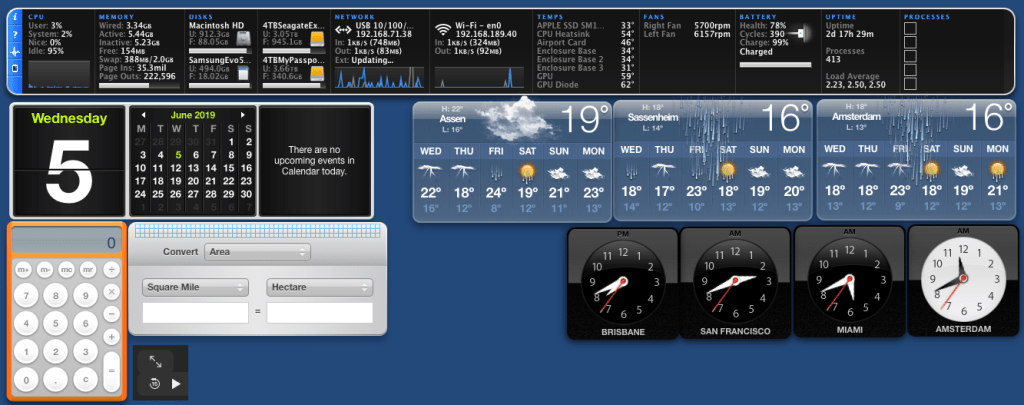
It was fun while it lasted: [WayBack] Did Apple remove dashboard in MacOS Catalina? – Appleosophy
I especially like the iStat Pro (though unsupported) widget, and that you can have a dashboard without the need to go on-line.
Related: [WayBack] Dashboard (macOS) – Wikipedia
Via: [WayBack] Apple verwijdert dashboard met widgets uit macOS Catalina – Computer – Nieuws – Tweakers
If might be that Übersicht can help me, but I am not sure yet if there is a good iStat Pro equivalent for it.
Future links to investigate:
Übersicht- Keep an eye on what is happening on your machine and in the World.
–jeroen

Posted in Apple, Mac OS X / OS X / MacOS, Power User | Leave a Comment »
Posted by jpluimers on 2019/06/07
For my link archive:
–jeroen
Posted in Apple, iMac, Mac, Mac OS X / OS X / MacOS, MacBook, MacBook Retina, MacBook-Air, MacBook-Pro, MacMini, macOS 10.12 Sierra, macOS 10.13 High Sierra, OS X 10.11 El Capitan, Power User | Leave a Comment »

 The Wiert Corner - irregular stream of stuff