The Wiert Corner – irregular stream of stuff

Jeroen W. Pluimers on .NET, C#, Delphi, databases, and personal interests

  • My badges

  • Twitter Updates

  • My Flickr Stream

  • Pages

  • All categories

  • Enter your email address to subscribe to this blog and receive notifications of new posts by email.

    Join 1,839 other subscribers

Author Archive

Polymer people discovered they need something like “wizzywid – what you see is what you deserve”

Posted by jpluimers on 2018/12/27

The 1990s are calling back: some people in the Polymer world now have realised that in order to be more productive, they need something like “wizzywid: wizzywid – what you see is what you deserve”.

It seems that the visual IDEs of the 1990s that so many from the web 2.0 era frowned upon are useful after all.

Reality check: if you write design tools for Polymer like that, then ensure they support proper refactoring. As that is the next step in the evolvement of your tool-chain.

Take a peak at IDE history, for example Delphi, Visual Basic, Visual C++, Visual Studio .NET, Blend, Visual Studio Code, JBuilder, Eclipse, NetBeans, and IntelliJ IDEA.

–jeroen

Read the rest of this entry »

Posted in Development, Software Development | Leave a Comment »

eventviewer – filtering on service stop/start events

Posted by jpluimers on 2018/12/27

Based on eventviewer – View Shutdown Event Tracker logs under Windows Server 2008 R2 – Server Fault « The Wiert Corner – irregular stream of stuff, I’ve made similar filters for service stop/start events.

Works on translated systems:

PowerShell
Get-EventLog System | Where-Object {$_.EventID -eq "7036"} | ft Machinename, TimeWritten, UserName, EventID, Message -AutoSize -Wrap

Or on one line:

Get-EventLog System ^| Where-Object {$_.EventID -in "6005","6006","7000","7009","7036","7040","7042","7043","7045"} ^| ft Machinename, TimeWritten, UserName, EventID, Message -AutoSize -Wrap

Note the -In operator was introduced in PowerShell 3: [WayBack]

Source: PowerShell v3 – New -in Operator | Jonathan Medd’s Blog

I’ve adapted the custom view to include all these event IDs above (note some links have disappeared moving my notes to a blog post):

  • [WayBack] 6005: The Event log service was started (indication for system startup).
  • [WayBack] 6006: The Event log service was stopped (indication for system shutdown).
  • [WayBack] 7000: The <servicename> service failed to start due to the following error:
    The service did not respond to the start or control request in a timely fashion.
  • [WayBack] 7009: A timeout was reached (30000 milliseconds) while waiting for the <servicename> service to connect.
  • [WayBack] 7036:
    • The <servicename> service entered the stopped state.
    • The <servicename> service entered the running state.
  • [WayBack] 7040: The start type of the <servicename> service was changed from demand start to auto start.
  • [WayBack] 7042: The <servicename> service was successfully sent a stop control.
  • [WayBack] 7043: The <servicename> service did not shut down properly after receiving a preshutdown control.
  • [WayBack] 7045: A service was installed in the system.

Other event IDs that might be relevant via [WayBack] Windows Server restart / shutdown history – Server Fault:

  • [WayBack] 6008: “The previous system shutdown was unexpected.” Records that the system started after it was not shut down properly.
  • [WayBack] 6009: Indicates the Windows product name, version, build number, service pack number, and operating system type detected at boot time.
  • [WayBack] 6013: Displays the uptime of the computer. There is no TechNet page for this id.
  • [WayBack] 1074: “The process X has initiated the restart / shutdown of computer on behalf of user Y for the following reason: Z.” Indicates that an application or a user initiated a restart or shutdown.
  • [WayBack] 1076: “The reason supplied by user X for the last unexpected shutdown of this computer is: Y.” Records when the first user with shutdown privileges logs on to the computer after an unexpected restart or shutdown and supplies a reason for the occurrence.
  • [WayBack] 41 (source: Microsoft-Windows-Kernel-Power)
  • [WayBack] 1001: (source: BugCheck).
  • [WayBack] 12, which is typically the first eventid to be logged after a reboot/reset etc and shows the actual “system start time”, i.e.: “The operating system started at system time ‎2017‎-‎09‎-‎19T02:46:06.582794900Z.”

A more complete list of Windows Kernel related Event IDs is at [WayBack] rootkit.com/NETEVENT.H at master · bowlofstew/rootkit.com.

Steps for the custom view:

Open Event Viewer then

  • Right click Custom Views
  • Click Create Custom View
  • Under the Filter tab
    • Keep Logged as Any time
    • Select all the Event level types (Critical, Warning, etc.)
    • Choose by source = Service Control Manager, Service Control Manager Performance Diagnostic Provider
    • Optionally; For Event ID under the Includes/Excludes Event IDs section enter 6005,6006,7000,7009,7036,7040,7042,7043,7045 for the Event ID
  • Click Ok
  • Enter a name like Shutdown Events and any description then
  • Click Ok again to complete the custom event log.

Your new custom view should show up in the list of custom views with the correct filter applied.

–jeroen

Posted in CommandLine, Development, Power User, PowerShell, PowerShell, Scripting, Software Development, Windows | Leave a Comment »

To Heap or not to Heap; That’s the Large Object Question? – CodeProject

Posted by jpluimers on 2018/12/27

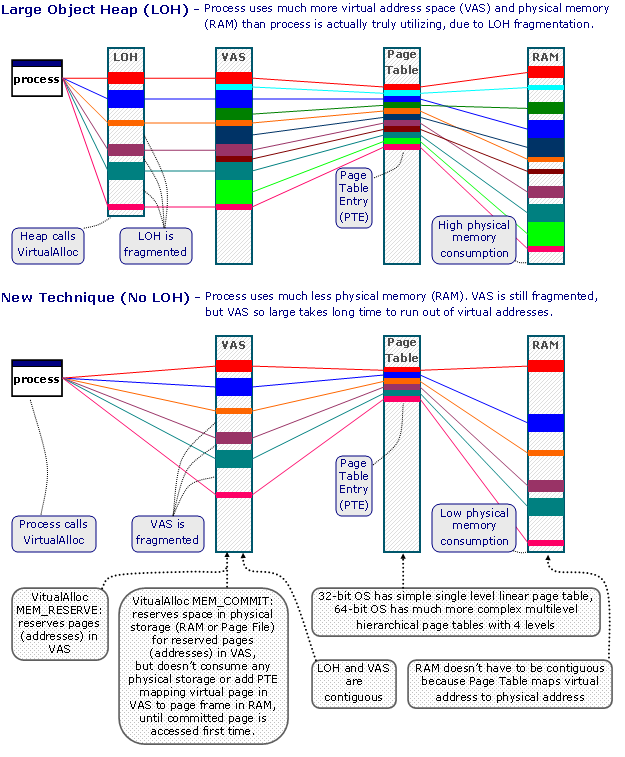
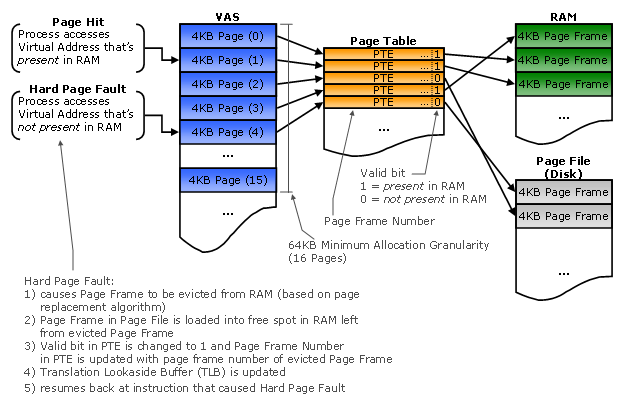
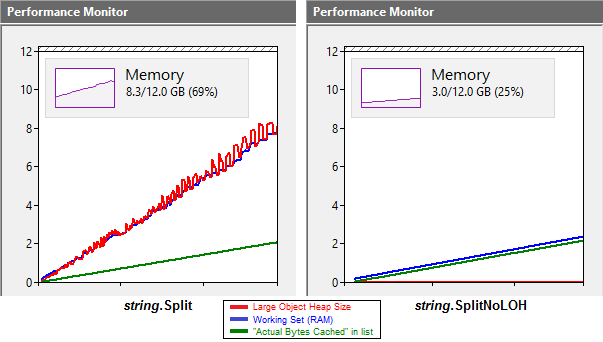
Interesting discussion on an alternative to the LoH: [WayBackTo Heap or not to Heap; That’s the Large Object Question? – CodeProject.

Via: [WayBack] To Heap or not to Heap; That’s the Large Object Question?Detailed analysis of large object heap allocation impacts under .NET: “…would it be better t… – Lars Fosdal – Google+

–jeroen


Posted in .NET, Development, Software Development | Leave a Comment »

Delphi: AutoSize property resizes a container (panel, scrollbox, form, frame…) to grow it to fit all controls

Posted by jpluimers on 2018/12/26

A while back I needed a design-time way to automatically resize a Delphi container control (descendants from the, [WayBackTWinControl Class like [WayBack] TPanel, [WayBack] TScrollbox, [WayBack] TForm, [WayBack] TFrame) to grow/shrink so it just fits around it’s contained controls.

Back then I needed it for VCL design time, if possible taking into account non-visual components.

The [WayBackTControl.AutoSize Property does just that for visual controls and works way better than suggestions on doing this manually.

Manually adjusting many controls at design time is a tedious job, especially when trying to prevent mouse usage (I’ve had RSI in the early 1990s, so I’m extra careful).

Thanks Uwe Raabe for helping me out on this.

I’ve not had the need for non-visual components or FMX yet, but if I ever need it, then this piece of code by Stefan Glienke might work:

[Archive.is[Delphi] ResizeControlEditor – Pastebin.com

–jeroen

Source: [WayBack] Is there an expert that can resize a container (panel, scrollbox, form, frame, etc) to be just large enough so it fits all it components?So: grow when… – Jeroen Wiert Pluimers – Google+

Read the rest of this entry »

Posted in Delphi, Development, Software Development | Leave a Comment »

Need to play with this: Raspberry Pi web simulator from Microsoft Corporation

Posted by jpluimers on 2018/12/26

It’s been a while since [WayBack] +Microsoft Corporation has recently released a preview version of an open source +Raspberry Pi web simulator where you can connect sensors and component… – Jean-Luc Aufranc – Google+

Back then it was convoluted to get going. Hopefully by now that has changed.

So time to take another look during the holiday season:


It reminded me a lot of [WayBackBring ideas to life with free online Arduino simulator and PCB apps | Autodesk Circuits (a.k.a. circuits.io):

Read the rest of this entry »

Posted in *nix, Development, Hardware, Hardware Development, Hardware Interfacing, Linux, Power User, Raspberry Pi, Software Development | Leave a Comment »

TED Talks on Twitter: “The real reason female entrepreneurs get less funding: @KanzeDana… they get asked different questions than male ones”

Posted by jpluimers on 2018/12/26

Interesting watch: [WayBack] TED Talks on Twitter: “The real reason female entrepreneurs get less funding: @KanzeDana… “

Via: [WayBack] The real reason female entrepreneurs get less funding … Gender gap in startup funding: Dana Kanze and collaborators found a surprising… – Marjan Venema – Google+

Gender gap in startup funding: Dana Kanze and collaborators found a surprising, consistent trend: in meetings with funders, men and women were being asked completely different types of questions.

Video at [Archive.is/WayBackDana Kanze: The real reason female entrepreneurs get less funding | TED Talk


–jeroen

Posted in Awareness, History | Leave a Comment »

Carmen Verheul on Twitter: “ik lees miv tweede kerstdag van 7 tot 12 uur, matijn van 13 tot 19 uur, michel van 20 tot 24 uur… “

Posted by jpluimers on 2018/12/26

“@jpluimers @matijn ik lees miv tweede kerstdag van 7 tot 12 uur, matijn van 13 tot 19 uur, michel van 20 tot 24 uur”

Voor zometeen als we in het [Archive.is] Top 2000 Café | Beeld en Geluid zijn: [WayBack] Carmen Verheul on Twitter: “ik lees miv tweede kerstdag van 7 tot 12 uur, matijn van 13 tot 19 uur, michel van 20 tot 24 uur… “

De [WayBack] Over de NOS – Onze mensen: Nieuwslezers op Twitter:

In de nacht is er de “nieuwslezer van dienst”: [WayBackMatijn Nijhuis on Twitter: “de nachtlezer die voor alle zenders leest

Carmen en Matijn zijn sowieso een stel apart (:

–jeroen

PS: Het is al vaak door me heen gegaan. De lijm van Radio 2 zit in de nieuwslezers: de nieuwslezers hebben behalve een perfecte verbinding met de DJ’s, ook de verbinding tussen de diverse programma’s. Dat zorgt voor een totaal-sfeer over de dag heen wat bij andere zenders goeddeels ontbreekt. Wat inmiddels ook helpt is dat diverse DJ’s aan het einde de DJ van het volgende programma live in de uitzending hebben, maar de nieuwslezers vormen nog steeds de basis.

Read the rest of this entry »

Posted in LifeHacker, Power User, SocialMedia, Twitter | Leave a Comment »

eventviewer – View Shutdown Event Tracker logs under Windows Server 2008 R2 – Server Fault

Posted by jpluimers on 2018/12/25

Works on translated systems:

PowerShell
Get-EventLog System | Where-Object {$_.EventID -eq "1074" -or $_.EventID -eq "6008" -or $_.EventID -eq "1076"} | ft Machinename, TimeWritten, UserName, EventID, Message -AutoSize -Wrap

Or on one line:

Get-EventLog System ^| Where-Object {$_.EventID -eq "1074" -or $_.EventID -eq "6008" -or $_.EventID -eq "1076"} ^| ft Machinename, TimeWritten, UserName, EventID, Message -AutoSize -Wrap

I’ve adapted the custom view to include all these event IDs above:

  • 12: The operating system started at system time ‎<iso8601utc>.
  • 13: The operating system is shutting down at system time  <iso8601utc>.
  • 109: The kernel power manager has initiated a shutdown transition.
  • 1074: [WayBack] The process <process> has initiated the restart of <computer name> for the following reason: No title for this reason could be found.
    Minor Reason: <reason>
    Shutdown Type: <type>
  • 1076: [WayBack] The reason supplied by user <user name> for the last unexpected shutdown of this computer is: <error description>
    Reason Code: <error code>
    Bug ID: <bug id>
    Bugcheck String: <string>
    Comment: <comment>
  • 6008: [WayBack] The previous system shutdown at <time> on <date> was unexpected.

Steps for the custom view:

Open Event Viewer then

  • Right click Custom Views
  • Click Create Custom View
  • Under the Filter tab
    • Keep Logged as Any time
    • Select all the Event level types (Critical, Warning, etc.)
    • Choose by source = Windows Logs > System
    • For Event ID under the Includes/Excludes Event IDs section enter 12,13,1074,1076,6008 for the Event ID
  • Click Ok
  • Enter a name like Shutdown Events and any description then
  • Click Ok again to complete the custom event log.

Your new custom view should show up in the list of custom views with the correct filter applied.

Source: [WayBackeventviewer – View Shutdown Event Tracker logs under Windows Server 2008 R2 – Server Fault

–jeroen

Posted in CommandLine, Development, Power User, PowerShell, PowerShell, Scripting, Software Development, Windows | Leave a Comment »

50 Shades of Grain

Posted by jpluimers on 2018/12/25

Have a good holiday season!

[WayBack50 Shades of Grain – Lars Fosdal – Google+: Adult cereals.

Original from [WayBackShopping Can Be Quite Entertaining 20 pics

–jeroen

Read the rest of this entry »

Posted in Fun | Leave a Comment »

Time to let go of prejudices: We are all much more the same than we are different.

Posted by jpluimers on 2018/12/25

All of humanity is more alike than different. This holds for generations as well:

the findings suggest meaningful differences among generations do not exist!

Let this be a thought in these days at the end of december: enjoy that we all are so much alike, and help each other succeed.

Source: [WayBackGenerations At Work: Persistent Myths Vs. Actual Science | Corporate Rebels.

In an article for Forbes Magazine, we busted the persistent myth that different generations have different needs and desires at work. Back then we were talking about popular-press articles claiming that, for…

Via: [WayBack] Time to let go of prejudices: Generations At Work: Persistent Myths Vs. Actual Science | Corporate Rebels – Marjan Venema – Google+

–jeroen

Posted in About, History, Personal | 2 Comments »