The Wiert Corner – irregular stream of stuff

Jeroen W. Pluimers on .NET, C#, Delphi, databases, and personal interests

  • My badges

  • Twitter Updates

  • My Flickr Stream

  • Pages

  • All categories

  • Enter your email address to subscribe to this blog and receive notifications of new posts by email.

    Join 1,839 other subscribers

Author Archive

brew update reminder

Posted by jpluimers on 2019/01/01

Reminder to self:

==> Caveats
==> nss
nss is keg-only, which means it was not symlinked into /usr/local,
because Firefox can pick this up instead of the built-in library, resulting in
random crashes without meaningful explanation.

Please see https://bugzilla.mozilla.org/show_bug.cgi?id=1142646 for details.

If you need to have nss first in your PATH run:
echo ‘export PATH=”/usr/local/opt/nss/bin:$PATH”‘ >> ~/.bash_profile

For compilers to find nss you may need to set:
export LDFLAGS=”-L/usr/local/opt/nss/lib”
export CPPFLAGS=”-I/usr/local/opt/nss/include”

For pkg-config to find nss you may need to set:
export PKG_CONFIG_PATH=”/usr/local/opt/nss/lib/pkgconfig”

==> sphinx-doc
sphinx-doc is keg-only, which means it was not symlinked into /usr/local,
because this formula is mainly used internally by other formulae.
Users are advised to use `pip` to install sphinx-doc.

If you need to have sphinx-doc first in your PATH run:
echo ‘export PATH=”/usr/local/opt/sphinx-doc/bin:$PATH”‘ >> ~/.bash_profile

==> sqlite
sqlite is keg-only, which means it was not symlinked into /usr/local,
because macOS provides an older sqlite3.

If you need to have sqlite first in your PATH run:
echo ‘export PATH=”/usr/local/opt/sqlite/bin:$PATH”‘ >> ~/.bash_profile

For compilers to find sqlite you may need to set:
export LDFLAGS=”-L/usr/local/opt/sqlite/lib”
export CPPFLAGS=”-I/usr/local/opt/sqlite/include”

For pkg-config to find sqlite you may need to set:
export PKG_CONFIG_PATH=”/usr/local/opt/sqlite/lib/pkgconfig”

==> openssl
A CA file has been bootstrapped using certificates from the SystemRoots
keychain. To add additional certificates (e.g. the certificates added in
the System keychain), place .pem files in
/usr/local/etc/openssl/certs

and run
/usr/local/opt/openssl/bin/c_rehash

openssl is keg-only, which means it was not symlinked into /usr/local,
because Apple has deprecated use of OpenSSL in favor of its own TLS and crypto libraries.

If you need to have openssl first in your PATH run:
echo ‘export PATH=”/usr/local/opt/openssl/bin:$PATH”‘ >> ~/.bash_profile

For compilers to find openssl you may need to set:
export LDFLAGS=”-L/usr/local/opt/openssl/lib”
export CPPFLAGS=”-I/usr/local/opt/openssl/include”

For pkg-config to find openssl you may need to set:
export PKG_CONFIG_PATH=”/usr/local/opt/openssl/lib/pkgconfig”

==> openssl@1.1
A CA file has been bootstrapped using certificates from the system
keychain. To add additional certificates, place .pem files in
/usr/local/etc/openssl@1.1/certs

and run
/usr/local/opt/openssl@1.1/bin/c_rehash

openssl@1.1 is keg-only, which means it was not symlinked into /usr/local,
because openssl/libressl is provided by macOS so don’t link an incompatible version.

If you need to have openssl@1.1 first in your PATH run:
echo ‘export PATH=”/usr/local/opt/openssl@1.1/bin:$PATH”‘ >> ~/.bash_profile

For compilers to find openssl@1.1 you may need to set:
export LDFLAGS=”-L/usr/local/opt/openssl@1.1/lib”
export CPPFLAGS=”-I/usr/local/opt/openssl@1.1/include”

For pkg-config to find openssl@1.1 you may need to set:
export PKG_CONFIG_PATH=”/usr/local/opt/openssl@1.1/lib/pkgconfig”

==> icu4c
icu4c is keg-only, which means it was not symlinked into /usr/local,
because macOS provides libicucore.dylib (but nothing else).

If you need to have icu4c first in your PATH run:
echo ‘export PATH=”/usr/local/opt/icu4c/bin:$PATH”‘ >> ~/.bash_profile
echo ‘export PATH=”/usr/local/opt/icu4c/sbin:$PATH”‘ >> ~/.bash_profile

For compilers to find icu4c you may need to set:
export LDFLAGS=”-L/usr/local/opt/icu4c/lib”
export CPPFLAGS=”-I/usr/local/opt/icu4c/include”

For pkg-config to find icu4c you may need to set:
export PKG_CONFIG_PATH=”/usr/local/opt/icu4c/lib/pkgconfig”

==> ruby
By default, binaries installed by gem will be placed into:
/usr/local/lib/ruby/gems/2.6.0/bin

You may want to add this to your PATH.

ruby is keg-only, which means it was not symlinked into /usr/local,
because macOS already provides this software and installing another version in
parallel can cause all kinds of trouble.

If you need to have ruby first in your PATH run:
echo ‘export PATH=”/usr/local/opt/ruby/bin:$PATH”‘ >> ~/.bash_profile

For compilers to find ruby you may need to set:
export LDFLAGS=”-L/usr/local/opt/ruby/lib”
export CPPFLAGS=”-I/usr/local/opt/ruby/include”

For pkg-config to find ruby you may need to set:
export PKG_CONFIG_PATH=”/usr/local/opt/ruby/lib/pkgconfig”

==> qt
We agreed to the Qt open source license for you.
If this is unacceptable you should uninstall.

qt is keg-only, which means it was not symlinked into /usr/local,
because Qt 5 has CMake issues when linked.

If you need to have qt first in your PATH run:
echo ‘export PATH=”/usr/local/opt/qt/bin:$PATH”‘ >> ~/.bash_profile

For compilers to find qt you may need to set:
export LDFLAGS=”-L/usr/local/opt/qt/lib”
export CPPFLAGS=”-I/usr/local/opt/qt/include”

For pkg-config to find qt you may need to set:
export PKG_CONFIG_PATH=”/usr/local/opt/qt/lib/pkgconfig”

==> python
Python has been installed as
/usr/local/bin/python3

Unversioned symlinks `python`, `python-config`, `pip` etc. pointing to
`python3`, `python3-config`, `pip3` etc., respectively, have been installed into
/usr/local/opt/python/libexec/bin

If you need Homebrew’s Python 2.7 run
brew install python@2

You can install Python packages with
pip3 install <package>
They will install into the site-package directory
/usr/local/lib/python3.7/site-packages

See: https://docs.brew.sh/Homebrew-and-Python
==> youtube-dl
Bash completion has been installed to:
/usr/local/etc/bash_completion.d

zsh completions have been installed to:
/usr/local/share/zsh/site-functions
==> cabal-install
Bash completion has been installed to:
/usr/local/etc/bash_completion.d
==> node
Bash completion has been installed to:
/usr/local/etc/bash_completion.d
==> hub
Bash completion has been installed to:
/usr/local/etc/bash_completion.d

zsh completions have been installed to:
/usr/local/share/zsh/site-functions
==> gnupg
Once you run this version of gpg you may find it difficult to return to using
a prior 1.4.x or 2.0.x. Most notably the prior versions will not automatically
know about new secret keys created or imported by this version. We recommend
creating a backup of your `~/.gnupg` prior to first use.

For full details on each change and how it could impact you please see
https://www.gnupg.org/faq/whats-new-in-2.1.html
==> mas
Bash completion has been installed to:
/usr/local/etc/bash_completion.d
==> pandoc
Bash completion has been installed to:
/usr/local/etc/bash_completion.d
==> go
A valid GOPATH is required to use the `go get` command.
If $GOPATH is not specified, $HOME/go will be used by default:
https://golang.org/doc/code.html#GOPATH

You may wish to add the GOROOT-based install location to your PATH:
export PATH=$PATH:/usr/local/opt/go/libexec/bin

–jeroen

Posted in Apple, LifeHacker, Mac, Mac OS X / OS X / MacOS, macOS 10.13 High Sierra, Power User | Leave a Comment »

Python 2.7 Countdown: a year from now it is unsupported

Posted by jpluimers on 2019/01/01

Besides wishing you a happy new year, also a reminder: [WayBack] Python 2.7 Countdown Python 2.7 will retire on januari 1, 2020. Learn more and see the countdown here.

This is indeed a breaking change for Python users, similar as from Perl 4 to Perl 5, and PHP 4 to PHP 5.

It shows two things:

  • how extremely hard it is to evolve a language without breaking things
  • how long it takes for the community at large to digest breaking changes

And indeed porting of complex systems is hard [WayBack] WIP: Port calibre to python 3 by flaviut · Pull Request #870 · kovidgoyal/calibre · GitHub but doable [WayBack] Bug #1714107 “Python 2 is retiring” : Bugs : calibre.

Via: [WayBack1/WayBack2] Python 3 improves in some ways over Python 2, but also makes a bunch of changes that are breaking, but cosmetic (i.e. renaming methods and functions, or… – Kristian Köhntopp – Google+ (with some interesting comments, but also a rant-sequence of someone who would better use that energy to improve Python than to bash it).

–jeroen

Posted in Development, Python, Scripting, Software Development | Leave a Comment »

programming practices – Unwritten rules of rewriting another team member’s code – Software Engineering Stack Exchange

Posted by jpluimers on 2018/12/31

[WayBackprogramming practices – Unwritten rules of rewriting another team member’s code – Software Engineering Stack Exchange

Especially the second answer has a nice set of follow-up questions to ask yourself when you are thinking about rewriting someone else’s code.

Some thoughts for the upcoming year (:

–jeroen

Posted in Agile, Development, Software Development | Leave a Comment »

zypper history notes/links

Posted by jpluimers on 2018/12/31

For my archive:

cut -d "|" -f 1-4 -s --output-delimiter " | " /var/log/zypp/history | grep -v " radd "

For comparisons with other package managers, see: [WayBackLinux Package Managers – Kyle’s Wiki

–jeroen

Posted in *nix, Debian, Linux, openSuSE, Power User, SuSE Linux, Tumbleweed, Ubuntu | Leave a Comment »

Monitoring: you can ignore ShellHWDetection service warnings on when it’s not started

Posted by jpluimers on 2018/12/31

I’m monitoring quite a bunch of Windows machines with Zabbix.

One of the services I turn off for monitoring is ShellHWDetection as otherwise you get this notification often:

Service "ShellHWDetection" (Shell Hardware Detection) is not running (startup type automatic)

When it happens, it’s always when there is nobody logged on to the machine. But sometimes you do not get this message. I’ve not fully figured out the pattern well, but since the service is associated with auto-play of inserted CD/DVD/USB and other media, I don’t bother too much.

References:

–jeroen

Posted in *nix, Monitoring, Power User, Windows, Zabbix | Leave a Comment »

4G zendmasten in Nederland; 2017

Posted by jpluimers on 2018/12/30

[WayBack] HMD brengt nieuwe versie van Nokia 106-featurephone uit voor 18 dollar – Tablets en telefoons – Nieuws – Tweakers

–jeroen

Posted in LifeHacker, Power User | Leave a Comment »

EKON 22 Slides and Code – Synopse

Posted by jpluimers on 2018/12/29

For my link archive: [WayBackEKON 22 Slides and Code – Synopse by Arnaud Bouchez.

I’ve uploaded two sets of slides from my presentations at EKON 22 : Object Pascal Clean Code Guidelines Proposal High Performance Object Pascal Code on Servers with the associated

Via: [WayBack] http://blog.synopse.info/post/2018/11/12/EKON-22-Slides-and-Code – A. Bouchez – Google+

–jeroen

Posted in Delphi, Development, Software Development | Leave a Comment »

mkbook – Hintjens’ book production tools

Posted by jpluimers on 2018/12/28

In case I ever am going to write a book. [WayBack] mkbook/example/produce at master · booksbyus/mkbook · GitHub: mkbook – Hintjens’ book production tools

–jeroen

Posted in LifeHacker, Power User | Leave a Comment »

Windows 7 Home Premium SP1 update throwing 8E5E03FB and later 80070490

Posted by jpluimers on 2018/12/28

A while ago one of our machines threw an error 8E5E03FB while installing SP1 (KB976932) on Window 7 Home Premium.

This is what I used to recover from that (note that failed alone means it failed with the previous error code):

  1. Performed chkdsk %SystemDrive% /F, rebooted, waited for any issues to get fixed (none were)
  2. Disabled Avast anti virus, then update -> failed
  3. Reboot, then update -> failed
  4. Reboot in safe mode, then update -> failed
  5. On an Administrative command prompt, run sfc /scannow
  6. Reboot, then update -> failed
  7. Downloaded [WayBackDownload Windows 7 and Windows Server 2008 R2 Service Pack 1 (KB976932) from Official Microsoft Download Center **
  8. Reboot, then install download -> failure
  9. Looked at %SystemRoot%\Logs\CBS\CBS.log and found this entry:
    • CBS Failed call to CryptCATAdminAddCatalog. [HRESULT = 0x8e5e03fb - JET_errPageNotInitialized
  10. Searched for that combination
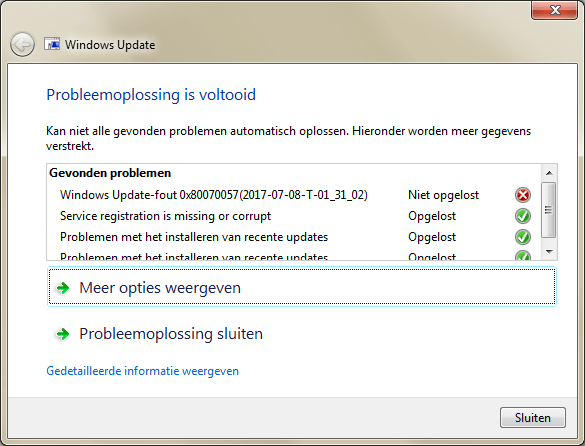
  11. Via [WayBackError code 8E5E03FB for Windows 7 updates – Microsoft Community, went for https://aka.ms/diag_wu to [WayBack] https://download.microsoft.com/download/6/C/9/6C970550-32AB-4235-9CDD-7FC9DD848BBB/WindowsUpdate.diagcab
  12. Ran the diagnostics which fixed many problems, but left alone a 0x80070057.
  13. Rebooted, then installed the SP1 download -> failed.
  14. Via[WayBackSP1 installation failure, Code 0x8e5e03fb, performed the steps in [WayBackHow do I reset Windows Update components?.
  15. Rebooted, then installed the SP1 download -> failed, but for a new reason: 0x80070490.
  16. Rebooted, then used on-line Windows update to install SP1 -> failed, but for again a new reason: Code B7. This was in the CBS.Log: Store corruption detected in function CCSDirectTransaaction::ShouldKeepAliveFromInstallmap on resource amd64_avast.vc140.crt_fcc99ee6193ebbca_14.0.24210.0_none_56aba0211ca246c2.
  17. Uninstalled Avast.
  18. Installed CheckSUR (KB947821:[WayBackDownload System Update Readiness Tool for Windows 7 (KB947821) [October 2014] from Official Microsoft Download Center)
  19. Rebooted, then used on-line Windows update to install SP1 -> failed, but for a new reason: 0x80070490. This was in the CBS.Log: Failed to resolve package 'Package_2_for_KB2507938~31bf3856ad364e35~amd64~~6.1.1.4' [HRESULT = 0x80070490 - ERROR_NOT_FOUND].
  20. Searching for that error, I found [WayBack[Win7HomePremium] Unable to install Service Pack 1 – Page 2 which got me to [WayBackDownload SFCFix – MajorGeeks, then run these in an administrative command prompt:
    SFC /SCANNOW
    SFCFix
  21. The latter reported no errors, so I did some more searching and bumped into [WayBackInstallation Failures / CBS Store corruptions: Uncommon issues and troubleshooting – Microsoft GTSC Romania – Enterprise Platforms Support.
  22. It lead me to uninstall the package encompassing 'Package_2_for_KB2507938~31bf3856ad364e35~amd64~~6.1.1.4': dism /online /remove-package /packagename:Package_2_for_KB2507938~31bf3856ad364e35~amd64~~6.1.1.4
  23. Rebooted, then used on-line Windows update to install SP1 -> failed
  24. CBS.log first 0x80070490 entry is still Failed to resolve package 'Package_2_for_KB2507938~31bf3856ad364e35~amd64~~6.1.1.4' [HRESULT = 0x80070490 - ERROR_NOT_FOUND]
  25. Performed wusa /uninstall /KB:2507938 -> failed indicating De update KB2507938 is niet op deze computer geïnstalleerd. (“The update KB2507938 is not installed on this computer.”)
  26. That resulted into one Google Search hit: [WayBack[SOLVED] [Win7] Error Code 80070490 to KB3126587, so downloaded [WayBackDownload Security Update for Windows 7 (KB2507938) from Official Microsoft Download Center
  27. Manually installed the downloaded KB2507938 -> failed with De update geldt niet voor uw computer. (“The update is not applicable to your computer”)
  28. Followed [WayBack] Windows Update Forum Posting Instructions and a few extra steps from [SOLVED] [Win7] Error Code 80070490 to KB3126587 so came up with this:
    1. To get into a relatively clean CBS log: Reboot, then install download -> failure
    2. Run CheckSUR KB947821
    3. On the administrative console, run
      • SFC /SCANNOW
      • SFCFix
      • FRST64
        the latter with search argument KB2507938
  29. Attached files from:
    1. %SystemRoot%\Logs\CBS:
      • CBS.log
      • CbsPersist_20170709180806.cab
        • This is the log file during SP1 update
      • CheckSUR.log
      • CheckSUR.persist.log
    2. %SystemRoot%\Logs\SFCFix:
    3. %SystemRoot%\Logs\FRST64:
      • Addition.txt
      • FRST.txt

So I asked this question: [WayBack[Win7HomePremium] SP1 fails with 0x80070490 as KB2507938 is not fully present.

Extra tools used

** SP1 download

TL;DR: for English Windows 7 x64 you need [WayBackhttps://download.microsoft.com/download/0/A/F/0AFB5316-3062-494A-AB78-7FB0D4461357/windows6.1-KB976932-X64.exe

Note that the download file naming is very confusing as you will see only the above 6 files from the below list (which is English, but similar for other languages):

Read the rest of this entry »

Posted in Power User, Windows, Windows 7 | Leave a Comment »

Delphi and C++ builder Platform Status

Posted by jpluimers on 2018/12/28

Almost all pages at the Embarcadero DocWiki have an embedded product version in the URL or get redirected to one.

One of the notable exceptions is the [WayBackPlatform Status:

The following table shows supported platforms and operating systems for different RAD Studio versions.

* (star) sign next to an operating system indicates that there is a known issue with that operating system and a corresponding RAD Studio version.

To see the workaround for that particular issue, click on the name of the operating system or scroll down to the appropriate section.

It got introduced in 2015 ([WayBackNew DocWiki RAD Studio, Delphi and C++Builder Platform Status Page – Community Blogs – Embarcadero Community) and is maintained at irregular intervals.

For some history: https://web.archive.org/web/*/http://docwiki.embarcadero.com/PlatformStatus/en/Main_Page

–jeroen

via: [WayBack] Summary page showing supported platforms and OS versions for XE4 and upwards, as well as links to known issues for specific versions… – Lars Fosdal – Google+

Posted in C++, C++ Builder, Delphi, Development, Software Development | Leave a Comment »