The Wiert Corner – irregular stream of stuff

Jeroen W. Pluimers on .NET, C#, Delphi, databases, and personal interests

  • My badges

  • Twitter Updates

  • My Flickr Stream

  • Pages

  • All categories

  • Enter your email address to subscribe to this blog and receive notifications of new posts by email.

    Join 1,839 other subscribers

Archive for the ‘Delphi’ Category

Delphi, decoding files to strings and finding line endings: some links, some history on Windows NT and UTF/UCS encodings

Posted by jpluimers on 2019/12/31

A while back there were a few G+ threads sprouted by David Heffernan on decoding big files into line-ending splitted strings:

Code comparison:

Python:

with open(filename, 'r', encoding='utf-16-le') as f:
  for line in f:
    pass

Delphi:

for Line in TLineReader.FromFile(filename, TEncoding.Unicode) do
  ;

This spurred some nice observations and unfounded statements on which encodings should be used, so I posted a bit of history that is included below.

Some tips and observations from the links:

  • Good old text files are not “good” with Unicode support, neither are TextFile Device Drivers; nobody has written a driver supporting a wide range of encodings as of yet.
  • Good old text files are slow as well, even with a changed SetTextBuffer
  • When using the TStreamReader, the decoding takes much more time than the actual reading, which means that [WayBack] Faster FileStream with TBufferedFileStream • DelphiABall does not help much
  • TStringList.LoadFromFile, though fast, is a memory allocation dork and has limits on string size
  • Delphi RTL code is not what it used to be: pre-Delphi Unicode RTL code is of far better quality than Delphi 2009 and up RTL code
  • Supporting various encodings is important
  • EBCDIC days: three kinds of spaces, two kinds of hyphens, multiple codepages
  • Strings are just that: strings. It’s about the encoding from/to the file that needs to be optimal.
  • When processing large files, caching only makes sense when the file fits in memory. Otherwise caching just adds overhead.
  • On Windows, if you read a big text file into memory, open the file in “sequential read” mode, to disable caching. Use the FILE_FLAG_SEQUENTIAL_SCAN flag under Windows, as stated at [WayBack] How do FILE_FLAG_SEQUENTIAL_SCAN and FILE_FLAG_RANDOM_ACCESS affect how the operating system treats my file? – The Old New Thing
  • Python string reading depends on the way you read files (ASCII or Unicode); see [WayBack] unicode – Python codecs line ending – Stack Overflow

Though TLineReader is not part of the RTL, I think it is from [WayBack] For-in Enumeration – ADUG.

Encodings in use

It doesn’t help that on the Windows Console, various encodings are used:

Good reading here is [WayBack] c++ – What unicode encoding (UTF-8, UTF-16, other) does Windows use for its Unicode data types? – Stack Overflow

Encoding history

+A. Bouchez I’m with +David Heffernan here:

At its release in 1993, Windows NT was very early in supporting Unicode. Development of Windows NT started in 1990 where they opted for UCS-2 having 2 bytes per character and had a non-required annex on UTF-1.

UTF-1 – that later evolved into UTF-8 – did not even exist at that time. Even UCS-2 was still young: it got designed in 1989. UTF-8 was outlined late 1992 and became a standard in 1993

Some references:

–jeroen

Read the rest of this entry »

Posted in Delphi, Development, Encoding, PowerShell, PowerShell, Python, Scripting, Software Development, The Old New Thing, Unicode, UTF-16, UTF-8, Windows Development | Leave a Comment »

Delphi: Why is there no class procedure TArray.Sort(Keys: array of T; var Values: array of T; const Comparer: IComparer);

Posted by jpluimers on 2019/12/26

The underlying question at [WayBack] … Does anyone know of any array sort method similar to this for Delphi (with the two array parameters, key and value with a comparer method) … – Ugochukwu Mmaduekwe – Google+ was basically this:

Why is there no
class procedure TArray<T>.Sort(Keys: array of T; var Values: array of T; const Comparer: IComparer<T>); overload;

From my answer:

No it is not there as the method that does the actual sort does not accommodate for it:

class procedure TArray.QuickSort<T>(var Values: array of T; const Comparer: IComparer<T>; L, R: Integer);

You could write a helper for it so that similarly to C#, they all end in public static void Sort(Array keys, Array items, int index, int length, IComparer comparer)

In case you need to look at the external TrySZSort: https://github.com/dotnet/coreclr/blob/master/src/classlibnative/bcltype/arrayhelpers.cpp#L268

In other cases, C# uses an IntrospectionSort implemented at

Or you could try to use this overload of TArray.Sort Method (array of T):

class procedure Sort<T>(var Values: array of T; const Comparer: IComparer<T>); overload;

It was introduced in Delphi 2009.

Your Comparer then needs to extract the key of each element and implement IComparer<T>.

However, this will never sort the Keys array.

–jeroen

Posted in Delphi, Development, Software Development | Leave a Comment »

Delphi 10.1.2 Berlin: after ….

Posted by jpluimers on 2019/12/25

For my archive: [WayBack] Bummer, a big showstopper with Berlin 10.1.2: an object with an indexed property getter crashes the debugger! Please +Marco Cantù we need a fix for this… – André Mussche – Google+

When debugging and adding a watch on a property:

  1. ‘Function to be called, xxxx, was eliminated by linker’
  2. ‘Assertion failure: “!e32->evalArgs.evalFCallPending”
    in ..\win32src\proc32.cpp at line 1830’

It was fixed in 10.2 Tokyo: [RSP-16522] property getters with index can’t be viewed in the debugger and crashes! – Embarcadero Technologies

–jeroen

Posted in Delphi, Delphi 10.1 Berlin (BigBen), Development, Software Development | Leave a Comment »

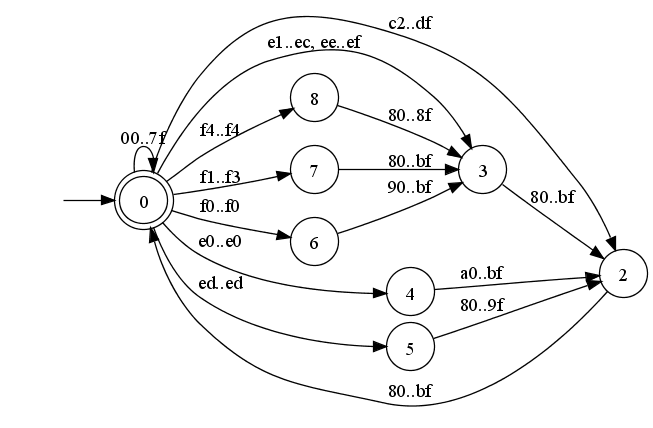
Flexible and Economical UTF-8 Decoder

Posted by jpluimers on 2019/12/25

For my link archive: [Archive.is] Flexible and Economical UTF-8 Decoder.

Be sure to read the whole article there as the explanation of the initial algorithm is important and final algorithm is towards the end.

The foundation is a state machine combined with a lookup table to find the initial state and proceed to subsequent states.

Related (and reminder to check what David did):

–jeroen

Read the rest of this entry »

Posted in C, C++, Delphi, Development, Software Development | 1 Comment »

Delphi and generics: some examples of “E2015: Operator not applicable to this operand type”

Posted by jpluimers on 2019/12/24

I don’t have enough time right now to elaborate on the code, so below is a an example of where I bumped into the very non-descriptive [WayBack/Archive.is] E2015: Operator not applicable to this operand type when using generics in Delphi.

Most have to do with comparing types (one of which is similar to comparing interfaces where you need to have a GUID in order to get an as comparison working, see Source: Delphi – Using FastMM4 part 2: TDataModule descendants exposing interfaces, or the introduction of a TInterfacedDataModule).

Like most post-Delphi 2007 language features in Delphi, generics still have rough edges. I doubt this will change anytime soon and I am not alone in this.

The documentation never got update to cover situations involving generics ([Archive.is] E2015 Operator not applicable to this operand type (Delphi) – RAD Studio), so basically this to show some examples you might bump into as well.

Note the code below usually is an indication of code-smell, as was the more elaborate situation I had to use it in. A long term solution for that code was to introduce more polymorphism.

A shorter term solution involves either the use of local variables or type-casting (for the latter, see [WayBack] delphi – Cannot compile constrained generic method – Stack Overflow)

–jeroen

Read the rest of this entry »

Posted in Delphi, Development, Software Development | Leave a Comment »

Delphi: 2 things to check when FMX/VCL units are inserted when you use VCL/FMX components

Posted by jpluimers on 2019/12/19

On G+Tom Field bumped in the [WayBack] issue that the IDE would add VCL units to the uses list when putting FMX controls on a form.

I’ve observed it the other way around as well, and there are two things you need to check:

References:

David Nottage:

It has to do with whether there’s {$R *.fmx} or {$R *.dfm} in the unit. You may be able to get away with renaming the .dfm file to .fmx, and changing the directive in the unit.

Jeroen Wiert Pluimers:

 Your .dproj file tells you what kind of application it is (FMX or VCL) in the FrameworkType element and the IDE should respond to that correctly.

–jeroen

Source: [WayBackIn the Berlin Update 2 IDE. I’m working on a multi-device app I’m creating. …

Posted in Delphi, Development, FireMonkey, OS X FMX, Software Development | 3 Comments »

IOTAProjectNotifier.Modified notifies when when Project Options have changed…

Posted by jpluimers on 2019/12/18

From: [WayBack] Is there any way using Open Tools to detect when Project Options have changed? This link from +David Hoyle covers a whole bunch of other notifications: … – David Nottage – Google+

IOTAProjectNotifier.Modified

Note a direct “IOTAProjectNotifier.Modified” – Google Search revealed nothing relevant, but a parts “IOTAProjectNotifier” “Modified” – Google Search revealed [WayBack] RadStudioVersionInsight/SvnIDENotifier.pas at master · rburgstaler/RadStudioVersionInsight · GitHub: TProjectNotifier

Further reading are these excellent blog posts:

–jeroen

Posted in Delphi, Development, Software Development | Leave a Comment »

Great quote destructors in Delphi development…

Posted by jpluimers on 2019/12/18

No destructor should ever throw an exception. If it does, there’s not really any way to recover from it anyway, so it doesn’t matter if anything leaks because of it.

Greate quote by [WayBackUser Rob Kennedy answering [WayBackinterface – Avoiding nested try…finally blocks in Delphi – Stack Overflow

It’s a basic development pattern for writing Delphi destructor code.

–jeroen

Posted in Delphi, Design Patterns, Development, Software Development | 6 Comments »

InplaceExeWrapper for those tools that do not allow specifying an output file – twm’s blog

Posted by jpluimers on 2019/12/17

In my bin directory from [WayBack] InplaceExeWrapper Project Top Page – OSDN: [WayBackInplaceExeWrapper for those tools that do not allow specifying an output file – twm’s blog:

There are a lot of command line tools that are very useful, but have one flaw: They directly modify a file in place and do not allow you to specify an output file instead.

Enter InplaceExeWrapper which called as

InplaceExeWrapper --expectfilenameonstdout c:\path\to\dprojnormalizercmd.exe input.dproj output.dproj

does the following:

  1. Create a temporary directory under %TEMP%
  2. Copy the input file input.dproj there
  3. Call the tool as dprojnormalizer tempfile.dproj
  4. Copy the modified file to the output file output.dproj
  5. Delete the temporary directory

So basically it replaces the missing functionality of specifying an output file for the tool it calls.

Here is the full help on command line parameters and options:

Synopsis: InplaceExeWrapper [options] Executable InFile [OutFile]

Parameters:
Executable        : Executable to call (if set to "copy" we only copy InFile to OutFile)
InFile            : input filename
OutFile           : output filename, defaults to infile

Options:
--CheckResult=value : If set, the executable must return the value given for this option (must be a number)
--debug           : if given, some debug output is written to error.txt in the temp directory and the temp directory will not be deleted.
--ExpectFilenameOnStdout : if set, the output of the executable must contain the filename
--help
-?
-h
-H                : display parameter help
--ShowCmdLine     : Show command line as passed to the program.
--StartupLog=value : Write a startup log to the given file.
--TempDir=value   : directory to use for temporary files (must exist)
--toStdOut        : if set, output is written to stdout and infile is not changed

Via [WayBack] There are a lot of command line tools that are very useful, but have one flaw: They directly modify a file in place and do not allow you to specify an o… – Thomas Mueller (dummzeuch) – Google+

–jeroen

Posted in Delphi, Development, Software Development | 2 Comments »

Delphi: “Override method %s.%s should match case of ancestor %s.%s (H2365)”

Posted by jpluimers on 2019/12/17

If you write consistent code, you will never see [WayBackOverride method %s.%s should match case of ancestor %s.%s (H2365), but a long while ago I bumped into a project where some the developers had trouble using their shift key and failed to use code completion in quite a few parts of the source code.

So next a lot of lines containing things like Begin, whIle, repeaT, wrong indentations (not just at the wrong level, but even getting things indented at the same level wrong).

Code formatted like this was no exception, not even for methods bound to events:

procedure  TForm1.Button1CLick(SendeR  : TOBJect ) ;
 Begin
  Button2Click  (Sender );
end;

You cannot disable this hint individually as it is not on the list at [WayBack] Delphi XE2’s hidden hints and warnings options | Marc Durdin’s Blog, so you either have to fix the code (which I prefer), or disable all hints with {$ HINTS OFF} as per [WayBackcompiler construction – Can specific Delphi hints be disabled? – Stack Overflow (thanks Lars Truijens).

The above occasion was the first and only time I saw the hint H2365 until recently when I again bumped into a project that had grown over a long time needing some maintenance.

This reminded me I should have blogged about it, found back [Archive.is] H2365 Override method %s.%s should match case of ancestor %s.%s (Delphi) Today was the first time I have ever seen this compiler hint. Why does Delphi… – Graeme Geldenhuys – Google+ and dug a bit deeper.

Read the rest of this entry »

Posted in Delphi, Development, Software Development | Leave a Comment »