The Wiert Corner – irregular stream of stuff

Jeroen W. Pluimers on .NET, C#, Delphi, databases, and personal interests

  • My badges

  • Twitter Updates

  • My Flickr Stream

  • Pages

  • All categories

  • Enter your email address to subscribe to this blog and receive notifications of new posts by email.

    Join 1,862 other subscribers

Archive for the ‘Internet protocol suite’ Category

Some postfix notes

Posted by jpluimers on 2020/10/15

Postfix has documentation on primary MX and secondary MX, but not on tertiary MX.

If the primary MX is down, you have a series of secondary MX and tertiary MX that configured the same way, MX DNS priority for primary, the series of secondary MX and tertiary MX have increasing numbers, and the primary MX goes down, then senders can get “too many hops” as secondary and tertiary MX are looping.

I had a hard time finding a good and easy solution as these queries do not return many meaningful results:

Here are some links that helped getting this solved:

  • [WayBack] Postfix Frequently Asked Questions: What does “Error: too many hops” mean?

    Short answer: this message means that mail is probably looping. If you see this after you turned on Postfix content filtering, then you have made a mistake that causes mail to be filtered repeatedly. This is cured by appropriate use of content_filter=header_checks=, and body_checks=.

    Long answer: the message has too many Received: message headers. A received header is added whenever Postfix (or any MTA) receives a message. A large number of Received: message headers is an indication that mail is looping around.

    Side comment: email uses the opposite of the technique that is used to avoid IP forwarding loops. With IP, the sender sets a TTL (time to live) field in the IP header. The field is decremented by each router. When the TTL reaches zero the packet is discarded and an ICMP error message is returned to the sender.

  • [WayBack] Error: too many hops (in reply to end of DATA command) · Issue #713 · mail-in-a-box/mailinabox · GitHub

    In case you or anyone else was/is wondering about the mydestination = localhost thing, the reason it has to be set to just localhost is because MIAB uses Postfix’s “virtual domain hosting” (http://www.postfix.org/VIRTUAL_README.html) support. Per the documentation for mydestination at http://www.postfix.org/postconf.5.html#mydestination:

    Do not specify the names of virtual domains – those domains are specified elsewhere. See VIRTUAL_README for more information.

    (in the context of MIAB every domain is a virtual domain).

In my case a series of these:

Received: from mwgp.xs4all.nl (mwgp.xs4all.nl [80.101.239.92])
    by fiber24315337242.heldenvannu.net (Postfix) with ESMTP id 26395200FE
    for <jeroen@pluimers.com>; Fri, 29 Jun 2018 11:01:02 +0200 (CEST)
Received: from fiber24315337242.heldenvannu.net (unknown [37.153.243.246])
    by mwgp.xs4all.nl (Postfix) with ESMTP id 077A5E937
    for <jeroen@pluimers.com>; Fri, 29 Jun 2018 11:01:02 +0200 (CEST)

Specifying the transport will likely help me solve this problem:

This all came down to editing /etc/postfix/transport adding lines for each relayed domain like this one:

example.org    smtp:[mx-a-record.example.org]

Lines like it direct to use the smtp transport and use a specific host (normally, the relay transport is being used).

After this:

# postmap /etc/postfix/transport
# rcpostfix reload

I choose not to configure [WayBack] Postfix Configuration Parameters: relay_recipient_maps, but might if I had an automated way of replicating lists of valid (and invalid) users.

Another option was confirmed at [WayBack] Software-update: Postfix 3.4.0 / 3.3.3 / 3.2.8 / 3.1.11 / 3.0.15 – Computer – Downloads – Tweakers by [WayBack] menocchio. Thanks!

Dat is volgens mij eenvoudig op te lossen met relay_transport of transport_maps. Zie ook: Postfix transport table format.

Daarmee dwing je de secondary servers de mail altijd af te willen leveren bij de primary server (en dus niet bij een andere secondary). En als de primary niet online is, dan wacht ie netjes tot dat wel het geval is :-)

Bijvoorbeeld:
relay_transport = smtp:[primarymx.domain.tld]

Likely relevant: [WayBack] The Book of Postfix

Maybe relevant in the future:

Found on my hunt for the above:

Try not to make typo’s: [WayBack] postfix appears not finding MX records or host names from DNS

Interesting thought, but not sure how smart SPAM bots are now: [Archive.is] Spam relaying through secondary MX… – Google Groups

To archive this:

  1. Rename from
  2. To
  3. Then save in Archive.is

–jeroen

Posted in *nix, Communications Development, Development, DevOps, DNS, etckeeper, Infrastructure, Internet, Internet protocol suite, Linux, Power User, SMTP | Leave a Comment »

Happy birthday UDP!

Posted by jpluimers on 2020/08/20

Today it’s the 40th birthday of UDP. Or more precise: 40 years after [WayBackRFC 768 – User Datagram Protocol got submitted.

It is still used a lot today, so be sure to read more background on [WayBackUser Datagram Protocol – Wikipedia.

And of course on a birthday, it is nice to have few good jokes. So here we go:

[WayBack“I would tell you a joke about UDP, but you probably wouldn’t get it.” | Hacker News

[WayBack] I would tell you a joke about UDP, but you probably wouldn’t get it. So here’s a TCP joke | reddit.

[Archive.is]:

  • UDP packet bar walks into
  • The best thing about UDP jokes is that I don’t care if you get it. #sysadmin #IT

You can generate more yourself: udpjoke.py

–jeroen

Read the rest of this entry »

Posted in Communications Development, Conference Topics, Conferences, Development, Event, History, Internet protocol suite, UDP | Leave a Comment »

Remote access to the Embarcadero License Center via SSH tunnel – twm’s blog

Posted by jpluimers on 2020/08/10

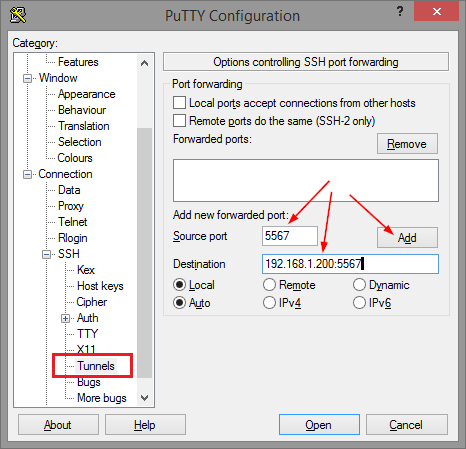
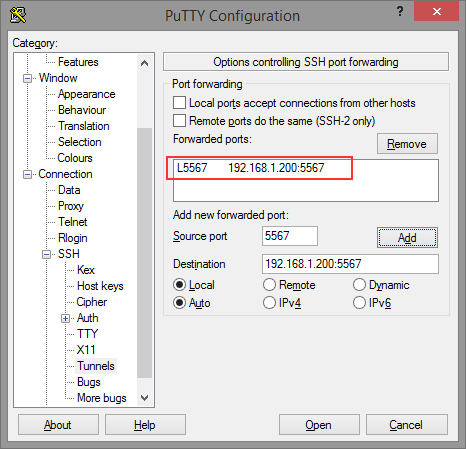
Thomas basically did all the research on the forwarding needed for ELC (formerly Belise/Elise), then showed the PuTTY equivalent to ssh user@remote -L5567:192.168.1.200:5567:

[WayBackRemote access to the Embarcadero License Center via SSH tunnel – twm’s blog

Via: [WayBack] Once you have set up an Embarcadero License Center (ELC) for your company (with network named user or concurrent licenses) you will need network access … – Thomas Mueller (dummzeuch) – Google+

Related: [WayBack] Introducing the Embarcadero License Center – ELC

–jeroen


Posted in *nix, Communications Development, Delphi, Development, Internet protocol suite, Licensing, Power User, Software Development, SSH, ssh/sshd | Leave a Comment »

ssh_config section order is important: the first setting obtained from a Host/Match section applies

Posted by jpluimers on 2020/06/12

Often, configuration files work like this:

  • global settings are at the top
  • detailed settings are further on, overwriting global settings

Not for ssh_config though, so I was right writing I should read more on it in Good read for starting to intermediate ssh users is “SSH Essentials: Working with SSH Servers, Clients, and Keys | DigitalOcean” and pointers to more advanced reading material.

So here is how ssh_config does it as per man page at [WayBack] ssh_config(5) – OpenBSD manual pages and [WayBack] ssh_config — OpenSSH SSH client configuration files at Linux.org:

     For each parameter, the first obtained value will be used.  The configuration files contain sections separated
     by “Host” specifications, and that section is only applied for hosts that match one of the patterns given in the
     specification.  The matched host name is the one given on the command line.

     Since the first obtained value for each parameter is used, more host-specific declarations should be given near
     the beginning of the file, and general defaults at the end.

This means a section Host * needs to come at the end.

I got that wrong and it took me the better half of a morning to figure out the cause of a connection problem ending in this:

debug1: Authentications that can continue: publickey,password
debug3: start over, passed a different list publickey,password
debug3: preferred publickey
debug3: authmethod_lookup publickey
debug3: remaining preferred:
debug1: No more authentication methods to try.

Somehow, the identity file was never used to try public key authentication at all because of the ssh_config order in ~/.ssh/config.

I’m not the only one confused, as during the search for the cause with “remaining preferred” “No more authentication methods to try.”:

Maybe now I should step up from manually editing the ssh_config file and use [WayBack] GitHub – moul/advanced-ssh-config: make your ssh client smarter to generate it for me.

–jeroen

Posted in *nix, *nix-tools, Communications Development, Development, Internet protocol suite, Power User, SSH, ssh/sshd, TCP | Leave a Comment »

Authssh from Windows

Posted by jpluimers on 2020/05/22

Running autossh from Windows is still on my list, so here are a few links:

–jeroen

Posted in Communications Development, Development, Internet protocol suite, Power User, SSH, TCP, Windows | Leave a Comment »

On my list of things to try: GitHub – arthepsy/ssh-audit; SSH server auditing

Posted by jpluimers on 2020/05/18

This looks like an ssh equivalent to testssl.sh: [WayBack] GitHub – arthepsy/ssh-audit: SSH server auditing (banner, key exchange, encryption, mac, compression, compatibility, security, etc).

It is on my list of things to try, so I’ve put a watch on the repository changes.

–jeroen

Read the rest of this entry »

Posted in Communications Development, Development, Encryption, Internet protocol suite, Power User, Security, SSH, TCP | Leave a Comment »

Insomnia REST Client

Posted by jpluimers on 2020/05/12

[WayBack] Insomnia REST Client  A powerful REST API Client with cookie management, environment variables, code generation, and authentication for Mac, Window, and Linux.

Source code at [WayBack] GitHub – getinsomnia/insomnia: The most intuitive cross-platform REST API Client 😴.

Via: [WayBack] Paw is nice – The Isoblog.

–jeroen


Posted in Communications Development, Development, HTTP, Internet protocol suite, JavaScript/ECMAScript, JSON, REST, Scripting, Software Development, TCP, Web Development | Leave a Comment »

OpenSuSE: keeping an ssh connection alive (convenient for keeping port forwardings up)

Posted by jpluimers on 2020/05/11

Below the steps for ensuring port forwardings are up from an OpenSuSE system to an ssh server using autossh on the client system.

Autossh

Many have written about the benefits of autossh, so I can’t do better than that. A good abbreviated quote is from [WayBack] Autossh for persistent database connectivity – Compose Articles:

Autossh wraps SSH in an application which was designed to monitor the state of the connection. It will also restart SSH if it exits. The idea of the monitoring is that If it sees the packets aren’t going through, it would also restart SSH. …

the developers of OpenSSH added some options – ServerAliveInterval and ServerAliveCountMax – which activate built in connection checking in OpenSSH. Together the options set checking at a set interval and exiting SSH if the count maximum is exceeded. And when SSH exits, autossh will restart it so it serves as much improved replacement as there’s no extra ports needed.

Summary

The scenario is that a client user named autoSshClientUser automatically logs on to a server as user autosshServerUser using autossh from the client system.

The sequence is to first test this manually from the client system using a regular ssh command, then manually with the autossh command from the client system, then automate the starting (and keep alive) of the autossh instance from the client system.

Start configuring the server side first:

  1. Create a user specific for logon (below it is autosshServerUser).
  2. Limit the user to only allow only port forwarding: [WayBacksecurity – How to create a restricted SSH user for port forwarding? – Ask Ubuntu

Then finish confiruging the client side:

  1. Install autossh: zypper install autossh
  2. Ensure autoSshClientUser has an ssh key that does not require a password
  3. Transfer the public key to autosshServerUser on the remote system
  4. Test with an autossh command that suits your situation best
  5. Ensure autoSshClientUser runs a job at or shortly after system boot (after the network is up) that will start autossh with the correct parameters

If the autoSshClientUser is root, then you could use a service to start autossh, but be sure that service depends on a functioning network connection.

If the autoSshClientUser is not root, then usually a user based cron job works best.

Naming idea:

  • Assume the client system is Train and the server is Station
  • The server user could be autosshTrainAtStation
  • The client user could be autosshTrainToStation

Server side

  1. [Archive.is] Installing on other OSes (Debian / Ubuntu;  Debian / Ubuntu; CentOS / Fedora / RHEL; ArchLinux; FreeBSD; OSX)
  2. As root, add he user using [Archive.is]useradd:

    # useradd --create-home --shell /bin/false autosshServerUser

  3. As root use su to become autosshServerUser, then create an ssh key without a password (you need to specify the logon shell) using [WayBackssh-keygen.
    This generates bot a secure rsa and

    # su --shell /bin/bash autosshServerUser
    > cd ~
    > whoami
    autosshServerUser
    > rm -f ~/.ssh/id_rsa ~/.ssh/id_rsa.pub
    > ssh-keygen -t rsa -b 4096 -o -a 100 -f ~/.ssh/id_rsa -N ''
    Generating public/private rsa key pair.
    Your identification has been saved in /home/autosshServerUser/.ssh/id_rsa.
    Your public key has been saved in /home/autosshServerUser/.ssh/id_rsa.pub.
    The key fingerprint is:
    SHA256:... autossh24@linux
    The key's randomart image is:
    +---[RSA 2048]----+
    ...
    +----[SHA256]-----+
    > rm -f ~/.ssh/id_ed25519 ~/.ssh/id_ed25519.pub
    > ssh-keygen -t ed25519 -o -a 100 -f ~/.ssh/id_ed25519 -N ''
    Generating public/private ed25519 key pair.
    Your identification has been saved in /home/autossh24/.ssh/id_ed25519.
    Your public key has been saved in /home/autossh24/.ssh/id_ed25519.pub.
    The key fingerprint is:
    SHA256:... autossh24@linux
    The key's randomart image is:
    +--[ED25519 256]--+
    ...
    +----[SHA256]-----+
    

Client side

I need to check the below links on killing autossh (including the underlying ssh based connection), as you need to use the kill or pkill parameters signals -3 (SIGQUIT), not -9 (SIGKILL) as explained in [WayBack] ssh – How to stop/kill an autossh tunnel? – Super User (thanks mariusmatutiae and dviljoen).

Monitoring the state of the ssh connection needs some parameters (like ClientAliveInterval and ClientAliveCountMax). A good start on that is [WayBack] networking – autossh does not kill ssh when link down – Server Fault.

Setting up a service so root automatically logs on a remote system:

With non-root, it might actually be possible to do this  as a service too given there is a user= parameter in service files:

Though as non-root, most people seem to use cron [WayBack] ssh – Problems with Autossh: running from cron vs terminal – Super User

Please do not use /etc/init.d/after.local as mentioned often (for instance in [WayBack] TUMBLEWEED run a script a boot): this mechanism has been deprecated and won’t work on more recent systems (like 2012 and younger: [WayBack] openSUSE Forums – systemd and using the after.local script in openSUSE 12.1). The same holds for /etc/init.d/boot.local: don’t use, even though many people indicate it works, for instance [WayBack] Run a command at boot.

An interesting approach is at [WayBack] Autossh Startup Script for Multiple Tunnels | Surnia Ulula, though I will stick with what’s below.

Read:

Downloads:

References

Most of the above comes from these links:

–jeroen

Continuation of:

Read the rest of this entry »

Posted in *nix, Communications Development, Development, Internet protocol suite, Linux, Power User, SSH, TCP | Leave a Comment »

SSH through HTTPS

Posted by jpluimers on 2020/05/04

Often, hotspots only allow http/https traffic. Other traffic – like SSH – is blocked. Nowadays, fewer hotspots block that, but too many still do.

So it can be worth a while to route your SSH server through HTTPS (I don’t like Web-based SSH that much as terminal emulation in browsers isn’t that well yet, but that seems to change rapidly, more on that in the “Further reading” section below).

After some background reading at apache – Tunnel over HTTPS – Stack Overflow, here are a few links that help you do it:

Server side: DAG: Tunneling SSH over HTTP(S).

You need:

  • An internet connected Apache server (eg. with IP address 10.1.2.3)
  • A FQDN that points to this IP address (eg. ssh.yourdomain.com)
  • A virtual host configuration in Apache for this domain (eg. /etc/httpd/conf.d/ssh.yourdomain.com.conf)
  • A configuration to adapt ssh to use the HTTP tunnel

Read more at DAG: Tunneling SSH over HTTP(S) and SSH over SSL, a quick and minimal config..

Client side: Using SSH over the HTTPS port · GitHub Help.

Steps:

  1. Test of it works at all
  2. Edit your local ~/.ssh/config file to redirect SSH to HTTPS

Read more at Using SSH over the HTTPS port · GitHub Help.

Using Putty and an HTTP proxy to ssh anywhere through firewalls | Me in IT.

the Digital me: SSH Tunneling Proxy using Putty on Windows and Linux (Unblock YouTube / Orkut / Facebook).

Tunneling SSH through HTTP proxies using HTTP Connect – ArchWiki.

HTTP Tunneling – ArchWiki.

Running SSHD on port 443.

Not all proxy configurations and hotspots support this. But it might be worth a look: SSH Over Proxy.

Further reading: Web-based SSH.

SSH plugins for browsers:

Web based SSH:

–jeroen

Posted in Communications Development, Development, Encryption, HTTP, https, HTTPS/TLS security, Internet protocol suite, Power User, Security, SSH, TCP | Leave a Comment »

SFTP (SSH file transfer protocol) server on Windows

Posted by jpluimers on 2020/04/10

A few links for my archive:

–jeroen

Posted in Communications Development, Development, Internet protocol suite, Security, SSH, TCP | Leave a Comment »