The Wiert Corner – irregular stream of stuff

Jeroen W. Pluimers on .NET, C#, Delphi, databases, and personal interests

  • My badges

  • Twitter Updates

  • My Flickr Stream

  • Pages

  • All categories

  • Enter your email address to subscribe to this blog and receive notifications of new posts by email.

    Join 1,839 other subscribers

Archive for the ‘Database Development’ Category

SQL server: getting database names and IDs

Posted by jpluimers on 2021/06/29

A few statements go get database names and IDs based on these functions or system tables:

Part of it has the assumption that a master database always exists.

-- gets current database name
select db_name() as name
;
name
--------------------------------------------------------------------------------------------------------------------------------
acc

(1 row affected)
-- gets current database ID
select db_id() as dbid
;
dbid
------
5

(1 row affected)
-- gets all database IDs and names
select dbid,name from sys.sysdatabases
;
dbid   name
------ --------------------------------------------------------------------------------------------------------------------------------
1      master
5      acc

(2 rows affected)
-- gets current database name by ID
select db_name(db_id()) as name
;
name
--------------------------------------------------------------------------------------------------------------------------------
acc

(1 row affected)
-- gets case corrected database name for sys.sysdatabases.name having a case insensitive collation sequence
select dbid,name from sys.sysdatabases 
where name='Master'
;
dbid   name
------ --------------------------------------------------------------------------------------------------------------------------------
1      master

(1 row affected)
-- gets case corrected database name for sys.sysdatabases.name having a case sensitive collation sequence
select dbid,name from sys.sysdatabases 
where name = 'Master' collate Latin1_General_100_CI_AI
;
dbid   name
------ --------------------------------------------------------------------------------------------------------------------------------
1      master

(1 row affected)

Note that:

  • even though by default the SQL server collation sequence is case insensitive, it can make sense to do a case insensitive search, for example by using the upper function, specifying a collation, or casting to binary. I like upper the most, because  – though less efficient – it is a more neutral SQL idiom.
  • the most neutral case insensitive collation seems to be Latin1_General_100_CI_AI

Related:

  • [WayBack] SQL server ignore case in a where expression – Stack Overflow answered by Solomon Rutzky, summarised as:
    • Do not use upper as upper with lower does not always round-trip.
    • Do not use varbinary as it is not case insensitive.
    • Neither the = or like operators are case sensitive by default: both need a collate clause.
    • Find the collation of the column(s) involved; if it contains _CI, then you are done (it is already case insensitive); if it contains _CS, then replace that with _CI (case insensitive) and add that in a collate clause.
    • Collations are per predicate, so not per query, per table, per column nor per database. This means you have to specify them if you want to use a different one than the default.
  • [WayBack] What is Collation in Databases? | Database.Guide
    Latin1_General_100_CI_AI Latin1-General-100, case-insensitive, accent-insensitive, kanatype-insensitive, width-insensitive
  • [WayBack] Collation Info: Information about Collations and Encodings for SQL Server
  • [WayBack] SQL Instance Collation – Language Neutral Required:

    I recommend using Latin1_General_100_CI_AI. I recommend this because:

    1. If Latin1_General_CI_AI is supported, then there’s almost no chance thatLatin1_General_100_CI_AI (which is a far better choice) isn’t also supported. The version 100 collation has about 15,400 more sort weight definitions, plus 438 more uppercase/lowercase mappings. Not having those sort weights means that 15,400 more characters in the non-100 version equate to space, an empty string, and to each other. Not having those case mappings means that 438 more characters in the non-100 version return the character passed in (i.e. no change) for the UPPER() and LOWER() functions. There is no reason at all to want Latin1_General_CI_AI instead of Latin1_General_100_CI_AI. There might be a need if code was put into place to work around these deficiencies, and that code would behave incorrectly under the newer, better version of that collation. However, it’s highly unlikely that code was put into place to account for this, and extremely unlikely that if such code did exist, that it would error or doing things incorrectly due to the newer collation.
  • [WayBack] Differences Between the Various Binary Collations (Cultures, Versions, and BIN vs BIN2) – Sql Quantum Leap
  • [WayBack] How to do a case sensitive search in WHERE clause (I’m using SQL Server)? – Stack Overflow answered by Jonas Lincoln:

    By using collation or casting to binary, like this:

    SELECT *
    FROM Users
    WHERE   
        Username = @Username COLLATE SQL_Latin1_General_CP1_CS_AS
        AND Password = @Password COLLATE SQL_Latin1_General_CP1_CS_AS
        AND Username = @Username 
        AND Password = @Password 

    The duplication of username/password exists to give the engine the possibility of using indexes. The collation above is a Case Sensitive collation, change to the one you need if necessary.

    The second, casting to binary, could be done like this:

    SELECT *
    FROM Users
    WHERE   
        CAST(Username as varbinary(100)) = CAST(@Username as varbinary))
        AND CAST(Password as varbinary(100)) = CAST(@Password as varbinary(100))
        AND Username = @Username 
        AND Password = @Password 
  • [WayBack] sql – How to get Database name of sqlserver – Stack Overflow

–jeroen

Posted in Database Development, Development, Encoding, internatiolanization (i18n) and localization (l10), SQL Server | Leave a Comment »

I don’t want to learn your garbage query language · Erik Bernhardsson

Posted by jpluimers on 2021/06/24

Interesting read:

This is a bit of a rant but I really don’t like software that invents its own query language. There’s a trillion different ORMs out there. Another trillion databases with their own query language. Another trillion SaaS products where the only way to query is to learn some random query DSL they made up.

Source: [WayBackI don’t want to learn your garbage query language · Erik Bernhardsson

Related:

Via: [WayBack] Die wichtigste Funktion in jedem ORM ist der Notausgang. Also, wie man literales SQL durch das Ding durch piped, ohne daß der ORM rein pullert. – Kristian Köhntopp – Google+

–jeroen

Posted in Database Development, Development, Software Development | Leave a Comment »

ODAC: calling SYS.DBMS_SESSION.SET_NLS failing with ORA-06550/PLS-00103

Posted by jpluimers on 2021/06/16

Do not call SYS.DBMS_SESSION.SET_NLS with an instance of the [Archive.is] TOraStoredProc Class, as under the hood, it will translate the call to this:

Class:Ora.TOraStoredProc;Component:sprSetNls;Flag:tfQPrepare,Text:Prepare: begin
  SYS.DBMS_SESSION.SET_NLS(:PARAM, :VALUE);
end;
:PARAM(VARCHAR[22],IN)='NLS_NUMERIC_CHARACTERS' 
:VALUE(VARCHAR[4],IN)=''.,''

The above is a translation of the bold portions in this call (note it contains the an instantiation of an [Archive.is] TOraSession Class as you need one; examples further down assume this session instance to exist):

var
  MainOraSession: TOraSession;
  DbmsSessionSetNlsOraStoredProc: TOraStoredProc;
begin
  MainOraSession := TOraSession.Create(Self);
  try
    MainOraSession.Name := 'MainOraSession';
    MainOraSession.Username := 'FOO';
    MainOraSession.Server := 'BAR';
    MainOraSession.LoginPrompt := False;
    MainOraSession.Options.UseOCI7 := True;
    MainOraSession.Open();
    DbmsSessionSetNlsOraStoredProc := TOraStoredProc.Create(Self);
    try
      DbmsSessionSetNlsOraStoredProc.Name := 'DbmsSessionSetNlsOraStoredProc';
      DbmsSessionSetNlsOraStoredProc.StoredProcName := 'SYS.DBMS_SESSION.SET_NLS';
      DbmsSessionSetNlsOraStoredProc.Session := MainOraSession;
      DbmsSessionSetNlsOraStoredProc.Debug := True;
      with DbmsSessionSetNlsOraStoredProc.ParamData.Add do 
      begin
        DataType := ftString;
        Name := 'PARAM';
        ParamType := ptInput;
        Value := nil;
      end;
      with DbmsSessionSetNlsOraStoredProc.ParamData.Add do
      begin
        DataType := ftString;
        Name := 'VALUE';
        ParamType := ptInput;
        Value := nil;
      end;
      DbmsSessionSetNlsOraStoredProc.ParamByName('PARAM').AsString := sParam;
      DbmsSessionSetNlsOraStoredProc.ParamByName('VALUE').AsString := sValue;
      DbmsSessionSetNlsOraStoredProc.Prepare();
      DbmsSessionSetNlsOraStoredProc.ExecProc();
    finally
      DbmsSessionSetNlsOraStoredProc.Free();
    end;
  finally
    MainOraSession();
  end;
end;

It will result in an Oracle error during the Prepare of the statement:

ORA-06550: line 2, column 36:
PLS-00103: Encountered the symbol ":" when expecting one of the following:

   ( - + case mod new not null 
   
   continue avg count current exists max min prior sql stddev
   sum variance execute forall merge time timestamp interval
   date  pipe
   

In stead, take your TOraPackage object and make a call like this:

var
  DbmsSessionOraPackage: TOraPackage;
begin
  DbmsSessionOraPackage := TOraPackage.Create(Self);
  try
    DbmsSessionOraPackage.Name := 'DbmsSessionOraPackage';
    DbmsSessionOraPackage.Debug := True;
    DbmsSessionOraPackage.Session := dbSession;
    DbmsSessionOraPackage.PackageName := 'SYS.DBMS_SESSION';

    DbmsSessionOraPackage.ExecProcEx('SET_NLS', ['PARAM', 'NLS_NUMERIC_CHARACTERS', 'VALUE', '''.,''']);
  finally
    DbmsSessionOraPackage.Free();
  end;
end;

This then results in this in the SQL monitoring (note quoting quotes is different in SQL than Delphi):

Class:Ora.TOraSQL;Component:;Flag:tfQExecute,Text:begin
  SYS.DBMS_SESSION.SET_NLS(:PARAM, :VALUE);
end;
:PARAM(VARCHAR[22],IN)='NLS_NUMERIC_CHARACTERS' 
:VALUE(VARCHAR[4],IN)=''.,''

instead of this:

Class:Ora.TOraStoredProc;Component:sprSetNls;Flag:tfQPrepare,Text:Prepare: begin
  SYS.DBMS_SESSION.SET_NLS(:PARAM, :VALUE);
end;
:PARAM(VARCHAR[22],IN)='NLS_NUMERIC_CHARACTERS' 
:VALUE(VARCHAR[4],IN)=''.,''

I am still a sort of baffled why this is a problem. But using the TOraPackage works.

One thing to remember is that an TOraSession instance does not allow you to get to the underlying TOCIConnection instance, which does allow setting NLS information directly; see for instance the old code at [WayBack] OraClasses.pas in xinhaining-dianjianyiqi-tongxunchengxu | source code search engine.

This is because the underlying connection can be both OCI and Direct depending on the TOraSession.Options.Direct value: [WayBack] About Connection.Ping method when Direct Mode – Devart Forums.

Other calls on SYS.DBMS_SESSION succeed

The odd thing is that single-parameter calls on SYS.DBMS_SESSION.SET_ROLE (which can be tricky, see [WayBack] Introducing Database Security for Application Developers) work fine, so no alternative (like a plain [WayBack] SET ROLE) is needed:

var
  DbmsSessionSetRoleOraStoredProc: TOraStoredProc;
begin
  DbmsSessionSetRoleOraStoredProc := TOraStoredProc.Create(Self);
  try
    DbmsSessionSetRoleOraStoredProc.Name := 'DbmsSessionSetRoleOraStoredProc';
    DbmsSessionSetRoleOraStoredProc.StoredProcName := 'SYS.DBMS_SESSION.SET_ROLE';
    DbmsSessionSetRoleOraStoredProc.Session := dbSession;
    with DbmsSessionSetRoleOraStoredProc.ParamData.Add do begin 
      DataType := ftString;
      Name := 'ROLE_CMD';
      ParamType := ptInput;
      Value := 'EXAMPLE';
    end;
    DbmsSessionSetRoleOraStoredProc.ParamByName('ROLE_CMD').AsString := 'EXAMPLEROLE';
    DbmsSessionSetRoleOraStoredProc.Prepare;
    DbmsSessionSetRoleOraStoredProc.ExecProc;
  finally
    DbmsSessionSetRoleOraStoredProc.Free();
  end;
end;

results in this log:

Class:Ora.TOraStoredProc;Component:StrdPSetRole;Flag:tfQExecute,Text:begin
  SYS.DBMS_SESSION.SET_ROLE(:ROLE_CMD);
end;
:ROLE_CMD(VARCHAR[10],IN)='EXAMPLEROLE'

Similar for SYS.DBMS_APPLICATION_INFO

Calling anything on DBMS_APPLICATION_INFO gives you an exception.

On the .NET side of DevArt, you can use

–jeroen

Posted in Database Development, Delphi, Development, OracleDB, Software Development | Leave a Comment »

ODAC undocumented exception ‘Need Oracle 8 Call Interface’

Posted by jpluimers on 2021/06/16

I got this when taking over maintenance of some legacy code that called a stored procedure in a :

---------------------------
Debugger Exception Notification
---------------------------
Project LegacyProject.exe raised exception class Exception with message 'Need Oracle 8 Call Interface'.
---------------------------
Break   Continue   Help   
---------------------------

The problem with finding more information about this, is that there are virtual no hits on Oracle 8 Call Interface, OCI 8 or Oracle Call Interface 8.

A good document is [WayBack] OCI: Introduction and Upgrading (found via [Archive.is] “OCI 7” – Google Search), but it never mentions 8, only these terms occur:

  • release 7.x OCI
  • OCI release 7
  • OCI version 7
  • Oracle release 7 OCI
  • Release 8.0 of the OCI
  • 7.x OCI
  • Later OCI
  • Post-release 7.x OCI

The error happens on the first instance of at least an [Archive.is] TOraStoredProc Class or [Archive.is] TOraPackage Class that prepares or executes a stored procedure.

One problem is that this is an instance of a plain [WayBack] Exception Class , not a [WayBack] EDatabaseError Class or [Archive.is] EDAError Class.

What it means is that the UseOCI7 sub-property was set to True in your TOraSession property Options:

var
  MainOraSession: TOraSession;
begin
  MainOraSession := TOraSession.Create(Self);

  MainOraSession.Name := 'MainOraSession';
  MainOraSession.Username := 'ExammpleUser';
  MainOraSession.Server := 'ExampleTnsName';
  MainOraSession.LoginPrompt := False;
  MainOraSession.Options.UseOCI7 := True;

One thing to remember is that an TOraSession instance does not allow you to get to the underlying TOCIConnection instance, which does allow setting NLS information directly; see for instance the error at [WayBack] Not connected to oracle error – Devart Forums and old code at [WayBack] OraClasses.pas … | source code search engine and [WayBack] Ora.pas in … | source code search engine; UniDac is relatively similar [WayBack] UniDAC v3.7 …:OraClassesUni.pas (another explanation is in [WayBack] Setting the Client Info for the TOraAlerter extra session – Devart Forums).

This is because the underlying connection can be both OCI and Direct depending on the TOraSession.Options.Direct value: [WayBack] About Connection.Ping method when Direct Mode – Devart Forums.

After the first occurrence, you will not get this error again, you get way more spurious errors, especially on stored procedures in packages, where the stored procedure has 2 or more parameters. There you get errors like this one for TOraStoredProc:

ORA-06550: line 2, column 36:
PLS-00103: Encountered the symbol ":" when expecting one of the following:

   ( - + case mod new not null <an identifier>
   <a double-quoted delimited-identifier> <a bind variable>
   continue avg count current exists max min prior sql stddev
   sum variance execute forall merge time timestamp interval
   date <a string literal with character set specification>
   <a number> <a single-quoted SQL string> pipe
   <an alternatively-quoted string literal with character set speci.

When logging using a [Archive.is] TOraSQLMonitor Class instance (use the [Archive.is] TCustomDASQLMonitor.OnSQL Event with the [Archive.is] TOnSQLEvent Procedure Reference signature) you can get the underlying information of the TOraStoredProc (see the example code below that raises this):

Class:Ora.TOraStoredProc;Component:sprSetNls;Flag:tfQPrepare,Text:Prepare: begin
  SYS.DBMS_SESSION.SET_NLS(:PARAM, :VALUE);
end;
:PARAM(VARCHAR[22],IN)='NLS_NUMERIC_CHARACTERS' 
:VALUE(VARCHAR[4],IN)=''.,''

It fails equally when doing any DBMS_APPLICATION_INFO calls, for which the .NET version of ODAC has a special [WayBack] SetDbmsApplicationInfo Method in the [WayBack] OracleConnection Class. Too bad the Delphi version omits that.

When using TOraPackage, you can get different errors, like for instance this EDatabaseError:

Exception class EDatabaseError with message 'Parameter 'VALUE' not found'.

It basically means that through OCI, the parameter list could not be obtained, so the error is caught on the Delphi side instead of the Oracle side.

Using a TOraPackage is easier at design time, as it allows you to select the [Archive.is] TOraPackage.PackageName Property property using the underlying TOraSession. Somehow a TOraStoredProc does not allow you to select the [Archive.is] TOraStoredProc.StoredProcName Property at design time.

Related:

–jeroen

Read the rest of this entry »

Posted in Database Development, Delphi, Development, OracleDB, Software Development | Leave a Comment »

(nullable) rowversion (Transact-SQL) – SQL Server | Microsoft Docs

Posted by jpluimers on 2021/06/09

I was not aware there could be a nullable [WayBack] rowversion (Transact-SQL) – SQL Server | Microsoft Docs, but it is possible:

Duplicate rowversion values can be generated by using the SELECT INTO statement in which a rowversioncolumn is in the SELECT list. We do not recommend using rowversion in this manner.

A nonnullable rowversion column is semantically equivalent to a binary(8) column. A nullable rowversion column is semantically equivalent to a varbinary(8) column.

You can use the rowversion column of a row to easily determine whether the row has had an update statement ran against it since the last time it was read. If an update statement is ran against the row, the rowversion value is updated. If no update statements are ran against the row, the rowversion value is the same as when it was previously read. To return the current rowversion value for a database, use @@DBTS.

You can add a rowversion column to a table to help maintain the integrity of the database when multiple users are updating rows at the same time. You may also want to know how many rows and which rows were updated without re-querying the table.

For example, assume that you create a table named MyTest. You populate some data in the table by running the following Transact-SQL statements.

–jeroen

Posted in Database Development, Development, Software Development, SQL, SQL Server | Leave a Comment »

List views in Oracle database – Oracle Query Toolbox

Posted by jpluimers on 2021/06/03

[WayBack] List views in Oracle database – Oracle Query Toolbox

A. All views accessible to the current user

select owner as schema_name, 
       view_name
from sys.all_views
order by owner, 
         view_name;

B. If you have privilege on dba_views

select owner as schema_name, 
       view_name
from sys.dba_views
order by owner, 
         view_name;

(more details in the above post)

–jeroen

Posted in Database Development, Development, OracleDB | Leave a Comment »

Some of the Oracle database errors I encountered

Posted by jpluimers on 2021/05/26

For my future self:

'Invalid Oracle Home: '

Not sure what exactly fixed this, but likely either of these:

It can also have to do with Win32 versus Win64.

Related:

Status : Failure -Test failed: Listener refused the connection with the following error:
ORA-12514, TNS:listener does not currently know of service requested in connect descriptor

This was using tnsping (actually the alternative McTnsPing); cause was the DBMS server VM being down..

ORA-12545: Connect failed because target host or object does not exist

It meant the VPN connection to the site having the Oracle server was down.

Related: [WayBack] ORA-12545 – Oracle FAQ

ORA-01017: invalid username/password; logon denied

There was confusion on which test credentials to use.

Related (as there are some bugs, case sensitivity issues, and confusion around special characters like $):

Need Oracle 8 Call Interface

a

ORA-06550: line 2, column 36:

Actual error:

ORA-06550: line 2, column 36:
PLS-00103: Encountered the symbol ":" when expecting one of the following:

   ( - + case mod new not null <an identifier>
   <a double-quoted delimited-identifier> <a bind variable>
   continue avg count current exists max min prior sql stddev
   sum variance execute forall merge time timestamp interval
   date <a string literal with character set specification>
   <a number> <a single-quoted SQL string> pipe
   <an alternatively-quoted string literal with character set speci.

The cause was a bit of PL/SQL as per [WayBack] ORA-06550 tips.

It was odd, as I was calling

Source: “SYS.DBMS_APPLICATION_INFO.SET_CLIENT_INFO” – Google Search which is part of package “SYS.DBMS_APPLICATION_INFO”.

In the end it all turned out that the underlying library was trying to use OCI 7 in stead of more modern OCI, so the OCI 7 API did not accept the more modern data.

ORA-03135: connection lost contact
Process ID: 14513
Session ID: 19 Serial number: 8319

VPN connection died; application did not have re-connect logic to restore the database connection.

ORA-12545: Connect failed because target host or object does not exist

a

ORA-12545: Connect failed because target host or object does not exist

a

ORA-12545: Connect failed because target host or object does not exist

a

ORA-12545: Connect failed because target host or object does not exist

a

ORA-12545: Connect failed because target host or object does not exist

a

–jeroen

Posted in Database Development, Development, OracleDB, Software Development | Leave a Comment »

How to do tnsping? | Oracle Community

Posted by jpluimers on 2021/05/25

Since How to do tnsping? | Oracle Community refuses to be archived in the WayBack archive and Archive.is, here a quote of the most important part in the thread:

EdStevensGrand Titan

Boopathy Vasagam wrote:
How to do tnsping?
I am new to databse.
i am using Oracle 10.2 database in windows XP. How to do ‘tnsping’ in that?

Others are helping you with how to run a command. In anticipation of what your next question will be ….

Assume you have the following in your tnsnames.ora:

larry =
  (DESCRIPTION =
    (ADDRESS_LIST =
      (ADDRESS = (PROTOCOL = TCP)(HOST = myhost)(PORT = 1521))
    )
    (CONNECT_DATA =
      (SERVICE_NAME = curley)
    )
  )

Now, when you issue a connect, say like this:

$> sqlplus scott/tiger@larry

tns will look in your tnsnames.ora for an entry called ‘larry’. Next, tns sends a request to (PORT = 1521) on (HOST = myhost) using (PROTOCOL = TCP), asking for a connection to (SERVICE_NAME = curley).

Where is (HOST = myhost) on the network? When the request gets passed from tns to the next layer in the network stack, the name ‘myhost’ will get resolved to an IP address, either via a local ‘hosts’ file, via DNS, or possibly other less used mechanisms. You can also hard-code the ip address (HOST = 123.456.789.101) in the tnsnames.ora.

Next, the request arrives at port 1521 on myhost. Hopefully, there is a listener on myhost configured to listen on port 1521, and that listener knows about SERVICE_NAME = curley. If so, you’ll be connected.

A couple of important points.

First, the listener is a server side only process. It’s entire purpose in life is the receive requests for connections to databases and set up those connections. Once the connection is established, the listener is out of the picture. It creates the connection. It doesn’t sustain the connection. One listener, running from one oracle home, listening on a single port, will serve multiple database instances of multiple versions running from multiple homes. It is an unnecessary complexity to try to have multiple listeners. That would be like the telephone company building a separate switchboard for each customer.

Second, the tnsnames.ora file is a client side issue. It’s purpose is for addressess resolution – the tns equivelent of the ‘hosts’ file further down the network stack. The only reason it exists on a host machine is because that machine can also run client processes.

What can go wrong?

First, there may not be an entry for ‘larry’ in your tnsnames. In that case you get “ORA-12154: TNS:could not resolve the connect identifier specified” No need to go looking for a problem on the host, with the listener, etc. If you can’t place a telephone call because you don’t know the number (can’t find your telephone directory (tnsnames.ora) or can’t find the party you are looking for listed in it (no entry for larry)) you don’t look for problems at the telephone switchboard.

Maybe the entry for larry was found, but myhost couldn’t be resolved to an IP address (say there was no entry for myhost in the local hosts file). This will result in “ORA-12545: Connect failed because target host or object does not exist”

Maybe there was an entry for myserver in the local hosts file, but it specified a bad IP address. This will result in “ORA-12545: Connect failed because target host or object does not exist”

Maybe the IP was good, but there is no listener running: “ORA-12541: TNS:no listener”

Maybe the IP was good, there is a listener at myhost, but it is listening on a different port. “ORA-12560: TNS:protocol adapter error”

Maybe the IP was good, there is a listener at myhost, it is listening on the specified port, but doesn’t know about SERVICE_NAME = curley. “ORA-12514: TNS:listener does not currently know of service requested in connect descriptor”

Also, please be aware that tnsping goes no further than to verify there is a listener at the specified host/port. It DOES NOT prove anything regarding the status of the listener’s knowledge of any particular database instance.

–jeroen

Posted in Database Development, Development, OracleDB, Software Development | Leave a Comment »

Oracle Instant Client – no chocolatey package for automatic install on Windows (yet?)

Posted by jpluimers on 2021/05/20

I tried finding a chocolatey package for the [WayBack] Oracle Instant Client – Free tools and libraries for connecting to Oracle Database.

The [WayBack] Instant Client editions support light-weight installations of the Oracle database client.

I was especially interested in automating the install of the basic or basic basic light varieties:

Instant Client Package

Description

References

Basic

All files required to run OCI, OCCI, and JDBC-OCI applications for Oracle Database

OCI
OCCI
JDBC-OCI

Basic Light

Smaller version of the Basic package, with only English error messages and Unicode, ASCII, and Western European character set support

OCI
OCCI
JDBC-OCI

Having this is a prerequisite of many DAC layers, including ODBC, although for the latter, you also need this one:

Instant Client Package

Description

References

ODBC

Additional libraries providing ODBC

ODBC

Since there is no chocolatey maintained package for any of these, these are the steps to download them:

  1. Ensure you have a Oracle account
  2. Sign in on www.oracle.com/webapps/redirect/signon?nexturl=https://www.oracle.com/technetwork/developer-tools/sql-developer/downloads
  3. Accept cookies if asked for
  4. Click on the “Downloads” button to go to [WayBack] Oracle Instant Client Downloads
  5. Click on either [WayBack] Instant Client for Microsoft Windows (32-bit) (note that [WayBack] Instant Client for Microsoft Windows (x64) is specific for Win64 applications; many are 32-bit only, especially end-user ones, for instance many supporting Microsoft Office (including Outlook addins, or document storage systems)
  6. Click on the “Accept License Agreement” radio button
  7. Select the version you need.
  8. Download and install the required files.
  9. Unzip and add the directories to the PATH

TNSPING

Note that these downloads not include TNSPING; for some reason, Oracle only adds that to the fat client. So you need to use alternatives:

You can also use sqlplus with sscripting, but that is much harder on Windows than on Linux:

Note there are very distinctive differences between tnsping and sqlplus, see How to do tnsping? | Oracle Community  which I will quote large parts of soon.

For sqlplus: it works with TNSNAMES.ORA, but you can also do without it.

For all the other tnsping substitutes: ensure your TNS_ADMIN points to a directory with a correct TNSNAMES.ORA file.

What I usually do is this:

  1. Create directory a directory ORA under %LOCALAPPDATA%
  2. Store TNSNAMES.ORA inside %LOCALAPPDATA%\ORA
  3. Point TNS_ADMIN environment variable to %LOCALAPPDATA%\ORA
  4. Unzip any of the instantclient-basiclite-nt-*.zip into %LOCALAPPDATA%\ORA\InstantClient
  5. Unzip any of the instantclient-sqlplus-nt-*.zip into %LOCALAPPDATA%\ORA\SqlPlus
  6. Add %LOCALAPPDATA%\ORA\InstantClient;%LOCALAPPDATA%\ORA\SqlPlus to the user PATH

Related

My blog post Chocolatey: installing Oracle SQL Developer and updating the chocolatey package (which works without the instantclient).

[WayBack] Install Oracle Instant Client on Linux and Windows | HelloDog:  Install Oracle instantclient basic and instantclient sqlplus on Linux and Windows (and some tnsping examples).

[Archive.is] oracle – How to set tnsnames.ora location for SQL Developer in Windows 10 – Stack Overflow

–jeroen

Posted in Database Development, Development, ODBC, OracleDB, Software Development | Leave a Comment »

SQL Server: RowVersion is not the same format as BigInt

Posted by jpluimers on 2021/05/18

A while ago, I needed to get RowVersion binary data out of SQL Server. People around me told me it is stored as BigInt.

I luckily bumped into [WayBack] sql server – Cast rowversion to bigint – Stack Overflow.

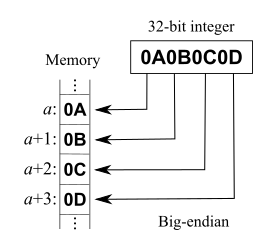
That post explains RowVersion is not stored as BigInt. Both RowVersion and BigInt take up 8 bytes of storage, but RowVersion is big-endian and unsigned, whereas BigInt is little-endian and signed.

A few quotes from it:

In my C# program I don’t want to work with byte array, therefore I cast rowversion data type to bigint:

SELECT CAST([version] AS BIGINT) FROM [dbo].[mytable]

So I receive a number instead of byte array. Is this conversion always successful and are there any possible problems with it? If so, in which data type should I cast rowversion instead?

and

You can convert in C# also, but if you want to compare them you should be aware that rowversion is apparently stored big-endian, so you need to do something like:

byte[] timestampByteArray = ... // from datareader/linq2sql etc...
var timestampInt = BitConverter.ToInt64(timestampByteArray, 0);
timestampInt = IPAddress.NetworkToHostOrder(timestampInt);

It’d probably be more correct to convert it as ToUInt64, but then you’d have to write your own endian conversion as there’s no overload on NetworkToHostOrder that takes uint64. Or just borrow one from Jon Skeet (search page for ‘endian’).

Code: [WayBack] Jon Skeet: Miscellaneous Utility Library

Related:

--jeroen

Posted in .NET, Database Development, Delphi, Development, Jon Skeet, Software Development, SQL Server | Leave a Comment »