The Wiert Corner – irregular stream of stuff

Jeroen W. Pluimers on .NET, C#, Delphi, databases, and personal interests

  • My badges

  • Twitter Updates

  • My Flickr Stream

  • Pages

  • All categories

  • Enter your email address to subscribe to this blog and receive notifications of new posts by email.

    Join 1,861 other subscribers

Archive for the ‘Hardware Development’ Category

Good tips for powering any kind of LED strips from the Adafruit NeoPixel Überguide | Adafruit Learning System

Posted by jpluimers on 2020/10/22

Read these tips before playing with any kind of LED strips: [WayBack] Powering NeoPixels | Adafruit NeoPixel Überguide | Adafruit Learning System.

There are more, but these are the most important:

  • When connecting NeoPixels to any live power source or microcontroller, ALWAYS CONNECT GROUND (–) BEFORE ANYTHING ELSE. Conversely, disconnect ground last when separating.
  • Adding a 300 to 500 Ohm resistor between your microcontroller’s data pin and the data input on the first NeoPixel can help prevent voltage spikes that might otherwise damage your first pixel. Please add one between your micro and NeoPixel.
  • Before connecting a NeoPixel strip to ANY source of power, we very strongly recommend adding a large capacitor (1000 µF, 6.3V or higher) across the + and – terminals. This prevents the initial onrush of current from damaging the pixels.
  • Be extremely cautious with bench power supplies. Some — even reputable, well-regarded brands — can produce a large voltage spike when initially switched on, instantly destroying your NeoPixels!
    If you use a bench supply, do not connect NeoPixels directly. Turn on the power supply first, let the voltage stabilize, then connect the pixels (GND first).

Via: [WayBack] Bouw je eigen ledtafel – Tot slot – Achtergrond – Tweakers

–jeroen

Posted in Arduino, Development, Hardware Development, Hardware Interfacing, Raspberry Pi | Leave a Comment »

LED Chaser with only 4017 – YouTube

Posted by jpluimers on 2020/10/21

Cool:

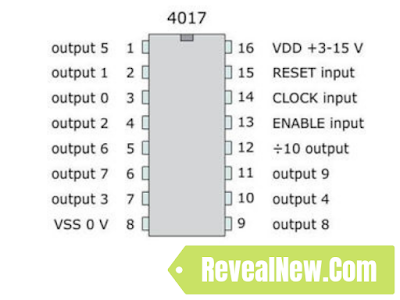
The triggering in this case is the result of a main power drop and recover. The battery is unable to keep the votage at 9V level at the very moment any led is turned on, the voltage is droped down. That is what makes pin 14 to get the clock pulse so the 4017 shifts to the next led. The moment the led is off and right before the next led is turned on the main power gets recovered. When the next led is on again, the main power drops down, and so on.

Schema but less explanation on: [WayBack] LED Chaser with only 4017 – RevealNew

–jeroen

Read the rest of this entry »

Posted in Development, Electronics Development, Hardware Development | 1 Comment »

Front Panel Audio Connector and Header Pinouts for Intel® Desktop: AC97 and HD Audio have the same layout…

Posted by jpluimers on 2020/09/21

Same layout, but different pin usage for AC97 and HA Audio headers: [WayBack] Front Panel Audio Connector and Header Pinouts for Intel® Desktop…

Much more background information at [WayBack] HD Audio or AC97 connector – Which to use when, and what’s the difference? – Super User

Via: [WayBackWTF? The connectors for HD Audio and AC’97 are pin compatible (so the connectors fit) but have different signals. Who came up with this stupid idea? – Thomas Mueller (dummzeuch) – Google+

–jeroen

Read the rest of this entry »

Posted in Development, Hardware Development, Power User | Leave a Comment »

GL-AR300M – GL.iNet: nice small device allowing NAT over WAN, WiFi, 3G/4G modem, or OpenVPN

Posted by jpluimers on 2020/08/28

Still glad I got a few of [WayBack] GL-AR300M – GL.iNet: it makes travel life so much easier when you cannot use tethering.

I got the model GL-AR300M with external antennas (the GL-AR300M only has internal ones with a much shorter range).

Powered over USB, it runs OpenWRT and can NAT a local network towards an external network on the WAN, WiFi or (via USB) 3G/4G modem.

Despite doing only 2.4Ghz, it was a life saver in many occasions (there is a 5Ghz model, but it has over heating issues).

Read the rest of this entry »

Posted in Development, Ethernet, GL-AR300M, GL.iNet, Hardware, Hardware Development, LifeHacker, Network-and-equipment, Power User, Raspberry Pi, routers, VPN, WiFi | Leave a Comment »

DIY electronic RFID Door Lock with Battery Backup – CodeProject

Posted by jpluimers on 2020/08/26

On my list: check if Mifare Desfire cards are still secure enough for something like a [WayBackDIY electronic RFID Door Lock with Battery Backup – CodeProject.

Via: [WayBack] Lots of interesting info on RFID use. https://www.codeproject.com/Articles/1096861/DIY-electronic-RFID-Door-Lock-with-Battery-Backup – Lars Fosdal – Google+

–jeroen

Posted in Development, Hardware Development, LifeHacker, Power User, Security | Leave a Comment »

Using LEDs as mains indicator lights on 120V and 230V (live demos) – YouTube

Posted by jpluimers on 2020/07/28

I love the “bigclive” YouToube channel: it is full of neat ideas, and wise tips on disassembled electrical gadgets. Most of his videos involve soldering or/and making schematics of the things he tears apart or builds.

This one is on Using LEDS as mains indicator lights on 120V and 230V (live demos):

Modern LEDs are bright enough at low current to use as directly mains powered indicators with minimal circuitry. The slight downside is that with a simple resistor circuit the vast majority of the power gets wasted as heat. But the current is so low anyway that it doesn’t really matter. Here are some simple ways to drive LEDs from 110V to 240V with minimal circuitry. I tend to recommend running resistors at around half their rating at worst as it means they will last a long time and not discolour too much with age.

His [WayBack] bigclive.com web-site is very small and shows some of his projects.

You can follow him on either youTube or on the the BigCliveDotCom reddit channel.

–jeroen

Read the rest of this entry »

Posted in Development, Hardware Development | Leave a Comment »

LOW-TECH MAGAZINE

Posted by jpluimers on 2020/07/16

Below is a cool site that I do not just list because I like the site, but also that they have a solar powered server running a low-tech version of it.

[WayBack] LOW-TECH MAGAZINE

Doubts on progress and technology

It actually started as a Dutch site, is ran by a Belgian now living in Barcelona. This means many articles are available in various languages, not just English and Dutch, but many also in French, German, Spanish, and Italian. Some articles are only available in English or Dutch.

Via: [WayBack] The last c’t Magazin +c’t magazin mentioned lowtechmagazine.com and I have already spent hours reading various articles there … – Thomas Mueller (dummzeuch) – Google+

Here are some more links.

Dutch

English

Read the rest of this entry »

Posted in Development, Hardware Development, LifeHacker, Power User, Solar Power | Leave a Comment »

Remote power control your IoT hardware and remote updating boot SD cards

Posted by jpluimers on 2020/07/16

Thomas Rini (of U-Boot and Yocto fame) mentioned these solutions for remote power control of IoT devices and remote updating SD cards in this slide State of the U-Boot – Thomas Rini, Konsulko Group:

Two power solutions I like myself are:

The combination of these allows for really flexible production and testing environments.

Slides at [WayBackELC2017 – State of the U-Boot.pdf

–jeroen

Read the rest of this entry »

Posted in Arduino, Development, ESP8266, ESP8266X, Hardware Development, Hardware Interfacing, IoT Internet of Things, Network-and-equipment, Odroid, Power User, Raspberry Pi | Leave a Comment »

Building a rudimentary battery backup for your USB powered devices (IoT, Raspberry, etc)

Posted by jpluimers on 2020/07/14

Malcolm Lewis [WayBack] came with these interesting pastes for a rudimentary battery backup servicing USB powered devices:

Since both expired, here is some more elaboration with Amazon.com links:

From the picture linked above (full one at the bottom of the post): a switch is missing from the parts list (:

Note that this is only the hardware parts, and no measurements of the voltage from the Raspberry Pi. So it is a battery backup, not a UPS.

For a UPS kind of functionality, you need more hardware (measure voltage to assess when to safely shut down, reset circuitry for when power comes up), and software (so the devices can shutdown).

Connections

After IRC chatting with Lewis (see his [WayBack] profile), this is how they should be connected:

  1. USB charger:
    1. OUT connector type A of USB charger cable
  2. Connections to the TP4056 battery charger (a nice video on this is at Charging a Lithium 18650 Cell using the TP4056)
    1. IN mini/micro USB from connector type B of USB charger cable
    2. BAT pins B+ and B- to the + and – of the 18650 battery holder
    3. OUT pins +/- to your LM2577 IN pins+/-
  3. 18650 battery holder
    1. IN pins +/- to the TP4056 BAT pins +/-
    2. One or two 18650 batteries
    3. Note
    4. Most of the wired “parallel” 18650 dual battery holders on non-USA Amazon sites are in fact serial (you see that in the comments, or by watching the wiring carefully), so better buy an unwired one!
  4. Connections to the adjustable LM2577 step-up converter having a max current of 3A
    (get one *with* voltage meter, as voltage meteres themselves are about half the price of the LM2577!)

    1. IN pins from the TP4056 OUT pins
    2. Adjust to slightly above 5V before connecting anything else!
    3. OUT pins +/- to the red/black pins of a connector A stripped micro USB cable
  5. USB powered device (like Raspberry Pi)
    1. Micro USB connector: connector B of the USB cable coming out of LM2577

If you want to measure both voltage and current, then a combined piece like Voltmeter Amperemeter Dual Digital Volt Amp Meter Messgerät 100V 10A is very convenient. Most of these do not come with schematics, so here is one:

Specs

Parts from Amazon.de

Media

There is a 6A module; though I’m not sure it is based on LM2577

Bad battery box example

–jeroen

Read the rest of this entry »

Posted in 18650, Batteries, Development, Hardware Development, Li-Ion, Power User | Leave a Comment »

EDSAC Simulator

Posted by jpluimers on 2020/07/08

Cool historic stuff: [WayBack/Archive.isEdsac Simulator.

It simulates the 1949 built EDSAC computer.

Via: EDSCA Simulator – Computerphile (video below) which explains concepts like the mercury memory “tank” used for memory.

Related:

–jeroen

Read the rest of this entry »

Posted in Development, Hardware Development, History, Software Development | Leave a Comment »