The Wiert Corner – irregular stream of stuff

Jeroen W. Pluimers on .NET, C#, Delphi, databases, and personal interests

  • My badges

  • Twitter Updates

  • My Flickr Stream

  • Pages

  • All categories

  • Enter your email address to subscribe to this blog and receive notifications of new posts by email.

    Join 1,854 other subscribers

Archive for the ‘Hardware Development’ Category

Building a rudimentary battery backup for your USB powered devices (IoT, Raspberry, etc)

Posted by jpluimers on 2020/07/14

Malcolm Lewis [WayBack] came with these interesting pastes for a rudimentary battery backup servicing USB powered devices:

Since both expired, here is some more elaboration with Amazon.com links:

From the picture linked above (full one at the bottom of the post): a switch is missing from the parts list (:

Note that this is only the hardware parts, and no measurements of the voltage from the Raspberry Pi. So it is a battery backup, not a UPS.

For a UPS kind of functionality, you need more hardware (measure voltage to assess when to safely shut down, reset circuitry for when power comes up), and software (so the devices can shutdown).

Connections

After IRC chatting with Lewis (see his [WayBack] profile), this is how they should be connected:

  1. USB charger:
    1. OUT connector type A of USB charger cable
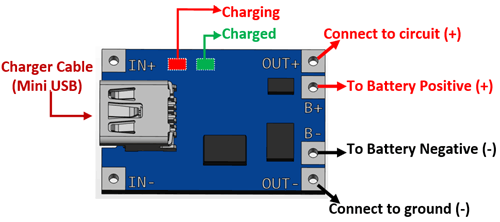
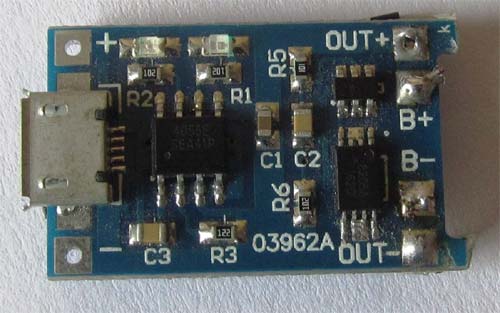
  2. Connections to the TP4056 battery charger (a nice video on this is at Charging a Lithium 18650 Cell using the TP4056)
    1. IN mini/micro USB from connector type B of USB charger cable
    2. BAT pins B+ and B- to the + and – of the 18650 battery holder
    3. OUT pins +/- to your LM2577 IN pins+/-
  3. 18650 battery holder
    1. IN pins +/- to the TP4056 BAT pins +/-
    2. One or two 18650 batteries
    3. Note
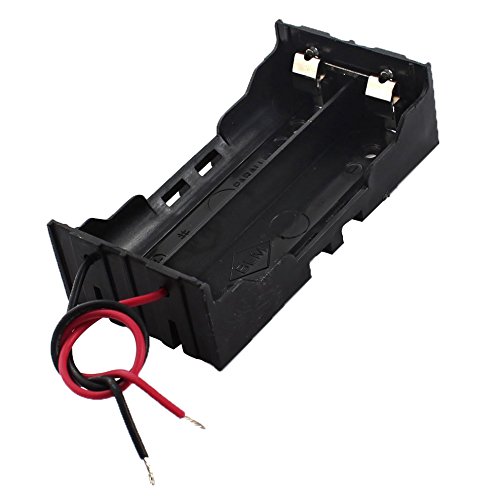
    4. Most of the wired “parallel” 18650 dual battery holders on non-USA Amazon sites are in fact serial (you see that in the comments, or by watching the wiring carefully), so better buy an unwired one!
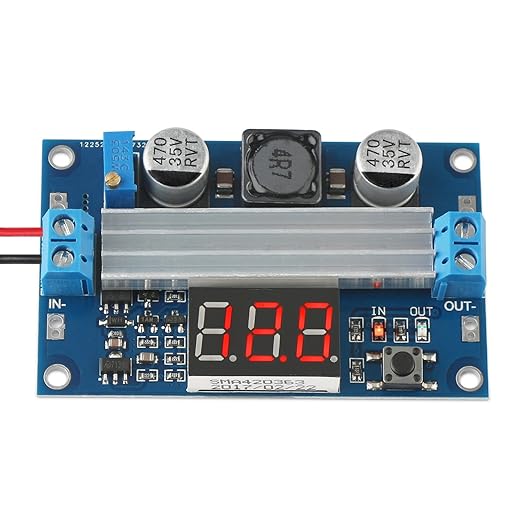
  4. Connections to the adjustable LM2577 step-up converter having a max current of 3A
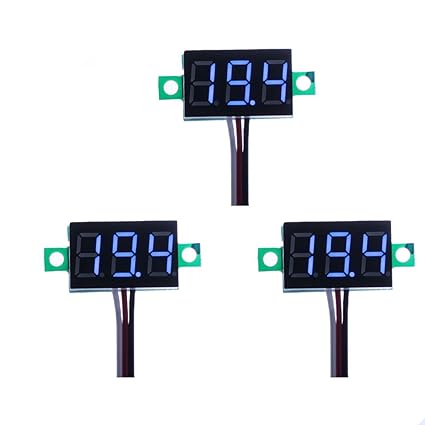
    (get one *with* voltage meter, as voltage meteres themselves are about half the price of the LM2577!)

    1. IN pins from the TP4056 OUT pins
    2. Adjust to slightly above 5V before connecting anything else!
    3. OUT pins +/- to the red/black pins of a connector A stripped micro USB cable
  5. USB powered device (like Raspberry Pi)
    1. Micro USB connector: connector B of the USB cable coming out of LM2577

If you want to measure both voltage and current, then a combined piece like Voltmeter Amperemeter Dual Digital Volt Amp Meter Messgerät 100V 10A is very convenient. Most of these do not come with schematics, so here is one:

Specs

Parts from Amazon.de

Media

There is a 6A module; though I’m not sure it is based on LM2577

Bad battery box example

–jeroen

Read the rest of this entry »

Posted in 18650, Batteries, Development, Hardware Development, Li-Ion, Power User | Leave a Comment »

EDSAC Simulator

Posted by jpluimers on 2020/07/08

Cool historic stuff: [WayBack/Archive.isEdsac Simulator.

It simulates the 1949 built EDSAC computer.

Via: EDSCA Simulator – Computerphile (video below) which explains concepts like the mercury memory “tank” used for memory.

Related:

–jeroen

Read the rest of this entry »

Posted in Development, Hardware Development, History, Software Development | Leave a Comment »

Raspberry Pi, Tumbleweed, btrfs

Posted by jpluimers on 2020/06/15

I want to use btrfs as filesystem on a Raspberry Pi with opensuse Tumbleweed.

It is hard to find out how, so here are a few links that should help me from “opensuse” “tumbleweed” “btrfs” “raspberry” pi:

–jeroen


Posted in *nix, *nix-tools, Development, Hardware Development, Linux, openSuSE, Power User, Raspberry Pi, SuSE Linux, Tumbleweed | Leave a Comment »

TOP 10 CD/DVD/Floppy Drives based Projects – YouTube

Posted by jpluimers on 2020/05/28

Cool stuff: TOP 10 CD/DVD/Floppy Drives based Projects – YouTube.

Via:

–jeroen

Read the rest of this entry »

Posted in Development, Hardware Development, LifeHacker, Power User | Leave a Comment »

GitHub – dschmenk/apple2pi: Apple II client/server for Raspberry Pi

Posted by jpluimers on 2020/05/28

[WayBack] GitHub – dschmenk/apple2pi: Apple II client/server for Raspberry Pi: hybrid computer of a Raspberry Pi inside an Apple II (either ][, or ][+, or //e) so the Apple II can be a front-end to the Raspberry Pi which then can run an Apple IIGS emulator, talk to the Apple II storage hardware and much more.

It can run [WayBack] RASPPLE II: A2CLOUD, A2SERVER, Apple II Pi for Raspberry Pi

Lot’s of videos below, all by David Schmenk https://www.youtube.com/user/dschmenk/videos

Via:

–jeroen


Posted in *nix, *nix-tools, //e, 6502, Apple, Apple ][, Development, Hardware Development, Hardware Interfacing, History, Power User, Raspberry Pi, USB | Leave a Comment »

Raspberry Pi 1B OpenSuSE Tumbleweed zypper upgrade problem · GitHub

Posted by jpluimers on 2020/05/25

It looks like OpenSuSE has stopped supporting Raspberry Pi 1, so the best likely is to recycle it into a Pi-Hole as basically it’s been dead since mid 2017: [WayBack] Raspberry Pi 1B OpenSuSE Tumbleweed zypper upgrade problem · GitHub.

Build status for armv6l support: [WayBack] Project openSUSE:Factory:ARM Status Monitor – openSUSE Build Service

–jeroen

Read the rest of this entry »

Posted in *nix, *nix-tools, Debian, Development, Hardware Development, History, Linux, openSuSE, Power User, Raspberry Pi, Raspbian, SuSE Linux, Tumbleweed | Leave a Comment »

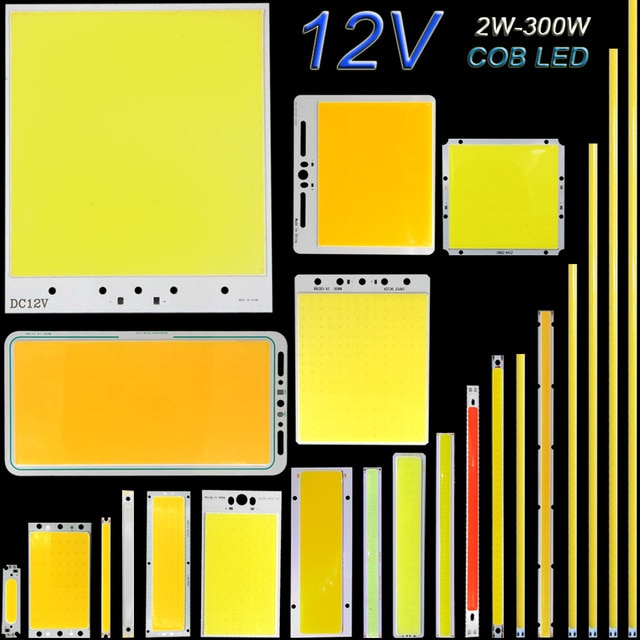
DC12V COB LED Light Strip Panel 5W 10W 20W 50W 200W 300W LED Bulb White Blue Red Flip Chip COB Lamp DIY House Car Lighting 12V-in LED Bulbs & Tubes from Lights & Lighting on Aliexpress.com | Alibaba Group

Posted by jpluimers on 2020/05/19

Interesting for some projects: [WayBack] DC12V COB LED Light Strip Panel 5W 10W 20W 50W 200W 300W LED Bulb White Blue Red Flip Chip COB Lamp DIY House Car Lighting 12V-in LED Bulbs & Tubes from Lights & Lighting on Aliexpress.com | Alibaba Group

Note they are not current limited!

This means I need to read more on current limiting; these might be a start:

Via The biggest LED COB panel yet! Voltage/current tests. – YouTube

–jeroen

Read the rest of this entry »

Posted in Development, DIY, Hardware Development, Power User | Leave a Comment »

LED bulbs in IKEA track lighting systems lie SANSA or LINA – SM2YER Goran’s Homepage

Posted by jpluimers on 2020/05/01

It is easy to replace the halogen bulbs in IKEA track lighting systems like IKEA SANSA or IKEA LINA by LED bulbs (Sansa uses 5.3mm spaced MR16 fitting compatible with both GX5.3 and GU5.3 bulbs, I think LINA uses the same): [WayBack] SM2YER Goran’s Homepage.

There are many other fittings; [WayBack] LED fitting welke moet ik kiezen? | Lampfittingen overzicht has a good list, mentioning these:

  • E14
  • E27
  • GU10
  • MR11 (which has slightly thicker pins than G4 and GU4)
  • G4 and GU4
    (with varying pin thickness)
  • G5.3, GX5.3, GU5.3
    (with varying pin thickness)
  • G6.35, GX6.535, GY6.35, GZ6.35
    (with varying pin thickness)
  • MR16
  • G9
  • GU10
  • AR111

The problem is the power supplies. They do not like the low wattage, or even burn with low wattage. Two solutions:

  • Use at least one 10W bulb, or
  • Use a 12V power supply from a laptop or other device that delivers far less power.

Fitting references:

--jeroen

Posted in Development, Hardware Development, IKEA hacks, LifeHacker, Power User | Leave a Comment »

This means your SD card is dead for writing: “fsck.ext4: unable to set superblock flags on ROOT”

Posted by jpluimers on 2020/04/24

A while ago I had a "fsck.ext4: unable to set superblock flags on ROOT" on an SD card in a Raspberry Pi: it basically means the SD card is dead.

Back then Google found only one entry: [WayBack] Bad Superblock – Raspberry Pi Forums

–jeroen

Posted in *nix, *nix-tools, Development, Hardware Development, Power User, Raspberry Pi | Leave a Comment »

Zelfbouw verlichting aansturen via Hue – Duurzame Energie & Domotica – GoT

Posted by jpluimers on 2020/04/16

On my research list: [WayBack] Zelfbouw verlichting aansturen via Hue – Duurzame Energie & Domotica – GoT.

via: [WayBack] Tweakers: Ikea komt met leddriver om geïntegreerde verlichting ‘slim’ te maken

–jeroen


PS: Lampen van de Action werken ook prima via Tuya. Met Google nest.

Posted in Development, Hardware Development | Leave a Comment »