The Wiert Corner – irregular stream of stuff

Jeroen W. Pluimers on .NET, C#, Delphi, databases, and personal interests

  • My badges

  • Twitter Updates

  • My Flickr Stream

  • Pages

  • All categories

  • Enter your email address to subscribe to this blog and receive notifications of new posts by email.

    Join 1,861 other subscribers

Archive for the ‘Hardware Development’ Category

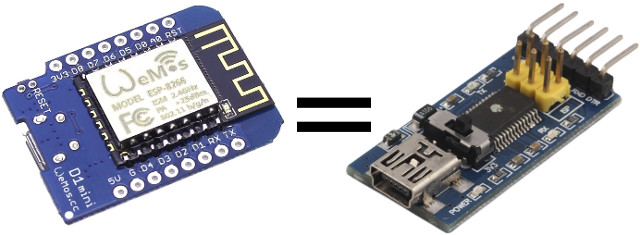
Transform Your ESP8266 Board into a USB to Serial Board Easily with Arduino Serial Bypass Sketch

Posted by jpluimers on 2018/07/11

An interesting re-use: [WayBackTransform Your ESP8266 Board into a USB to Serial Board Easily with Arduino Serial Bypass Sketch

Via: [WayBack] If you don’t have a USB to TTL board around, you can use an +ESP8266 board instead (or any other Arduino compatible boards with USB). – Jean-Luc Aufranc – Google+

–jeroen

Posted in Development, ESP8266, Hardware Development, IoT Internet of Things, Network-and-equipment, Power User | Leave a Comment »

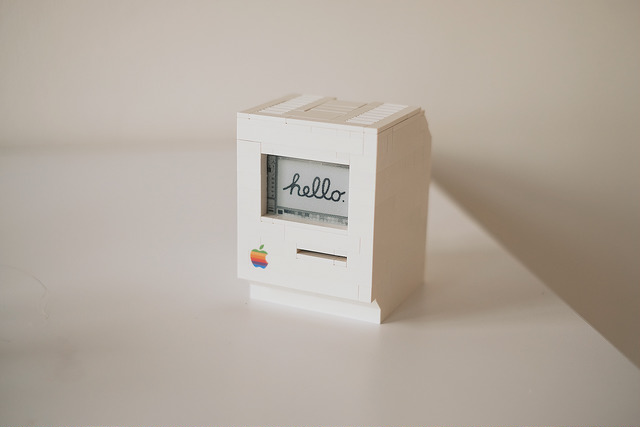
LEGO Macintosh classic with Wi-Fi and e‑paper display running docker

Posted by jpluimers on 2018/07/06

A Wi-Fi enabled 1990 Macintosh Classic built with LEGO, powered by a Raspberry Pi Zero running docker and a 2.7″ e-paper display by EmbeddedArtists.

Cool stuff!

Source: [Archive.isLEGO Macintosh classic with Wi-Fi and e‑paper display running docker

Via: [WayBack] This guy built a (kind of) working Lego Macintosh, and now you can too … | 9to5Mac

This should run well with a Classic Color Macintosh System 7 emulated on Raspberry Pi: [WayBack] On this tutorial I show you how to run Mac II OS color on your Raspberry PI, I have also included a compiled version for Windows. Running Mac OS 7 on Raspberry Pi with Color – Novaspirit

via:

ROM images: [WayBackIndex of /pub/software/ROM/Macintosh 68K

–jeroen

Read the rest of this entry »

Posted in Apple, Classic Macintosh, Development, Hardware Development, History, Macintosh SE/30, Power User, Raspberry Pi | Leave a Comment »

Raspberry Pi zero W notes

Posted by jpluimers on 2018/07/06

Launch dates:

Now you only need a memory card and a camera module to make a nice “CCTV” system with plenty of choice. More details here:

Depending on what and when you record video, you might want to consider an IR capable camera. In Raspberry Pi land, they call them NOIR (which stands for No IR, meaning they leave out the IR filter which means they can record IR).

–jeroen

Read the rest of this entry »

Posted in Development, Hardware Development, Power User, Raspberry Pi | Leave a Comment »

Cool 10-thousand piece domino bricks based computer that can add numbers

Posted by jpluimers on 2018/07/04

Very cool video based on these logic gates made from domino bricks:

The 4-bit calculator worked.

The 5-bit was set-up failed in part. That conclusion is at around 19:00.

A post mortem is at around 20:00: the machine was setup sizing it too small so the timing was too tight and didn’t work out.

–jeroen

Read the rest of this entry »

Posted in Development, Hardware Development, History | Leave a Comment »

Amazon Alexa on a Raspberry Pi (add a USB microphone and a speaker with a 3.5mm plug)

Posted by jpluimers on 2018/06/19

I never realised that Amazon Alexa has an open source account on GitHub: https://github.com/alexa

There are full instructions on getting a Java based Alexa Voice Service (AVS) – also used by Amazon Echo – to run on a Raspberri Pi (3 or better recommended, works on 2 as well) with this extra hardware:

  • USB microphone
  • Speaker with a 3.5mm audio plug
  • USB WiFi (essential for Raspberry Pi 2, optional if you want to boost your WiFi signal on a Raspberry Pi 3)

Full instructions are at Raspberry Pi · alexa/alexa-avs-sample-app Wiki and a video is below: https://www.youtube.com/watch?v=baec1CbV6A0

I should find some time to try this out (:

–jeroen

Read the rest of this entry »

Posted in Development, Hardware, Hardware Development, Hardware Interfacing, Software Development | Leave a Comment »

USB serial converters from FTDI – how to select them and get rid of fake chips

Posted by jpluimers on 2018/06/08

Be sure to read the comments at USB serial converters from FTDI are quite popular – Thomas Mueller (dummzeuch) – Google+ [WayBack] as it tells more about how to set genuine and fake FTDI chips apart (often before buying them, you cannot tell) and how to replace fake ones buy genuine ones.

Getting back to original means de-soldering fake chips, and soldering new genuine chips on the boards.

Fake chips:

  • have limited batches of the same serial (although there are ways to reprogram the serial, see links below)
    • connecting multiple adapters with the same serial causes trouble
  • are mangled by various FTDI drivers (either their PID is reset, or fake-data is inserted in the serial stream)
  • have problems operating at higher data rates

Note that the workarounds for these fake chips mean you cannot use more recent chips.

Links from Thomas’s post and other relevant links on the various kinds of genuine/fake and getting fake ones work again

Fake chips can cause you a lot of headaches – and time – sorting out communication problems: [WayBack] esptool-ck, esp8266, and FTDI Bug Hunting – vilimblog

Two years ago, this shoot-out (with results on github) had a great conclusion:

Buy either an adapter with a genuine FTDI chip, or one of the Silicon Labs CP2102 chips.

The FTDI chip is the only one attaining 3M baud rates.

Overview articles:

SiLabs chips seem to be the only without much trouble:

  • [WayBack] SiLabs CP210x USB Adapters For The Win – vilimblog
  • Review of a Generic USB RS 232/485/TTL Adapter (“Winners” branded) – YouTube:
    • Almost anything with FTDI/Prolific chips that comes from ebay/aliexpress should be assumed to be counterfeit – easy way to test this is to buy 2 and see if their serial numbers match. You don’t really want to waste your time with fake ones, you’ll end up spending more on those if you try to get them for as cheap as possible. Itead sells an adapter for 6.8 USD with genuine FT232RL chips, but they aren’t in as convenient dongle form factor, but might be worth more than your own time replacing fake chips with genuine ones.Although not mentioned here, CH340/1 should generally be avoided, while they work fine for short periods of time, for longer use they seem to be as unreliable as the counterfeit FTDI/Prolific chips on Linux.

      I haven’t seen or recognized a fake CP210x chip yet, so my guess would be that these are generally fine no matter where you get them. One big advantage of those is the integrated voltage 3.3V regulator, which can save some space when rolling your own boards.

FTDI related:

Genuine FTDI seems to be the easiest to find:

Prolific has similar issues, driver v3.4.25.218 still works with fake chips:

–jeroen

Related posts where I mentioned some of the trouble with FTDI chips:

Read the rest of this entry »

Posted in *nix, Development, Hardware Development, Hardware Interfacing, Legacy Ports: COM, Linux, openSuSE, Power User, SuSE Linux | Leave a Comment »

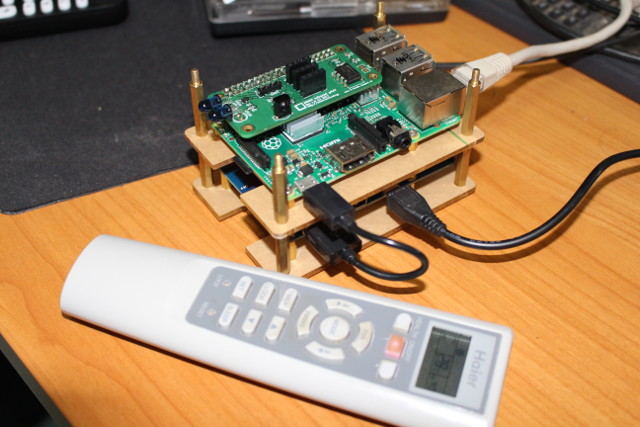
How to Control Your Air Conditioner with Raspberry Pi Board and ANAVI Infrared pHAT

Posted by jpluimers on 2018/06/04

Interesting howto: [WayBackHow to Control Your Air Conditioner with Raspberry Pi Board and ANAVI Infrared pHAT

via: [WayBack] Air conditioners’ remote control codes are a bit different from say your TV remote control, as they don’t just send one byte, but a bunch of bytes… – Jean-Luc Aufranc – Google+

–jeroen

Posted in *nix, Development, Hardware Development, Power User, Raspberry Pi | Leave a Comment »

DRAM Access Timing – now and then (then = during 6502 times) TL;DR: Modern DR…

Posted by jpluimers on 2018/05/28

DRAM Access Timing – now and then (then = during 6502 times)TL;DR: Modern DRAM ist faster old stuff, but not much. – Kristian Köhntopp – Google+

Source: [WayBackDRAM Access Timing – now and then (then = during 6502 times) TL;DR: Modern DR…

Full article: [WayBackdram_latency_then_and_now.md by [WayBackPer Vognsen.

–jeroen

Posted in Development, Hardware Development, History, Software Development | Leave a Comment »

Hmm, latest Tumbleweed on Raspberry Pi 3 has an odd thing booting: Ansi termi…

Posted by jpluimers on 2018/05/25

Reminder to self: since the [ArchiveARM Cortex A53 problems are fixed, check out if this is also fixed:

[WayBack] Hmm, latest Tumbleweed on Raspberry Pi 3 has an odd thing booting: Ansi terminal characters aren’t being processed any more. – Jeroen Wiert Pluimers – Google+

Related: Git repository with fixed binaries for Tumbleweed on Raspberry Pi 3 – Bug 1084419 – Glibc update to 2.27 causes segfault during name resolution

–jeroen

Related as a different Pi died after a sudden power down:

Posted in *nix, Development, Hardware Development, Linux, openSuSE, Power User, Raspberry Pi, SuSE Linux, Tumbleweed | Leave a Comment »

Electronics components and resistor decoder colours

Posted by jpluimers on 2018/05/17

Cool video about basic electronic components explained:

It goes well with these posts:

Read the rest of this entry »

Posted in Development, Hardware Development | Leave a Comment »