The Wiert Corner – irregular stream of stuff

Jeroen W. Pluimers on .NET, C#, Delphi, databases, and personal interests

  • My badges

  • Twitter Updates

  • My Flickr Stream

  • Pages

  • All categories

  • Enter your email address to subscribe to this blog and receive notifications of new posts by email.

    Join 1,839 other subscribers

Archive for the ‘Hardware Development’ Category

SSH: Connection Reset by Peer – Server Fault

Posted by jpluimers on 2018/11/22

One occasion I had SSH throw a Connection Reset by Peer on my when was the SD-card of a Raspberry Pi started failing and the ext4 filesystem got mounted in read-only mode.

Then sshd was still listening on port 22, but since it could not write to disk any more, it threw a Connection Reset by Peer to the client.

It was on OpenSuSE Tumbleweed, but would failed just as well using Raspbian.

Lessons learned:

  • IoT hardware will fail.
  • ext4 breaks when the hardware breaks.

–jeroen

Reference:

Posted in *nix, *nix-tools, Debian, Development, Hardware Development, IoT Internet of Things, Linux, Network-and-equipment, openSuSE, Power User, Raspberry Pi, Raspbian, SuSE Linux, Tumbleweed | Leave a Comment »

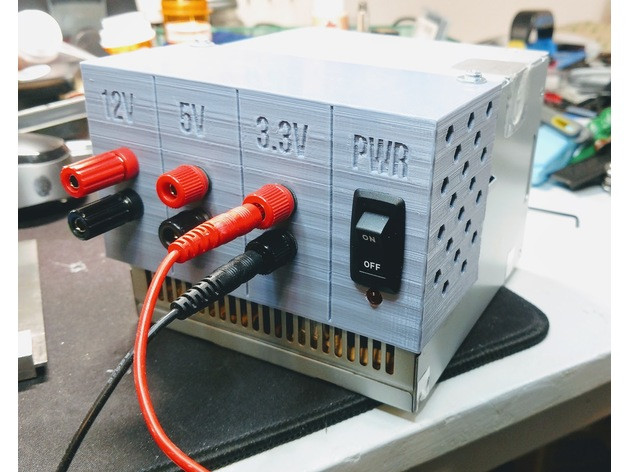
Convert/adapt an old ATX Power Supply into a Bench Power Supply with (or without) 3D Printed Parts

Posted by jpluimers on 2018/11/16

An interesting idea, although I would slightly modify it so I can -12V and -5V as well and maybe other voltage combinations too:

They are based on these underlying links:

Note that some of the newer power supplies with 24-pin molex connectors do not give you -5V any more.

A few notes:

  • depending on the age, ATX supplies can get you these voltages: -12V, -5V, 0V, +3.3V, +5V, +12V
    • -12V and -5V have very limited currents
    • newer power supplies often do not have -5V (especially the ones having 24-pin connectors)
    • newer power supplies have limited +5V power, but higher +12V power
    • older power supplies have limited +12V power, but higher +5V power
  • always take pictures of all connectors and the wire colours connected to them before starting (especially before cutting any wires)
    • this allows you to find back:
      • non-standard wire colours
      • configurations not covered here
  • to get stable 12V, you need a 5V load of about 5W:
    • between RED (+5V) andBLACK (GND),
    • for instance with pin 3 and pin 4,
    • or over one of the molex/floppy connectors: pins RED-BLACK
    • as load,
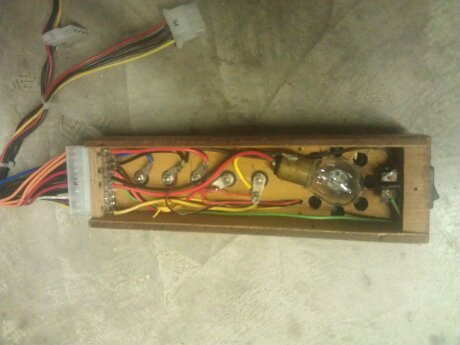
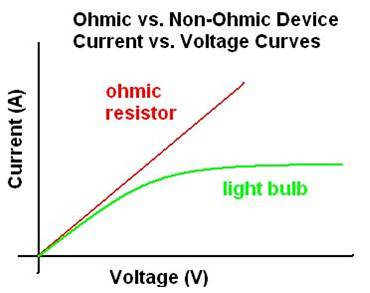
      • use at least a 10V/10W resistor or 12v/10W halogen lamp
      • ensure they are cooled well
  • to get stable 12V, you need a 12V load of about 10W
    • between YELLOW (+12V) andBLACK (GND),
    • for instance with pin 10 and pin 17,
    • or over one of the molex/floppy connectors: pins YELLOW-BLACK
    • as load,
      • use at least a 20V/20W resistor or 12v/20W halogen lamp
      • ensure they are cooled well
  • if your power supply has a BROWN (+3.3VS),
    • then ensure it is connected to ORANGE (+3.3V)
      • as brown is the SENSING wire to check 3.3V is OK.
  • to turn the power supply on,
    • short GREEN (PWR_ON, pin 14) and BLACK (GND, pin 15)
  • to know when the power is on:
    • connect a LED via a resistor between GREY (PWR_OK, pin 8) and BLACK (GND, pin 7)
  • to know when there is mains power:
    • connect a LED via a resistor between PURPLE (+5VSB, pin 9: stand by) and BLACK (GND, pin 7 or pin17)
  • Wikipedia: ATX Power supply describes
    • PWR_OK (often called Power Good)
    • +5VSB (stand by)
  • read the specs of your power supply to understand how much current it can deliver on which lines
  • some more current information

Example for loads: https://www.youtube.com/watch?v=gKgziA46wFY; more on why you need them and how to choose:

With a few more modifications you can [WayBack] Convert a Computer Power Supply to a Variable Bench Top Lab Power Supply.

I will probably go for this solution as it is easier to swap power supplies.

–jeroen

Via: [WayBack] Nice recycling of an old ATX power supply with a 3D printed part and a few accessories and cables… – Jean-Luc Aufranc – Google+


Read the rest of this entry »

Posted in Development, Hardware Development | 3 Comments »

Relay Switch Circuit and Relay Switching Circuit

Posted by jpluimers on 2018/11/08

Via yesterdays post on a bench power supply fabricated from an ATX power supply, I found this very interesting set of relay switching circuits:

Electronics Tutorial about the Relay Switch Circuit and relay switching circuits used to control a variety of loads in circuit switching applications

[WayBackRelay Switch Circuit and Relay Switching Circuit

The images below are from that site. Note the BC337 and BC109 have different voltage/power specs. See [WayBackBC337/BC109 datasheet & application note – Datasheet Archive.

–jeroen

Read the rest of this entry »

Posted in Development, Hardware Development | Leave a Comment »

DIY Filament Sensor for your 3D Printer

Posted by jpluimers on 2018/10/23

Via:

–jeroen

Read the rest of this entry »

Posted in 3D printing, Development, Hardware Development, LifeHacker | Leave a Comment »

Hopefully this is now available: in March you could pre-order the PoE hat for the Raspberry Pi 3 B+ at ~ EUR 15.

Posted by jpluimers on 2018/10/22

Wow, EUR 15 is almost half the price of an Raspberry Pi 3 B+:

[WayBack] RPI3-MODBP-POE RASPBERRY-PI, Add-On Board, Power over Ethernet (PoE) HAT for Raspberry Pi 3 Model B+ | Farnell UK

Via:

–jeroen

Posted in Development, Hardware Development, Power User, Raspberry Pi | Leave a Comment »

MotionEyeOS on Odroid C1+ with Logitech USB web cameras

Posted by jpluimers on 2018/10/11

Hopefully I get this to work after fixing

The first part of the fix was to

  1. re-image the SD card.
  2. boot
  3. wait 5 minutes (there is no output on HDMI apart from some flickering and no output on TTY using 115200 bits/second despite trying [WayBacken:c1_hardware_uart [ODROID Wiki])

The second part is getting the USB web cameras to work.

I’ve got two types, but the label on them doesn’t list their common name, only their P/N sometimes with M/N:

  1. P/N 860-000049 M/N V-UBC40 (really old USB cameras)
  2. P/N 860-000334 (new USB camera)

The MotionEyeOS web interface didn’t list any working cameras so I had to do some digging.

Luckily [WayBackWebcam software and driver support for Windows has a table of part and model numbers combined with product names, so they got revealed them as these:

  1. P/N 860-000334 = M/N V-U0028  with name HD Pro Webcam C920
  2. P/N 861225 = M/N V-UBC40 with name Quick Cam Messenger
    (which is funny as the P/N on the label is different)

Both are supported by motion according to [WayBackLogitech < Motion < Foswiki though the Quick Cam Messenger needs [WayBackQuickcam Messenger & Communicate driver for Linux which I should try to cross-compile one day.

The latter works fine. Below are some settings I used.

Read the rest of this entry »

Posted in *nix, Development, Hardware Development, Linux, Odroid, Power User | Leave a Comment »

Giving up on the official Ubuntu for Odroid C1 image

Posted by jpluimers on 2018/10/09

After the trouble in Ubuntu: Fixing the myserious “Failed to stop apt-daily.timer: Connection timed out” I got into more trouble:
apt-get update && apt-get upgrade hung the device.

It booted fine, but a new update showed it was in a hosed state.

I don’t expect vendor supported distributions to fail this way, so I gave up on the ubuntu-16.04-minimal-odroid-c1-20160817.img.xz .

–jeroen


root@odroidC1:~# apt-get update && apt-get upgrade
Hit:1 http://ports.ubuntu.com/ubuntu-ports xenial InRelease
Hit:2 http://ports.ubuntu.com/ubuntu-ports xenial-updates InRelease
Hit:3 http://ports.ubuntu.com/ubuntu-ports xenial-backports InRelease
Hit:4 http://ports.ubuntu.com/ubuntu-ports xenial-security InRelease
Hit:5 http://deb.odroid.in/c1 xenial InRelease
Reading package lists… Done
E: dpkg was interrupted, you must manually run 'dpkg –configure -a' to correct the problem.
root@odroidC1:~# dpkg –configure -a
Processing triggers for ureadahead (0.100.0-19) …
Setting up initramfs-tools (0.122ubuntu8.8) …
update-initramfs: deferring update (trigger activated)
Processing triggers for systemd (229-4ubuntu17) …
Processing triggers for initramfs-tools (0.122ubuntu8.8) …
update-initramfs: Generating /boot/initrd.img-4.4.0-28-generic
WARNING: missing /lib/modules/4.4.0-28-generic
Ensure all necessary drivers are built into the linux image!
depmod: ERROR: could not open directory /lib/modules/4.4.0-28-generic: No such file or directory
depmod: FATAL: could not search modules: No such file or directory
depmod: WARNING: could not open /var/tmp/mkinitramfs_FQEGW2/lib/modules/4.4.0-28-generic/modules.order: No such file or directory
depmod: WARNING: could not open /var/tmp/mkinitramfs_FQEGW2/lib/modules/4.4.0-28-generic/modules.builtin: No such file or directory
root@odroidC1:~# df -h
Filesystem Size Used Avail Use% Mounted on
udev 396M 0 396M 0% /dev
tmpfs 81M 3.3M 78M 5% /run
/dev/mmcblk0p2 59G 1.1G 55G 2% /
tmpfs 403M 0 403M 0% /dev/shm
tmpfs 5.0M 0 5.0M 0% /run/lock
tmpfs 403M 0 403M 0% /sys/fs/cgroup
/dev/mmcblk0p1 128M 11M 118M 9% /media/boot

Posted in Development, Hardware Development, Odroid | 3 Comments »

Raspberry Pi Power Limitations – Raspberry Pi Stack Exchange

Posted by jpluimers on 2018/10/04

There are very many, often contradictory, claims about the power requirements and limitations of the Pi. What are the exact requirements?

has a very elaborate answer at [WayBackRaspberry Pi Power Limitations – Raspberry Pi Stack Exchange covering all non-zero models.

I’ve archived some of the links it points to:

And some links on how to power a Raspberry Pi when you only have a 12V power source:

Read the rest of this entry »

Posted in Development, Hardware Development, Raspberry Pi | Leave a Comment »

Not cool: openSuse Tumbleweed switched DHCP clientID algorithm on Raspberry Pi 3, so now all devices get a non-static DHCP address

Posted by jpluimers on 2018/09/15

Not sure in which changeset this happened, but here is one example:

  1. old DHCP client ID 1:b8:27:eb:1a:b1:ec
  2. new DHCP client ID ff:eb:78:a9:4:0:1:0:1:22:6:67:49:b8:27:eb:78:a9:4

The first one was marked static in the DHCP server, which means the Raspberry Pi now did get a different IP address.

This messes up a few places that cannot do proper address resolution.

Anyone who knows where this has changed / is configured?

These did not help finding the cause:

Edit

As commented by Leen below, this is about

Wicked changed its defaults to use this DHCPv6 compatible RFC4361 client-id in favour of the older RFC2132 client-id. However, this has caused some issues with older DHCPv4 servers and existing setups where the client-id stored by the server is used to assign a (static) address. It is recommended to fix this server-side, but still, wicked provides several ways of addressing this issue

So here are some links:

–jeroen

Posted in *nix, Hardware Development, Linux, openSuSE, Power User, Raspberry Pi, SuSE Linux, Tumbleweed | 6 Comments »

DFRobot 7″ HDMI Display with Touchscreen Sells for $69 – for use with Raspberry Pi or Adruino

Posted by jpluimers on 2018/09/10

There are plenty of HDMI displays, but if you want a smaller size it become more complicated although some 7″ HDMI displays are available. However, if you

Source: [Archive.isDFRobot 7″ HDMI Display with Touchscreen Sells for $69

Via: [Archive.is] 7″ HDMI touchscreen display with mounting holes for +Raspberry Pi board. – Jean-Luc Aufranc – Google+

–jeroen

Posted in Development, Hardware Development, Power User, Raspberry Pi | Leave a Comment »