The Wiert Corner – irregular stream of stuff

Jeroen W. Pluimers on .NET, C#, Delphi, databases, and personal interests

  • My badges

  • Twitter Updates

  • My Flickr Stream

  • Pages

  • All categories

  • Enter your email address to subscribe to this blog and receive notifications of new posts by email.

    Join 1,861 other subscribers

Archive for the ‘Hardware Development’ Category

Powering Raspberry Pi devices from a Fritz!Box USB connection

Posted by jpluimers on 2017/03/30

I tried to power both Raspberry B+ and Raspberry 2 B devices via the USB ports of both a Fritz!Box 7490 and Fritz!Box 7360.

At first this works, but the Raspberry B+ devices over time would become unstable: not being able to ping and/or boot.

So below are some links on power requirements and powering Raspberry Pi A, B, A+, B+, 2B and zero.

Fazit/TL;DR: use an external power supply when available.

Read the rest of this entry »

Posted in *nix, Development, Fritz!, Fritz!Box, Hardware Development, Internet, Linux, openSuSE, Power User, Raspberry Pi, SuSE Linux | Leave a Comment »

Mac OS X – serial communication programs

Posted by jpluimers on 2017/03/30

Some links that helped me getting FTDI USB serial communication to Raspberry Pi systems going:

–jeroen

Posted in Apple, Communications Development, Development, Hardware Development, Hardware Interfacing, iMac, Legacy Ports: COM, Mac, Mac OS X / OS X / MacOS, MacBook, MacBook Retina, MacBook-Air, MacBook-Pro, MacMini, OS X 10.10 Yosemite, OS X 10.9 Mavericks, Power User, Raspberry Pi, USB | Leave a Comment »

`-bash: warning: setlocale: LC_ALL: cannot change locale (en_US.UTF-8)` on fresh Raspbian on Raspberry

Posted by jpluimers on 2017/03/24

Every time I logged onto a freshly installed Rasbian system (Debian Jessie), I had this message:

The programs included with the Debian GNU/Linux system are free software;
the exact distribution terms for each program are described in the
individual files in /usr/share/doc/*/copyright.

Debian GNU/Linux comes with ABSOLUTELY NO WARRANTY, to the extent
permitted by applicable law.
Last login: Sat Aug 27 19:52:33 2016 from 192.168.171.24
-bash: warning: setlocale: LC_ALL: cannot change locale (en_US.UTF-8)

Asking for the locale settings would give this:

jeroenp@raspberrypi:~ $ locale
locale: Cannot set LC_CTYPE to default locale: No such file or directory
locale: Cannot set LC_MESSAGES to default locale: No such file or directory
locale: Cannot set LC_ALL to default locale: No such file or directory
LANG=en_GB.UTF-8
LANGUAGE=
LC_CTYPE="en_US.UTF-8"
LC_NUMERIC="en_US.UTF-8"
LC_TIME="en_US.UTF-8"
LC_COLLATE="en_US.UTF-8"
LC_MONETARY="en_US.UTF-8"
LC_MESSAGES="en_US.UTF-8"
LC_PAPER="en_US.UTF-8"
LC_NAME="en_US.UTF-8"
LC_ADDRESS="en_US.UTF-8"
LC_TELEPHONE="en_US.UTF-8"
LC_MEASUREMENT="en_US.UTF-8"
LC_IDENTIFICATION="en_US.UTF-8"
LC_ALL=en_US.UTF-8

Searching for raspbian jessie “-bash: warning: setlocale: LC_ALL: cannot change locale (en_US.UTF-8)” I found fix locale issue #15 · scaleway/image-debian@543e9b4 [WayBack] that fixes Locale issue on Debian Jessie · Issue #15 · scaleway/image-debian · GitHub [WayBack]:

When logging into to a freshly booted debian jessie image:

-bash: warning: setlocale: LC_ALL: cannot change locale (en_US.UTF-8)

Source: Locale issue on Debian Jessie · Issue #15 · scaleway/image-debian

I changed the crux of that solution to this one:

echo "en_US.UTF-8 UTF-8" >> /etc/locale.gen && locale-gen

When running, it showed this:

# echo "en_US.UTF-8 UTF-8" >> /etc/locale.gen && locale-gen
Generating locales (this might take a while)...
  en_GB.UTF-8... done
  en_US.UTF-8... done
Generation complete.

And logging this:

The programs included with the Debian GNU/Linux system are free software;
the exact distribution terms for each program are described in the
individual files in /usr/share/doc/*/copyright.

Debian GNU/Linux comes with ABSOLUTELY NO WARRANTY, to the extent
permitted by applicable law.
Last login: Sat Aug 27 20:26:34 2016 from 192.168.171.24

Problem solved: 1 line of code!

–jeroen

Posted in *nix, Arduino, Debian, Development, Hardware Development, Linux, Power User, Raspberry Pi, Raspbian | 1 Comment »

KPN LoRa om Van Raam fietsen te traceren Zakelijk KPN Forum

Posted by jpluimers on 2017/03/02

Interesting: [Archive.isKPN LoRa om Van Raam fietsen te traceren Zakelijk KPN Forum via [WayBackNederlands bedrijf komt met narrowband-internet-of-things-ontwikkelbordje – Computer – Nieuws – Tweakers

–jeroen

Posted in Arduino, Development, Hardware Development, Hardware Interfacing | Leave a Comment »

230 V safety on the work bench – Put your power supply in an old tablet container…

Posted by jpluimers on 2017/02/28

Great tip from Nelis Willers:

230 V safety on the work bench.
Put your power supply in an old tablet container. The high voltage is safely encapsulated and will not accidentally touch something. Of course don’t do this for a kW supply, only where low heat is generated, otherwise you might set a fire!

Source: 230 V safety on the work bench. Put your power supply in an old tablet container…

Posted in Development, Hardware Development, LifeHacker, Power User | Leave a Comment »

The woods and trees of OpenSuSE on single-board computers – image abbreviations – and getting it installed using OS X

Posted by jpluimers on 2017/02/27

Finding the right image

There are many single-board computers on the OpenSuSE hardware-compatibility list (HCL), including:

A lot of them have ready to go images, often for Tumbleweed, however none of the pages explain the below image differences hence the one-line for each:

Since I wanted a headless system, JeOS was what I needed.

As it wasn’t available for my ODroid C1+ but was for my Raspberry Pi 2 and as my main machine is a 15″ Retina MacBook Pro Late 2013 [WayBack] below are the steps I used to get the image working.

Installing the Raspberry Pi 2 image using OS X

The below Raspberry Pi2 link will redirect to the correct image in the generic download directory http://download.opensuse.org/repositories/devel:/ARM:/Factory:/Contrib:/RaspberryPi2/images/

http://download.opensuse.org/repositories/devel:/ARM:/Factory:/Contrib:/RaspberryPi2/images/openSUSE-Tumbleweed-ARM-JeOS-raspberrypi2.armv7l.raw.xz

For other Raspberry Pi versions, you can find them here:

http://download.opensuse.org/repositories/devel:/ARM:/Factory:/Contrib:/RaspberryPi3/images/openSUSE-Tumbleweed-ARM-JeOS-raspberrypi3.aarch64.raw.xz

http://download.opensuse.org/ports/armv6hl/tumbleweed/images/openSUSE-Tumbleweed-ARM-JeOS-raspberrypi.armv6l-Current.raw.xz

I installed on a 8 gigabyte SD card that revealed itself as /dev/disk1 using this diskutil command (via osx – List all devices connected, lsblk for Mac OS X – Ask Different [WayBack])

diskutil list

So this wrote the image to SD card in a sudo su - prompt:

targetDevice="disk2"
unxz --keep openSUSE-Tumbleweed-ARM-JeOS-raspberrypi2.armv7l-2016.08.20-Build2.1.raw.xz; \
diskutil umount "/dev/${targetDevice}s1"; \
dd bs=1m of="/dev/r${targetDevice}" if=openSUSE-Tumbleweed-ARM-JeOS-raspberrypi2.armv7l-2016.08.20-Build2.1.raw; \
sync; \
diskutil list; \
diskutil eject "/dev/${targetDevice}"

or if you want to select which image to “burn”:

targetDevice="disk2"
imageName="openSUSE-Tumbleweed-ARM-JeOS-raspberrypi2.armv7l-2016.08.20-Build2.1.raw"
imageName="openSUSE-Tumbleweed-ARM-JeOS-raspberrypi.armv6l-2016.11.23-Build2.22.raw"
imageName="openSUSE-Tumbleweed-ARM-JeOS-raspberrypi3.aarch64-2017.01.12-Build3.2.raw"
unxz --keep ${imageName}.xz; \
diskutil umount "/dev/${targetDevice}s1"; \
dd bs=1m of="/dev/r${targetDevice}" if=${imageName}; \
sync; \
diskutil list; \
diskutil eject "/dev/${targetDevice}"

A few notes:

Read the rest of this entry »

Posted in *nix, Development, Hardware, Hardware Development, Linux, Odroid, openSuSE, Power User, Raspberry Pi, Single-Board Computers, SuSE Linux, Tumbleweed | 1 Comment »

AllPro Adapter – open source ODBII adapter for car monitoring

Posted by jpluimers on 2017/02/23

One day I’ll dig in this ODB2 adapter to see how this open source project has evolved: AllPro Adapter

Now that’s a nice project. Open Source/Open Hardware OBD II adapter for your car. http://www.obddiag.net/allpro.html #OpenIsDefault – Jan Wildeboer – Google+

Read the rest of this entry »

Posted in Development, Hardware Development | Leave a Comment »

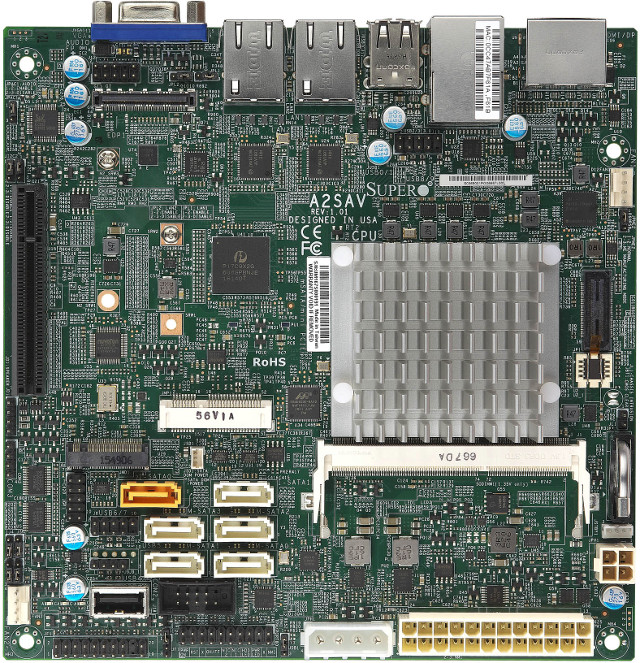
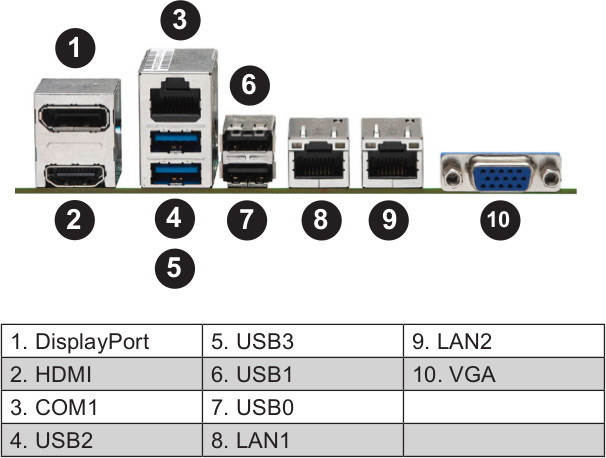
Supermicro A2SAV mini-ITX Board Powered by Intel Atom E3940 SoC Features 6 SATA Ports, Dual GbE, and Up to 9 USB Interfaces

Posted by jpluimers on 2017/02/17

Interesting board: [WayBackSupermicro A2SAV mini-ITX Board Powered by Intel Atom E3940 SoC Features 6 SATA Ports, Dual GbE, and Up to 9 USB Interfaces

All below pictures from www.cnx-software.com

Could for IoT hardware and software development.

via: [WayBack] http://www.cnx-software.com/2017/02/06/supermicro-a2sav-mini-itx-board-powered-by-intel-atom-e3940-soc-features-6-sata-ports-dual-gbe-and-up-to-9-usb-in… – Joe C. Hecht – Google+

–jeroen

Posted in Development, Hardware Development, Power User, Software Development | Leave a Comment »

Get a code signing certificate – Windows 10 hardware dev

Posted by jpluimers on 2017/02/07

Thanks Mathijs ter Woord for letting me know this: Get a code signing certificate – Windows 10 hardware dev

Posted in Development, Hardware Development | Leave a Comment »

DIY pick and place machine from parts of scanner, inkjet printer, DVD player and vaccuum pump – Open Theremin – Urs Gaudenz

Posted by jpluimers on 2017/01/30

Urs Gaudenz manufactures Open.Theremin kits using his do it yourself pick and place machine which he built from low cost scanner, ink jet printer, DVD player mechanics and some Arduino controlling. Even his solder oven is Arduino controlled!

This is months of work showing a work flow in a 11 minute youtube video. Well done!

via:

Video:

Read the rest of this entry »

Posted in Arduino, Development, Geeky, Hardware Development | Leave a Comment »