The Wiert Corner – irregular stream of stuff

Jeroen W. Pluimers on .NET, C#, Delphi, databases, and personal interests

  • My badges

  • Twitter Updates

  • My Flickr Stream

  • Pages

  • All categories

  • Enter your email address to subscribe to this blog and receive notifications of new posts by email.

    Join 1,839 other subscribers

Archive for the ‘Hardware Development’ Category

The woods and trees of OpenSuSE on single-board computers – image abbreviations – and getting it installed using OS X

Posted by jpluimers on 2017/02/27

Finding the right image

There are many single-board computers on the OpenSuSE hardware-compatibility list (HCL), including:

A lot of them have ready to go images, often for Tumbleweed, however none of the pages explain the below image differences hence the one-line for each:

Since I wanted a headless system, JeOS was what I needed.

As it wasn’t available for my ODroid C1+ but was for my Raspberry Pi 2 and as my main machine is a 15″ Retina MacBook Pro Late 2013 [WayBack] below are the steps I used to get the image working.

Installing the Raspberry Pi 2 image using OS X

The below Raspberry Pi2 link will redirect to the correct image in the generic download directory http://download.opensuse.org/repositories/devel:/ARM:/Factory:/Contrib:/RaspberryPi2/images/

http://download.opensuse.org/repositories/devel:/ARM:/Factory:/Contrib:/RaspberryPi2/images/openSUSE-Tumbleweed-ARM-JeOS-raspberrypi2.armv7l.raw.xz

For other Raspberry Pi versions, you can find them here:

http://download.opensuse.org/repositories/devel:/ARM:/Factory:/Contrib:/RaspberryPi3/images/openSUSE-Tumbleweed-ARM-JeOS-raspberrypi3.aarch64.raw.xz

http://download.opensuse.org/ports/armv6hl/tumbleweed/images/openSUSE-Tumbleweed-ARM-JeOS-raspberrypi.armv6l-Current.raw.xz

I installed on a 8 gigabyte SD card that revealed itself as /dev/disk1 using this diskutil command (via osx – List all devices connected, lsblk for Mac OS X – Ask Different [WayBack])

diskutil list

So this wrote the image to SD card in a sudo su - prompt:

targetDevice="disk2"
unxz --keep openSUSE-Tumbleweed-ARM-JeOS-raspberrypi2.armv7l-2016.08.20-Build2.1.raw.xz; \
diskutil umount "/dev/${targetDevice}s1"; \
dd bs=1m of="/dev/r${targetDevice}" if=openSUSE-Tumbleweed-ARM-JeOS-raspberrypi2.armv7l-2016.08.20-Build2.1.raw; \
sync; \
diskutil list; \
diskutil eject "/dev/${targetDevice}"

or if you want to select which image to “burn”:

targetDevice="disk2"
imageName="openSUSE-Tumbleweed-ARM-JeOS-raspberrypi2.armv7l-2016.08.20-Build2.1.raw"
imageName="openSUSE-Tumbleweed-ARM-JeOS-raspberrypi.armv6l-2016.11.23-Build2.22.raw"
imageName="openSUSE-Tumbleweed-ARM-JeOS-raspberrypi3.aarch64-2017.01.12-Build3.2.raw"
unxz --keep ${imageName}.xz; \
diskutil umount "/dev/${targetDevice}s1"; \
dd bs=1m of="/dev/r${targetDevice}" if=${imageName}; \
sync; \
diskutil list; \
diskutil eject "/dev/${targetDevice}"

A few notes:

Read the rest of this entry »

Posted in *nix, Development, Hardware, Hardware Development, Linux, Odroid, openSuSE, Power User, Raspberry Pi, Single-Board Computers, SuSE Linux, Tumbleweed | 1 Comment »

AllPro Adapter – open source ODBII adapter for car monitoring

Posted by jpluimers on 2017/02/23

One day I’ll dig in this ODB2 adapter to see how this open source project has evolved: AllPro Adapter

Now that’s a nice project. Open Source/Open Hardware OBD II adapter for your car. http://www.obddiag.net/allpro.html #OpenIsDefault – Jan Wildeboer – Google+

Read the rest of this entry »

Posted in Development, Hardware Development | Leave a Comment »

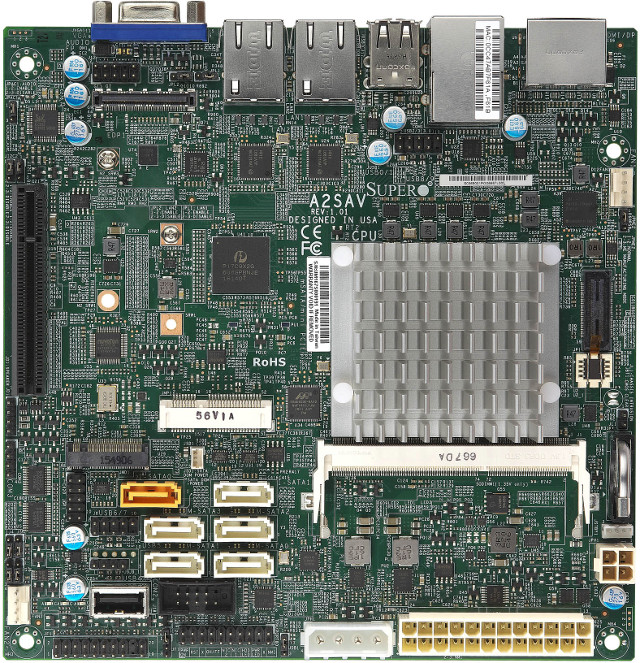
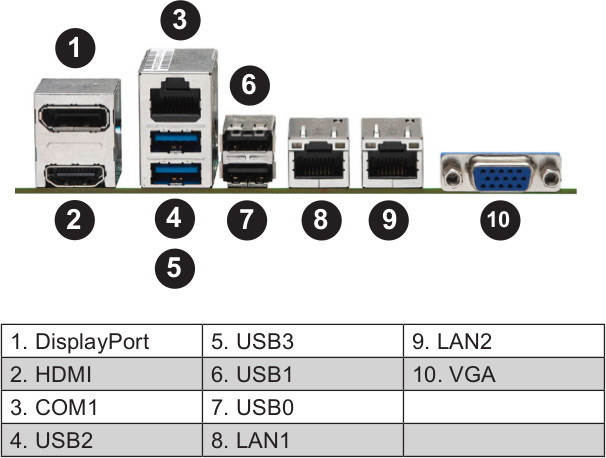
Supermicro A2SAV mini-ITX Board Powered by Intel Atom E3940 SoC Features 6 SATA Ports, Dual GbE, and Up to 9 USB Interfaces

Posted by jpluimers on 2017/02/17

Interesting board: [WayBackSupermicro A2SAV mini-ITX Board Powered by Intel Atom E3940 SoC Features 6 SATA Ports, Dual GbE, and Up to 9 USB Interfaces

All below pictures from www.cnx-software.com

Could for IoT hardware and software development.

via: [WayBack] http://www.cnx-software.com/2017/02/06/supermicro-a2sav-mini-itx-board-powered-by-intel-atom-e3940-soc-features-6-sata-ports-dual-gbe-and-up-to-9-usb-in… – Joe C. Hecht – Google+

–jeroen

Posted in Development, Hardware Development, Power User, Software Development | Leave a Comment »

Get a code signing certificate – Windows 10 hardware dev

Posted by jpluimers on 2017/02/07

Thanks Mathijs ter Woord for letting me know this: Get a code signing certificate – Windows 10 hardware dev

Posted in Development, Hardware Development | Leave a Comment »

DIY pick and place machine from parts of scanner, inkjet printer, DVD player and vaccuum pump – Open Theremin – Urs Gaudenz

Posted by jpluimers on 2017/01/30

Urs Gaudenz manufactures Open.Theremin kits using his do it yourself pick and place machine which he built from low cost scanner, ink jet printer, DVD player mechanics and some Arduino controlling. Even his solder oven is Arduino controlled!

This is months of work showing a work flow in a 11 minute youtube video. Well done!

via:

Video:

Read the rest of this entry »

Posted in Arduino, Development, Geeky, Hardware Development | Leave a Comment »

If anyone ever wants to have a batch of LTE dumb phones built…

Posted by jpluimers on 2017/01/09

via: “SF has lost track of buses because SFMTA didn’t upgrade from 2G (to 3G to 4G to LTE) and AT&T finally turned it off.” – Kristian Köhntopp – Google+

If anyone ever wants to have a batch of LTE dumb phones built:

+Jeroen Wiert Pluimers I’m not aware of simple-voice-only phones with LTE modem. From my former life at a telephone producer i remember costs to get a platform running and the effort spend on special editions, i’d say if you are willing to buy 50000 we could find someone producing this for you. In China. But as written above, a basic-2G service (for M2M and emergency signalling or calls) will stay for long.

–jeroen

Posted in Development, Hardware Development, LifeHacker, Power User | Leave a Comment »

Arduino controlled automated blinds with Web UI

Posted by jpluimers on 2017/01/05

Interesting idea [WayBackArduino controlled automated blinds with Web UI

Via:

–jeroen


Posted in Arduino, Development, ESP8266, ESP8266X, Hardware Development, LifeHacker, Power User | Leave a Comment »

#220 feature `SKIP_FIRMWARE` by jpluimers · Pull Request #221 · Hexxeh/rpi-update

Posted by jpluimers on 2016/12/13

Reminder to self: Fix #220 feature SKIP_FIRMWARE by jpluimers · Pull Request #221 · Hexxeh/rpi-update

It’s bash. How hard can it be.

(no that was a rhetorical question).

–jeroen

Posted in *nix, *nix-tools, Debian, Development, Hardware Development, Linux, openSuSE, Power User, Raspberry Pi, Raspbian, SuSE Linux, Tumbleweed | Leave a Comment »

Meet PoisonTap, the $5 tool that ransacks password-protected computers | Ars Technica

Posted by jpluimers on 2016/11/23

Too bad Ars Technica redirects https to http while preaching anyone should use https.

Anyway: OS device driver install and network configuration should probably be less automatic than it is now.

All the more reason to go fully https (hello LetsEncrypt, goodbye Embarcadero).

A video showing how it works is below.

The clever device emulates a USB ethernet adapter (that virtually every operating system has default drivers for) then fakes being 1.0.0.1 handing out DHCP address 1.0.0.10 with a netmask of 128.0.0.1 thereby routing almost all network traffic over it.

It makes a tiny peace of the internet unreachable (like 1.0.0.1 itself in Brisbane Australia).

More details on how it works at [WayBackSamy Kamkar: PoisonTap – exploiting locked computers over USB.

Lets not leave this out:

Securing Against PoisonTap

Server-Side Security

If you are running a web server, securing against PoisonTap is simple:

  • Use HTTPS exclusively, at the very least for authentication and authenticated content
    • Honestly, you should use HTTPS exclusively and always redirect HTTP content to HTTPS, preventing a user being tricked into providing credentials or other PII over HTTP
  • Ensure Secure flag is enabled on cookies, preventing HTTPS cookies from leaking over HTTP
  • When loading remote Javascript resources, use the Subresource Integrity script tag attribute
  • Use HSTS to prevent HTTPS downgrade attacks

Desktop Security

  • Adding cement to your USB and Thunderbolt ports can be effective
  • Closing your browser every time you walk away from your machine can work, but is entirely impractical
  • Disabling USB ports is also effective, though also impractical
  • Locking your computer has no effect as the network and USB stacks operate while the machine is locked, however, going into an encrypted sleep mode where a key is required to decrypt memory (e.g., FileVault2 + deep sleep) solves most of the issues as your browser will no longer make requests, even if woken up

–jeroen

via Joe C. Hecht – Google+

Read the rest of this entry »

Posted in Development, Hardware Development, Raspberry Pi | Leave a Comment »

conorpp/u2f-zero: U2F USB token optimized for physical security, affordability, and style

Posted by jpluimers on 2016/10/26

Conor Patrick built humself u2f-zero an U2F USB token optimized for physical security, affordability, and style.

He open sourced the hardware and software at conorpp/u2f-zero.

–jeroen

Posted in Development, Hardware Development | Leave a Comment »