The Wiert Corner – irregular stream of stuff

Jeroen W. Pluimers on .NET, C#, Delphi, databases, and personal interests

  • My badges

  • Twitter Updates

  • My Flickr Stream

  • Pages

  • All categories

  • Enter your email address to subscribe to this blog and receive notifications of new posts by email.

    Join 1,860 other subscribers

Archive for the ‘CommandLine’ Category

PowerShell OS Support Matrix – mohitgoyal.co

Posted by jpluimers on 2021/09/08

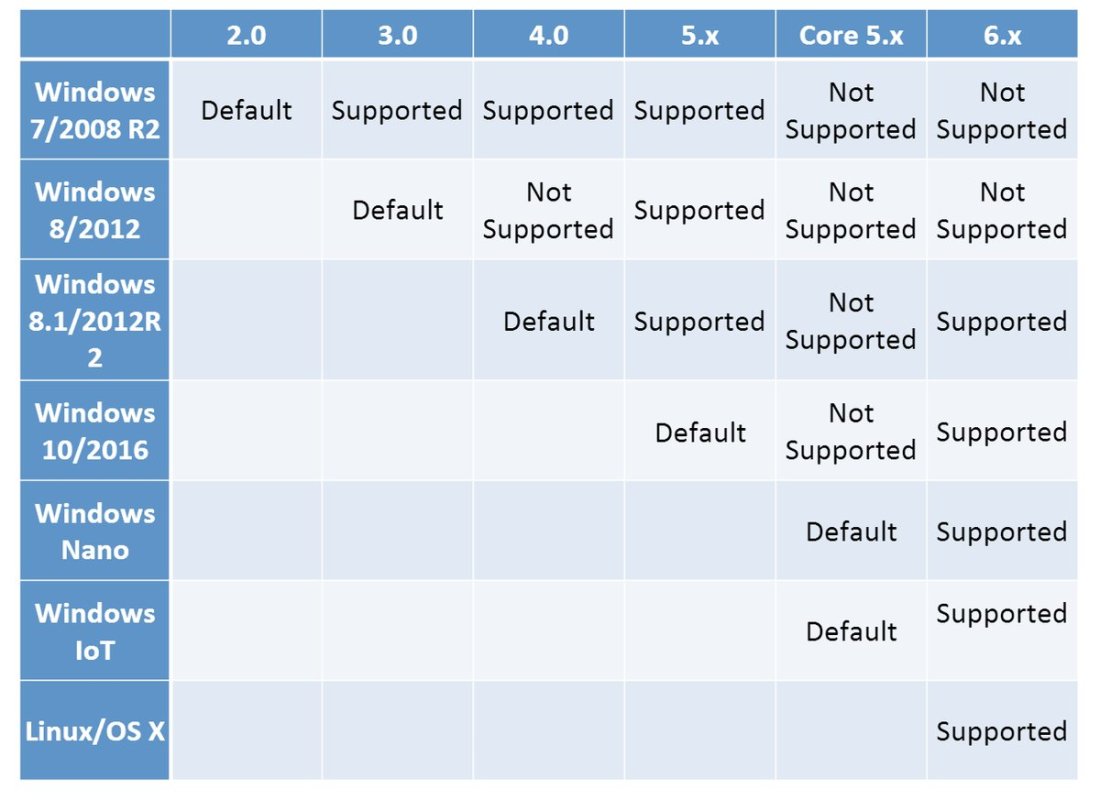
By now, probably newer versions have come out, but this should give a rough indication of the 2019 state of [WayBack] PowerShell OS Support Matrix – mohitgoyal.co:

For 5.1 and lower, you can find the prerequisites in [WayBack] Windows PowerShell System Requirements – PowerShell | Microsoft Docs.

–jeroen

Posted in .NET, CommandLine, Development, PowerShell, PowerShell, Scripting, Software Development | Leave a Comment »

“A parameter cannot be found that matches parameter name ‘PassThru'” – likely your powershell version is too old

Posted by jpluimers on 2021/09/07

If you get [WayBack] “A parameter cannot be found that matches parameter name ‘PassThru'” as PowerShell error, then likely the PowerShell version is too old to support -PassThru, which likely means you have are running pre-Windows 10 version.

PowerShell 3 (introduced in 2012) added the -PassThru parameter that allowed to chain multiple commands from one list pipe.

Another reason for the error might be that the command you use does not support the -PassThru parameter.

To check which commandlets support -PassThru, use the below command (the output is from a Windows 8.1 machine running PowerShell 4.0).

Read the rest of this entry »

Posted in .NET, CommandLine, Development, PowerShell, PowerShell, Software Development | Leave a Comment »

windows – Is there any sed like utility for cmd.exe? – Stack Overflow

Posted by jpluimers on 2021/07/19

[WayBack] windows – Is there any sed like utility for cmd.exe? – Stack Overflow

TL;DR: many people suggest to use PowerShell, but there is GNU sed in Chocolatey

The chocolatey part:

The PowerShell part: read the other answers from the above question.

–jeroen

Posted in *nix, *nix-tools, CommandLine, Power User, PowerShell, RegEx, sed, Windows | Leave a Comment »

Small batch file wrapper around PowerShell to uniquely sort file based content

Posted by jpluimers on 2021/05/19

From my batch file library; note this PowerShell wrapper does not support stdin, but that is OK for me.

For Windows 10 and up, sort /unique works too and supports stdin.

:: note: does not work on stdin, unliqke sort which does support standard input
:: http://secretgeek.net/ps_duplicates
PowerShell Get-Content %1 ^| Sort-Object ^| Get-Unique
:: note that for Windoww 10 and up, there is a sort /unique switch, but Windows versions below it do not.
:: https://superuser.com/questions/1316317/is-there-a-windows-equivalent-to-the-unix-uniq

Related:

–jeroen

Posted in Batch-Files, CommandLine, Development, PowerShell, PowerShell, Scripting, Software Development | Leave a Comment »

Chocolatey: installing Oracle SQL Developer and updating the chocolatey package

Posted by jpluimers on 2021/05/13

Sometimes an install is not just as simple as C:\>choco install --yes oracle-sql-developer.

Edit 20210514:

Note that most of the below pain will be moot in the future as per [Archive.is] Jeff Smith 🍻 on Twitter: “we’re working on removing the SSO requirement, it’s already done for @oraclesqlcl – see here … “ referring to [Wayback] SQLcl now under the Oracle Free Use Terms and Conditions license | Oracle Database Insider Blog

SQLcl, the modern command-line interface for the Oracle Database, can now be downloaded directly from the web without any click-through license agreement.

It means the Oracle acount restriction will be lifted, and downloads will be a lot simpler.

I started with the below failing command, tried a lot of things, then finally almost gave up: Oracle stuff does not want to be automated, which means I should try to less of their stuff.

First of all you need an Oracle account (I dislike companies doing that for free product installs; I’m looking at Embarcadero too) by going to profile.oracle.com:

[WayBack] Chocolatey Gallery | Oracle SQL Developer 18.4.0 (also: gist.github.com/search?l=XML&q=oracle-sql-developer)

Notes

  • This version supports both 32bit and 64bit and subsequently does not have a JDK bundled with it. It has a
    dependency on the jdk8 package to meet the application’s JDK requirement.
  • An Oracle account is required to download this package. See the “Package Parameters” section below for
    details on how to provide your Oracle credentials to the installer. If you don’t have an existing account, you can
    create one for free here: https://profile.oracle.com/myprofile/account/create-account.jspx

Package Parameters

The following package parameters are required:

/Username: – Oracle username
/Password: – Oracle password

(e.g. choco install oracle-sql-developer --params "'/Username:MyUsername /Password:MyPassword'")

To have choco remember parameters on upgrade, be sure to set choco feature enable -n=useRememberedArgumentsForUpgrades.

Then the installation failed fail again: ERROR: The response content cannot be parsed because the Internet Explorer engine is not available, or Internet Explorer's first-launch configuration is not complete. Specify the UseBasicParsing parameter and try again.

The trick is to RUN IEXPLORE.EXE AS ADMINISTRATOR ONCE BEFORE INSTALLING FROM CHOCOLATEY. Who would believe that.

The reason is that the package uses Invoke-WebRequest which requires Internet Explorer and PowerShell 3. Chocolatey packages however need to be able to run on just PowerShell 2 without Invoke-WebRequest.

Maybe using cURL can remedy that; adding a dependency to is is possible, as cURL can be installed via chocolatey: [WayBack] How to Install cURL on Windows – I Don’t Know, Read The Manual. Another alternative might be [WayBack] Replace Invoke-RestMethod in PowerShell 2.0 to use [WayBack] WebRequest Class (System.Net) | Microsoft Docs.

Read the rest of this entry »

Posted in CertUtil, Chocolatey, CommandLine, Database Development, Development, DVCS - Distributed Version Control, git, Hashing, OracleDB, Power User, PowerShell, Security, SHA, SHA-1, Software Development, Source Code Management, Windows, XML, XML/XSD | Leave a Comment »

Preference variable $ConfirmPreference allows getting more or less PowerShell confirmation prompts

Posted by jpluimers on 2021/05/04

On my list to experiment with are [Wayback] about_Preference_Variables – PowerShell | Microsoft Docs, especially

$ConfirmPreference

Determines whether PowerShell automatically prompts you for confirmation before running a cmdlet or function.

The $ConfirmPreference variable’s valid values are HighMedium, or Low. Cmdlets and functions are assigned a risk of HighMedium, or Low. When the value of the $ConfirmPreference variable is less than or equal to the risk assigned to a cmdlet or function, PowerShell automatically prompts you for confirmation before running the cmdlet or function.

If the value of the $ConfirmPreference variable is None, PowerShell never automatically prompts you before running a cmdlet or function.

To change the confirming behavior for all cmdlets and functions in the session, change $ConfirmPreference variable’s value.

To override the $ConfirmPreference for a single command, use a cmdlet’s or function’s Confirm parameter. To request confirmation, use -Confirm. To suppress confirmation, use -Confirm:$false.

Valid values of $ConfirmPreference:

  • None: PowerShell doesn’t prompt automatically. To request confirmation of a particular command, use the Confirm parameter of the cmdlet or function.
  • Low: PowerShell prompts for confirmation before running cmdlets or functions with a low, medium, or high risk.
  • Medium: PowerShell prompts for confirmation before running cmdlets or functions with a medium, or high risk.
  • High: PowerShell prompts for confirmation before running cmdlets or functions with a high risk.

–jeroen

Posted in .NET, CommandLine, Development, PowerShell, PowerShell, Scripting, Software Development | Leave a Comment »

PowerShell: avoid Write-Output, use Return only for ending execution, use $Output variable for returning additional output

Posted by jpluimers on 2021/02/18

Recently, I bumped into [WayBack] Write-Output confusion for the upteenth time.

Luckily I had the below links archived, basically invalidating the use of Write-Output, and invalidating the answer at [WayBack] powershell – What’s the difference between “Write-Host”, “Write-Output”, or “[console]::WriteLine”? – Stack Overflow.

Read the rest of this entry »

Posted in CommandLine, Development, PowerShell, PowerShell, Scripting, Software Development | Leave a Comment »

Windows command prompt: decrementing loop

Posted by jpluimers on 2020/12/30

I needed a decrementing loop on the Windows command prompt, but that seems very hard from batch files without programming your own kind of while loop:

PowerShell to the rescue to loop back from and including 463 down to and including 290:

PowerShell -Command "for ($i=463; $i -ge 290; $i--) { Write-Host "Value " $i}"

This outputs:

Value 463
Value 462
...
Value 291
Value 290

In a similar way, you can execute a cmd command, but then you need to be careful on how to pass parameters: the \" is important to you can have quotes within quoted strings..

PowerShell -Command "for ($i=463; $i -ge 290; $i--) { & echo \"Value $i\"}"

gives this:

Value 463
Value 462
...
Value 291
Value 290

Read the rest of this entry »

Posted in Batch-Files, CommandLine, Console (command prompt window), Development, PowerShell, PowerShell, Scripting, Software Development, Windows | 1 Comment »

On Windows 7 and 8.x too: Completely disable Windows 10 telemetry collection – twm’s blog

Posted by jpluimers on 2020/12/10

From [WayBack] Completely disable Windows 10 telemetry collection – twm’s blog:

So I don’t forget: According to an article in c’t magazine, disabling the “DiagTrack” service (“Connected User Experience and Telemetry”) will completely disable user tracking in Windows 10. They also say that they did not see any negative effects.

Source: [WayBack] Telefonierverbot in c’t 01/2019 page 172 (in German)

I saw at least one system where the service is not shown when you run Services.msc: it did not list DiagTrack, nor Connected User Experience and Telemetry. How awful is that!

The service can also be installed non older Windows versions: [WayBack] Just found DiagTrack running in Services – Tips and Tricks

Sometimes, it gets re-enabled. I think this happens during major Windows updates.

To inspect, stop and disable

Run all commands from the console the below bold commands. The non-bold text was the output on my system. If instead of the cmd.exe console, you run a PowerShell console, then remove the bits PowerShell -Command " and " at the start and end of each command.

The first command does not require an Administrative (UAC Elevated) command prompt; the last one does.

However, the first command, needs the | Select-Object * bit as otherwise most of the fields will not be displayed, excluding for instance StartType.

powershell -Command "Get-Service -Name DiagTrack | Select-Object *"


Name                : DiagTrack
RequiredServices    : {RpcSs}
CanPauseAndContinue : False
CanShutdown         : True
CanStop             : True
DisplayName         : Connected User Experiences and Telemetry
DependentServices   : {}
MachineName         : .
ServiceName         : DiagTrack
ServicesDependedOn  : {RpcSs}
ServiceHandle       :
Status              : Running
ServiceType         : Win32OwnProcess
StartType           : Automatic
Site                :
Container           :

On an Administrative command-prompt:

powershell -Command "Set-Service -Name DiagTrack -StartUpType Disabled"
powershell -Command "Get-Service -Name DiagTrack | Stop-Service"

Two notes:

Read the rest of this entry »

Posted in Batch-Files, CommandLine, Development, Power User, PowerShell, PowerShell, Scripting, Software Development, Windows | Leave a Comment »

powershell – Format-Table forgets some properties, but Format-List shows them all. Why? – Stack Overflow

Posted by jpluimers on 2020/11/12

Reminder to self: finish the script that initiated this 2013 question (yes ages ago!) [WayBack] powershell – Format-Table forgets some properties, but Format-List shows them all. Why? – Stack Overflow.

The question was based on code I was really happy I saved in the WayBack machine: WayBack: how-to: Print/List installed programs/applications sorted by date | Tech Off | Forums | Channel 9

So here the question and the answer.

Read the rest of this entry »
Posted in .NET, CommandLine, Development, PowerShell, PowerShell, Scripting, Software Development | Leave a Comment »