One of those “must watch” videos if you are remotely or more interested in how compilers influence our day to day coding activities.
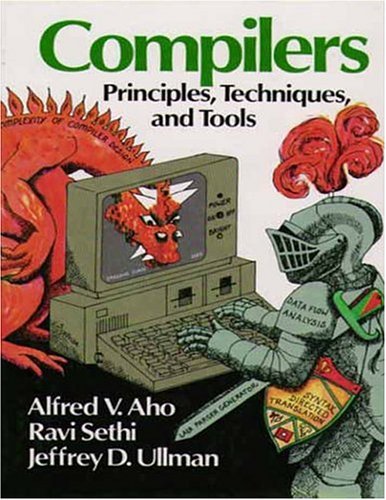
The Red Dragon Book, first edition: Compilers. Principles, Techniques and Tools.
It starts out with referring to the Dragon Book (well, actually the first edition of the Red Dragon Book, as there are three) describing the compilers as having front-ends consisting of a Lexer, Parser and Type Checker and back-ends consisting of Code Generator and Emitter. A full compilation is going through all five stages and there is an increasing cost using these traditional stages when going from syntax highlighting via collapsible regions to red squiggles and code completion will need to go further along those stages taking an increasing time – like seconds or even longer – whereas the user experience requires responses in ~ 100 milliseconds where his code might not even compile in the first place.
Then Anders goes on describing Roslyn, TypeScript and Compiler API JSON interfaces to them so you can run them as a service and keep compiler state, rebuilding just enough of the state on source code changes. He goes on talking about how Visual Studio, Visual Studio Code, Command-Line Compiler, Sublime Text and other tools (can) use these APIs to interact with the compiler so it keeps state of slowly evolving code of which the tools than can emit what they need.
Anders explains this much better and much more visually than I do: so it’s a highly recommended video.
This might be obvious for CMake regulars, but given the help, I would never have guessed this.
Generate x64:
cmake .. -G"Visual Studio 14 Win64"
Generate x86 is just leaving out the platform away:
cmake .. -G"Visual Studio 14"
In this case they are for Visual Studio 2015 (internally named 14).
The help:
The following generators are available on this platform:
  Visual Studio 14 2015 [arch] = Generates Visual Studio 2015 project files.
                                 Optional [arch] can be "Win64" or "ARM".
  Visual Studio 12 2013 [arch] = Generates Visual Studio 2013 project files.
                                 Optional [arch] can be "Win64" or "ARM".
  Visual Studio 11 2012 [arch] = Generates Visual Studio 2012 project files.
                                 Optional [arch] can be "Win64" or "ARM".
  Visual Studio 10 2010 [arch] = Generates Visual Studio 2010 project files.
                                 Optional [arch] can be "Win64" or "IA64".
  Visual Studio 9 2008 [arch]  = Generates Visual Studio 2008 project files.
                                 Optional [arch] can be "Win64" or "IA64".
  Visual Studio 8 2005 [arch]  = Generates Visual Studio 2005 project files.
                                 Optional [arch] can be "Win64".
  Visual Studio 7 .NET 2003    = Deprecated.  Generates Visual Studio .NET
                                 2003 project files.
Sometimes msbuild will throw an error like this for an x86 project:
"C:\Users\Developer\Versioned\libssh2\build\libssh2.sln" (default target) (1) ->

(ValidateSolutionConfiguration target) ->

C:\Users\Developer\Versioned\libssh2\build\libssh2.sln.metaproj : error MSB4126: The specified solution configuration "Debug|X64" is invalid. Please specify a valid solution configuration using the Configuration and Platform properties

form="Any CPU") or leave those properties blank to use the default solution configuration. [C:\Users\Developer\Versioned\libssh2\build\libssh2.sln]
Cause:
vsvars64.bat will set the environment variable Platform=x64 but vsvars32.bat will not empty this environment variable.
Easiest is to run set Platform= then run vsvars32.bat.
If you are running this in the Visual Studio x64 command window it will set an environment variable Platform=x64 that will be used by msbuild. You can verify this by running echo in the command prompt you are using.
echo %platform%
So you will need to override the default when using x64 cmd, or run from the x86 cmd.
Sometime you might want to protect your data in memory – the greatest example is when dealing with anything related to passwords. It is simply not smart to keep that data around in a plain-text. In .NET there are multiple methods you can use for this purpose, starting with SecureString, ProtectedMemory, and my favorite ProtectedData.…
via: Found this via +Ilya S a post from +Josip Medved – Stuff like this should be way built into an OS, and RTL’s should have a secureMalloc()… – Joe C. Hecht – Google+
Since then I had to maintain too many locales running Windows 10. So here is the batch file:
for /f "delims=" %%A in ('PowerShell -Command "(Get-Culture).Name"') do explorer "%LocalAppData%\Packages\windows.immersivecontrolpanel_cw5n1h2txyewy\LocalState\Indexed\Settings\%%A\AAA_SystemSettings_MusUpdate_UpdateActionButton.settingcontent-ms"
… there’s no need to use WaitForMultipleObjects in Step 2. It’s fairly easy to keep a counter of active threads in the pool (interlocked-incremented when a thread starts, interlocked-decremented when a thread is finished). When the counter reaches zero (no more active threads), signal an event. With only one event to wait for, you can use WaitForSingleObject…
Brilliant Date format converter from dates in Text (almost any format) or timestamp numbers in Unix, Mac, Filetime or Microsoft (which is the same as Delphi TDateTime) format to any of these formats:
It’s Delphi, but I’ve not seen practical implementations in C# either.
(the updated version thanks to Anders Melander).
–jeroen
This file contains hidden or bidirectional Unicode text that may be interpreted or compiled differently than what appears below. To review, open the file in an editor that reveals hidden Unicode characters. Learn more about bidirectional Unicode characters
This file contains hidden or bidirectional Unicode text that may be interpreted or compiled differently than what appears below. To review, open the file in an editor that reveals hidden Unicode characters. Learn more about bidirectional Unicode characters




 The Wiert Corner - irregular stream of stuff