The Wiert Corner – irregular stream of stuff

Jeroen W. Pluimers on .NET, C#, Delphi, databases, and personal interests

  • My badges

  • Twitter Updates

  • Pages

  • All categories

  • Enter your email address to subscribe to this blog and receive notifications of new posts by email.

    Join 1,839 other subscribers

Archive for the ‘.NET’ Category

on my .NET research list: Mini (Raspberry Pi) and Micro (Arduino)

Posted by jpluimers on 2012/08/01

Computing on not so common platforms it so much fun, especially when you can use familiar tools for it.

A couple of years ago, I did a fun project with an USB WebCam, a Pololu USB servo controller, two servo motors, a servo relay and a laser pointer. The device would point the laser pointer at the biggest moving object in the WebCam view, and flash the laser pointer at it.

All code was C# running on Windows.

Basically there are two classes on “small” devices that run .NET code (apart from smartphones and tablets):

  • Raspberry Pi:
    Mini devices with more than a couple of megabytes memory running a kind of regular .NET Framework.
  • Arduino:
    Micro devices with maximum of a couple of dozen kilobytes memory (a megabyte if you are really lucky) running the .NET Micro Framework

This might be a chance to lift it to a new level and embed everything in one device (:

The cool thing about the .NET Micro Framework is that you can do real time stuff.

–jeroen

via:

Posted in .NET, Arduino, Development, Hardware Development, Raspberry Pi, Software Development | 2 Comments »

.NET/C#: Generating a WordPress posting categories page – part 1

Posted by jpluimers on 2012/07/31

From the category cloud it is hard to see that the categories are organized as a hierarchy. The combobox on the right shows that, but does not have room to properly show the hierarchy. Since WordPress.com does not allow you to deploy your own code, I worked around it in this way using a small .NET C# console program:

  1. Extract the HTML for the All Categories combobox on the right of the page.
  2. Convert that HTML to XHTML (and therefore XML)
  3. Generate XSD from that XML
  4. Generate C# class wrappers from the XSD

Future posts will show more logic on how to handle the imported information, and generate nice category overviews. Preliminary source code is at the BeSharp.net source repository.

Extract the HTML

The HTML is not fully accurate (see my post on HTML and XML escapes from last week), but it is fairly easy to extract. Most web browsers allow you to view the source of your web page. Do that, then search for “All Categories”. Now you see HTML like this:

</pre>
<h2 class="widgettitle">All categories</h2>
<pre><select class="postform" name="cat"><option value="-1">Select Category</option></select><select class="postform" name="cat"><option class="level-0" value="256">About  (66)</option></select><select class="postform" name="cat"><option class="level-1" value="64">   Personal  (60)</option></select><select class="postform" name="cat"><option class="level-2" value="20254983">      Adest Musica  (7)</option></select><select class="postform" name="cat"><option class="level-2" value="32122">      Certifications  (2)</option></select><select class="postform" name="cat">...</select><select class="postform" name="cat"><option class="level-0" value="756">Comics  (3)</option></select><select class="postform" name="cat"><option class="level-0" value="780">Development  (473)</option></select><select class="postform" name="cat"><option class="level-1" value="872460">   Database Development  (55)</option></select><select class="postform" name="cat">...</select><select class="postform" name="cat"><option class="level-0" value="9280">User Experience  (3)</option></select>

I don’t need the H2 heading line, but the rest I do need to generate XML from. I saved the HTML into a text file for processing by the console app.

Convert the HTML to XML

The HTML contains loads of &nbsp;, but XML does not allow for that entity. So the & ampersand needs to be escaped into &amp;This also solves other uses of & in the HTML. The rest of the HTML is XHTML compliant, so does not require change, which results into this C# conversion method:

        private static string toXml(string inputHtml)
        {
            string result = inputHtml.Replace("&", "&");
            return result;
        }

Generate an XSD for the XML, then amend the XSD

Given my comparison of tools for generating XSD from XML, so I used the XmlForAsp XML Schema generator, with the “Separate Complex Types” option. (Note: I will link to the XSD before/after, as WordPress – yet again – screws the XSD sourcecode in the post; this should do for now). That gives me XSD like this (XML is also at pastebin):

<?xml version="1.0" encoding="utf-8"?>
<xsd:schema attributeFormDefault="unqualified" elementFormDefault="qualified" version="1.0" xmlns:xsd="http://www.w3.org/2001/XMLSchema">
 <xsd:element name="select" type="selectType" />
 <xsd:complexType name="selectType">
  <xsd:sequence>
   <xsd:element maxOccurs="unbounded" name="option" type="optionType" />
  </xsd:sequence>
  <xsd:attribute name="name" type="xsd:string" />
  <xsd:attribute name="id" type="xsd:string" />
  <xsd:attribute name="class" type="xsd:string" />
 </xsd:complexType>
 <xsd:complexType name="optionType">
  <xsd:attribute name="value" type="xsd:int" />
 </xsd:complexType>
</xsd:schema>

Which is not complete, but gives a good start. The actual XSD it needs to be like this with a more elaborate optionType complex type that also defines it’s own content as deriving from xsd:string, and adds the class attribute (XML is also at pastebin):

<?xml version="1.0" encoding="utf-8"?>
<xsd:schema attributeFormDefault="unqualified" elementFormDefault="qualified" version="1.0" xmlns:xsd="http://www.w3.org/2001/XMLSchema">
 <xsd:element name="select" type="selectType" />
 <xsd:complexType name="selectType">
  <xsd:sequence>
   <xsd:element maxOccurs="unbounded" name="option" type="optionType" />
  </xsd:sequence>
  <xsd:attribute name="name" type="xsd:string" />
  <xsd:attribute name="id" type="xsd:string" />
  <xsd:attribute name="class" type="xsd:string" />
 </xsd:complexType>
 <xsd:complexType name="optionType">
  <xsd:simpleContent>
  <xsd:extension base="xsd:string">
   <xsd:attribute name="class" type="xsd:string" />
   <xsd:attribute name="value" type="xsd:int" />
  </xsd:extension>
 </xsd:simpleContent>
 </xsd:complexType>
</xsd:schema>

Generate C# classes from the XSD

You can generate C# wrapper classes using the XSD.exe tool that ships with Visual Studio, but XSD.exe is hard to use, is hard to integrate into Visual Studio (despite Microsoft Connect request for it), the XSD.exe generated code still needs work for deserializing, and XSD.exe has very limited generation options (heck, after it changed from .NET 1.x to 2.0, it hasn’t been updated for about a decade). XSD2Code has some great reviews, to I used that in stead. And indeed, very well integrates into Visual Studio 2010, and generates very nice C#, especially when you use the options (see also the screenshot on the right):

  • Under Serialization, set Enabled to True
  • Under Serialization, set GenerateXmlAttributes to True

That way, loading the HTML, converting it to XML, then deserializing it into object instances is as simple as this:

                string inputFileName = args[0];
                string inputHtml = getHtml(inputFileName);
                string xml = toXml(inputHtml);
                selectType select = selectType.Deserialize(xml);

More on actually working with the loaded instances in the next episode, including the great benefit of XSD2Code: it generates C# code as partial classes.

–jeroen

Posted in .NET, C#, C# 4.0, C# 5.0, Development, SocialMedia, Software Development, Usability, User Experience (ux), Web Development, WordPress, WordPress, XML, XML escapes, XML/XSD, XSD | 2 Comments »

.NET/Visual Studio: disable “Step over properties and operators” – one of the settings I always change for a new Visual Studio Installation

Posted by jpluimers on 2012/07/25

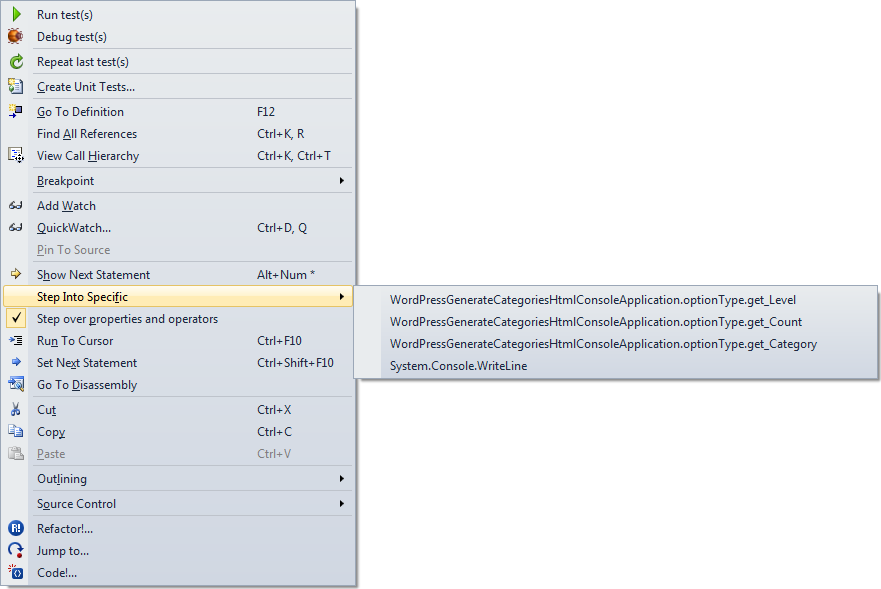
Boy I wish Visual Studio had a “Step into first property or operator” command. You can only do this through the context menu, and that is awfully cumbersome to use.

Just look at the context menu at the end of the post to see why.

Luckily, the option below it is “Step over properties and operators”, which you can easily disable. I usually have it disabled, so for me it is the way to temporarily enable it when I want to skip properties and operators.

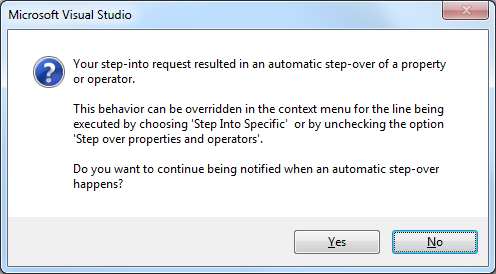
If you don’t then you get this message when tracing into properties (or operators):

[Microsoft Visual Studio]
Your step-into request resulted in an automatic step-over of a property or operator.
This behavior can be overridden in the context menu for the line being executed by choosing 'Step Into Specific' or by unchecking the option 'Step over properties and operators'.
Do you want to continue being notified when an automatic step-over happens?
[Yes] [No]

–jeroen

Posted in .NET, Development, Software Development, Visual Studio 11, Visual Studio 2005, Visual Studio 2008, Visual Studio 2010, Visual Studio and tools | Leave a Comment »

Alternatives to Reflector that I tried: ILSpy (from SharpDevelop), DotPeek (from JetBrains) and JustDecompile (from Telerik) – none of them cut it

Posted by jpluimers on 2012/07/24

A long time ago, I wrote about the Reflector debacle and the URLs how it used to update. Since then Reflector 6.8.2.5 came out. No newer free versions will be released, and RedGate randomized parts of the URLs to make it harder to upgrade if you do not have version 6.5.0.135 around (if you really want you can go around that too).

So I’ve been using some alternatives for a while: ILSpy by SharpDevelop (open source), dotPeek by JetBrains and JustDecompile by Telerik (both closed source).

There are more (monoflector, Kaliro App Explorer, Dotnet IL Editor, Dis#, StackOverflow threads and various sites describing more) but I discuss the ones I used. Read the rest of this entry »

Posted in .NET, Development, Reflection, Software Development | 10 Comments »

C# code fragment of the week

Posted by jpluimers on 2012/07/24

Please don’t do your code like this:

        internal bool blnMDACResult = true;

        internal bool CheckMDACisOK(string eenMDAC, string strAdoDllPath)
        {
            FileVersionInfo AdoVersionInfo;

            try
            {
                AdoVersionInfo = FileVersionInfo.GetVersionInfo(strAdoDllPath);
                AdoDllVersion = new Version(AdoVersionInfo.ProductMajorPart, AdoVersionInfo.ProductMinorPart, AdoVersionInfo.ProductBuildPart, AdoVersionInfo.ProductPrivatePart);

                switch (eenMDAC)
                {
                    case "2.6":
                    case "2,6":
                        // MDAC 2.6 - 2.60.6526.0
                        Version MinimumVersion = new Version(2, 60, 6526, 0);
                        blnMDACResult = AdoDllVersion.CompareTo(MinimumVersion) >= 0;
                        break;

                    case "2.7":
                    case "2,7":
                        // MDAC 2.7 - 2.70.7713.0
                        Version MinimumVersion = new Version(2, 70, 7713, 0);
                        blnMDACResult = AdoDllVersion.CompareTo(MinimumVersion) >= 0;
                        break;

                    case "2.8":
                    case "2,8":
                        // MDAC 2.8 - 2.80.1022.0
                        Version MinimumVersion = new Version(2, 80, 1022, 0);
                        blnMDACResult = AdoDllVersion.CompareTo(MinimumVersion) >= 0;
                        break;

                    default:
                        // 2.9 and up
                        string numberDecimalSeparator = Thread.CurrentThread.CurrentCulture.NumberFormat.NumberDecimalSeparator;
                        double dMinVersion = ConvertAppl.ToDouble(eenMDAC.Replace(".", numberDecimalSeparator));
                        double dVersion = ConvertAppl.ToDouble(AdoDllVersion.Major + ".".Replace(".", numberDecimalSeparator) + AdoDllVersion.Minor);
                        if (dVersion > dMinVersion)
                            blnMDACResult = true;
                        else
                            blnMDACResult = false;
                        break;
                }
            }
            catch
            {
                // Something went wrong, let's assume the version is ok. (trial on error)
                blnMDACResult = true;
                return blnMDACResult;
            }

            return blnMDACResult;

        }

–jeroen

Posted in .NET, C#, C# 1.0, C# 2.0, C# 3.0, C# 4.0, C# 5.0, Development, Software Development | Leave a Comment »

Visual Studio – How to: Reset Your Settings

Posted by jpluimers on 2012/07/17

There are features you rarely use. I once screwed up my Visual Studio desktop. Resetting to the default is easy, if you remember it is in the import/export settings dialog, which I didn’t (:

This is how I got back to the default:

To reset your settings

  1. On the Tools menu, click Import and Export Settings.
  2. On the Welcome to the Import and Export Settings Wizard page, click Reset all settings and then click Next.
  3. If you want to save your current settings combination, click Yes, save my current settings, specify a file name, and then click Next.
    —or—
    If you want to delete your current settings combination, choose No, just reset settings, overwriting my current settings, and then click Next. This option does not delete default settings, which will still be available the next time you use the wizard.
  4. In Which collection of settings do you want to reset to, select a settings collection from the list.
  5. Click Finish.
    The Reset Complete page alerts you to any problems encountered during the reset.

–jeroen

via: How to: Reset Your Settings.

Posted in .NET, Development, Software Development, Visual Studio 11, Visual Studio 2005, Visual Studio 2008, Visual Studio 2010, Visual Studio and tools | Leave a Comment »

.NET/C# InternalsVisibleTo Attribute via: Salvo(z)

Posted by jpluimers on 2012/07/12

Didn’t need it until now, as now I wrote my first unit test on an internal class, with the unit test in a separate assembly.

Visual Studio 2010 suggested adding the InternalsVisibleTo Attribute to the assembly containing the internal class specifying that the unit test assembly would have access to it.

For me that felt up-side-down, but thinking again it is logical, but still doesn’t feel well.

This is what it does:

The InternalVisibleToAttribute was added in .Net 2.0 and most people seem to be using it in order expose internal methods to external unit test classes. However, there is nothing to prevent you from using it in non-testing situations., although I have not seen a good reason other then unit testing to use it.

–jeroen

via: C# InternalVisibleTo Attribute | Salvo(z).

Posted in .NET, C#, C# 2.0, C# 3.0, C# 4.0, Development, Prism, Software Development, VB.NET | Leave a Comment »

Connecting Visual Studio 2010 to TFS over a Corporate Proxy (via: Visual studio 2010: cannot connect for any online resource – Stack Overflow)

Posted by jpluimers on 2012/07/11

One of the clients has tightened up their web proxy so much that Visual Studio 2010 does not want to connect to the HTTP 8080 port on the external TFS server (yes, I will switch to HTTPS if the workaround appears stable enough).

The problem is that Visual Studio often just tells you it cannot connect. No further error details.

Well, after you get most things working, you get this error every now and then:

[Microsoft Visual Studio]
Error
Team Foundation services are not available from server tfs.some-domain\PREFIX.
Technical information (for administrator):
HTTP code 407: Proxy Authentication Required
[OK]

There are a few problems involved:

  • Visual Studio does not allow you to enter credentials for the Proxy server.
  • Visual Studio doesn’t fully use the proxy settings from Internet Explorer either.
  • Visual Studio (unlike Internet Explorer) seems to loose the proxy session and or proxy authentication for that session over time.

All in all, it is fishy, even editing the devenv.exe.config proxy settings didn’t work (maybe I haven’t found the right combination of settings yet: that’s part of the research I need to do).

Workaround

So far, these are the current workaround steps (I will post a new entry when I found the solution or shortened the steps).

The workaround includes HTTP Fiddler, and sometimes doesn’t work without. HTTP Fiddler helps anyway as it shows the HTTP traffic (including error messages from the proxy server) between Visual Studio and TFS. Read the rest of this entry »

Posted in .NET, Development, Fiddler, Software Development, Visual Studio 2010, Visual Studio and tools, Web Development | 3 Comments »

which kind of IsHex() function do you like most, and why?

Posted by jpluimers on 2012/07/10

Though the sample question is in C#, it applies to almost any language and framework: for relatively simple checks like IsHex(), you can go the RegEx way, or the compound if-statement way.

Which kind of function do you like most?

I’m not only interested in the percentages, so let me know in the comments why.

–jeroen

PS: if you want to use RegEx in .NET, you can compile them to IL, but be very cautious for the compilation overhead.

Posted in .NET, C#, COBOL, Delphi, Development, JavaScript/ECMAScript, PHP, RegEx, Scripting, Software Development, VB.NET | 8 Comments »

Dear fellow programmer. If you aren’t experienced doing multi-threading, please don’t!

Posted by jpluimers on 2012/07/05

Recently I was asked to investigate a performance problem with a certain .NET application.

The first error I got when getting the app to build in Visual Studio 2010, and then run it was like this:

System.ComponentModel.InvalidAsynchronousStateException was caught
  Message=An error occurred invoking the method.  The destination thread no longer exists.
  Source=System.Windows.Forms
  StackTrace:
       at System.Windows.Forms.Control.WaitForWaitHandle(WaitHandle waitHandle)
       at System.Windows.Forms.Control.MarshaledInvoke(Control caller, Delegate method, Object[] args, Boolean synchronous)
       at System.Windows.Forms.Control.Invoke(Delegate method, Object[] args)
       at UI.Splash.SetStatus(String status) in C:\...\Splash.cs:line 395
       at UI.Menu.Main() in C:\...\Menu.cs:line 4275
  InnerException:

Someone built their own splash logic with multi-threading.

Funny that today, this got answered on StackOverflow by [WayBackmgie: [WayBack] multithreading – TMonitor synchronization / Application.ProcessMessages – Stack Overflow.

Though that is a Delphi link (and points to the nice libraries [Archive.is] AsynCalls and [WayBack] OmniThreadLibrary), the most important link it contains is to  [WayBackBorland Newsgroup Archive :: borland.public.delphi.internet.winsock :: Re: Disconnect TIdHttp in thread.

That sounds like a Delphi link too, but the subtitle “‘Ways to get into avoidable trouble with threads, V1.2′” hints the essence: it is a post that describes in an environment-agnostic way how to avoid multi-threading problems.

Recommended reading!

Anyway: Building multi-threaded code is hard. Even harder fleshing out all the corner cases and potential error conditions.

No matter what kind of programming environment: If you have not done lots of multi-threaded programming, then please don’t do it yourself: go ask someone that does know how to do it. Or better, try to avoid it.

I try to let libraries to the handling of multi-threading for me, if I use multi-threading at all, as others are far better at this than I am.

–jeroen

Posted in .NET, C#, C# 1.0, C# 2.0, C# 3.0, C# 4.0, C# 5.0, Conference Topics, Conferences, Delphi, Development, Event, Java, Software Development, VB.NET, VBS, Visual Studio 2010, Visual Studio and tools, WinForms | 6 Comments »