The Wiert Corner – irregular stream of stuff

Jeroen W. Pluimers on .NET, C#, Delphi, databases, and personal interests

  • My badges

  • Twitter Updates

  • My Flickr Stream

  • Pages

  • All categories

  • Enter your email address to subscribe to this blog and receive notifications of new posts by email.

    Join 1,854 other subscribers

Archive for the ‘Software Development’ Category

Chocolatey: forcing a certain package version and pinning it at that version

Posted by jpluimers on 2021/09/23

For my future self.

Due to an issue with choco-cleaner versions [WayBack] 0.0.6 and [WayBack] 0.0.7, I needed to ensure it was installed as version [WayBack] 0.0.5.2 and keep it that version.

Not sure if this is the canonical way, but this worked:

choco uninstall --yes choco-cleaner
choco install --yes choco-cleaner --version 0.0.5.2
choco pin add --name=choco-cleaner --version 0.0.5.2
choco pin list

This worked to revert:

choco pin remove --name=choco-cleaner
choco pin list
choco upgrade --yes choco-cleaner

Aftere this upgrade, choco-cleaner version 0.0.7.1 shows a nice error message when the environment variable %ChocolateyToolsLocation% fails to exist.

In that case calling RefreshEnv.cmd will create that environment variable.

Related:

–jeroen

Read the rest of this entry »

Posted in .NET, Chocolatey, CommandLine, Development, Power User, PowerShell, PowerShell, Scripting, Software Development, Windows | Leave a Comment »

Select-Object versus Write-Output: “The input object cannot be bound to any parameters for the command either because the command does not take pipeline input or the input and its properties do not match any o f the parameters that take pipeline input.”

Posted by jpluimers on 2021/09/23

I bumped in the error [WayBack] “The input object cannot be bound to any parameters for the command either because the command does not take pipeline input or the input and its properties do not match any of the parameters that take pipeline input.” when using [WayBack] Write-Output where [WayBack] Select-Object worked just fine.

This happened when playing around with detecting empty Chocolatey .nupkg package files.

$LibPath = Join-Path $env:ChocolateyInstall 'lib'
$NupkgFilter = '*.nupkg'

Get-ChildItem -Path $LibPath -Recurse -Filter $NupkgFilter | 
    Where-Object {($_.Length -eq 0) -and ($_.BaseName -eq "hg")} | 
        Sort-Object LastWriteTime | 
            Select-Object BaseName

<#
Get-ChildItem -Path $LibPath -Recurse -Filter $NupkgFilter | 
    Where-Object {($_.Length -eq 0) -and ($_.BaseName -eq "hg")} | 
        Sort-Object LastWriteTime | 
            Write-Output BaseName
## Write-Output : The input object cannot be bound to any parameters for the command either because the command does not take pipeline input or the input and its properties do not match any of the parameters that take pipeline input.
#>

Get-ChildItem -Path $LibPath -Recurse -Filter $NupkgFilter | 
    Where-Object {($_.Length -eq 0) -and ($_.BaseName -eq "hg")} | 
        Sort-Object LastWriteTime | 
            ForEach-Object { Write-Output $_.BaseName }

The output is also slightly different, hinting on the root cause:

BaseName
--------
hg      
hg

The above shows that Select-Object selects a list of BaseName properties (italic part), whereas Write-Output shows a single BaseName property content (bold part).

Read the rest of this entry »

Posted in .NET, CommandLine, Development, PowerShell, PowerShell, Scripting, Software Development | Leave a Comment »

GitHub – metasfresh/metasfresh: We do Open Source ERP – Fast, Flexible & Free Software to scale your Business.

Posted by jpluimers on 2021/09/22

For my link archive: [WayBack] GitHub – metasfresh/metasfresh: We do Open Source ERP – Fast, Flexible & Free Software to scale your Business.

It’s mainly written in JavaScript and Java with a PostgreSQL database and elasticsearch search.

There is plenty of [WayBack] metasfresh documentation (for users, administrators and developers), all with markdown source.

The developer documentation starts with a nice diagram of the [WayBack] metasfresh Architecture:

Markdown source of the architecture page: [WayBack] metasfresh-documentation/metasfresh_architecture.md at gh-pages · metasfresh/metasfresh-documentation · GitHub: Docs and Manuals for Devs, Users, Admins.

Via:

–jeroen

Posted in Development, Java, Java Platform, JavaScript/ECMAScript, Scripting, Software Development | Leave a Comment »

Twitter thread by thread by @0xdade; More unicode shit: zero width space and a zero width nonjoiner in filenames

Posted by jpluimers on 2021/09/22

[WayBack] Thread by @0xdade: Today I learned that you can put zero width spaces in file names on Linux. Have fun. I’m playing with this because punycode/IDN is fascinati…

Today I learned that you can put zero width spaces in file names on Linux. Have fun.

I’m playing with this because punycode/IDN is fascinating, and I wanted to know what happened when I started shoving unicode in the path portion of the url, which isn’t part of how browsers try to protect URLs, as far as I can tell

wiki.mozilla.org/IDN_Display_Al…

I think it’s more entertaining to have a file that is named *only* a zero width space, but I think using them throughout a filename is better to break tab completion and not stand out too much. A filename that is just blank looks strange in ls output.
Thank goodness adduser is looking out for our best interests.
Oooh this one is pretty subtle.
Just about pissed myself with this one.

Not related to the terminal fun, but related to zero width characters:

You can:
– Break url previews https://0xda​​​​​​.​de
– @​0xdade without tagging
– Make a word like system​d not searchable twitter.com/search?q=from%…

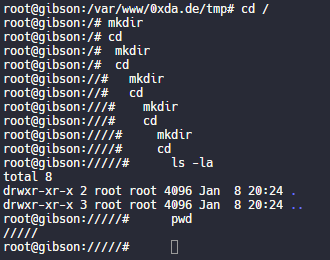
Okay but back to command line crap. I really like this one. Create a directory named .[ZWS]

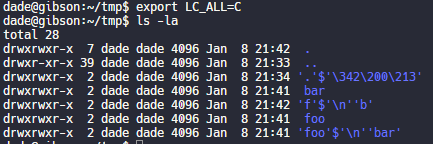
One thing that is cool about using zero width spaces is that “ls” has a flag, “-b”, that is meant to escape non-graphic characters. Inserting a newline, for instance, would be escaped to \n. But the zero width space is technically a graphic character, so nothing happens.

Fun.

Have no fear, though. It’s not unbeatable. It’s only fun if the language and LC settings are set to support utf-8. If you set LC_ALL=C or whatever that isn’t utf-8, then it looks like this.

Putting a link to this tweet here so that I don’t lose it again in the future.

dade@0xdade

My god, it is beautiful. I mean except all the whitespace I can’t get rid of before the command lmao.

View image on Twitter
But on the other hand if you just have a search for the zws, then whatever you find is probably worth investigating. 
I guess I’ll start the hashtag before @QW5kcmV3 does for #irresponsibleutf8 🤭😏😂 

And these tweets:

[WayBack] Thread by @Plazmaz: @0xdade Was doing some real fucking around with urls recently: gist.github.com/Plazmaz/565a5c… (was gonna flesh it out more but didn’t find…:

mentions Was doing some real fucking around with urls recently:
mentions This one is my fave:
‘⁄’ (\u2044)
or
‘∕’ (\u2215)
Allow for this:
google.com⁄search⁄query⁄.example.com
google.com⁄search⁄query⁄@example.com 

[WayBack] url-screwiness.md · GitHub:

This is a list of methods for messing with urls. These are often useful for bypassing filters, SSRF, or creating convincing links that are difficult to differentiate from legitimate urls.

And a bit of documentation links:

–jeroen


Posted in *nix, .NET, C#, Development, NTFS, Power User, Python, Scripting, Software Development, Windows | Leave a Comment »

Code Layout and Formatting: Indentation · PowerShell Practice and Style

Posted by jpluimers on 2021/09/22

Since I switch a lot between languages, I tend to forget what indentation, spacing and termination to use.

So from the Indentation/Length/Spacing/Termination sections in [WayBack] Code Layout and Formatting · PowerShell Practice and Style:

Read the rest of this entry »

Posted in .NET, CommandLine, Development, PowerShell, PowerShell, Scripting, Software Development | Leave a Comment »

Unix and NTFS file systems, hardlinks, inodes, files, directories, dot directories, bugs and implementation details

Posted by jpluimers on 2021/09/21

Lots of interesting tidbits on unix and NTFS file systems.

If you want to blow up your tooling, try creating a recursive hardlink…, which is likely one of the reasons that nx file systems do not support them.

Covered and related topics:

Read the rest of this entry »

Posted in *nix, Development, File-Systems, History, NTFS, Power User, Software Development, Windows, Windows Development | Leave a Comment »

The spookback localghost address to resolve 👻 

Posted by jpluimers on 2021/09/21

“Spooky dev environment hack: add 127.0.0.1 xn--9q8h to /etc/hosts and then all your dev servers can be accessed at http://👻 It’s localghost!”

Via:

–jeroen

Posted in Communications Development, Development, HTTP, Internet protocol suite, Power User, Software Development, TCP | Leave a Comment »

AgileTD Keynote | Happiness is Quality

Posted by jpluimers on 2021/09/16

Hopefully this becomes available on-line, as this will be a great talk, but Potsdam is out of my reach in my current physical condition.

[Wayback] AgileTD Keynote | Happiness is Quality

In Gwen Diagram’s keynote go on a journey of looking at how to improve happiness in teams for the goal of building quality systems.


How can we build teams that strive to build quality systems? By building in happiness early and often.

Each organisation has a culture which directly affects the quality of their work. Organisations with a lower level of quality; that is, systems that fail more often, longer times to fix and longer times to build often have a few things in common; frustration, apathy and cynicism.

On the other side of the coin, teams with slack, time to learn and time to reflect also have the space to improve their systems. Quality is everyone’s responsibility is an oft quoted phrase. But, how do you actually engage people to build quality systems?

Improving quality should not weigh heavy on the shoulders of the test specialist. Their main role should not be attempting to convince people that unit tests should exist, that systems should be testable and observable or that automated tests will speed up development. Instead, we should be building teams that want to find out together how to build a system that breathes quality.

The way to do this is by improving the happiness of the engineers on the team with learning, autonomy and coaching. So, how can we build teams that strive to build quality systems? By building in happiness early and often. In this talk, we will go on a journey of looking at how to improve happiness in teams for the end goal of building quality systems.

Via: [Wayback] Agile Testing Days on Twitter: “☀️ Here comes the happiness! ☀️ @gwendiagram will take us on a journey of looking at how to improve happiness in teams for the end goal of building quality systems. ➡️ Learn more about the keynote and the speaker: … “

–jeroen

Posted in Agile, Conferences, Development, Event, Power User, Software Development, Testing | Leave a Comment »

How to prepare your IdentityServer for Chrome’s SameSite cookie changes – and how to deal with Safari, nevertheless – Thinktecture

Posted by jpluimers on 2021/09/15

For my link archive:

Via:

–jeroen

Posted in .NET, .NET Core, ASP.NET, C#, Chrome, Chrome, Development, Firefox, Google, Power User, Safari, Software Development, Web Browsers | Leave a Comment »

Overview of Client Libraries · Internet Archive

Posted by jpluimers on 2021/09/14

Besides manual upload at [Archive.is] Upload to Internet Archive, there are also automated ways of uploading content.

One day I need this to archive pages or sites into the WayBack machine: [WayBack] Overview of Client Libraries · Internet Archive (most of which is Python based):

Read the rest of this entry »

Posted in Bookmarklet, Development, Internet, InternetArchive, Power User, Python, Scripting, Software Development, WayBack machine, Web Browsers | Leave a Comment »