


Link archival: [WayBack] How to Install Node.js and NPM on a Mac:
In this article, I’ll take you through the process of installing Node.js and NPM on a Mac using Homebrew.
TL;DR
- Ensure you have installed
homebrew. - Run
brew install node.
–jeroen
Posted by jpluimers on 2019/09/03
Link archival: [WayBack] How to Install Node.js and NPM on a Mac:
In this article, I’ll take you through the process of installing Node.js and NPM on a Mac using Homebrew.
homebrew.brew install node.–jeroen

Posted in Apple, Development, Mac OS X / OS X / MacOS, Power User, Software Development | Leave a Comment »
Posted by jpluimers on 2019/09/03
A very concise way for [WayBack] how to filter name/value pairs under a registry key by name and value in PowerShell?:
$path = 'hkcu:\Software\Microsoft\Windows\CurrentVersion\Extensions'
(Get-ItemProperty $path).PSObject.Properties |
  Where-Object { $_.Name -match '^xls' ` -or $_.Value -match 'msaccess.exe$' } |
  Select-Object Name, Value
Thanks montonero for getting me on that path and pointing me to the hidden PSObject property which by itself has Properties, and making me find these links with background information:
PSObject being hiddenPSObject is revealed when calling Get-Member with the -Force parameter.More in-depth information:
Get-Member cmdlet gets the members, the properties and methods, of objects. To specify the object, use the InputObject parameter or pipe an object to Get-Member. To get information about static members, the members of the class, not of the instance, use the Static parameter. To get only certain types of members, such as NoteProperties, use the MemberType parameter.-ForceAdds the intrinsic members (PSBase, PSAdapted, PSObject, PSTypeNames) and the compiler-generated get_ and set_ methods to the display. By default, Get-Member gets these properties in all views other than Base and Adapted, but it does not display them.
The following list describes the properties that are added when you use the Force parameter:
Property collection, or the members that are actually properties.PSMemberInfoCollection<PSPropertyInfo>PSObject or MemberSet–jeroen
Posted in CommandLine, Development, PowerShell, PowerShell, Scripting, Software Development | Leave a Comment »
Posted by jpluimers on 2019/09/03
A very subtle thing that keeps biting me as my background is from languages where by default, identifiers on the class scope are instance level, not class level:
In Python, variables on class level are class variables.
If you need instance variables, initialise them in your constructor with a
self.variable = value.
The example in the Python 3 docs [WayBack] Classes – A First Look at Classes – Class and Instance Variables is the same as in the Python 2 docs [WayBack] Classes – A First Look at Classes – Class and Instance Variables:
Generally speaking, instance variables are for data unique to each instance and class variables are for attributes and methods shared by all instances of the class:
class Dog:

    kind = 'canine'         # class variable shared by all instances

    def __init__(self, name):
        self.name = name    # instance variable unique to each instance

>>> d = Dog('Fido')
>>> e = Dog('Buddy')
>>> d.kind                  # shared by all dogs
'canine'
>>> e.kind                  # shared by all dogs
'canine'
>>> d.name                  # unique to d
'Fido'
>>> e.name                  # unique to e
'Buddy'
For people new at Python: the __init__ is a constructor; see these links for more explanation:
Of course, the
__init__()method may have arguments for greater flexibility. In that case, arguments given to the class instantiation operator are passed on to__init__(). For example,>>> class Complex: ... def __init__(self, realpart, imagpart): ... self.r = realpart ... self.i = imagpart ... >>> x = Complex(3.0, -4.5) >>> x.r, x.i (3.0, -4.5)
–jeroen
Posted in Development, Python, Scripting, Software Development | Leave a Comment »
Posted by jpluimers on 2019/09/02
Being a back-end and library person by heart, I am always late in the web-UI game, so this is on my list of things to try: CSS flex-box layout – Wikipedia.
I saw it being used by [WayBack] markdownlint demo: Demo for markdownlint, a Node.js style checker and lint tool for Markdown/CommonMark files.
Some links that should me help further:
–jeroen

Posted in CSS, Development, HTML, HTML5, Software Development, Web Development | Leave a Comment »
Posted by jpluimers on 2019/09/02
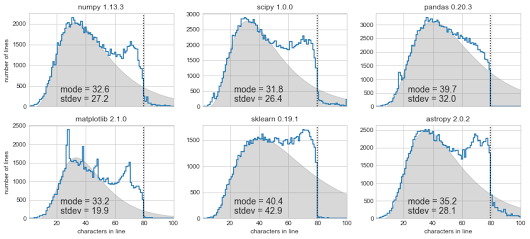 [Archive.is] Exploring Line Lengths in Python Packages is an interesting read.
It explores the relation between actual and “maximum” line lengths in Python in related to the prior 140 Twitter character limit.
via [Archive.is] Exploring Line Lengths in Python Packages – ThisIsWhyICode – Google+
–jeroen

Posted in Development, Python, Scripting, Software Development, Static Code Analysis | Leave a Comment »
Posted by jpluimers on 2019/08/29
ANWB can superimpose the lane availability indicators on their internap maps software.
Some links so I won’t forget:
–jeroen

Posted in Development, Google, GoogleMaps, Power User, Software Development, Web Development | Leave a Comment »
Posted by jpluimers on 2019/08/29
via [WayBack] Writing solid code the NASA way. – Lars Fosdal – Google+, I bumped into [WayBack] How To Code Like The Top Programmers At NASA — 10 Critical Rules:
Do you know how top programmers write mission-critical code at NASA? To make such code clearer, safer, and easier to understand, NASA’s Jet Propulsion Laboratory has laid 10 rules for developing software.
The rules:
- Restrict all code to very simple control flow constructs – do not use goto statements, setjmp or longjmp constructs, and direct or indirect recursion.
- All loops must have a fixed upper-bound. It must be trivially possible for a checking tool to prove statically that a preset upper-bound on the number of iterations of a loop cannot be exceeded. If the loop-bound cannot be proven statically, the rule is considered violated.
- Do not use dynamic memory allocation after initialization.
- No function should be longer than what can be printed on a single sheet of paper in a standard reference format with one line per statement and one line per declaration. Typically, this means no more than about 60 lines of code per function.
- The assertion density of the code should average to a minimum of two assertions per function. Assertions are used to check for anomalous conditions that should never happen in real-life executions. Assertions must always be side-effect free and should be defined as Boolean tests. When an assertion fails, an explicit recovery action must be taken, e.g., by returning an error condition to the caller of the function that executes the failing assertion. Any assertion for which a static checking tool can prove that it can never fail or never hold violates this rule (I.e., it is not possible to satisfy the rule by adding unhelpful “assert(true)” statements).
- Data objects must be declared at the smallest possible level of scope.
- The return value of non-void functions must be checked by each calling function, and the validity of parameters must be checked inside each function.
- The use of the preprocessor must be limited to the inclusion of header files and simple macro definitions. Token pasting, variable argument lists (ellipses), and recursive macro calls are not allowed. All macros must expand into complete syntactic units. The use of conditional compilation directives is often also dubious, but cannot always be avoided. This means that there should rarely be justification for more than one or two conditional compilation directives even in large software development efforts, beyond the standard boilerplate that avoids multiple inclusion of the same header file. Each such use should be flagged by a tool-based checker and justified in the code.
- The use of pointers should be restricted. Specifically, no more than one level of dereferencing is allowed. Pointer dereference operations may not be hidden in macro definitions or inside typedef declarations. Function pointers are not permitted.
- All code must be compiled, from the first day of development, with all compiler warnings enabled at the compiler’s most pedantic setting. All code must compile with these setting without any warnings. All code must be checked daily with at least one, but preferably more than one, state-of-the-art static source code analyzer and should pass the analyses with zero warnings.
–jeroen
PS: twitter comment
“All code must compile with these settings without any warnings” – I absolutely agree with this. It really annoys me to find code which people have shipped which generates warnings. They’re there for a reason and should be fixed! 👍
Posted in Agile, Code Quality, Conference Topics, Conferences, Development, Event, Software Development | Leave a Comment »
Posted by jpluimers on 2019/08/29
Via [WayBack] SQL select only rows with max value on a column, I bumped into http://sqlfiddle.com/#!9/a6c585/1:
Application for testing and sharing SQL queries.
Source: [WayBack] SQL Fiddle | A tool for easy online testing and sharing of database problems and their solutions.
It is a cool site, currently supporting these SQL back-ends:
You can host it yourself using [WayBack] GitHub – zzzprojects/sqlfiddle2: New version of SQL Fiddle based on OpenIDM (in the past it was [WayBack] GitHub – zzzprojects/sqlfiddle)
Other resources for learning and playing around with SQL:
–jeroen
Posted in Database Development, Development, MySQL, OracleDB, PostgreSQL, Software Development, SQL, SQL Server | Leave a Comment »
Posted by jpluimers on 2019/08/28
Must watch when you do unit testing (no matter the environment): [WayBack] Structure and Interpretation of Test Cases : Kevlin Henney on Vimeo which he presented at Javazone 2018 [Archive.is]
via [WayBack] Kevlin Henney – Google+
–jeroen
Posted in Agile, Conference Topics, Conferences, Development, Event, Software Development, Unit Testing | Leave a Comment »
Posted by jpluimers on 2019/08/28
I had to pass parameters to a method so they became a list:
    threadManager.append(
        UrlMonitorThread(monitor, "http://%s" % targetHost),
        SmtpMonitorThread(monitor, targetHost, 25),
        SmtpMonitorThread(monitor, targetHost, 587),
        SshMonitorThread(monitor, targetHost, 22))
This appeared much easier than I anticipated:
    def append(self, *threads):
        for thread in threads:
            self.threads.append(thread)
It uses the * tag which is explained here:
–jeroen
Posted in Development, Python, Scripting, Software Development | Leave a Comment »
 The Wiert Corner - irregular stream of stuff