The Wiert Corner – irregular stream of stuff

Jeroen W. Pluimers on .NET, C#, Delphi, databases, and personal interests

  • My badges

  • Twitter Updates

  • My Flickr Stream

  • Pages

  • All categories

  • Enter your email address to subscribe to this blog and receive notifications of new posts by email.

    Join 1,839 other subscribers

Archive for the ‘Software Development’ Category

Adobe Photoshop 1.0 Source Code About 75% is in Pascal, get it from the Computer History Museum

Posted by jpluimers on 2013/02/15

Thanks Lennart Aasenden for sharing this on FaceBook: Mariuz’s Blog: Adobe Photoshop 1.0 Source Code About 75% is in Pascal.

This was back when I was already a professional Turbo Pascal for PC programmer, not yet a Mac programmer, but doing Pascal on VMS to assist a client in the scaleable font industry.

The 1990 version 1.0.1 of Photoshop code was written in Object Pascal, and based on MacApp.

Back then Apple’s Object Pascal was one of the few IDEs available to develop Macintosh software. Later on, you also had Turbo Pascal and THINK Pascal (which many Macintosh developers preferred, was later acquired by Symantec, and died). A big reason they liked it so much was the THINK integrated debugger, which was lightyears ahead of any Pascal product on any other platform.

Apple had great documentation, not only on their compilers and libraries, but also one that everyone should hav read: Apple Human Interface Guidelines: The Apple Desktop Interface: Inc. Apple Computer: 9780201177534: Amazon.com: Books.

The Adobe Photoshop 1.0 source code can be downloaded (for non-commercial use) from the Computer History Museum | @CHM : Adobe Photoshop Source Code page.

The source is a very interesting read, and a great comments on it by Grady Booch.

This is how everyone should think about their code.

–jeroen

PS: A nice introduction to Object Pascal for a Macintosh is at MacTech | The journal of Apple technology..

Posted in Delphi, Development, Object Pascal, Pascal, Software Development, Think Pascal | Tagged: , , , , , , , , , | 4 Comments »

MonkeyStyler Blog: should be on DelphiFeeds too.

Posted by jpluimers on 2013/02/15

I mailed the DelphiFeeds people to add the MonkeyStyler Blog by Mike Sutton.

It is a nice Delphi related blog focussing on FireMonkey stuff.

–jeroen

Posted in Delphi, Delphi 1, Delphi 2005, Delphi 2006, Delphi 2007, Delphi 2009, Delphi 2010, Delphi 3, Delphi 4, Delphi 5, Delphi 6, Delphi 7, Delphi 8, Delphi x64, Delphi XE, Delphi XE2, Delphi XE3, Development, FireMonkey, OS X FMX, Software Development | 4 Comments »

Delphi bindings for WebSphere MQ

Posted by jpluimers on 2013/02/14

The current Delphi bindings for WebSphere MQ (formerly known as MQSeries) are very old.

The MA7Q: WebSphere MQ – MQI for Delphi formal binding from IBM is incomplete. Even though it is from 2005, it doesn’t contain the MQCD definition that was there at least since WebSphere MQ 5.2 (released in 2000). And by now it should be gone, since MQSeries 5.x is not supported any more.

A newer one by Dinko Miljak which is mentioned on Delphi 3000 and mentioned on MQSeries.net, has some errors and is from the WebSphere MQ 5.2 era.
It is available via this posting on MQSeries.net (direct download link), and this author reference on Torry.net (direct download link). Both files are identical.

Since it is much more extensive than the IBM version, I am using it to update it for newer WebSphere versions.
Great help while updating are the Gefira MQ bindings for Python: readable, indexed on nullege, and helpful (for instance on the usage of MQHO_UNUSABLE_HOBJ – which is assigned when calling MQCLOSE, I found out later that it is also explained here). The latest Gefira change was in 2008, but still way better than the Delphi bindings.

Also the Perl bindings for MQSeries together with their ASCII/EBCDIC client demo helped a lot.

A big issue when translating is that the i5/OS API in large part uses different names than the regular API.
For instance MQMD (i5/OS) contains MDENCMDCSI and MDFMT fields where MQMD (regular) contains and EncodingCodedCharSetId and Format fields.

As soon as I have done proper translation and upgrading to WebSphere MQ 7.x, I will upload source code.

Source code will be on the BeSharp.net CodePlex repository.

–jeroen

Posted in Delphi, Development, MQ Message Queueing/Queuing, Software Development, WebSphere MQ | 1 Comment »

Delphi turns 18 today; did it get real undo/redo in the form designer?

Posted by jpluimers on 2013/02/14

18 years ago, Delphi 1 was launched (still not sure if valentine’s day was a good idea for a product launch).

I wonder – when writing this long before valentine’s day – if the matureness of Delphi finally introduced real undo/redo in the form designer.

Probably still a dream, but still…

–jeroen

Posted in Delphi, Delphi 1, Development, Software Development | Leave a Comment »

A couple of notes on NMQ_MQ_LIB

Posted by jpluimers on 2013/02/13

A couple of notes on NMQ_MQ_LIB and the WebSphere MQ aka MQSeries client libraries:

  • NMQ_MQ_LIB specifies the MQ DLL to use
  • Depending in your interface, the NMQ_MQ_LIB can be an environment variable, application setting, or hardcoded DLL name
  • MQSeries 5.x and WebShpere MQ 6.x require you to specify the bitness in the MQIC DLL name (they don’t accept mqic.dll, but require mqic32.dll) when you access it from the C or Delphi interface.
    MQM DLL does not require bitness: it is mqm.dll in all versions.
  • From client applications, use mqic.dll or mqic32.dll.

And a few links:

I needed this to get some apps talking to MQ on AS/400 aka iSeries aka System i working correctly by getting the DLLs right.

–jeroen

Posted in .NET, AS/400 / iSeries / System i, Delphi, Development, MQ Message Queueing/Queuing, Software Development, WebSphere MQ | Leave a Comment »

Cool: your own queries on Stack Exchange Data Explorer (StackOverflow: My answers with non Delphi tag)

Posted by jpluimers on 2013/02/12

This is way cool, and has been there for a long time, and I completely missed it until recently (:

On the Stack Exchange Data Explorer, you can write your own queries for any of the StackExchange sites as they share a common database infrastructure.

The queries can even contain an execution plan, and given the large number of questions (the total of Questions (table Posts) is total over 10 million now: select count(*) as QuestionCount from Posts as Questions).

There are many examples, for instance this one by sam.saffron and  TLama that lists posts outside the Delphi area: Read the rest of this entry »

Posted in Database Development, Delphi, Development, SQL, SQL Server | 2 Comments »

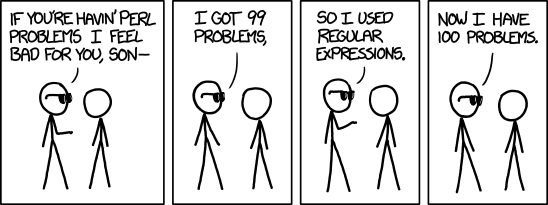
xkcd: Perl Problems; I got 99 problems. So I used regular expressions.

Posted by jpluimers on 2013/02/08

(:

I got 99 problems. So I used regular expressions...
I got 99 problems. So I used regular expressions…

–jeroen

via: xkcd: Perl Problems.

Posted in Development, Perl, RegEx, Scripting, Software Development | Tagged: , , | Leave a Comment »

Extracting MSI files revisited: the Office 2003 PIA (which lived up its acronym)

Posted by jpluimers on 2013/02/07

The methods I described in via: Extracting MSI files didn’t work for the MSI installer for the Office 2003 Primary Interop Assemblies (which you get through here, or directly download the O2003PIA.exe installer).

I needed to extract the files, because of this problem described in by Office 2003 PIA Redistributable is available – Patrick Smith: Microsoft InfoPath – Site Home – MSDN Blogs:

Important Issues to keep in mind:

  • This MSI is designed to contain all of the PIA’s which shipped with Microsoft Office System 2003.  The product PIA’s will only install if the parent product is installed on the machine.
  • Leave the PIA redistributable on the machine once it’s installed.  Because this product is redistributable, many add-ins could ship it.  The MSI will only install once and then subsequent installs would just see that it’s already on the machine.  Removing it via Setup logic will remove it for everyone.  The current recommendation is to leave uninstallation of the PIA Redistributable to the end user through Add/Remove Programs.

Currently I’m involved in a suite of .NET 4 applications that interface with Office. Office 2003 is the minimum required version, but:

  • most users and developers have Office 2007 or better installed,
  • not all people have all parts of Office installed,
  • the build server does not have Office installed at all.

In none of those scenarios, the PIAs are installed.

So I needed a way to extract all the PIA binaries with the official long filenames from the O2003PIA.MSI that is inside the O2003PIA.EXE installer.

Extracting the installer was simple: just install it, and it decompresses to a directory of choice. Or use your decompression tool of choice.

Extracting the O2003PIA.MSI was a lot harder: Read the rest of this entry »

Posted in .NET, Development, Office PIA, Software Development | Leave a Comment »

Allen Bauer on: delphi – What’s the difference between CreateWnd and CreateWindowHandle? (plus a bit of CreateParams)

Posted by jpluimers on 2013/02/06

One of the really nice contributions on StackOverflow by Allen Bauer is almost 3 years ago.

It is about these three Delphi VCL methods introduced by TWinControl to make control development easier:

The really cool thing is that this API has been stable since 1995, and still allows you to subclass windows controls or create your own controls in a very simple way.

Note that Allen does not cover DestroyWnd or DestroyWindowHandle, but those are just counterparts of CreateWnd and CreateWindowHandle.

In normal Delphi application code, you have less Destroy overrides than Create overrides, and the same holds for control development.

–jeroen

via: delphi – What’s the difference between CreateWnd and CreateWindowHandle? – Stack Overflow.

Posted in Delphi, Delphi 1, Delphi 2005, Delphi 2006, Delphi 2007, Delphi 2009, Delphi 2010, Delphi 3, Delphi 4, Delphi 5, Delphi 6, Delphi 7, Delphi 8, Delphi x64, Delphi XE, Delphi XE2, Delphi XE3, Software Development | 2 Comments »

Integrating Beyond Compare into Visual Studio for use with Team Foundation System

Posted by jpluimers on 2013/02/05

Clarification of the steps from via Support Beyond Compare to use Beyond Compare 3 or 2 from Visual Studio and with Team Foundation System.

First run this little batch file to show you the exact location of BComp.exe:

@echo off
  call :show "%ProgramFiles%\Beyond Compare 3\BComp.exe"
  call :show "%ProgramFiles(x86)%\Beyond Compare 3\BComp.exe"
  call :show "%ProgramFiles%\Beyond Compare 2\BComp.exe"
  call :show "%ProgramFiles(x86)%\Beyond Compare 2\BComp.exe"
  goto :eof
:show
  if not exist %1 goto :eof
  echo Beyond Compare is here:
  echo %~1

(I know that this will not find a Portable Beyond Compare installation).

Note that BComp.exe (for GUI use) and BComp.com (for console use) are bootstrappers for BCompare.exe. Both will wait when ran from a GUI or console for the comparison to finish. Starting BCompare.exe will not wait. See BComp.exe vs BComp.com – Scooter Forums for more information on this.

Everywhere you see path to BComp.exe below, enter the path that the above batch file tells you.

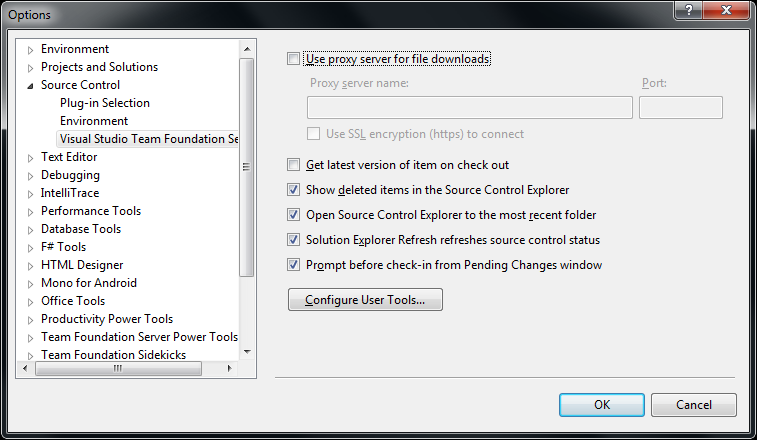
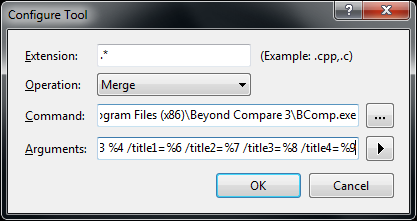
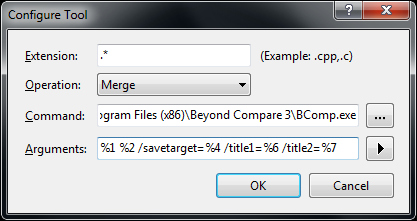
The first two pictures on the right show common steps for all three integrations. The images below are the specific ones for each integration. You can click on each image to view a larger version.

The steps work with the full version of Visual Studio and the Team Explorer edition of Visual Studio.

You can find different arguments for other tools on this excellent diff/merge configuration in Team Foundation – common Command and Argument values post by James Manning.

Adding diff/compare support to Visual Studio

  1. In Visual Studio Choose Options from the Tools menu.
  2. Expand Source Control in the treeview.
  3. Click Visual Studio Team Foundation Server in the treeview.
  4. Click the Configure User Tools button.
  5. Click the Add button.
  6. Enter “.*” in the Extension edit.
  7. Choose Compare in the Operation combobox.
  8. Enter the path to BComp.exe in the Command edit.
  9. In the Arguments edit, use:
    %1 %2 /title1=%6 /title2=%7
  10. Then press OK, then OK, then OK

Adding 3-way Merge to Visual Studio

You need Beyond Compare version 3 Professional for this.
(note: only the steps marked with * are different from above)

  1. In Visual Studio Choose Options from the Tools menu.
  2. Expand Source Control in the treeview.
  3. Click Visual Studio Team Foundation Server in the treeview.
  4. Click the Configure User Tools button.
  5. Click the Add button.
  6. Enter “.*” in the Extension edit.
  7. * Choose Merge in the Operation combobox.
  8. Enter the path to BComp.exe in the Command edit.
  9. * In the Arguments edit, use:
    %1 %2 %3 %4 /title1=%6 /title2=%7 /title3=%8 /title4=%9
  10. Then press OK, then OK, then OK

Adding 2-way Merge to Visual Studio

This is for Beyond Compare version 2, and Beyond Compare version 3 Standard.
(note: only the step marked with * is different from above)

  1. In Visual Studio Choose Options from the Tools menu.
  2. Expand Source Control in the treeview.
  3. Click Visual Studio Team Foundation Server in the treeview.
  4. Click the Configure User Tools button.
  5. Click the Add button.
  6. Enter “.*” in the Extension edit.
  7. Choose Merge in the Operation combobox.
  8. Enter the path to BComp.exe in the Command edit.
  9. * In the Arguments edit, use:
    %1 %2 /savetarget=%4 /title1=%6 /title2=%7
  10. Then press OK, then OK, then OK

To summarize, the differences

Functionality
entry in
Operation combobox
content of
Arguments edit
Beyond Compare
version/edition
 diff/merge Compare %1 %2 /title1=%6 /title2=%7 any version/edition
3-ware compare Merge %1 %2 %3 %4 /title1=%6 /title2=%7 /title3=%8 /title4=%9 3/Professional
2-way compare Merge %1 %2 /savetarget=%4 /title1=%6 /title2=%7 2 or 3/Standard

Hope this helps a few people.

–jeroen

via:

Posted in .NET, Beyond Compare, Development, Power User, Software Development, Visual Studio 11, Visual Studio 2002, Visual Studio 2003, Visual Studio 2005, Visual Studio 2008, Visual Studio 2010, Visual Studio and tools | Leave a Comment »